Airbnb Scraper Chrome Extension: Export Listings (2026)
Export Airbnb listings, prices, reviews, and host data to CSV or Excel. Free Airbnb scraper Chrome extension for investors and property managers.
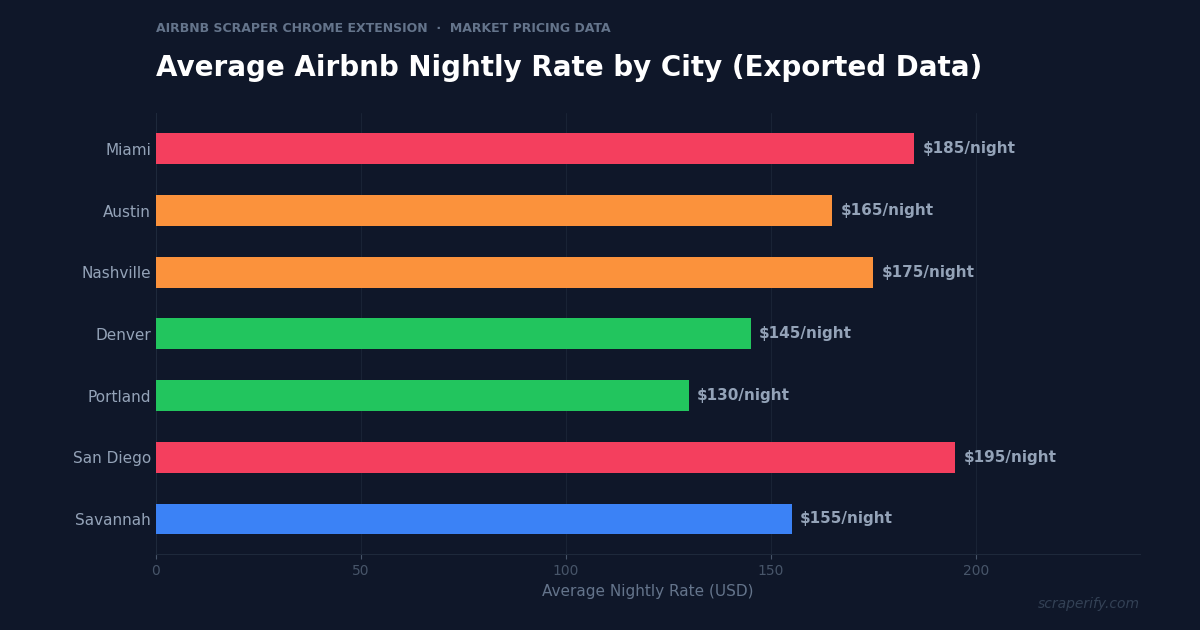
Airbnb has over 7 million active listings in 220+ countries. For short-term rental investors, the question is not whether Airbnb data matters — it is how to get it into a spreadsheet. Nightly rates, occupancy patterns, review scores, Superhost status, and competitor pricing all drive investment decisions worth tens of thousands of dollars. But Airbnb does not let you export search results. An Airbnb scraper Chrome extension fixes this — install it, browse Airbnb, and export listing data to CSV, Excel, or JSON in one click. No coding. No API keys.
This guide shows you how to use an Airbnb scraper Chrome extension to export listing data, analyze short-term rental markets, benchmark competitor pricing, and make data-driven investment decisions.
Why You Need an Airbnb Scraper Chrome Extension
Airbnb dominates the short-term rental market. Whether you are an investor evaluating a property purchase, a host optimizing your pricing, or a property manager benchmarking your portfolio against competitors, Airbnb data is the foundation of every decision.
But Airbnb locks all this data inside its platform. Without an Airbnb scraper Chrome extension, there is no way to download search results, export competitor listings, or extract pricing data to a spreadsheet. You are stuck clicking through listings one at a time, mentally noting nightly rates and review counts, and trying to remember how one listing compared to another.
This is a massive problem for investors. Evaluating a short-term rental investment requires analyzing 50-200 comparable listings in the target area — their nightly rates, review counts, amenities, and occupancy signals. Doing this manually takes days. With an Airbnb scraper Chrome extension, the same analysis takes 15 minutes.
An Airbnb scraper Chrome extension automates the data collection:
- Captures listing data automatically as you browse Airbnb search results
- Exports to CSV, Excel, or JSON — the Airbnb scraper Chrome extension supports all formats
- Extracts pricing, reviews, and host data — complete listing profiles
- Runs inside your browser — no software installation beyond the Chrome Web Store
- Processes data locally — the Airbnb scraper Chrome extension never sends data to external servers
- Works globally — the Airbnb scraper Chrome extension exports listings from any Airbnb market worldwide
The Scraperify Airbnb scraper Chrome extension is built for short-term rental investors analyzing markets, hosts benchmarking their pricing, property managers tracking portfolios, and travel planners comparing accommodations.
What Data Can the Airbnb Scraper Chrome Extension Export?
The Airbnb scraper Chrome extension extracts every visible data point from Airbnb listing pages:
Listing details the Airbnb scraper Chrome extension captures:
- Listing title — the property name/headline
- Nightly price — current rate per night
- Total price — with cleaning fee, service fee, and taxes for your dates
- Property type — entire home, private room, shared room, hotel
- Beds/bedrooms/bathrooms — capacity details
- Guest capacity — maximum number of guests
- Location — city, neighborhood, and approximate map coordinates
- Amenities — Wi-Fi, pool, kitchen, parking, washer/dryer, etc.
- Photos — direct URLs to listing images via the Airbnb scraper Chrome extension
- Listing URL — direct link to the Airbnb page
Review and rating data the Airbnb scraper Chrome extension exports:
- Overall rating — average score out of 5 (the Airbnb scraper Chrome extension captures this for quality benchmarking)
- Number of reviews — total review count
- Rating breakdown — cleanliness, accuracy, communication, location, check-in, value
- Review text — individual reviews on listing detail pages
- Review dates — when reviews were posted
Host data from the Airbnb scraper Chrome extension:
- Host name — the property manager or owner
- Superhost status — whether the host has Superhost badge
- Host response rate — how quickly the host responds
- Host response time — average response time
- Years hosting — how long they have been on Airbnb
- Number of listings — how many properties the host manages
- Host profile URL — direct link to the host page
This data is what separates successful Airbnb investors from those who buy based on hunches. The Airbnb scraper Chrome extension gives you the complete competitive picture — nightly rates, review quality, amenity offerings, and host performance — all in one export.
WHAT THE AIRBNB SCRAPER CHROME EXTENSION EXTRACTS
Listing Data
- Title & Property Type
- Nightly & Total Price
- Beds, Baths, Guests
- Location & Neighborhood
- Amenities
- Photos & Listing URL
Reviews & Ratings
- Overall Rating (out of 5)
- Review Count
- Rating Breakdown (6 cats)
- Review Text
- Review Dates
Host Data
- Host Name
- Superhost Status
- Response Rate & Time
- Years Hosting
- Number of Listings
How to Install the Airbnb Scraper Chrome Extension
Setting up the Airbnb scraper Chrome extension takes 30 seconds.
Step 1: Open the Chrome Web Store. Search for “Airbnb Scraper” or visit the Scraperify Airbnb scraper Chrome extension page.
Step 2: Click “Add to Chrome.” Confirm permissions. The Airbnb scraper Chrome extension needs access to airbnb.com.
Step 3: Start using it. The Airbnb scraper Chrome extension is ready immediately.
HOW THE AIRBNB SCRAPER CHROME EXTENSION WORKS
Install
Add the Airbnb scraper Chrome extension
Search
Search Airbnb — data captured automatically
Click
One click on the Airbnb scraper Chrome extension
Export
Download CSV, Excel, or JSON
How to Export Airbnb Listings to CSV (Step-by-Step)
Step 1: Search on Airbnb
With the Airbnb scraper Chrome extension installed, go to airbnb.com and search for properties. The Airbnb scraper Chrome extension works on search results, map views, and individual listing pages.
Use Airbnb’s filters before the Airbnb scraper Chrome extension captures data:
- Filter by property type — entire home, private room, shared room
- Filter by price range — set min and max per night
- Filter by beds/bedrooms — capacity requirements
- Filter by amenities — pool, hot tub, kitchen, Wi-Fi, parking
- Filter by dates — specific check-in/out for accurate pricing
- Filter by Superhost — show only Superhost properties
- Filter by instant book — immediately bookable properties
Step 2: Let the Airbnb Scraper Chrome Extension Capture Data
As you scroll through search results, the Airbnb scraper Chrome extension captures listing data automatically. The Airbnb scraper Chrome extension icon shows progress. Scroll to load more results — Airbnb uses infinite scroll, and the Airbnb scraper Chrome extension captures every listing that loads.
Step 3: Click Export
Click the Airbnb scraper Chrome extension icon. Choose CSV, Excel, or JSON. The Airbnb scraper Chrome extension downloads the file instantly.
Step 4: Analyze Your Airbnb Data
Open the Airbnb scraper Chrome extension export. Each row is one listing. With the data:
- Calculate average nightly rate for your target market
- Sort by review count — high-review listings are established competitors
- Filter by Superhost — benchmark against the best operators
- Calculate revenue estimates — nightly rate × estimated occupancy × 30 days
- Compare amenities — identify what top-performing listings offer that you do not
Why Airbnb Data Is Essential for Short-Term Rental Investors
Airbnb data drives every stage of the short-term rental investment process. Understanding these use cases helps you get the most from the Airbnb scraper Chrome extension:
Nightly rate analysis determines revenue potential. The single most important metric for STR investors is the average nightly rate in a target market. Export 100+ listings with the Airbnb scraper Chrome extension, calculate the median rate for your property type (2-bed entire home, 1-bed private room, etc.), and multiply by estimated occupancy to project annual revenue. If the median 2-bed nightly rate is $165 and average occupancy is 70%, projected annual revenue is $165 × 365 × 0.70 = $42,153. This number determines whether a property purchase makes financial sense.
Review count signals market maturity. A market where the average listing has 200+ reviews is mature and competitive — breaking in requires exceptional quality or competitive pricing. A market where the average listing has 30-50 reviews is newer and less saturated — easier entry with less established competition. The Airbnb scraper Chrome extension captures review counts for instant market maturity assessment.
Superhost percentage indicates quality standards. In markets where 40%+ of listings are Superhosts, guests expect exceptional quality. In markets where only 15% are Superhosts, the quality bar is lower. The Airbnb scraper Chrome extension captures Superhost status, letting you calculate the Superhost percentage for any market.
Amenity analysis reveals competitive requirements. Export competitor listings with the Airbnb scraper Chrome extension and analyze which amenities the top-rated listings offer. If 90% of 4.8+ rated listings have hot tubs and you are considering a property without one, the data tells you that a hot tub is not optional in that market — it is table stakes for premium pricing.
Host portfolio size reveals professional competition. Hosts managing 10+ listings are professional operators with optimized operations, dynamic pricing tools, and dedicated cleaning crews. If 60% of listings in a market are managed by professional operators, competing as a solo host requires matching their service level. The Airbnb scraper Chrome extension captures the host’s total listing count, letting you assess the professional-to-amateur ratio in any market.
Seasonal pricing patterns inform investment strategy. Export the same market search at different times of year with the Airbnb scraper Chrome extension. Compare average nightly rates across seasons. A beach market where summer rates are $250/night but winter rates drop to $90/night has very different economics than a city market where rates stay stable at $150/night year-round. Seasonal volatility affects financing, cash flow planning, and occupancy projections.
Ready to analyze Airbnb market data?
Scraperify offers Chrome extensions for 40+ platforms including Airbnb, Zillow, and Yelp. Export listing data to CSV with one click.
Browse All Scrapers →5 Ways to Use the Airbnb Scraper Chrome Extension
1. Pre-Purchase Investment Analysis
Before buying a property for short-term rental, investors use the Airbnb scraper Chrome extension to analyze the local market. Export all listings within 5 miles of the target property. Calculate: median nightly rate, average review score, Superhost percentage, median review count, and amenity frequency. These metrics tell you whether the market can support your investment thesis — before you spend $300K+ on a property.
The investment analysis spreadsheet typically includes: projected nightly rate (from exported median), estimated occupancy (from seasonal analysis), projected annual revenue, annual expenses (mortgage, utilities, cleaning, maintenance), and projected cash flow. The Airbnb scraper Chrome extension provides the revenue side of this equation.
2. Dynamic Pricing Optimization
Existing Airbnb hosts use the Airbnb scraper Chrome extension to benchmark their pricing against competitors. Export competitor listings weekly, track their nightly rates, and adjust your pricing to stay competitive. If your 3-bed oceanfront home is priced at $220/night but 5 similar properties are at $185-$195, you are likely losing bookings to price-competitive alternatives. If competitors are at $250-$275, you may be underpriced and leaving money on the table.
Professional property managers export competitor data with the Airbnb scraper Chrome extension every week and feed it into dynamic pricing tools (PriceLabs, Beyond, Wheelhouse) to automate rate adjustments. The exported data validates that the pricing tool’s recommendations align with actual market conditions.
3. Competitive Listing Audit
Compare your listing against the top 10 competitors using Airbnb scraper Chrome extension data. Analyze:
- What amenities do they offer that you do not? (hot tub, EV charger, game room)
- How do their review scores compare to yours? (especially cleanliness and accuracy)
- How many photos do top listings have? (usually 30-50)
- What does their pricing look like across seasons?
This audit reveals specific improvements you can make — adding an amenity, improving your photos, adjusting your description — rather than guessing what might improve performance.
4. Market Entry Research
Entrepreneurs considering entering the short-term rental market use the Airbnb scraper Chrome extension to evaluate different cities. Export listings from 5-10 candidate markets, compare average rates, review volumes, and competition density. The ideal market has: strong nightly rates ($150+), moderate competition (not oversaturated), growing review counts (rising demand), and favorable regulations (STR-friendly local laws).
Combine Airbnb scraper Chrome extension data with Zillow Scraper data to get both sides of the equation — Airbnb data shows revenue potential, Zillow data shows property purchase costs. The ratio between projected STR revenue and property price determines investment viability.
5. Review Mining for Service Improvement
Export competitor reviews with the Airbnb scraper Chrome extension and analyze what guests praise and complain about. Common patterns in reviews reveal market-specific expectations. In beach markets, guests care about cleanliness, view quality, and beach access. In city markets, guests care about location, walkability, and check-in ease. In mountain markets, guests care about hot tubs, fireplaces, and scenic views.
Understanding these expectations — visible only in exported review data — helps you design and furnish properties that earn 4.9+ ratings from day one.
Airbnb Scraper Chrome Extension vs Other Methods
AIRBNB SCRAPER: CHROME EXTENSION VS ALTERNATIVES
| Feature | Airbnb Scraper Chrome Extension | AirDNA ($99-$250/mo) | Manual |
|---|---|---|---|
| Monthly cost | Free tier / $19.99 | $99-$250/mo | Free |
| Raw data export (CSV) | ✓ | Limited | ✗ |
| Individual listing details | ✓ | ✓ | ✓ |
| Historical occupancy data | ✗ | ✓ | ✗ |
| Speed (100 listings) | ~5 min | Instant (dashboard) | ~6 hours |
The Airbnb scraper Chrome extension offers the best value for most investors. AirDNA is the industry-standard Airbnb analytics tool, but it costs $99-$250/month — a significant expense before you have even purchased a property. The Airbnb scraper Chrome extension gives you the core data (nightly rates, reviews, amenities, host data) at a fraction of the cost. AirDNA’s advantage is historical occupancy data and revenue estimates — if you need those features, consider AirDNA for deep analysis and the Airbnb scraper Chrome extension for ongoing competitive monitoring.
Tips for Using the Airbnb Scraper Chrome Extension
Search with Specific Dates for Accurate Pricing
Airbnb prices change based on dates. Export listings for specific date ranges with the Airbnb scraper Chrome extension — not just “anytime.” This captures actual nightly rates for those dates, including seasonal adjustments and dynamic pricing.
Export Competitor Listings Monthly
Markets change. New listings appear, pricing shifts, and review counts grow. Use the Airbnb scraper Chrome extension to export your competitive set monthly. Track average nightly rates, new entrants, and listings that disappear (possible regulation enforcement or underperformance).
Combine with Zillow Data for Investment Analysis
The Airbnb scraper Chrome extension shows revenue potential. The Zillow Scraper shows property costs. Together, they give you both sides of the investment equation. Export Airbnb listings for revenue projection and Zillow for-sale listings for purchase price — calculate the ratio to determine whether a market supports profitable short-term rental investment.
Use Review Count as an Occupancy Proxy
Airbnb does not publicly show occupancy rates. But review count divided by months active gives an approximate booking frequency. A listing with 200 reviews over 3 years averages about 5.5 reviews per month — suggesting high occupancy (since only a fraction of guests leave reviews). The Airbnb scraper Chrome extension captures both review count and host years active for this calculation.
Analyze Host Portfolios
Hosts with 10+ listings are professional operators. Export their full portfolio with the Airbnb scraper Chrome extension to see their pricing strategy across property types, locations, and seasons. Professional operators have usually optimized their pricing — studying their rates gives you a benchmark for your own properties.
Who Uses the Airbnb Scraper Chrome Extension?
Short-Term Rental Investors — Analyze markets before purchasing properties, project revenue, and benchmark against competitors. The Airbnb scraper Chrome extension is the first step in every STR investment analysis.
Airbnb Hosts — Current hosts benchmark pricing, track competitors, and identify improvement opportunities. Monthly exports with the Airbnb scraper Chrome extension keep pricing competitive.
Property Managers — Companies managing multiple STR properties use the Airbnb scraper Chrome extension to monitor competitive landscapes across all their markets simultaneously.
Real Estate Agents — Agents advising clients on investment properties use the Airbnb scraper Chrome extension to demonstrate STR revenue potential in specific markets — data that supports higher property valuations.
Travel Planners — Group travel coordinators export Airbnb options with the Airbnb scraper Chrome extension to compare accommodations in a spreadsheet — prices, amenities, locations, and reviews side by side for group decision-making.
Academic Researchers — Researchers studying the impact of short-term rentals on housing markets, tourism economics, and urban planning use the Airbnb scraper Chrome extension to gather large datasets for analysis.
Airbnb Scraper Chrome Extension — FAQs
Is the Airbnb scraper Chrome extension free?
The Airbnb scraper Chrome extension typically offers a free tier. Scraperify plans start at $19.99/month or $79 lifetime.
Does the Airbnb scraper Chrome extension export nightly rates?
Yes. The Airbnb scraper Chrome extension captures nightly rates, total prices (including fees), and pricing for specific date ranges.
Is my data private with the Airbnb scraper Chrome extension?
Yes. The Airbnb scraper Chrome extension processes everything locally. No listing data leaves your browser.
Can I export Airbnb reviews with the Airbnb scraper Chrome extension?
Yes. The Airbnb scraper Chrome extension exports overall ratings, review counts, rating breakdowns, and individual review text from listing detail pages.
How is the Airbnb scraper Chrome extension different from AirDNA?
AirDNA ($99-$250/mo) provides curated dashboards with historical occupancy and revenue estimates. The Airbnb scraper Chrome extension ($19.99/mo or $79 lifetime) exports raw listing data to CSV for your own analysis. Use the Airbnb scraper Chrome extension for cost-effective ongoing monitoring and AirDNA for deep market analysis when needed.
Start Exporting Airbnb Data Today
Stop manually browsing Airbnb listings. The Airbnb scraper Chrome extension exports listing data to CSV so you can analyze markets, benchmark pricing, and make investment decisions with data.
Scraperify offers Chrome extensions for 40+ platforms including Zillow for property purchase data, Yelp for local business analysis alongside rental investments, and 13 other platforms for cross-platform data export.
Analyze Any Airbnb Market
Scraperify’s Chrome extensions export data from Airbnb, Zillow, and 40+ platforms. Make investment decisions with data, not guesswork.
Browse All Scrapers →Free tier on every extension · Paid plans from $19.99/month · $79 lifetime