AliExpress Scraper Chrome Extension: Export to CSV (2026)
Export AliExpress products, prices, and reviews to CSV or Excel with the AliExpress scraper Chrome extension. Built for dropshippers and product research.
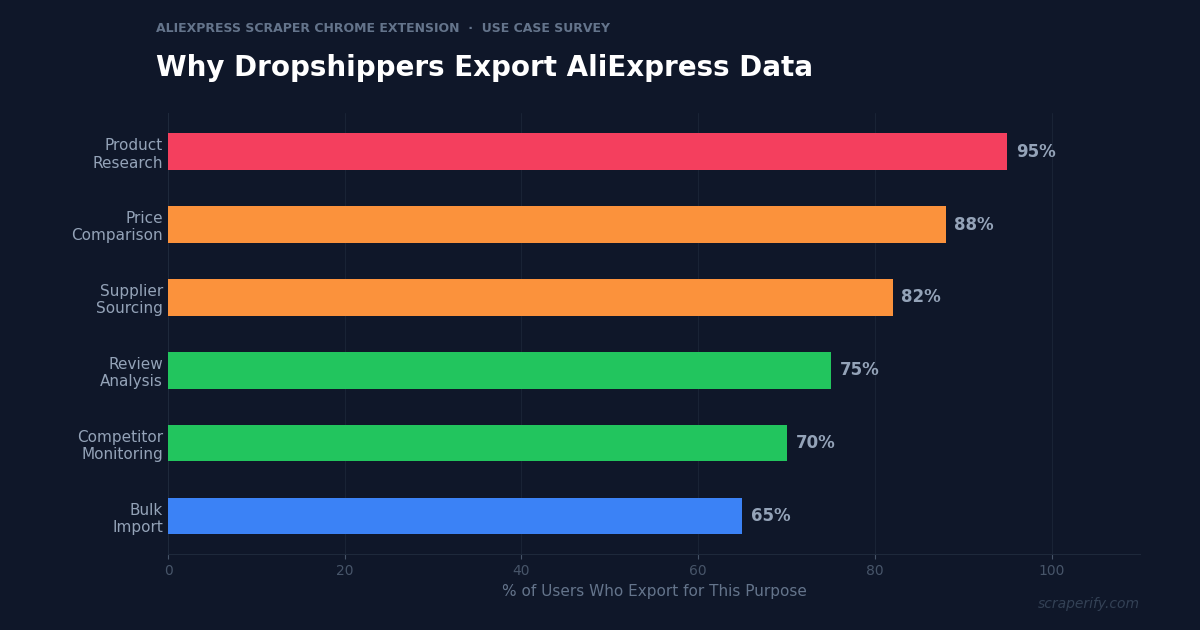
AliExpress has over 100 million products from manufacturers in China and Southeast Asia — the largest supplier catalog for dropshippers worldwide. Whether you run a Shopify store, sell on Amazon, or wholesale for retail, AliExpress product data drives your sourcing decisions. But AliExpress does not let you export search results, download product lists, or save pricing data to a spreadsheet. An AliExpress scraper Chrome extension fixes this — install it, browse AliExpress, and export products to CSV, Excel, or JSON in one click. No coding. No API keys.
This guide shows you how to use an AliExpress scraper Chrome extension to export product data, compare suppliers, analyze reviews, and do dropshipping product research at scale.
Why You Need an AliExpress Scraper Chrome Extension
AliExpress is the foundation of the dropshipping industry. When a Shopify seller needs a product to sell, they start on AliExpress. When an Amazon FBA seller wants to source inventory, they compare AliExpress prices. When a wholesale buyer evaluates manufacturers, they browse AliExpress stores.
But AliExpress product research is painfully manual without an AliExpress scraper Chrome extension. Finding a winning product requires checking dozens of listings — comparing prices, review counts, shipping times, seller ratings, and order volumes. Each listing takes 2-3 minutes to evaluate. For 100 products, that is 3-5 hours of browsing. With an AliExpress scraper Chrome extension, you export 100 products in 2 minutes and do all the analysis in a spreadsheet.
An AliExpress scraper Chrome extension automates the research:
- Captures product data automatically as you browse AliExpress search results
- Exports to CSV, Excel, or JSON — the AliExpress scraper Chrome extension supports all formats
- Extracts prices, reviews, and seller data — complete product profiles via the AliExpress scraper Chrome extension
- Exports reviews — the AliExpress scraper Chrome extension captures customer review text and images
- Runs inside your browser — no software installation required
- Processes data locally — the AliExpress scraper Chrome extension never sends data to external servers
The Scraperify AliExpress scraper Chrome extension is built for dropshippers doing product research, wholesale buyers comparing suppliers, and e-commerce sellers tracking competitor pricing.
What Data Can the AliExpress Scraper Chrome Extension Export?
The AliExpress scraper Chrome extension extracts every visible data point from AliExpress pages:
Product details the AliExpress scraper Chrome extension captures:
- Product title — full listing title with keywords
- Price — current price or price range (min-max for variants)
- Original price — before-discount price
- Discount percentage — current promotion level
- Category — product category and subcategory
- Product images — direct URLs to all product photos via the AliExpress scraper Chrome extension
- Product URL — direct link to the AliExpress listing
- Product ID — unique AliExpress identifier
- Variants — available sizes, colors, specs with individual pricing
Sales and review data the AliExpress scraper Chrome extension exports:
- Orders count — total number of orders placed (the AliExpress scraper Chrome extension captures this as the primary demand signal)
- Star rating — average rating out of 5
- Number of reviews — total review count
- Review text — individual reviews with photos on product detail pages
- Review images — buyer-uploaded photos showing actual product quality
Seller data from the AliExpress scraper Chrome extension:
- Store name — seller’s AliExpress store
- Store rating — overall positive feedback percentage
- Store followers — number of followers
- Years on AliExpress — store age (reliability indicator)
- Communication score — responsiveness rating
- Shipping score — delivery speed rating
- Item as described score — accuracy rating
Shipping data:
- Free shipping availability — whether free shipping is offered
- Shipping methods — AliExpress Standard, ePacket, etc.
- Estimated delivery time — delivery window in days
- Ships from — China, US warehouse, EU warehouse
This data is what separates successful dropshippers from those who pick products blindly. The AliExpress scraper Chrome extension gives you the numbers — order volumes, review quality, seller reliability, and shipping speed — that predict whether a product will succeed in your store.
WHAT THE ALIEXPRESS SCRAPER CHROME EXTENSION EXTRACTS
Product Data
- Title & Description
- Price & Discount
- Variants & Specs
- Category
- Image & Product URLs
- Product ID
Demand Signals
- Orders Count
- Star Rating
- Review Count
- Review Text & Photos
Seller & Shipping
- Store Name & Rating
- Store Age & Followers
- Communication Score
- Shipping Methods & Time
- Free Shipping Status
How to Install the AliExpress Scraper Chrome Extension
Setting up the AliExpress scraper Chrome extension takes 30 seconds.
Step 1: Open the Chrome Web Store. Search for “AliExpress Scraper” or “AliExpress CSV Export.” The Scraperify AliExpress scraper Chrome extension exports product data to CSV, Excel, and JSON.
Step 2: Click “Add to Chrome.” Confirm permissions. The AliExpress scraper Chrome extension needs access to aliexpress.com.
Step 3: Start using it. The AliExpress scraper Chrome extension is ready immediately.
HOW THE ALIEXPRESS SCRAPER CHROME EXTENSION WORKS
Install
Add the AliExpress scraper Chrome extension
Browse
Search AliExpress — data captured automatically
Click
One click on the AliExpress scraper Chrome extension
Export
Download CSV, Excel, or JSON
How to Export AliExpress Products to CSV (Step-by-Step)
Step 1: Search on AliExpress
With the AliExpress scraper Chrome extension installed, go to aliexpress.com and search for products. The AliExpress scraper Chrome extension works on search results, category pages, store pages, and bestseller lists.
Use AliExpress filters before the AliExpress scraper Chrome extension captures data:
- Filter by category — electronics, clothing, home, beauty, etc.
- Filter by price range — set min and max
- Filter by min orders — 100+ orders for validated products
- Filter by star rating — 4+ stars for quality
- Filter by free shipping — reduce your cost basis
- Filter by ships from — US/EU warehouse for faster delivery
- Sort by orders, newest, or price
Step 2: Let the AliExpress Scraper Chrome Extension Capture Data
As you scroll, the AliExpress scraper Chrome extension captures product data automatically. The AliExpress scraper Chrome extension icon shows a badge count. Navigate to additional pages — the AliExpress scraper Chrome extension grabs everything.
Step 3: Click Export
Click the AliExpress scraper Chrome extension icon. Choose CSV, Excel, or JSON. The AliExpress scraper Chrome extension downloads the file instantly.
Step 4: Analyze Your Product Data
Open the AliExpress scraper Chrome extension export. Each row is one product. With the data:
- Sort by orders to find products with proven demand
- Filter by rating — 4.5+ stars for quality assurance
- Calculate profit margins — (your selling price - AliExpress cost - shipping - platform fees)
- Sort by seller rating — work only with reliable suppliers
- Filter by shipping — “ships from US” for 3-7 day delivery vs 15-30 days from China
Why AliExpress Data Is Critical for Dropshipping in 2026
AliExpress is not just a shopping site — it is the world’s largest supplier database for e-commerce entrepreneurs. Understanding why this data matters helps you use the AliExpress scraper Chrome extension more strategically:
Orders count is the ultimate demand signal. AliExpress publicly displays how many orders each product has received. A product with 10,000+ orders has validated market demand. A product with 50 orders is unproven. The AliExpress scraper Chrome extension captures this metric for every exported product, letting you filter for proven winners instantly. This is the single most valuable data point for dropshipping product research.
Seller ratings predict supplier reliability. AliExpress sellers are rated on three dimensions: communication, shipping speed, and item accuracy. Sellers with 95%+ positive feedback and 4.7+ item accuracy scores are safe to work with. Sellers below 90% are risky — expect quality issues, slow shipping, and customer complaints. The AliExpress scraper Chrome extension captures all three scores, letting you vet suppliers before placing a single order.
Price comparison across sellers reveals true cost. The same product is often sold by 10-50 different AliExpress sellers at different prices. The AliExpress scraper Chrome extension exports all of them, letting you identify the lowest-cost supplier for any product. Price differences of 30-50% for the same item are common — the AliExpress scraper Chrome extension ensures you find the best deal.
Review photos show actual product quality. AliExpress buyer reviews often include photos of the actual product received — not the manufacturer’s promotional images. The AliExpress scraper Chrome extension captures review text and photo URLs, letting you assess real-world product quality before adding it to your store. Products with many positive review photos are safer bets than products with only manufacturer images.
US and EU warehouse availability changes the game. Products that ship from US or EU warehouses arrive in 3-7 days instead of 15-30 days from China. For dropshippers, this dramatically improves customer satisfaction and reduces refund rates. The AliExpress scraper Chrome extension captures the “ships from” field, letting you filter for fast-delivery products that compete with Amazon’s shipping speeds.
Seasonal trends are visible in order data. Export the same product category monthly with the AliExpress scraper Chrome extension and track order counts over time. Rising orders signal growing demand. Products with 10K orders in January but only 2K orders in July are seasonal — adjust your inventory and marketing accordingly.
Ready to export AliExpress product data?
Scraperify offers Chrome extensions for 40+ platforms including AliExpress, Temu, Shopee, and more. Browse the full suite.
Browse All Scrapers →5 Ways to Use the AliExpress Scraper Chrome Extension
1. Dropshipping Product Research
The primary use of the AliExpress scraper Chrome extension is finding winning products for Shopify, WooCommerce, or eBay dropshipping stores. Export 200+ products from a trending category, sort by orders (proven demand), filter by 4.5+ stars (quality), and identify products with strong review photos. The AliExpress scraper Chrome extension replaces hours of manual browsing with a 10-minute data exercise.
The winning product criteria in a spreadsheet: 1,000+ orders, 4.5+ stars, 50+ reviews with photos, US warehouse option, price under $15 (for selling at $29-$39 retail), and seller with 95%+ positive feedback. The AliExpress scraper Chrome extension exports all of these fields so you can filter with formulas, not guesswork.
2. Supplier Comparison and Vetting
The same product appears from dozens of AliExpress sellers. Use the AliExpress scraper Chrome extension to export all listings for a product, then compare sellers on price, rating, shipping speed, and communication score. The cheapest seller is not always the best — a seller with $0.50 lower price but 85% feedback will cost you more in refunds than the $0.50 savings. The AliExpress scraper Chrome extension data makes this comparison instant.
3. Price Monitoring and Negotiation
AliExpress prices fluctuate based on promotions, seasons, and seller competition. Use the AliExpress scraper Chrome extension to export your key products monthly and track price changes. When prices drop during AliExpress sales events (11.11, Black Friday, store anniversaries), you know exactly how much you are saving versus regular pricing. This historical data also gives you leverage when negotiating bulk pricing with sellers — “Your price was $3.50 last month, why is it $4.20 now?“
4. Review Mining for Product Improvement
Export reviews from the top-selling products in your niche with the AliExpress scraper Chrome extension. Analyze what buyers love and hate. Common complaints reveal product weaknesses you can exploit — if every review of a phone case says “too slippery,” sourcing a version with a textured grip gives you a competitive advantage. Common praise reveals selling points for your product listing copy.
5. Cross-Platform Sourcing Comparison
AliExpress is not the only sourcing platform. Use the AliExpress scraper Chrome extension alongside the Temu Scraper and Shopee Scraper to compare prices across all three platforms. Temu often undercuts AliExpress by 10-20% on identical products. Shopee offers faster shipping to Southeast Asian markets. Having data from all three platforms — exported in the same CSV format — lets you choose the optimal sourcing platform for each product.
AliExpress Scraper Chrome Extension vs Other Methods
ALIEXPRESS SCRAPER: CHROME EXTENSION VS ALTERNATIVES
| Feature | AliExpress Scraper Chrome Extension | DSers/Oberlo | Manual |
|---|---|---|---|
| CSV/Excel export | ✓ | ✗ (import only) | ✗ |
| Bulk product research | ✓ (100s at once) | One at a time | One at a time |
| Seller comparison | ✓ (all sellers in CSV) | Limited | Manual tab-by-tab |
| Review export | ✓ (text + photos) | Import to store only | ✗ |
| Speed (100 products) | ~3 min | N/A | ~5 hours |
The AliExpress scraper Chrome extension fills a gap that DSers and Oberlo do not. Those tools are designed to import AliExpress products directly into your Shopify store — they are fulfillment tools, not research tools. They do not export data to CSV for analysis, comparison, or spreadsheet work. The AliExpress scraper Chrome extension is the research counterpart — export data, analyze in a spreadsheet, make decisions, then use DSers to import the winners.
Tips for Using the AliExpress Scraper Chrome Extension
Filter by 1,000+ Orders for Validated Products
After exporting with the AliExpress scraper Chrome extension, filter for products with 1,000+ orders. These products have proven demand — hundreds or thousands of customers have already validated the product-market fit. Products with under 100 orders are higher risk. The AliExpress scraper Chrome extension orders field is your most important filter.
Check “Ships from” for Delivery Speed
Dropshipping success in 2026 depends on fast delivery. Use the AliExpress scraper Chrome extension to filter for products that ship from US or EU warehouses. These arrive in 3-7 days versus 15-30 days from China. Customers who wait 3 weeks for delivery leave negative reviews and request refunds — destroying your store’s reputation.
Export Reviews Before Committing to a Product
Use the AliExpress scraper Chrome extension on product detail pages to export reviews. Read the 1-star and 2-star reviews first — they reveal the product’s weaknesses. If quality complaints are consistent (“color fades after one wash,” “broke on day 3”), the product is not worth selling regardless of its order count. The AliExpress scraper Chrome extension review export prevents you from listing products that will generate returns.
Compare AliExpress Prices with Temu and Shopee
The same factory products are often listed on AliExpress, Temu, and Shopee at different prices. Use the AliExpress scraper Chrome extension alongside the Temu Scraper and Shopee Scraper to find the lowest sourcing cost. Even a $0.50 difference per unit adds up to thousands of dollars in savings at volume.
Export Monthly for Price Tracking
AliExpress prices change constantly. Use the AliExpress scraper Chrome extension to export your key products monthly. Track price trends to identify the best time to stock up (during AliExpress sales events) and when prices are inflated (after major holidays when demand spikes).
Who Uses the AliExpress Scraper Chrome Extension?
Shopify Dropshippers — The largest user group. They use the AliExpress scraper Chrome extension to find winning products, vet suppliers, and compare prices before adding products to their store.
Amazon FBA Sellers — Sellers sourcing private label or wholesale products use the AliExpress scraper Chrome extension to find manufacturers, compare per-unit costs, and identify trending products to list on Amazon.
eBay Dropshippers — eBay sellers who fulfill from AliExpress use the AliExpress scraper Chrome extension to find profitable products where the eBay selling price exceeds the AliExpress cost by enough to cover eBay’s 13.25% fee.
Wholesale Buyers — Retail store owners and e-commerce businesses buying in bulk use the AliExpress scraper Chrome extension to identify potential suppliers, compare pricing across sellers, and shortlist products for sample orders.
Product Researchers — Market research firms analyzing e-commerce trends use the AliExpress scraper Chrome extension to track product categories, pricing movements, and supplier dynamics across the world’s largest manufacturer marketplace.
AliExpress Scraper Chrome Extension — FAQs
Is the AliExpress scraper Chrome extension free?
The AliExpress scraper Chrome extension typically offers a free tier. Scraperify plans start at $19.99/month or $79 lifetime.
Does the AliExpress scraper Chrome extension export reviews?
Yes. The AliExpress scraper Chrome extension exports review text, star ratings, and review image URLs from product detail pages.
Is my data private with the AliExpress scraper Chrome extension?
Yes. The AliExpress scraper Chrome extension processes everything locally. No product data leaves your browser.
How many AliExpress products can the AliExpress scraper Chrome extension export?
The AliExpress scraper Chrome extension captures products as you scroll and navigate pages. There is no hard limit.
Can I use the AliExpress scraper Chrome extension data for my Shopify store?
Yes. Export product data with the AliExpress scraper Chrome extension for research and comparison. When you find a winning product, use DSers or a similar tool to import it into Shopify.
Start Exporting AliExpress Data Today
Stop browsing AliExpress manually for hours. The AliExpress scraper Chrome extension exports product data to CSV so you can find winning products, compare suppliers, and source smarter.
Scraperify offers Chrome extensions for 40+ platforms including Temu and Shopee for cross-platform sourcing comparison, eBay for resale price validation, and TikTok Shop for trending product discovery.
Export AliExpress Products in One Click
Scraperify has 40+ Chrome extensions for e-commerce product research, sourcing, and data export. All with one-click CSV export.
Browse All Scrapers →Free tier on every extension · Paid plans from $19.99/month · $79 lifetime