Amazon Scraper Chrome Extension: Export Products (2026)
Export Amazon products, prices, reviews, and BSR data to CSV or Excel. Free Amazon scraper Chrome extension for FBA sellers and product researchers.
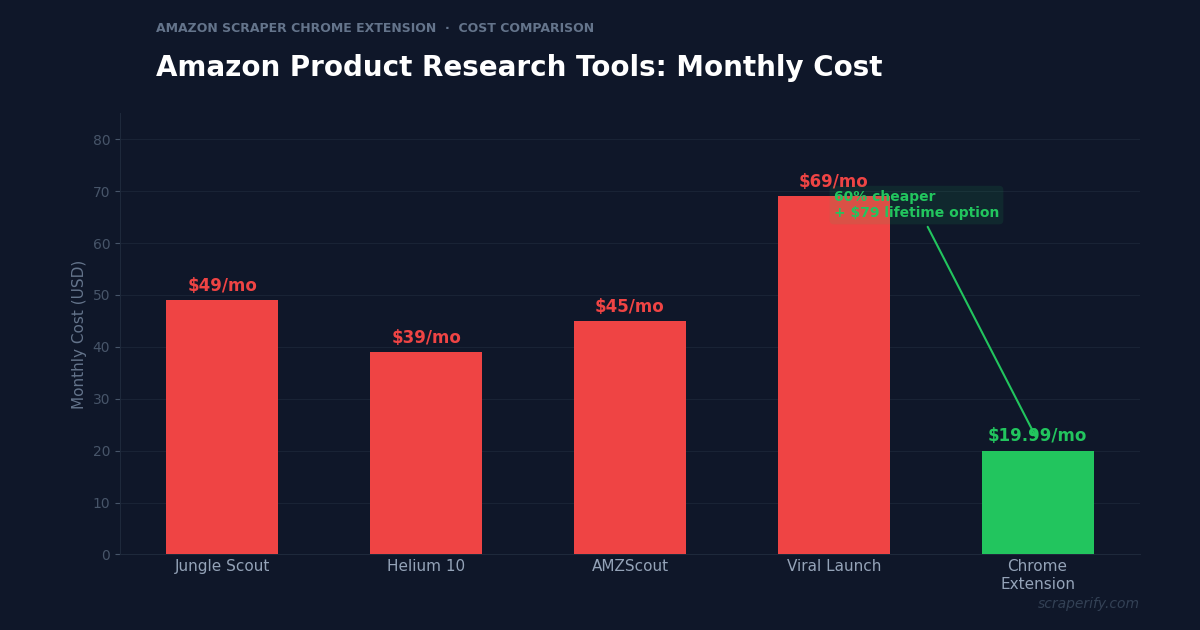
Amazon has over 350 million products listed across its global marketplaces. For FBA sellers, product researchers, and arbitrage sellers, Amazon product data — prices, BSR (Best Sellers Rank), review counts, and seller information — drives every business decision. Tools like Jungle Scout ($49/month) and Helium 10 ($39/month) provide this data through polished dashboards, but they cost $500-$1,200 per year. An Amazon scraper Chrome extension delivers the same core data at a fraction of the cost — export products to CSV, Excel, or JSON in one click. No coding. No expensive subscriptions.
This guide shows you how to use an Amazon scraper Chrome extension to export product data, analyze competitors, mine reviews, and do product research without paying premium SaaS prices.
Why You Need an Amazon Scraper Chrome Extension
Amazon is the world’s largest e-commerce marketplace, with millions of sellers competing across every product category. Success on Amazon requires data — BSR trends, competitive pricing, review analysis, and market sizing. But Amazon does not let you export search results or download product data.
Professional Amazon seller tools solve this problem, but they are expensive. Jungle Scout costs $49/month, Helium 10 starts at $39/month, and AMZScout charges $45/month. For established sellers doing $10K+/month in revenue, these tools pay for themselves. But for new sellers, side hustlers, and researchers, spending $500-$1,200/year before making a single sale is a steep barrier.
An Amazon scraper Chrome extension offers a cost-effective alternative:
- Captures product data automatically as you browse Amazon search results
- Exports to CSV, Excel, or JSON — the Amazon scraper Chrome extension supports all formats
- Extracts prices, BSR, reviews, and seller data — core research fields
- Costs a fraction of premium tools — free tier available, paid plans from $19.99/month or $79 lifetime
- Runs inside your browser — the Amazon scraper Chrome extension needs no installation beyond Chrome Web Store
- Processes data locally — the Amazon scraper Chrome extension never sends your data to external servers
- Works across Amazon regional domains — amazon.com, amazon.co.uk, amazon.de, amazon.co.jp, and more
The Scraperify Amazon scraper Chrome extension is built for Amazon FBA sellers doing product research, arbitrage sellers comparing prices, brand owners monitoring competitors, and analysts tracking e-commerce trends.
What Data Can the Amazon Scraper Chrome Extension Export?
The Amazon scraper Chrome extension extracts every visible data point from Amazon product pages:
Product details the Amazon scraper Chrome extension captures:
- Product title — full listing title with keywords
- Price — current selling price
- List price — original MSRP for calculating discount percentage
- ASIN — Amazon Standard Identification Number (the Amazon scraper Chrome extension captures this unique identifier)
- BSR (Best Sellers Rank) — ranking within the product category
- Category — product category and subcategory
- Brand — manufacturer brand name
- Product images — direct URLs to all product photos
- Product URL — direct link to the Amazon listing
- Availability — in stock, limited stock, out of stock
- Prime eligible — whether the product has Prime shipping
- Coupon — active coupon discount if available
Review data the Amazon scraper Chrome extension exports:
- Star rating — average rating out of 5 (the Amazon scraper Chrome extension captures this for quality assessment)
- Number of ratings — total rating count
- Number of reviews — total review count with text
- Review text — individual reviews on product detail pages
- Review breakdown — distribution of 1-5 star ratings
Seller data from the Amazon scraper Chrome extension:
- Sold by — seller name (Amazon, FBA seller, or FBM seller)
- Fulfilled by — Amazon FBA or seller-fulfilled
- Number of sellers — how many sellers offer the same product
- Buy Box winner — which seller currently holds the Buy Box
- Seller rating — feedback percentage
Additional data:
- Variations — available colors, sizes, styles
- Frequently bought together — cross-sell products
- Shipping weight — for FBA fee calculation
- Product dimensions — for FBA sizing tier
This data set covers the core needs of Amazon product research. The Amazon scraper Chrome extension captures what you need for product validation, competitive analysis, and sourcing decisions — without the $49-$99/month price tag of premium tools.
WHAT THE AMAZON SCRAPER CHROME EXTENSION EXTRACTS
Product Data
- Title & Brand
- Price & List Price
- ASIN & BSR
- Category & Availability
- Prime Status & Coupon
- Image & Product URLs
Reviews & Ratings
- Star Rating
- Rating & Review Count
- Review Text
- Rating Breakdown
Seller & Shipping
- Sold By & Fulfilled By
- Number of Sellers
- Buy Box Winner
- Shipping Weight
- Product Dimensions
How to Install the Amazon Scraper Chrome Extension
Setting up the Amazon scraper Chrome extension takes 30 seconds.
Step 1: Open the Chrome Web Store. Search for “Amazon Scraper” or “Amazon Product Scraper.” The Scraperify Amazon scraper Chrome extension exports product data to CSV, Excel, and JSON.
Step 2: Click “Add to Chrome.” Confirm permissions. The Amazon scraper Chrome extension needs access to amazon.* domains.
Step 3: Start using it. The Amazon scraper Chrome extension works on all Amazon regional domains immediately.
HOW THE AMAZON SCRAPER CHROME EXTENSION WORKS
Install
Add the Amazon scraper Chrome extension
Search
Search Amazon — data captured automatically
Click
One click on the Amazon scraper Chrome extension
Export
Download CSV, Excel, or JSON
How to Export Amazon Products to Excel (Step-by-Step)
Step 1: Search on Amazon
With the Amazon scraper Chrome extension installed, go to any Amazon domain and search for products. The Amazon scraper Chrome extension works across all Amazon marketplaces:
| Market | Domain |
|---|---|
| United States | amazon.com |
| United Kingdom | amazon.co.uk |
| Germany | amazon.de |
| Japan | amazon.co.jp |
| Canada | amazon.ca |
| France | amazon.fr |
| Italy | amazon.it |
| Spain | amazon.es |
| Australia | amazon.com.au |
| India | amazon.in |
Use Amazon’s filters before the Amazon scraper Chrome extension captures data:
- Filter by category — narrow to specific departments
- Filter by price range — set min and max
- Filter by rating — 4+ stars
- Filter by Prime eligible — FBA products only
- Sort by featured, price, avg. customer review, or newest arrivals
Step 2: Let the Amazon Scraper Chrome Extension Capture Data
As you scroll through results, the Amazon scraper Chrome extension captures product data automatically. Navigate to page 2, 3, and beyond — the Amazon scraper Chrome extension grabs listings from every page.
Step 3: Click Export
Click the Amazon scraper Chrome extension icon. Choose CSV, Excel, or JSON. The Amazon scraper Chrome extension downloads the file instantly.
Step 4: Analyze Your Amazon Data
Open the Amazon scraper Chrome extension export. Each row is one product. With the data:
- Sort by BSR to find category bestsellers
- Filter by review count — 1,000+ reviews indicates strong demand
- Calculate margins — selling price minus sourcing cost minus FBA fees
- Sort by number of sellers — fewer sellers = less competition for the Buy Box
- Filter by Prime to focus on FBA-eligible products
Why Amazon Data Drives E-Commerce Decisions
Amazon is not just a marketplace — it is the world’s largest product research database. Understanding these dynamics helps you use the Amazon scraper Chrome extension more strategically:
BSR reveals real-time demand. Amazon’s Best Sellers Rank updates hourly based on recent sales. A product with BSR #500 in its category sells significantly more than one at BSR #5,000. The Amazon scraper Chrome extension captures BSR for every exported product, letting you rank opportunities by actual sales velocity rather than guessing based on review counts.
Review count is a moat indicator. Products with 10,000+ reviews have a significant competitive advantage — new sellers cannot easily replicate this social proof. Products with 50-200 reviews are still in their growth phase and more vulnerable to competition. The Amazon scraper Chrome extension exports review counts, helping you identify categories where you can realistically compete versus those dominated by entrenched products.
Price vs value perception. Amazon shoppers compare on price aggressively. Exporting all products in a category with the Amazon scraper Chrome extension and calculating the average price reveals the market’s price expectation. Products priced 30%+ above the category average need strong differentiation (better reviews, unique features) to convert. Products priced below average may have margin issues.
Number of sellers indicates competition intensity. Amazon products with 20+ sellers competing for the Buy Box are commodity products with razor-thin margins. Products with 1-3 sellers have more pricing power. The Amazon scraper Chrome extension captures seller count, letting you filter for low-competition products.
Cross-marketplace pricing varies significantly. The same product often sells for different prices on amazon.com vs amazon.co.uk vs amazon.de. The Amazon scraper Chrome extension works on all Amazon domains, enabling cross-marketplace arbitrage — buy on the cheapest domain, sell on the most expensive one using Amazon’s Global Selling program.
Seasonal BSR patterns predict future performance. Export BSR data monthly with the Amazon scraper Chrome extension and track how products perform across seasons. A product with BSR #200 in December but #3,000 in July is highly seasonal — plan inventory and advertising accordingly.
Ready to export Amazon product data?
Scraperify offers Chrome extensions for 40+ platforms including Amazon, Walmart, eBay, and more. Export data to CSV with one click.
Browse All Scrapers →5 Ways to Use the Amazon Scraper Chrome Extension
1. Product Research for FBA
The primary use of the Amazon scraper Chrome extension is FBA product research. Export 200+ products from a niche category, sort by BSR (demand), filter by review count (competition level), and identify products with strong demand but fewer than 500 reviews (opportunities for new entrants). The Amazon scraper Chrome extension replaces the $49-$99/month tools that most new sellers cannot afford.
The ideal FBA product in your spreadsheet: BSR under 5,000, fewer than 500 reviews, selling price $20-$50, 3+ sellers (validated demand but not overcrowded), and sourcing cost 25-30% of selling price. The Amazon scraper Chrome extension data feeds directly into this validation framework.
2. Retail and Online Arbitrage
Arbitrage sellers buy products cheaply from Walmart, Temu, or clearance sales and resell on Amazon at a markup. The Amazon scraper Chrome extension provides the Amazon selling price and BSR for margin calculations. Export Amazon products, match them to sourcing platforms using ASIN or product title, and calculate profit after Amazon’s referral fee (~15%) and FBA fees.
3. Competitive Price Monitoring
Brand owners and sellers use the Amazon scraper Chrome extension to monitor competitor pricing. Export competitor ASINs weekly and track price changes. If a competitor drops their price by 15%, you need to know immediately — the Amazon scraper Chrome extension data alerts you to pricing shifts that affect your sales volume.
4. Review Mining for Product Development
Export reviews for existing products in your niche with the Amazon scraper Chrome extension. Analyze 1-star and 2-star reviews to identify common complaints — these are product improvement opportunities. If 30% of reviews for yoga mats mention “slippery surface,” sourcing a mat with better grip gives you a competitive advantage backed by customer demand data.
5. Cross-Marketplace Price Comparison
The Amazon scraper Chrome extension works on all Amazon domains. Export the same product from amazon.com, amazon.co.uk, and amazon.de. Products that sell for $25 on amazon.com but £28 ($36) on amazon.co.uk have a cross-marketplace arbitrage opportunity. Use Amazon’s Global Selling program to list on higher-priced markets.
Amazon Scraper Chrome Extension vs Premium Tools
AMAZON SCRAPER CHROME EXTENSION VS PREMIUM TOOLS
| Feature | Amazon Scraper Chrome Extension | Jungle Scout | Helium 10 |
|---|---|---|---|
| Monthly cost | Free / $19.99 | $49/mo | $39/mo |
| Lifetime option | $79 | ✗ | ✗ |
| CSV/Excel export | ✓ | ✓ | ✓ |
| Sales estimates | BSR (raw data) | ✓ (calculated) | ✓ (calculated) |
| Keyword research | ✗ | ✓ | ✓ |
| Review export | ✓ (full text) | Limited | ✓ |
The Amazon scraper Chrome extension and premium tools serve different needs. Jungle Scout and Helium 10 provide calculated monthly sales estimates, keyword search volume data, and historical BSR tracking that the Amazon scraper Chrome extension does not. These features are valuable for established sellers optimizing PPC campaigns and tracking keyword rankings.
However, the Amazon scraper Chrome extension excels at raw data export — getting product data into a spreadsheet where you can analyze it your way. For new sellers learning product research, arbitrage sellers comparing prices, and researchers who need bulk data export, the Amazon scraper Chrome extension delivers 80% of the value at 20% of the cost.
Many sellers use both: the Amazon scraper Chrome extension for day-to-day product research and price monitoring, and a premium tool for keyword research and PPC optimization once they have a product to sell.
Tips for Using the Amazon Scraper Chrome Extension
Use BSR as Your Primary Filter
After exporting with the Amazon scraper Chrome extension, sort by BSR ascending. Lower BSR = more sales. In most categories, BSR under 5,000 indicates healthy daily sales volume. BSR under 1,000 indicates a bestseller. Use BSR ranges to segment products into tiers of demand.
Check Review Count for Competition Assessment
Products with 5,000+ reviews are heavily established — competing against them as a new seller is extremely difficult. Products with 100-500 reviews have proven demand but are still beatable with a better product or better listing. The Amazon scraper Chrome extension review count data helps you identify the sweet spot of demand vs competition.
Export Multiple Amazon Domains for Global Opportunities
The Amazon scraper Chrome extension works on amazon.com, amazon.co.uk, amazon.de, and more. Export the same category from 3-4 domains and compare BSR, pricing, and competition. Some products face heavy competition on amazon.com but have untapped markets on amazon.de or amazon.co.jp.
Combine with Walmart and Temu Data for Arbitrage
Use the Amazon scraper Chrome extension to establish Amazon selling prices, then compare with Walmart Scraper and Temu Scraper data for sourcing costs. Products where the Amazon price exceeds the sourcing cost by 40%+ (after all fees) are viable arbitrage candidates.
Export Monthly for BSR Trend Analysis
BSR fluctuates daily, but monthly averages reveal trends. Use the Amazon scraper Chrome extension to export your target niche monthly. Track whether average BSR is improving (growing market) or declining (shrinking market). This macro trend data informs whether to enter, stay, or exit a product category.
Who Uses the Amazon Scraper Chrome Extension?
New FBA Sellers — Sellers who cannot justify $49-$99/month before their first sale use the Amazon scraper Chrome extension for product research at a fraction of the cost.
Arbitrage Sellers — Retail and online arbitrage sellers use the Amazon scraper Chrome extension to check Amazon prices and BSR before purchasing inventory from Walmart, Temu, or clearance sales.
Brand Owners — Brands selling on Amazon use the Amazon scraper Chrome extension to monitor competitor pricing, track new entrants, and analyze review sentiment across their category.
Product Researchers — Consultants and agencies doing Amazon market research for clients use the Amazon scraper Chrome extension to gather data at scale for category analysis reports.
E-Commerce Analysts — Researchers studying Amazon’s marketplace dynamics, pricing algorithms, and seller competition use the Amazon scraper Chrome extension to build large datasets for analysis.
Amazon Scraper Chrome Extension — FAQs
Is the Amazon scraper Chrome extension free?
The Amazon scraper Chrome extension offers a free tier. Scraperify plans start at $19.99/month or $79 lifetime — significantly cheaper than Jungle Scout ($49/mo) or Helium 10 ($39/mo).
Does the Amazon scraper Chrome extension export BSR data?
Yes. The Amazon scraper Chrome extension captures BSR, which is the most important demand indicator on Amazon.
Does the Amazon scraper Chrome extension work on all Amazon marketplaces?
Yes. The Amazon scraper Chrome extension works on amazon.com, amazon.co.uk, amazon.de, amazon.co.jp, amazon.ca, and all other regional Amazon domains.
Is my data private with the Amazon scraper Chrome extension?
Yes. The Amazon scraper Chrome extension processes everything locally. No product data leaves your browser.
Can the Amazon scraper Chrome extension replace Jungle Scout?
The Amazon scraper Chrome extension provides raw product data (prices, BSR, reviews, sellers). Jungle Scout adds calculated monthly sales estimates and keyword research. For basic product research and price comparison, the Amazon scraper Chrome extension is sufficient. For advanced keyword optimization and PPC management, you may still want a premium tool.
Start Exporting Amazon Data Today
Stop paying $49-$99/month for product research data. The Amazon scraper Chrome extension exports Amazon product data to CSV at a fraction of the cost.
Scraperify offers Chrome extensions for 40+ platforms including Walmart for sourcing, eBay for resale pricing, AliExpress for supplier research, and Temu for low-cost sourcing.
Export Amazon Products Without the Premium Price
Scraperify’s Amazon scraper exports products, BSR, reviews, and seller data to CSV. Free tier available. $79 lifetime.
Browse All Scrapers →Free tier · $19.99/month · $79 lifetime — no Jungle Scout pricing