Best Lead Generation Chrome Extensions (2026 Guide)
The best lead generation Chrome extensions for building B2B lead lists — sourcing tools and email finders compared. Free and paid options for 2026.
Search “best lead generation Chrome extension” and you get the same list every time: Apollo, Hunter, Skrapp, Lusha, GetProspect. All excellent tools. All doing the exact same job — finding email addresses for people you already identified.
But that skips the harder half of the problem. Before you can enrich a lead, you need a list of target companies. Where does that list come from? Most articles quietly assume you already have it, or that you will build it on LinkedIn. That assumption costs sales teams enormous amounts of time.
This guide covers lead generation Chrome extensions across both stages: the sourcing tools that build your company list, and the enrichment tools that find contact details. We compare what data each source gives you natively, which sources skip enrichment entirely, and how to assemble a complete pipeline for 2026.
The Two-Stage Lead Generation Pipeline
Every B2B lead list is built in two stages. Understanding this framework tells you which lead generation Chrome extension you actually need — and which ones you are paying for but do not.
Stage 1 — Sourcing. You start with a target profile (“HVAC contractors in Houston with 4+ star ratings” or “SaaS companies with under 50 employees”) and end with a list of company names, websites, and sometimes phone numbers. This is the stage almost nobody writes about.
Stage 2 — Enrichment. You take that list of companies and find the specific humans to contact — names, job titles, and verified work email addresses. This is where Apollo, Hunter, and Skrapp operate.
Here is the trap: most people do Stage 1 manually. One sales operator described the typical workflow — searching company by company, filtering by title, opening profile after profile, copying and pasting. “Several hours later, maybe you found 12 leads out of 25 companies. But tomorrow you have to start all over again.”
With the right lead generation Chrome extension at each stage, that same job takes minutes. One demonstrated workflow turned a spreadsheet of 50 company domains into 312 verified leads in under two minutes — but only because the 50 domains already existed. Getting those 50 domains is Stage 1, and that is where a sourcing lead generation Chrome extension earns its keep.
Stage 1: Lead Sourcing Chrome Extensions
These lead generation Chrome extension tools build your raw company list. The critical question for each: what data does it give you natively, before you spend a single enrichment credit?
Yelp Scraper — Best for Local Business Leads
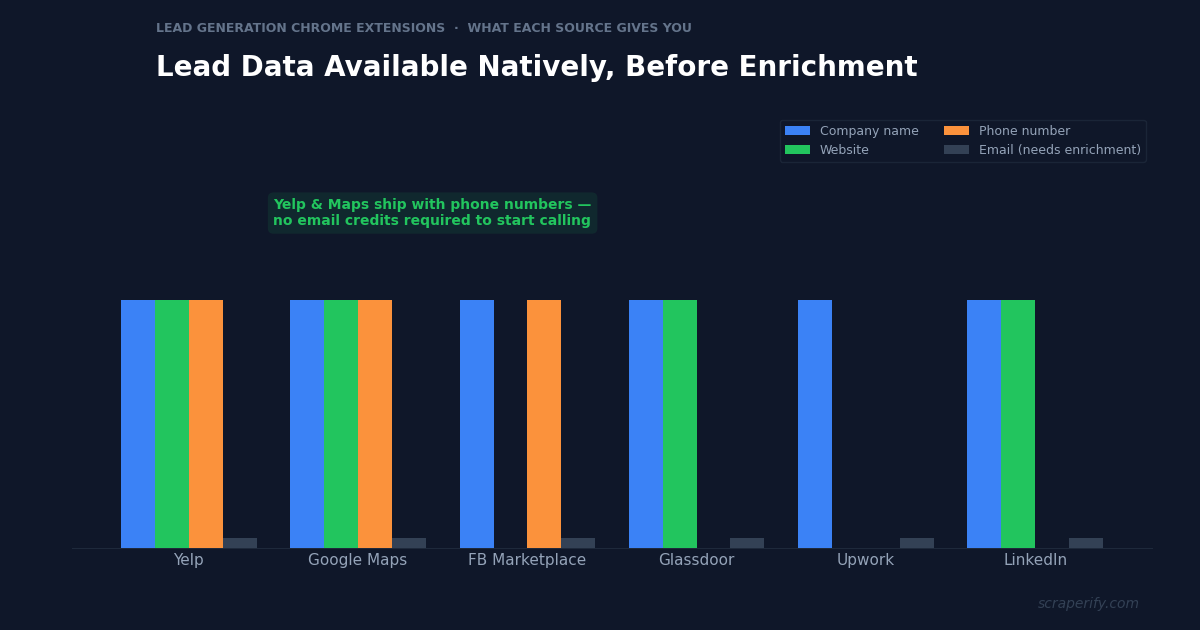
This is the highest-ROI sourcing lead generation Chrome extension for anyone selling to local businesses. The Yelp Scraper Chrome Extension exports local business listings with phone numbers and websites included. This is the single most underrated fact in local lead generation: Yelp publishes business phone numbers publicly. Export 240 HVAC contractors in Houston and you have 240 phone numbers immediately — no email credits, no enrichment step, no waiting.
Native data: Business name, phone number, website, full address, category, star rating, review count, hours, claimed status.
Best for: Agencies selling to local businesses (SEO, web design, PPC), home services sales, B2B SaaS targeting SMBs, cold callers.
Why it matters: A cold email campaign needs enrichment. A cold calling campaign does not. Yelp exports are call-ready on day one, which makes this lead generation Chrome extension the fastest path from zero to first conversation.
Facebook Marketplace Scraper — Best for Local Seller Leads
The Facebook Marketplace Scraper Chrome Extension is an unconventional lead generation Chrome extension that exports listings with seller names, locations, and item details. For certain businesses, Marketplace is a surprisingly effective lead source: people listing large volumes of furniture are often moving (leads for movers, storage, real estate). People selling vehicles need insurance quotes.
Native data: Listing title, price, condition, location, seller name, seller profile, date posted, plus vehicle-specific fields (make, model, year, mileage, VIN).
Best for: Moving companies, junk haulers, insurance agents, auto dealers, local service businesses.
Glassdoor Scraper — Best for Company Intelligence Leads
As a lead generation Chrome extension, the Glassdoor Scraper exports company profiles including websites, employee counts, ratings, and salary data. Companies with low Glassdoor ratings are prime prospects for HR tech, employer branding services, and recruiting firms — they have a visible, urgent problem.
Native data: Company name, website, industry, overall rating, subcategory ratings, review volume, salary reports, CEO approval.
Best for: HR tech vendors, recruiting agencies, employer branding consultants, CX and culture consultancies.
Upwork Scraper — Best for Client and Talent Leads
The Upwork Scraper Chrome Extension is a lead generation Chrome extension that exports job listings with client spending history — total spent, hire rate, payment verification status. For agencies, clients who have spent $100K+ on Upwork with high hire rates are proven buyers of outsourced services.
Native data: Job title, description, budget, required skills, proposal count, client total spend, client hire rate, payment verified status, client rating.
Best for: Agencies selling to companies that already outsource, freelancer recruiters, staffing firms.
Trustpilot Scraper — Best for Reputation-Based Prospecting
The Trustpilot Scraper Chrome Extension works as a signal-based lead generation Chrome extension, exporting company profiles with TrustScores and websites from category pages. Companies with TrustScores below 3.5 need reputation management, customer service software, and CX consulting — a visible pain point that makes for a warm opening line.
Native data: Company name, website, TrustScore, review count, rating distribution, category, business response rate.
Best for: Reputation management agencies, CX software vendors, customer service consultancies.
STAGE 1 SOURCING: WHAT YOU GET WITHOUT ENRICHMENT
| Source | Company | Website | Phone | Best For | |
|---|---|---|---|---|---|
| Yelp | ✓ | ✓ | ✓ | Enrich | Local businesses |
| Facebook Marketplace | ✓ | — | Some | Enrich | Local sellers |
| Glassdoor | ✓ | ✓ | — | Enrich | HR tech buyers |
| Upwork | ✓ | — | — | Enrich | Outsourcing buyers |
| Trustpilot | ✓ | ✓ | — | Enrich | CX/reputation buyers |
| ✓ | ✓ | — | Enrich | Enterprise B2B |
”Enrich” means the field requires a Stage 2 email-finding tool.
Build your Stage 1 company list
Scraperify offers sourcing Chrome extensions for Yelp, Facebook Marketplace, Upwork, Glassdoor, Trustpilot, and 35+ more platforms.
Browse All Scrapers →Stage 2: Email Finder Chrome Extensions
Once you have a company list, these lead generation Chrome extension tools find the humans. All work on a credit model — you pay per successful email found.
Apollo.io
Apollo is the most widely used enrichment lead generation Chrome extension for B2B prospecting. It combines a 275M+ contact database with a Chrome extension that surfaces contact data as you browse LinkedIn or company websites. Includes sequences and dialer, so it doubles as a lightweight sales engagement platform.
Pricing: Free tier with limited credits; paid plans from roughly $49/user/month.
Best for: Full-stack B2B sales teams that want database, enrichment, and outreach in one tool.
Hunter.io
A domain-first email finding lead generation Chrome extension. Give Hunter a company website and it returns the email pattern plus known addresses at that domain. The Chrome extension shows emails for whatever site you are viewing. Strong verification, clean API.
Pricing: Free tier (25 searches/month); paid from around $34/month.
Best for: Teams that already have a website list — which is exactly what a Stage 1 sourcing export produces.
Skrapp / GetProspect / Lusha
Three similar LinkedIn-focused lead generation Chrome extension options. Each lead generation Chrome extension overlays LinkedIn profiles and search results with email addresses, exporting to CSV. They differ mainly in database coverage by region and pricing tiers.
Best for: LinkedIn-centric prospecting where your ICP lives on LinkedIn.
Google Sheets Add-ons (Skalelist, SalesQL)
Not a lead generation Chrome extension strictly, but they solve the same problem inside a spreadsheet. Paste a column of domains, click once, and get back first name, last name, email, job title, department, seniority, LinkedIn URL, and a valid/risky deliverability flag. One demo turned 50 domains into 312 leads in under two minutes.
Credits are only charged on successful finds, and verification is included in the credit cost — a meaningful difference from tools that bill for every attempt.
Best for: Teams whose workflow already lives in spreadsheets — a natural fit after a Stage 1 CSV export.
STAGE 2 ENRICHMENT: EMAIL FINDER COMPARISON
| Tool | Free Tier | Starts At | Input | Extras |
|---|---|---|---|---|
| Apollo.io | ✓ | ~$49/user/mo | LinkedIn, domains | Sequences, dialer |
| Hunter.io | ✓ (25/mo) | ~$34/mo | Domains | Verification, API |
| Skrapp / GetProspect | ✓ | ~$39/mo | List management | |
| Sheets add-ons | ✓ (credits) | Pay per find | Domain column | Bulk, in-sheet |
The Complete Lead Generation Pipeline
Here is how the two stages fit together in practice, using a local-business agency as the example.
Step 1 — Define the target profile. “HVAC contractors in the Houston metro, 4+ stars, 20+ reviews, with a website.” Specificity here determines lead quality more than any tool choice.
Step 2 — Source the company list. Search that profile on Yelp, then run the Yelp Scraper Chrome Extension — the sourcing lead generation Chrome extension in this pipeline. Yelp returns up to 240 businesses per search. Repeat across 5 nearby cities and you have roughly 1,200 companies with names, phone numbers, websites, and ratings — in about an hour.
Step 3 — Filter before enriching. This is the step that saves the most money, and no lead generation Chrome extension will do it for you. Filter your export down to businesses that match your buying criteria — those with websites (if you sell web services), 3.5-4.5 stars (good but improvable), 50+ reviews (established, has budget). A 1,200-row list often filters to 300 genuinely qualified companies. Enriching 300 instead of 1,200 cuts your credit spend by 75%.
Step 4 — Enrich the survivors. Feed the filtered website column into Hunter, Apollo, or whichever enrichment lead generation Chrome extension you prefer. Expect a 60-80% match rate on decision-maker emails for SMB targets.
Step 5 — Split your channels. You now have two campaigns from one lead generation Chrome extension export. Email the enriched contacts. Cold call the phone numbers Yelp gave you natively — including the businesses where enrichment found nothing. Most teams throw away non-matched rows; those rows still have phone numbers.
Step 6 — Verify before sending. No lead generation Chrome extension guarantees deliverability, so run emails through a verification service (ZeroBounce, NeverBounce) before your first send. Bounces damage sender reputation, and one bad campaign can suppress deliverability for months.
How to Choose Your Lead Generation Chrome Extension
The right lead generation Chrome extension depends entirely on where your prospects actually live. There is no universally best option — only the best fit for your specific buyer.
Selling to local businesses? Start with Yelp. It is the only major source that hands you phone numbers natively — which means you can start conversations before spending a cent on enrichment. A lead generation Chrome extension for Yelp typically pays for itself in the first campaign.
Selling to mid-market and enterprise? Pair LinkedIn with an Apollo or Skrapp lead generation Chrome extension. That is where those buyers maintain profiles, and where title-based filtering is most accurate.
Selling HR, recruiting, or CX software? Use a signal-based sourcing lead generation Chrome extension. Glassdoor exports reveal companies with poor employee ratings; Trustpilot exports reveal companies with poor customer ratings. Both are urgent, visible problems — a far warmer opening than a cold pitch to a company with no observable pain.
Selling to companies that outsource? Use the Upwork lead generation Chrome extension. Client spend history and hire rate are published, so you can target companies that have already demonstrated both budget and willingness to buy outside help.
Working on a tight budget? Free tiers across multiple lead generation Chrome extension tools stack surprisingly well. Yelp exports via a free-tier lead generation Chrome extension plus Hunter’s 25 free monthly searches is enough to test a niche before committing to any paid plan.
Common Lead Generation Mistakes
Enriching before filtering. The single most expensive mistake teams make with any lead generation Chrome extension. Every unqualified company you enrich costs a credit and returns a lead you will never contact. Filter in the spreadsheet first — it is free.
Ignoring phone numbers. Cold email response rates hover in the low single digits, yet most teams pick a lead generation Chrome extension optimized only for email. Cold calling local businesses converts considerably better, and Yelp exports include the phone numbers already. Teams focused solely on email leave the easier channel unused.
Chasing volume over fit. A tightly filtered list of 200 companies that genuinely match your ICP outperforms 5,000 loosely related ones. Better targeting also protects deliverability, since irrelevant recipients mark messages as spam.
Skipping verification. Sending to unverified addresses generates bounces, and bounce rates above 3-5% trigger provider penalties. Verification costs a fraction of a cent per address; recovering a burned sending domain takes months.
Treating the list as static. Businesses close, people change roles, emails go dead — no lead generation Chrome extension export stays accurate forever. B2B contact data decays at roughly 22-30% per year. Re-export your Stage 1 sources quarterly rather than working a list until it stops producing.
FAQs
What is the best free lead generation Chrome extension in 2026?
For local businesses, a Yelp-focused lead generation Chrome extension offers the best free-tier value because it returns phone numbers and websites without enrichment. For email finding, Hunter’s free tier (25 searches/month) is the most generous starting point.
Do I need both a sourcing and an enrichment lead generation Chrome extension?
Usually yes — unless you are cold calling. A sourcing lead generation Chrome extension builds the company list; an enrichment tool finds the email addresses. If your campaign is phone-based, a sourcing lead generation Chrome extension alone is sufficient.
How many leads can I generate per hour?
With a sourcing lead generation Chrome extension, expect 200-240 companies per search and roughly 1,000+ per hour across multiple searches. Enrichment adds time but runs in bulk — one documented workflow produced 312 contacts from 50 domains in under two minutes.
Is using a lead generation Chrome extension legal?
Scraping publicly visible business data — company names, public phone numbers, websites — is generally permissible, and courts have found that scraping public data does not violate the Computer Fraud and Abuse Act. However, individual platform Terms of Service may still prohibit it, and outreach itself is regulated separately (GDPR, CAN-SPAM, CCPA). Consult counsel for your specific jurisdiction and use case.
What email match rate should I expect?
For SMB and local business targets, 50-70% is typical. For mid-market and enterprise, 70-85%. Match rates are lower for very small businesses that lack a formal web presence.
Build Your Lead Pipeline
The best lead generation Chrome extension setup is not one tool — it is a pair. A sourcing extension to build the company list, and an enrichment tool to find the people. Most teams over-invest in a Stage 2 lead generation Chrome extension and do Stage 1 by hand, which is exactly backwards: Stage 1 is where the hours disappear.
Scraperify provides the sourcing lead generation Chrome extension half across 40+ platforms — Yelp for local businesses with phone numbers, Glassdoor for HR-tech signals, Upwork for outsourcing buyers, Trustpilot for CX prospects, and Facebook Marketplace for local sellers. Pair any of them with your preferred enrichment lead generation Chrome extension.
Start With the Company List
Scraperify’s Chrome extensions export business leads from Yelp, Glassdoor, Upwork, Trustpilot, and 36 more platforms — with phone numbers and websites included.
Browse All Scrapers →Free tier on every extension · $19.99/month · $79 lifetime