Depop Scraper Chrome Extension: Export to CSV (2026)
Export Depop listings to CSV, Excel, or JSON with a free Depop scraper Chrome extension. No coding needed. Bulk export for resellers and analysts.
Depop has zero selling fees, which is why resellers are flocking to it from Poshmark, eBay, and Mercari. But Depop does not let you export your search results, competitor listings, or market data. That is a problem if you need to price items competitively, track trends, or build sourcing lists. A Depop scraper Chrome extension fixes this — install it, browse Depop, and export everything to CSV, Excel, or JSON in one click. No coding. No API keys. No per-record fees.
This guide shows you how to use the Depop scraper Chrome extension by Scraperify to export Depop listings, analyze pricing data, and grow your reselling business with data-driven decisions.
Why You Need a Depop Scraper Chrome Extension
Depop is one of the fastest-growing resale platforms, especially popular with Gen-Z and millennial sellers. The platform charges zero seller fees — a major advantage over Poshmark (20% commission) and eBay (13.25% final value fee). One reseller shared that she paid over $12,000 in selling fees to a single platform over 5 years before switching to Depop.
But Depop has a glaring gap: no built-in data export. Without a Depop scraper Chrome extension, you cannot download search results, export competitor listings, or extract pricing data. Everything is locked inside the app and website.
That means pricing research happens manually. You browse Depop, open each listing, note the price, note the brand, note the condition. For 10 listings, this is tedious. For 100 listings, it is a full day of work. For 500 listings across multiple categories, it is simply impossible without a Depop scraper Chrome extension.
A Depop scraper Chrome extension automates this entirely:
- Captures listing data automatically as you browse Depop search results
- Exports to CSV, Excel, or JSON with a single click
- Runs inside your browser — no software to install, no servers to configure
- Processes data locally — your Depop data never leaves your computer
- Works with all Depop categories — clothing, shoes, accessories, home, electronics
The Scraperify Depop scraper Chrome extension is built for resellers who sell on Depop, analysts researching fashion trends, and crosslisters who manage inventory across multiple platforms. If you need Depop data in a spreadsheet, the Depop scraper Chrome extension is the fastest way to get it.
What Data Can the Depop Scraper Chrome Extension Export?
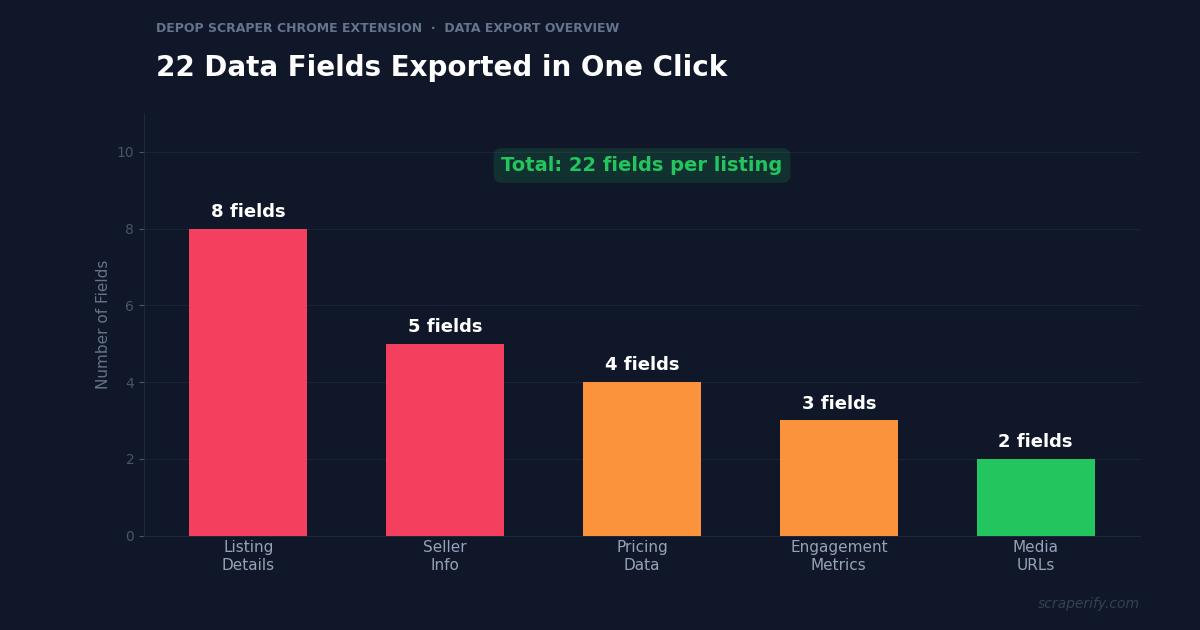
The Scraperify Depop scraper Chrome extension extracts every visible data point from Depop listing pages. Here is the complete list of fields the Depop scraper Chrome extension captures:
Listing details the Depop scraper Chrome extension captures:
- Title — full listing title and description
- Price — current asking price with currency
- Brand — brand name (Nike, Vintage, Levi’s, etc.)
- Size — clothing size (XS, S, M, L, XL, or specific measurements)
- Condition — new with tags, like new, used, etc.
- Category — men’s, women’s, accessories, home, etc.
- Photos — direct URLs to all listing images via the Depop scraper Chrome extension
- Listing URL — direct link back to the Depop listing
Seller data the Depop scraper Chrome extension exports:
- Seller username — Depop handle
- Seller rating — star rating and review count
- Number of sold items — total sales history
- Location — seller’s city and country
- Last active — when the seller was last online
Pricing and engagement data from the Depop scraper Chrome extension:
- Original price — if discounted
- Discount amount — price reduction
- Shipping cost — seller-set or free shipping
- Number of likes — how many users liked the listing (the Depop scraper Chrome extension captures this for demand analysis)
- Number of saves — saved to collections
- Date posted — when the listing went live
- Number of comments — buyer interest signals
This data is critical for competitive pricing. Top Depop sellers say that taking great photos is step one, but pricing correctly is step two. The Depop scraper Chrome extension gives you the data to nail step two every time.
WHAT THE DEPOP SCRAPER CHROME EXTENSION EXTRACTS
Listing Data
- Title & Description
- Price & Currency
- Brand & Size
- Condition & Category
- Photo URLs
- Listing URL
Seller Data
- Username & Handle
- Rating & Reviews
- Total Sales Count
- Location
- Last Active
Engagement Data
- Likes & Saves
- Comments Count
- Shipping Cost
- Original Price
- Date Posted
How to Install the Depop Scraper Chrome Extension
Setting up the Scraperify Depop scraper Chrome extension takes less than 30 seconds. No account creation, no API keys, no configuration needed.
Step 1: Open the Chrome Web Store. Go to the Depop Scraper Chrome Extension page. The Depop scraper Chrome extension is called “Depop Scraper — Export Listings” by Scraperify.
Step 2: Click “Add to Chrome.” Click the blue button and confirm permissions. The Depop scraper Chrome extension only needs access to depop.com — it cannot read data from other websites.
Step 3: Confirm the installation. Click “Add extension” in the dialog. The Scraperify icon appears in your Chrome toolbar. The Depop scraper Chrome extension is ready to use immediately.
Step 4: Pin the extension (optional). Click the puzzle piece icon in Chrome’s toolbar, find the Depop scraper Chrome extension, and click the pin icon for quick access.
HOW THE DEPOP SCRAPER CHROME EXTENSION WORKS
Install
Add the Depop scraper Chrome extension — 30 seconds
Browse
Search Depop — data captured automatically
Click
One click on the Depop scraper Chrome extension icon
Export
Download as CSV, Excel, or JSON
Why Depop Is the Reseller Platform of Choice
Before diving into the export workflow, it helps to understand why so many resellers are moving to Depop in 2026. The platform stands out for several reasons that make data export especially valuable:
Zero selling fees. Unlike Poshmark (20% commission), eBay (13.25% final value fee), and Mercari (10% selling fee), Depop charges absolutely nothing when you make a sale. One full-time reseller shared that she paid over $12,000 in fees to other platforms over five years before discovering Depop’s zero-fee model. With no fees eating into margins, every pricing decision matters more — and data-driven pricing through exported listings maximizes your take-home.
Gen-Z audience. Depop’s core demographic is 16-26 year olds, a group that drives fashion trends before they hit mainstream retail. This makes Depop data particularly valuable for trend forecasting. Items that gain traction on Depop often show up on TikTok and Instagram months later.
Global reach. Depop operates in over 150 countries, with particularly strong markets in the US, UK, and Australia. This geographic spread means pricing can vary significantly by region, creating opportunities for sellers who track cross-market data.
Photography-first platform. Depop’s feed is visual — good photos sell items. But great photos without competitive pricing still leave items sitting. The combination of strong visuals and data-informed pricing is what separates top Depop sellers from average ones.
All of these factors make exported Depop data incredibly actionable. Knowing that a vintage Nike hoodie gets 200+ likes on Depop at $45 but sits unsold at $65 gives you a clear pricing signal. Knowing that Arc’teryx jackets are getting 3x more likes this month than last month tells you to source more immediately.
How to Export Depop Listings to CSV (Step-by-Step)
Here is the complete workflow for exporting Depop listings using the Depop scraper Chrome extension:
Step 1: Search on Depop
With the Depop scraper Chrome extension installed, go to depop.com and search for the items you want to export. For example, search “vintage Nike windbreaker” to find all matching listings. The Depop scraper Chrome extension works on every Depop search page.
Use Depop’s filters to narrow your results before the Depop scraper Chrome extension starts capturing:
- Filter by category — men’s, women’s, accessories
- Filter by size — XS through XXL or specific shoe sizes
- Filter by price range — set min and max for your buy range
- Filter by condition — new with tags, like new, used
- Sort by relevance, newest, or price
Step 2: Let the Depop Scraper Chrome Extension Capture Data
As you scroll through search results, the Depop scraper Chrome extension captures listing data automatically in the background. You do not need to click anything — just browse Depop as you normally would. The Depop scraper Chrome extension icon shows a badge count of captured listings. Scroll down to load more results, and the Depop scraper Chrome extension captures those too.
Step 3: Click Export
Click the Depop scraper Chrome extension icon in your toolbar. You will see a summary of all captured listings and three export options:
- CSV — opens in Excel, Google Sheets, Numbers, or any spreadsheet app
- Excel (.xlsx) — native Excel format with pre-formatted columns
- JSON — structured data for developers, APIs, or automation tools
Click your preferred format. The Depop scraper Chrome extension downloads the file instantly.
Step 4: Analyze Your Depop Data
Open the file exported by the Depop scraper Chrome extension. Each row is one Depop listing. Each column is a data field.
With the Depop scraper Chrome extension data, you can:
- Sort by price to find underpriced items for resale
- Filter by brand to analyze specific market segments
- Sort by likes — high likes signal strong demand
- Use AVERAGE() and MEDIAN() on the price column for instant pricing research
- Filter by date posted to see only fresh listings
The entire process — from searching Depop to a complete spreadsheet — takes under 2 minutes with the Depop scraper Chrome extension. The Depop scraper Chrome extension turns what used to be hours of manual work into seconds.
Depop Scraper Chrome Extension: Export to Excel, JSON, or CSV
The Depop scraper Chrome extension supports three export formats, each optimized for different workflows:
CSV (Comma-Separated Values)
Best for: Google Sheets, quick pricing checks, crosslisting tools. When you use the Depop scraper Chrome extension for a quick competitor check, CSV is the simplest choice. Every spreadsheet app can open the Depop scraper Chrome extension CSV files.
Excel (.xlsx)
Best for: Microsoft Excel users, formatted reports, pivot tables. The Depop scraper Chrome extension Excel export includes pre-formatted column headers and proper data types. Numbers stay as numbers, not text. The Depop scraper Chrome extension Excel format is ideal for inventory tracking and pricing databases.
JSON (JavaScript Object Notation)
Best for: Developers, API integrations, n8n or Make.com automations. The Depop scraper Chrome extension JSON export gives you structured data that automation tools can parse directly. If you are building automated workflows, the Depop scraper Chrome extension JSON format integrates seamlessly.
All three Depop scraper Chrome extension export formats contain the same complete dataset. Choose based on your preferred application.
5 Ways Resellers Use the Depop Scraper Chrome Extension
The Depop scraper Chrome extension is not just about moving data into a spreadsheet. Here is how professional resellers use the Depop scraper Chrome extension to grow their businesses:
1. Competitive Pricing Research
Before listing an item, successful Depop sellers use the Depop scraper Chrome extension to check what similar items are selling for. Instead of manually browsing 50 listings, the Depop scraper Chrome extension exports them all in seconds. Use AVERAGE() and MEDIAN() on the price column to set your price. Top Depop sellers say that pricing correctly is what separates items that sell in hours from items that sit for months.
For example, if you thrifted a vintage Carhartt jacket for $8 and want to list it on Depop, export all “vintage Carhartt jacket” listings with the Depop scraper Chrome extension. If the median price is $55 and the average is $62, pricing yours at $50-$55 will move it fast. Without this data, you are guessing — and guessing wrong either leaves money on the table (priced too low) or keeps the item unsold for weeks (priced too high).
2. Cross-Platform Price Comparison
Many resellers sell on Depop, Poshmark, eBay, and Mercari simultaneously. The Depop scraper Chrome extension combined with other Scraperify extensions — like the Vinted Scraper, Mercari Scraper, and eBay Scraper — lets you compare prices across platforms. If a vintage Nike windbreaker sells for $45 on Depop but $65 on eBay, you know where to focus. The Depop scraper Chrome extension makes cross-platform data collection effortless.
3. Trending Brand and Style Detection
Fashion trends move fast on Depop. The Depop scraper Chrome extension helps resellers spot rising trends by exporting search results weekly. Track which brands appear more often, which items get the most likes, and which price points move fastest. The Depop scraper Chrome extension data reveals trends before they peak — resellers who caught the Arc’teryx and Gorpcore wave early made significant profits.
Depop’s audience skews younger than most resale platforms, which means trends start here before hitting mainstream retail. By running weekly exports with the Depop scraper Chrome extension for broad categories like “streetwear” or “Y2K fashion,” you build a dataset that shows exactly when a brand starts gaining traction. Rising listing counts combined with increasing average likes per listing is the clearest demand signal.
4. Inventory Sourcing at Scale
High-volume resellers use the Depop scraper Chrome extension to find underpriced items for resale. Export listings filtered by “like new” condition and under a price threshold, then sort by likes count. High likes + low price = items that will resell quickly. The Depop scraper Chrome extension gives you a sourcing shortlist complete with URLs to buy instantly.
The most efficient sourcing strategy is to build a “buy list” spreadsheet. Export listings for your target categories weekly with the Depop scraper Chrome extension, filter for items under your buy threshold with high engagement, and work through the list purchasing the best opportunities. This is how full-time resellers process hundreds of potential buys per week without spending all day browsing.
5. Sales Tax and Bookkeeping Data
Depop sellers in the US need to track sales for tax purposes — platforms are required to report sales over $600 to the IRS via 1099-K forms starting from 2026. The Depop scraper Chrome extension can help by exporting your listing data — prices, dates, categories — into a spreadsheet format compatible with bookkeeping tools like QuickBooks, Wave, or even a simple Google Sheets tracker. The Depop scraper Chrome extension makes tax season less painful.
Having all your listing data in a spreadsheet also helps with inventory management. You can track which items you purchased, what you paid, when you listed them, and what they sold for. This gives you a clear picture of your actual profit margins — not just revenue — which many resellers overlook until tax time forces them to calculate it.
Bonus: Depop Algorithm Research
The Depop algorithm determines which listings appear at the top of search results. Factors include freshness (recently listed or refreshed items rank higher), engagement (likes, saves, and comments boost visibility), and seller reputation. By exporting search results with the Depop scraper Chrome extension and sorting by position, you can reverse-engineer what the algorithm favors. Listings at the top with high likes and recent post dates confirm the freshness-plus-engagement theory. This insight helps you optimize your own listing strategy — refresh listings daily, encourage saves, and respond to comments quickly.
Ready to export Depop listings?
Install the Depop scraper Chrome extension and start exporting data in under 2 minutes. Free tier available.
Add to Chrome — FreeDepop Scraper Chrome Extension vs Other Methods
There are several ways to scrape data from Depop. Here is how the Depop scraper Chrome extension compares:
DEPOP SCRAPER: CHROME EXTENSION VS ALTERNATIVES
| Feature | Depop Scraper Chrome Extension | Python Script | Manual |
|---|---|---|---|
| Setup time | 30 sec | 30-60 min | 0 min |
| Coding required | No | Yes | No |
| Data stays local | ✓ | ✓ | ✓ |
| CSV + Excel + JSON | ✓ | Partial | ✗ |
| Speed (100 listings) | ~2 min | ~10 min | ~3 hours |
The Depop scraper Chrome extension wins on speed and simplicity. Unlike Python scripts that require coding knowledge, pip dependency management, and handling Depop’s anti-bot protections, the Depop scraper Chrome extension works out of the box. You install it and start exporting within 30 seconds.
Unlike manual copy-paste — which is fine for 5-10 listings but completely impractical for market research — the Depop scraper Chrome extension handles hundreds of listings in minutes. If you have ever spent an afternoon manually compiling a spreadsheet of competitor Depop listings, you understand why the Depop scraper Chrome extension exists. Most resellers choose the Depop scraper Chrome extension because it requires zero technical knowledge and delivers complete data instantly.
Tips for Using the Depop Scraper Chrome Extension Effectively
To get the most out of the Depop scraper Chrome extension, follow these best practices:
Use Specific Search Terms
The Depop scraper Chrome extension captures everything you scroll past, so narrow your search first. Search “Levi’s 501 W32 L32” instead of just “jeans.” The more specific your search, the more useful the Depop scraper Chrome extension output.
Apply Filters Before the Depop Scraper Chrome Extension Captures Data
Use Depop’s filters before scrolling. Filter by condition (new with tags), price range, brand, and size. This means every listing the Depop scraper Chrome extension captures is relevant — no time wasted cleaning data.
Export Regularly for Trend Tracking
One-time exports give you a snapshot. Use the Depop scraper Chrome extension to export weekly for trend data. Save each Depop scraper Chrome extension export with a date (“depop-vintage-nike-2026-06-27.csv”). Over time, the Depop scraper Chrome extension data reveals seasonal patterns — vintage denim peaks in fall, summer dresses spike in June.
Combine the Depop Scraper Chrome Extension with Other Scraperify Extensions
If you crosslist, combine the Depop scraper Chrome extension with:
- Vinted Scraper — compare prices on Europe’s largest resale platform
- Mercari Scraper — export Mercari data (popular in the US and Japan)
- eBay Scraper — export eBay listings across 15+ regional domains
The Depop scraper Chrome extension combined with these tools lets you see which platform offers the highest price for any item. Since all Scraperify extensions export in the same CSV format, you can paste Depop, Vinted, and eBay data into a single spreadsheet and compare prices side by side. This cross-platform visibility is what full-time resellers use to decide where to list each item for maximum profit.
Who Uses the Depop Scraper Chrome Extension?
The Depop scraper Chrome extension is built for anyone who needs Depop data at scale:
Side Hustle Resellers — Sellers flipping thrifted finds alongside their day job use the Depop scraper Chrome extension to quickly check competitive prices. The Depop scraper Chrome extension replaces hours of manual browsing with a 2-minute export. Many report that the Depop scraper Chrome extension helps them price items to sell within days instead of weeks. Since Depop charges zero seller fees, every dollar of your selling price is profit minus sourcing cost — making accurate pricing through the Depop scraper Chrome extension even more valuable.
Full-Time Depop Businesses — Professional resellers processing hundreds of items per month use the Depop scraper Chrome extension to build pricing databases and identify sourcing opportunities. The Depop scraper Chrome extension gives them a data advantage over competitors who price by gut feeling.
Crosslisting Sellers — Sellers who list on Depop, Poshmark, eBay, and Vinted use the Depop scraper Chrome extension alongside other Scraperify extensions. The Depop scraper Chrome extension exports data in the same CSV format as other Scraperify tools, making cross-platform comparison seamless.
Fashion Trend Analysts — Researchers tracking Gen-Z fashion trends use the Depop scraper Chrome extension to export thousands of listings. The Depop scraper Chrome extension data reveals which brands, styles, and price points dominate the market. Because Depop trends often predict what goes mainstream 6-12 months later, the Depop scraper Chrome extension data has value well beyond the resale market — fashion brands, buyers, and consultants all benefit from Depop trend data.
Vintage and Thrift Store Owners — Brick-and-mortar vintage shop owners use the Depop scraper Chrome extension to research online pricing before setting in-store prices. The Depop scraper Chrome extension shows them what the same items sell for online, helping them stay competitive with e-commerce sellers while understanding their market position.
Depop Scraper Chrome Extension — Frequently Asked Questions
Is the Depop scraper Chrome extension free?
The Depop scraper Chrome extension offers a free tier with limited exports per month. Paid plans start at $19.99/month. Lifetime access to the Depop scraper Chrome extension is $79 — one payment, use forever.
Is my data private when using the Depop scraper Chrome extension?
Yes. The Depop scraper Chrome extension processes all data locally in your browser. No listing data is sent to external servers. The Depop scraper Chrome extension keeps your scraped data on your computer.
How many Depop listings can the Depop scraper Chrome extension export at once?
The Depop scraper Chrome extension captures listings as you scroll. There is no hard limit — the Depop scraper Chrome extension can export hundreds or thousands of listings in a single session.
Will the Depop scraper Chrome extension get my account banned?
The Depop scraper Chrome extension reads data from pages you are already viewing. The Depop scraper Chrome extension does not send automated requests or bypass access controls. Browse at a normal pace and take breaks between long sessions.
What is the difference between CSV and Excel export in the Depop scraper Chrome extension?
The Depop scraper Chrome extension CSV export works in any spreadsheet app. The Depop scraper Chrome extension Excel (.xlsx) export has pre-formatted columns. Both Depop scraper Chrome extension exports contain the same data.
Can I use the Depop scraper Chrome extension data commercially?
Yes. The Depop scraper Chrome extension data is yours to use for pricing research, competitor analysis, market reports, and any legal business purpose.
How is the Scraperify Depop scraper Chrome extension different from other tools?
The Scraperify Depop scraper Chrome extension captures data automatically as you browse — no manual clicking per listing. The Depop scraper Chrome extension exports all data fields including photos, seller info, and engagement metrics. The Depop scraper Chrome extension supports CSV, Excel, and JSON, and processes everything locally.
Start Exporting Depop Listings Today
Stop copying Depop listings by hand. The Scraperify Depop scraper Chrome extension exports hundreds of listings to CSV, Excel, or JSON in under 2 minutes.
What the Depop scraper Chrome extension gives you:
- Depop scraper Chrome extension one-click export from any Depop search page
- Complete listing data — titles, prices, brands, sizes, conditions, seller info, photos
- Depop scraper Chrome extension CSV, Excel, and JSON export formats
- 100% local data processing — the Depop scraper Chrome extension keeps your data private
- Zero selling fees on Depop + zero per-record fees with the Depop scraper Chrome extension
- Free tier available — try the Depop scraper Chrome extension before you buy
Whether you are a reseller tracking prices, a crosslister managing inventory across platforms, or an analyst researching fashion trends, the Depop scraper Chrome extension is the fastest way to get Depop data into a spreadsheet.
Export Depop Listings in One Click
Join resellers who use the Depop scraper Chrome extension to get Depop data into spreadsheets — no coding, no API keys.
Add the Depop Scraper to Chrome →Free tier available · Paid plans from $19.99/month · $79 lifetime