eBay Scraper Chrome Extension: Export Listings to CSV (2026)
Export eBay listings, sold items, and prices to CSV or Excel. Free eBay scraper Chrome extension for resellers. Works across 15+ eBay domains.
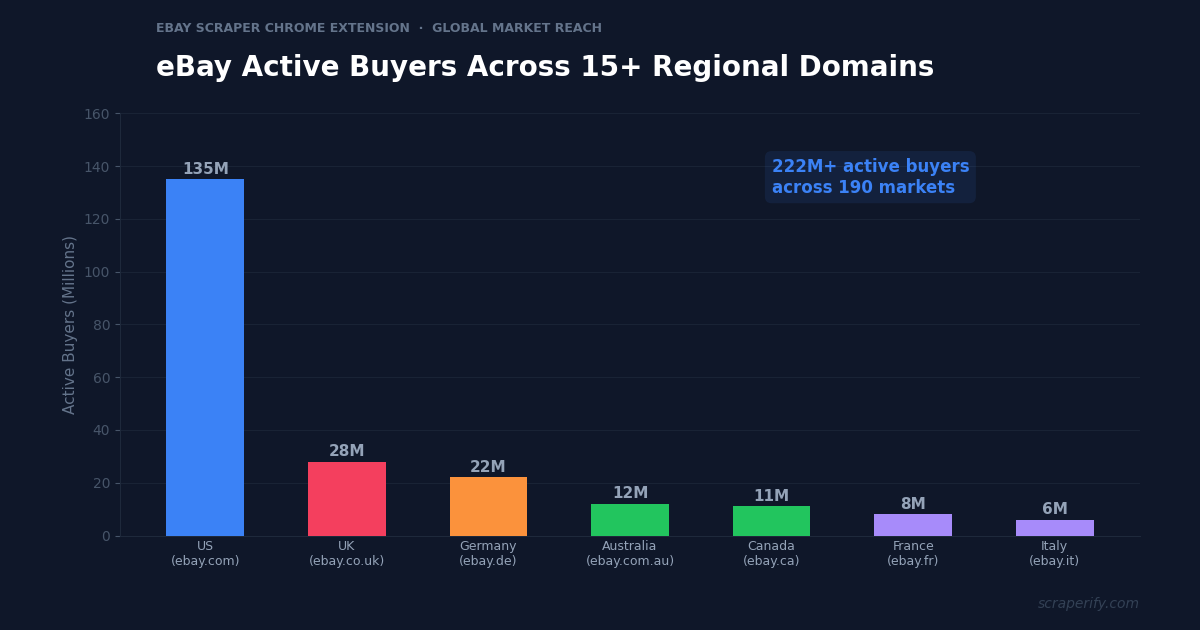
eBay has 222 million active buyers across 190 markets, with 15+ regional domains from ebay.com to ebay.co.uk, ebay.de, ebay.com.au, and beyond. For resellers, the platform’s “sold listings” feature reveals exactly what items sell for — not asking prices, but actual transaction prices. This data is gold for pricing research. But eBay does not let you export search results, download sold listings, or save data to a spreadsheet. An eBay scraper Chrome extension fixes this — install it, browse eBay, and export listings to CSV, Excel, or JSON in one click. No coding. No API keys.
This guide shows you how to use the Scraperify eBay scraper Chrome extension to export eBay listings across 15+ regional domains, analyze sold prices, and make data-driven selling decisions.
Why You Need an eBay Scraper Chrome Extension
eBay remains one of the most important reselling platforms in the world. Unlike newer platforms like Depop or Vinted, eBay has decades of transaction history, a massive global buyer base, and the unique “completed listings” feature that shows whether items actually sold and at what price. This historical pricing data is what makes eBay the go-to reference for resellers on every platform.
But eBay locks this data inside its interface. Without an eBay scraper Chrome extension, you cannot download sold listings to a spreadsheet, export search results in bulk, or extract pricing data across multiple eBay regional domains. Everything must be browsed one listing at a time, one country at a time.
This is a massive bottleneck for resellers who use eBay sold prices as their pricing benchmark. When a reseller on Depop, Vinted, or Mercari wants to know what a vintage Levi’s jacket is worth, they check eBay sold listings. When an Amazon FBA seller evaluates a Walmart clearance find, they check eBay sold prices. eBay is the universal pricing reference — and the eBay scraper Chrome extension makes accessing this data at scale possible.
An eBay scraper Chrome extension automates the data collection:
- Captures listing data automatically as you browse eBay search results
- Exports to CSV, Excel, or JSON — the eBay scraper Chrome extension supports all formats
- Works across 15+ eBay regional domains — the eBay scraper Chrome extension supports US, UK, Germany, Australia, Canada, France, Italy, Spain, and more
- Exports sold/completed listings — the eBay scraper Chrome extension captures actual transaction prices
- Extracts auction data — the eBay scraper Chrome extension captures bid counts, auction end prices, and Buy It Now prices
- Processes data locally — the eBay scraper Chrome extension never sends data to external servers
The Scraperify eBay scraper Chrome extension is built for resellers pricing items across platforms, auction enthusiasts tracking market values, collectors monitoring rare items, and businesses doing competitive intelligence across global eBay markets.
What Data Can the eBay Scraper Chrome Extension Export?
The eBay scraper Chrome extension extracts every visible data point from eBay pages. Here is the complete list:
Listing details the eBay scraper Chrome extension captures:
- Title — full listing title
- Price — current price or final sold price
- Buy It Now price — fixed-price option when available
- Listing type — auction, Buy It Now, or Best Offer
- Condition — new, open box, refurbished, pre-owned, for parts
- Item specifics — brand, model, color, size, and custom attributes
- Photos — direct URLs to all listing images via the eBay scraper Chrome extension
- Listing URL — direct link to the eBay listing
- Item number — eBay’s unique listing identifier
- Category — eBay category and subcategory
Auction-specific data the eBay scraper Chrome extension exports:
- Number of bids — total bid count (the eBay scraper Chrome extension captures this as a demand signal)
- Time left — remaining auction time
- Starting price — opening bid amount
- Current bid — highest current bid
- Shipping cost — seller-specified shipping price
- Returns — return policy details
Seller data from the eBay scraper Chrome extension:
- Seller username — eBay handle
- Seller feedback score — total feedback points
- Positive feedback percentage — seller reliability metric
- Seller location — country and region
- Top Rated Seller — badge status
Sold listing data (completed listings):
- Sold price — actual transaction price
- Sold date — when the item was purchased
- Sold status — sold or unsold (ended without sale)
The sold listing data is the single most valuable feature of the eBay scraper Chrome extension. While every other marketplace shows asking prices (what sellers want), eBay shows actual sold prices (what buyers paid). This distinction is critical for accurate pricing.
WHAT THE EBAY SCRAPER CHROME EXTENSION EXTRACTS
Listing Data
- Title & Item Specifics
- Price (BIN/Auction)
- Condition & Category
- Bids & Time Left
- Shipping & Returns
- Photo & Listing URLs
Sold Data
- Sold Price
- Sold Date
- Sold/Unsold Status
- Final Bid Amount
Seller Data
- Username
- Feedback Score
- Positive %
- Location
- Top Rated Status
How to Install the eBay Scraper Chrome Extension
Setting up the eBay scraper Chrome extension takes 30 seconds.
Step 1: Open the Chrome Web Store. Go to the eBay Scraper Chrome Extension page. The eBay scraper Chrome extension is called “AuctionData Scraper — Export Listings” by Scraperify.
Step 2: Click “Add to Chrome.” Confirm permissions. The eBay scraper Chrome extension needs access to ebay.* domains.
Step 3: Start using it. The eBay scraper Chrome extension is ready on all 15+ eBay regional domains immediately.
HOW THE EBAY SCRAPER CHROME EXTENSION WORKS
Install
Add the eBay scraper Chrome extension — 30 sec
Search
Search eBay — data captured automatically
Click
One click on the eBay scraper Chrome extension
Export
Download CSV, Excel, or JSON
How to Export eBay Listings to CSV (Step-by-Step)
Step 1: Search on eBay
With the eBay scraper Chrome extension installed, go to any eBay domain and search. The eBay scraper Chrome extension works across all 15+ eBay regional sites:
| Region | Domain | Currency |
|---|---|---|
| United States | ebay.com | USD |
| United Kingdom | ebay.co.uk | GBP |
| Germany | ebay.de | EUR |
| Australia | ebay.com.au | AUD |
| Canada | ebay.ca | CAD |
| France | ebay.fr | EUR |
| Italy | ebay.it | EUR |
| Spain | ebay.es | EUR |
| Netherlands | ebay.nl | EUR |
| Switzerland | ebay.ch | CHF |
| Austria | ebay.at | EUR |
| Ireland | ebay.ie | EUR |
| Japan | ebay.co.jp | JPY |
| Singapore | ebay.com.sg | SGD |
| India | ebay.in | INR |
Use eBay’s filters before the eBay scraper Chrome extension captures data:
- Sold listings — check “Completed Items” and “Sold Items” for actual transaction prices
- Filter by condition — new, open box, pre-owned, refurbished
- Filter by price range — set min and max
- Filter by listing type — auction, Buy It Now, or both
- Sort by price, newly listed, ending soonest, or best match
Step 2: Let the eBay Scraper Chrome Extension Capture Data
As you scroll through results, the eBay scraper Chrome extension captures listing data automatically. The eBay scraper Chrome extension icon shows a badge count. Navigate to page 2, 3, and beyond — the eBay scraper Chrome extension grabs listings across all pages.
Step 3: Click Export
Click the eBay scraper Chrome extension icon. Choose CSV, Excel, or JSON. The eBay scraper Chrome extension downloads instantly.
Step 4: Analyze eBay Data
Open the eBay scraper Chrome extension export. Each row is one listing. With the data:
- Filter by “Sold” to see only completed transactions at actual prices
- Calculate AVERAGE() and MEDIAN() on sold prices for accurate market values
- Sort by date to see recent selling trends
- Filter by condition — “new” and “pre-owned” have very different price points
- Compare across regions — the same item on ebay.co.uk vs ebay.com often has 20-40% price gaps
Why eBay Sold Data Is the Universal Pricing Reference
eBay’s sold listing data is unique in e-commerce. Understanding why this data is so valuable helps you use the eBay scraper Chrome extension to its full potential:
Sold prices are actual transaction prices. Every other marketplace (Amazon, Walmart, Depop, Vinted) shows asking prices — what sellers want. eBay’s “Sold Items” filter shows what buyers actually paid. This is the only reliable way to determine fair market value for most secondhand, vintage, and collectible items. The eBay scraper Chrome extension captures these sold prices in bulk, giving you a complete pricing dataset rather than a sample of 5-10 manually checked listings.
30+ years of market history. eBay has been operating since 1995, and completed listings are available for the past 90 days at any time. This means you can export 3 months of sales data for any item category using the eBay scraper Chrome extension — enough to calculate reliable averages, identify seasonal trends, and understand price distributions. No other marketplace provides this depth of historical transaction data.
Global pricing across 15+ currencies. A vintage Rolex might sell for $4,500 on ebay.com, £3,800 on ebay.co.uk, and €4,200 on ebay.de. These regional price differences — visible only when comparing across eBay domains — create arbitrage opportunities. The eBay scraper Chrome extension works on every eBay domain, making cross-border price comparison systematic instead of accidental.
Auction data reveals true demand. Auction listings on eBay are a pure market mechanism — the price is determined entirely by buyer demand. Items with 25+ bids that sell above the starting price have strong demand. Items with 0-2 bids that do not meet reserve have weak demand. The eBay scraper Chrome extension captures bid counts, which is one of the most honest demand signals in all of e-commerce.
eBay is the pricing backbone for all reselling. Professional resellers on Depop, Poshmark, Mercari, Facebook Marketplace, and Vinted all use eBay sold prices as their benchmark. Before listing a vintage Nike jacket on Depop, a smart reseller checks what the same jacket sold for on eBay. The eBay scraper Chrome extension data is not just useful for eBay sellers — it is the pricing foundation for the entire reselling industry.
Seller feedback reveals market quality. eBay’s feedback system (1-100% positive rating with detailed feedback) provides transparency that newer platforms lack. The eBay scraper Chrome extension captures seller feedback scores and percentages, letting you filter for high-reputation sellers whose pricing represents the “premium” end of the market.
Auction vs Buy It Now data reveals price elasticity. Some items sell better at auction (where buyer competition drives prices up) while others sell better at fixed price (where buyers want certainty). By exporting both auction and Buy It Now sold listings with the eBay scraper Chrome extension, you can compare average sold prices between the two formats. If auction items consistently sell for 20% more than Buy It Now listings for the same product, listing as an auction is the better strategy. This insight is invisible without exported data — and the eBay scraper Chrome extension makes the comparison straightforward.
Category-specific pricing norms differ dramatically. Electronics depreciate rapidly — a 2-year-old smartphone is worth 40% of its original price. Vintage clothing appreciates — a 20-year-old band t-shirt may be worth 5-10x its original retail price. Collectible cards can swing 100% in either direction based on competitive play announcements or cultural moments. Each category has its own pricing logic, and the eBay scraper Chrome extension data across categories teaches you these norms. Export sold listings from 3-4 categories you sell in, study the pricing distributions, and you will develop intuition backed by data rather than guesswork.
Ready to export eBay listings?
Install the eBay scraper Chrome extension and start exporting sold prices across 15+ eBay domains. Free tier available.
Add to Chrome — Free5 Ways to Use the eBay Scraper Chrome Extension
1. Sold Price Analysis for Any Item
The primary use of the eBay scraper Chrome extension is analyzing sold prices before listing an item on any platform. Export 90 days of sold listings for your item, calculate the median sold price, and set your price accordingly. If a vintage Levi’s Type III jacket has a median eBay sold price of $85 with a range of $55-$140, you know exactly where to price yours based on condition.
The eBay scraper Chrome extension makes this analysis take 2 minutes instead of 30. Without export, you are scrolling through sold listings, mentally noting prices, and guesstimating the average. With the eBay scraper Chrome extension, you have every data point in a spreadsheet where AVERAGE() and MEDIAN() give you precise numbers.
2. Cross-Regional Price Arbitrage
eBay operates 15+ regional domains with significant price differences for the same items. Use the eBay scraper Chrome extension to export sold listings from ebay.com, ebay.co.uk, and ebay.de for the same product. Items that sell for $50 in the US might sell for £55 ($70) in the UK or €65 ($72) in Germany. List on the highest-priced regional domain or use eBay’s Global Shipping Program to reach buyers in premium markets.
3. Competitor Seller Analysis
Use the eBay scraper Chrome extension to export all listings from a competitor’s eBay store. The eBay scraper Chrome extension captures their entire inventory — products, prices, conditions, and shipping. This reveals their bestselling categories, pricing strategy, and inventory depth. If a competitor sells 200 vintage t-shirts at $25-$45 and you are pricing yours at $55-$75, the data explains why they are outselling you.
4. Collectible and Vintage Market Research
Collectors of trading cards, vinyl records, vintage electronics, and sports memorabilia use the eBay scraper Chrome extension to track market values. Export sold listings for specific items monthly to build a price history. Pokémon card values, for example, can swing 50% in a month based on competitive play announcements. The eBay scraper Chrome extension historical data reveals these trends before price guides catch up.
5. Dropshipping and Sourcing Research
eBay dropshippers use the eBay scraper Chrome extension to identify products with strong demand (high bid counts, frequent sales) and compare eBay selling prices to sourcing costs on Walmart, Temu, or Shopee. Products where eBay sold prices consistently exceed sourcing costs by 40%+ are viable dropshipping candidates.
eBay Scraper Chrome Extension vs Other Methods
EBAY SCRAPER: CHROME EXTENSION VS ALTERNATIVES
| Feature | eBay Scraper Chrome Extension | eBay API | Manual |
|---|---|---|---|
| Setup time | 30 sec | Hours-days | 0 min |
| Coding required | No | Yes | No |
| Sold listing data | ✓ | ✓ | ✓ |
| 15+ regional domains | ✓ | Complex | ✓ |
| Speed (100 listings) | ~2 min | ~1 min | ~3 hours |
The eBay scraper Chrome extension is the best option for resellers. The eBay Browse API requires developer account approval, OAuth tokens, and programming skills — a barrier that 95% of resellers cannot clear. The eBay scraper Chrome extension delivers the same data in a format anyone can use. The API is faster for bulk automated pulls, but the eBay scraper Chrome extension is sufficient for the research needs of individual sellers and small teams.
Tips for Using the eBay Scraper Chrome Extension
Always Export Sold Listings, Not Just Active
Active listings show what sellers are asking — which is often optimistic. Sold listings show what buyers actually paid. Before pricing any item, use the eBay scraper Chrome extension to export sold listings (check “Completed Items” and “Sold Items” in eBay’s filter sidebar). The median sold price is your most reliable pricing anchor.
Compare US, UK, and German eBay for International Opportunities
The same vintage watch might sell for $200 on ebay.com, £220 ($280) on ebay.co.uk, and €240 ($265) on ebay.de. Use the eBay scraper Chrome extension to export the same search from all three domains. If you have inventory that commands a premium in the UK or German market, eBay’s Global Shipping Program makes cross-border selling straightforward.
Use Bid Count as a Demand Indicator
In your eBay scraper Chrome extension exports, the bid count column is a powerful demand signal. Auction items with 15+ bids have strong buyer interest. Items with 0-2 bids have weak demand at that price point. Sort by bid count descending to find the hottest items in any category — these are the items worth sourcing and listing.
Export Monthly for Price Trend Analysis
eBay completed listings are available for 90 days. Use the eBay scraper Chrome extension to export your key categories monthly, creating a rolling 3-month price history. Track average sold prices over time to spot trends — rising prices signal growing demand (source more), falling prices signal oversupply (reduce inventory).
Combine with Other Scraperify Extensions for Cross-Platform Research
eBay sold prices are the benchmark — but sourcing happens elsewhere. Use the eBay scraper Chrome extension alongside the Walmart Scraper for retail arbitrage, Vinted Scraper for European fashion resale, Depop Scraper for Gen-Z fashion, and Facebook Marketplace Scraper for local deals. All Scraperify extensions export in the same format for seamless cross-platform comparison.
Who Uses the eBay Scraper Chrome Extension?
Resellers Across All Platforms — eBay sold data is the universal pricing reference. Resellers on Depop, Poshmark, Mercari, Vinted, and Facebook Marketplace all use the eBay scraper Chrome extension to check what items are actually worth before setting their prices. The eBay scraper Chrome extension is the pricing tool for the entire reselling industry.
eBay Sellers — Active eBay sellers use the eBay scraper Chrome extension to research competitors, analyze category pricing, and optimize their own listing strategies. Export a competitor’s store, analyze their pricing patterns, and position your listings accordingly.
Collectors — Trading card collectors, vintage watch enthusiasts, vinyl record hunters, and sports memorabilia investors use the eBay scraper Chrome extension to track market values. Monthly exports create price histories that reveal trends before published price guides reflect them.
Amazon FBA Sellers — FBA sellers use the eBay scraper Chrome extension to validate product demand. If an item sells frequently on eBay at strong prices, it likely has demand on Amazon too. eBay sold data from the eBay scraper Chrome extension is a demand validation signal for Amazon product research.
Estate Sale and Auction Companies — Professionals valuing estates use the eBay scraper Chrome extension to determine fair market values for items ranging from furniture to jewelry to electronics. eBay sold prices are the most widely accepted valuation reference for personal property.
Insurance Adjusters — When valuing personal property for insurance claims, adjusters use eBay sold prices as market comparables. The eBay scraper Chrome extension exports provide documented evidence of market value that can be presented in claims.
Vintage and Antique Dealers — Dealers at flea markets, antique malls, and online shops use the eBay scraper Chrome extension to research values before buying at estate sales, auctions, and garage sales. When evaluating a vintage Pyrex collection or a set of mid-century modern furniture, eBay sold data from the eBay scraper Chrome extension provides the most comprehensive pricing reference available. Dealers who price based on eBay data consistently outperform those who rely on outdated price guides or personal experience alone.
Online Arbitrage Professionals — Full-time online arbitrage sellers who source products from retail websites and resell on eBay use the eBay scraper Chrome extension to validate selling prices before purchasing inventory. The workflow is: find a deal on Walmart or Temu, check the eBay sold price with the eBay scraper Chrome extension, calculate margin after eBay’s 13.25% final value fee and shipping costs, and purchase if the margin exceeds their threshold (typically 30%+).
eBay Scraper Chrome Extension — Frequently Asked Questions
Is the eBay scraper Chrome extension free?
The eBay scraper Chrome extension offers a free tier. Paid plans start at $19.99/month. Lifetime access to the eBay scraper Chrome extension is $79.
Does the eBay scraper Chrome extension export sold listing prices?
Yes. The eBay scraper Chrome extension captures sold prices, sold dates, and sold/unsold status from eBay’s completed listings. This is the most valuable feature of the eBay scraper Chrome extension.
Does the eBay scraper Chrome extension work on all eBay domains?
Yes. The eBay scraper Chrome extension works on ebay.com, ebay.co.uk, ebay.de, ebay.com.au, ebay.ca, ebay.fr, ebay.it, ebay.es, and all other regional eBay domains.
Is my data private with the eBay scraper Chrome extension?
Yes. The eBay scraper Chrome extension processes everything locally. No listing data leaves your browser.
How many eBay listings can the eBay scraper Chrome extension export?
The eBay scraper Chrome extension captures listings as you scroll and navigate pages. There is no hard limit.
Can the eBay scraper Chrome extension export auction bid data?
Yes. The eBay scraper Chrome extension captures bid counts, current bid amounts, and starting prices for auction listings.
Start Exporting eBay Listings Today
Stop manually checking eBay sold prices one item at a time. The eBay scraper Chrome extension exports listings to CSV, Excel, or JSON so you can analyze market values, compare prices across regions, and make pricing decisions with data.
What the eBay scraper Chrome extension gives you:
- eBay scraper Chrome extension one-click export from any search or store page
- Complete data — listings, sold prices, bids, sellers, item specifics
- eBay scraper Chrome extension works across 15+ regional eBay domains
- eBay scraper Chrome extension CSV, Excel, and JSON formats
- Sold listing data — actual transaction prices, not just asking prices
- Free tier — try the eBay scraper Chrome extension before you buy
Whether you are a reseller pricing inventory, a collector tracking values, or an arbitrage seller comparing prices across platforms, the eBay scraper Chrome extension is the fastest way to get eBay data into a spreadsheet.
Export eBay Listings in One Click
Join resellers who use the eBay scraper Chrome extension to price with data across 15+ eBay domains.
Add the eBay Scraper to Chrome →Free tier available · Paid plans from $19.99/month · $79 lifetime