Facebook Marketplace Scraper Chrome Extension: Export CSV
Export Facebook Marketplace listings to CSV or Excel with the Facebook Marketplace scraper Chrome extension. No coding needed. Built for resellers.
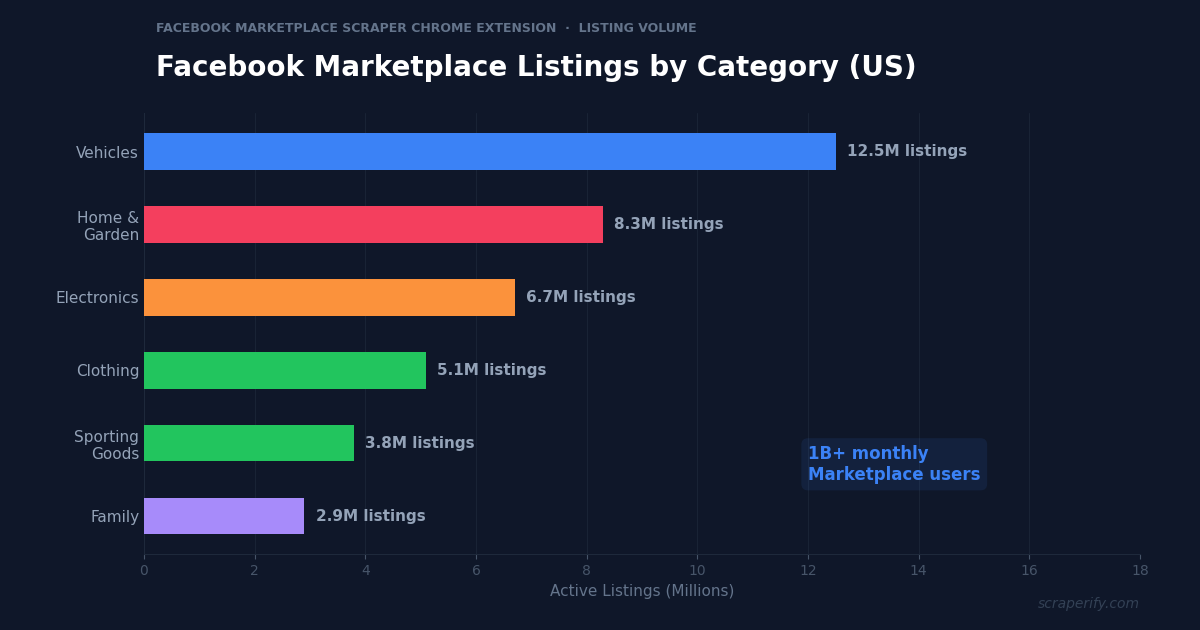
Facebook Marketplace has over 1 billion monthly users and millions of active listings across vehicles, electronics, furniture, clothing, and more. It is the largest local buy-and-sell platform in the world. But Facebook does not let you export search results, download listing data, or save your research to a spreadsheet. A Facebook Marketplace scraper Chrome extension solves this — install it, browse Marketplace, and export listings to CSV, Excel, or JSON in one click. No coding. No API keys. No per-record fees.
This guide shows you how to use the Scraperify Facebook Marketplace scraper Chrome extension to export listing data, analyze local markets, track competitor pricing, and build lead lists from the world’s largest marketplace.
Why You Need a Facebook Marketplace Scraper Chrome Extension
Facebook Marketplace is unique among e-commerce platforms. Unlike eBay, Amazon, or Shopify stores, Marketplace is deeply integrated into Facebook’s social network — the same app that 3 billion people use daily. This integration means Marketplace has the largest built-in audience of any selling platform, and listings reach buyers who were not even actively shopping.
But Marketplace has a critical limitation for serious sellers and researchers: no data export. Without a Facebook Marketplace scraper Chrome extension, there is no way to download search results, export competitor listings, or extract pricing data in bulk. Everything stays locked inside Facebook’s interface.
This matters for several key use cases. Resellers who flip furniture, electronics, and vehicles need to compare dozens of listings before setting prices. Car dealers tracking competitive pricing need data across hundreds of vehicle listings. Market researchers validating a business idea need to count competitors and analyze pricing in specific geographic areas. All of these tasks require data in a spreadsheet — and Facebook does not provide one.
A Facebook Marketplace scraper Chrome extension automates the data collection:
- Captures listing data automatically as you browse Marketplace search results
- Exports to CSV, Excel, or JSON — the Facebook Marketplace scraper Chrome extension supports all formats
- Extracts seller information — the Facebook Marketplace scraper Chrome extension captures seller profiles
- Runs inside your browser — no software to install beyond the Chrome Web Store
- Processes data locally — the Facebook Marketplace scraper Chrome extension never sends data to external servers
- Works with all Marketplace categories — vehicles, property rentals, electronics, furniture, clothing, and more
The Scraperify Facebook Marketplace scraper Chrome extension is built for resellers, car dealers, real estate investors, market researchers, and anyone who needs Facebook Marketplace data in spreadsheet format.
What Data Can the Facebook Marketplace Scraper Chrome Extension Export?
The Scraperify Facebook Marketplace scraper Chrome extension extracts over 50 data points from Marketplace listings. Here is what the Facebook Marketplace scraper Chrome extension captures:
Listing details the Facebook Marketplace scraper Chrome extension captures:
- Title — listing title as posted by the seller
- Price — asking price in local currency
- Description — full listing description text
- Category — vehicles, electronics, furniture, clothing, etc.
- Condition — new, like new, good, fair, for parts
- Location — city, state, and distance from your search center
- Photos — direct URLs to all listing images via the Facebook Marketplace scraper Chrome extension
- Listing URL — direct link to the Marketplace listing
- Date posted — when the listing went live
- Listing status — available, pending, or sold
Vehicle-specific data (for automotive listings):
- Make and model — manufacturer and model name
- Year — model year
- Mileage — odometer reading
- Transmission — automatic or manual
- Fuel type — gas, diesel, electric, hybrid
- Body style — sedan, SUV, truck, coupe
- Color — exterior color
- VIN — vehicle identification number (when listed)
Seller data the Facebook Marketplace scraper Chrome extension exports:
- Seller name — Facebook profile name
- Seller profile URL — link to the seller’s Facebook profile
- Member since — when the seller joined Facebook
- Location — seller’s listed location
- Marketplace badges — verified seller, quick responder, etc.
This data is especially powerful for vehicle research — the Facebook Marketplace scraper Chrome extension captures make, model, year, mileage, and price in a format that makes vehicle market analysis effortless.
WHAT THE FACEBOOK MARKETPLACE SCRAPER CHROME EXTENSION EXTRACTS
Listing Data
- Title & Description
- Price & Condition
- Category & Location
- Photos & Date Posted
- Status (Available/Sold)
Vehicle Data
- Make, Model & Year
- Mileage
- Transmission & Fuel
- Body Style & Color
- VIN (when listed)
Seller Data
- Seller Name
- Profile URL
- Member Since
- Location
- Marketplace Badges
How to Install the Facebook Marketplace Scraper Chrome Extension
Setting up the Facebook Marketplace scraper Chrome extension takes 30 seconds.
Step 1: Open the Chrome Web Store. Go to the Facebook Marketplace Scraper Chrome Extension page. The Facebook Marketplace scraper Chrome extension is called “Listing Scraper — Export Marketplace Data” by Scraperify.
Step 2: Click “Add to Chrome.” Confirm permissions. The Facebook Marketplace scraper Chrome extension needs access to facebook.com.
Step 3: Start using it. The Facebook Marketplace scraper Chrome extension is ready immediately.
HOW THE FACEBOOK MARKETPLACE SCRAPER CHROME EXTENSION WORKS
Install
Add the Facebook Marketplace scraper Chrome extension
Browse
Search Marketplace — data captured automatically
Click
One click to start export
Export
Download CSV, Excel, or JSON
How to Export Facebook Marketplace Listings to CSV (Step-by-Step)
Step 1: Search on Facebook Marketplace
With the Facebook Marketplace scraper Chrome extension installed, go to facebook.com/marketplace and search for items. The Facebook Marketplace scraper Chrome extension works on all Marketplace search pages and category pages.
Use Marketplace filters before the Facebook Marketplace scraper Chrome extension starts capturing:
- Filter by category — vehicles, property rentals, electronics, furniture
- Filter by price range — set min and max
- Filter by condition — new, like new, good, fair
- Filter by location radius — 5 miles to 100+ miles from your location
- Sort by date listed, price low to high, or distance
- For vehicles: filter by make, model, year, mileage, and transmission
Step 2: Let the Facebook Marketplace Scraper Chrome Extension Capture Data
As you scroll, the Facebook Marketplace scraper Chrome extension captures listing data automatically. The Facebook Marketplace scraper Chrome extension navigates to each listing and extracts detailed information including the full description, all photos, and seller data. The Facebook Marketplace scraper Chrome extension icon shows progress as it works.
Step 3: Click Export
When the Facebook Marketplace scraper Chrome extension finishes, choose CSV, Excel, or JSON. The Facebook Marketplace scraper Chrome extension downloads the file with all captured data.
Step 4: Analyze Your Marketplace Data
Open the Facebook Marketplace scraper Chrome extension export. Each row is one listing. With the data you can sort by price, filter by condition, compare sellers, and build competitive pricing models.
Why Facebook Marketplace Data Is Uniquely Valuable
Facebook Marketplace is fundamentally different from other selling platforms. Understanding these differences helps you use the Facebook Marketplace scraper Chrome extension more effectively:
Hyper-local pricing. Marketplace prices are driven by local supply and demand — a used couch in Manhattan is priced very differently from the same couch in rural Oklahoma. This geographic pricing variation creates arbitrage opportunities for resellers. The Facebook Marketplace scraper Chrome extension captures location data for every listing, enabling geographic price analysis that reveals where items are cheapest to buy and most expensive to sell.
No seller fees. Facebook charges zero fees for Marketplace transactions. This means sellers keep 100% of the sale price, which affects pricing dynamics. Items on Marketplace are often 10-20% cheaper than the same items on eBay (which charges 13.25%) because sellers do not need to build fees into their asking price. The Facebook Marketplace scraper Chrome extension data shows you these price differences directly.
Vehicles are the largest category. With over 12 million vehicle listings, Facebook Marketplace has become one of the largest used car marketplaces in the US — rivaling Autotrader and Cars.com. The Facebook Marketplace scraper Chrome extension captures vehicle-specific fields (make, model, year, mileage, VIN) that make car market analysis possible at scale.
Seller identity is social. Unlike anonymous eBay or Amazon sellers, Marketplace sellers are real Facebook users with profiles, friends lists, and social history. The Facebook Marketplace scraper Chrome extension captures seller names and profile URLs. For B2B use cases (identifying car dealers, furniture stores, or professional resellers), this social data helps distinguish individual sellers from businesses.
Listing freshness matters. Marketplace listings that have been up for weeks are often negotiable — the seller is motivated. Fresh listings (posted today or yesterday) reflect current market pricing. The Facebook Marketplace scraper Chrome extension captures the posting date, letting you segment by freshness and prioritize accordingly.
Massive scale. Over 1 billion people use Marketplace monthly across 200+ countries. No other local marketplace has this reach. The Facebook Marketplace scraper Chrome extension gives you access to this enormous dataset in spreadsheet form.
Marketplace algorithm visibility. Facebook Marketplace uses an algorithm that prioritizes listings based on relevance, freshness, and seller reputation. Listings that appear at the top of search results are what Facebook considers most relevant to buyers. By exporting search results with the Facebook Marketplace scraper Chrome extension and analyzing which listings rank highest — their titles, photos, pricing, and descriptions — you can reverse-engineer what the Marketplace algorithm favors. Sellers who study these patterns consistently outperform those who list and hope.
Seasonal and event-driven demand. Marketplace activity spikes around moving season (May-September), back-to-school (August), holiday shopping (November-December), and New Year’s resolution cleanouts (January). During moving season, furniture prices drop as people sell before relocating — prime sourcing time for flippers. During the holidays, electronics and toys command premium prices. The Facebook Marketplace scraper Chrome extension data across different time periods reveals these patterns and helps you time your buying and selling.
Cross-listing opportunity. Many Marketplace sellers do not list on other platforms, which means items that are fairly priced on Marketplace might command 30-50% more on eBay, Poshmark, or specialized platforms. A vintage mid-century modern chair priced at $150 on Marketplace might sell for $300 on Chairish or 1stDibs. Furniture, vintage items, and collectibles have the largest cross-platform price gaps. The Facebook Marketplace scraper Chrome extension data is your sourcing foundation for this arbitrage strategy.
Ready to export Facebook Marketplace data?
Install the Facebook Marketplace scraper Chrome extension and start exporting listings. Free tier available.
Add to Chrome — Free5 Ways to Use the Facebook Marketplace Scraper Chrome Extension
1. Used Car Market Analysis
Car dealers and individual sellers use the Facebook Marketplace scraper Chrome extension to analyze the used car market in their area. Export all listings for a specific make and model (e.g., “Toyota Camry 2020-2023”), then sort by mileage and price. This data reveals the fair market value range — a 2021 Camry with 30K miles should be priced between $X and $Y based on what competitors are asking.
The vehicle data captured by the Facebook Marketplace scraper Chrome extension — make, model, year, mileage, price, and location — feeds directly into pricing models. Dealers who use data consistently outprice competitors who rely on gut feeling.
2. Competitive Market Validation
Entrepreneurs considering a new local business use the Facebook Marketplace scraper Chrome extension to validate market size. An experienced Marketplace seller shared his research framework: search for your product or service in your target city, count the listings, then repeat for comparable cities with similar demographics and population sizes. If your city has 15 firewood sellers but comparable cities have 40+, there is room for a new entrant. The Facebook Marketplace scraper Chrome extension makes this competitive counting fast and systematic.
The key is controlling for variables. Choose benchmark cities with similar population sizes, income levels, and demographics. For example, if you are considering a firewood delivery business in Plano, TX (population 290K), compare against McKinney (215K) and Frisco (225K) — similar cities in the same metro area. Export listings from all three cities with the Facebook Marketplace scraper Chrome extension, count competitors in each, and calculate the listings-per-capita ratio. This data-driven validation prevents you from entering oversaturated markets or missing opportunities in underserved ones.
3. Reseller Sourcing and Flipping
Furniture flippers, electronics resellers, and vintage collectors use the Facebook Marketplace scraper Chrome extension to find underpriced items for resale. Export all listings in your target category, sort by price ascending, and filter for items priced below market value. Cross-reference with eBay sold prices to calculate potential flip margins. The Facebook Marketplace scraper Chrome extension turns sourcing from a browse-and-hope approach into a data-driven process.
4. Property Rental Market Research
Real estate investors and property managers use the Facebook Marketplace scraper Chrome extension to analyze rental pricing. Marketplace has a growing rental listings section — export all “apartments for rent” in a ZIP code, compare prices by bedroom count and square footage, and benchmark against your own rental pricing. The Facebook Marketplace scraper Chrome extension captures price, location, and description data that feeds into rental market analysis.
5. Seller Performance Tracking
Large sellers and dealers who list inventory on Marketplace use the Facebook Marketplace scraper Chrome extension to track their own listings over time. Export your active listings weekly, monitor which items have been up longest (indicating overpricing), and identify your fastest-selling categories. The Facebook Marketplace scraper Chrome extension data helps you optimize your listing strategy based on actual performance metrics.
Facebook Marketplace Scraper Chrome Extension vs Other Methods
FACEBOOK MARKETPLACE SCRAPER: CHROME EXTENSION VS ALTERNATIVES
| Feature | Chrome Extension | Python Script | Manual |
|---|---|---|---|
| Setup time | 30 sec | 2-4 hours | 0 min |
| Coding required | No | Yes | No |
| Facebook login | Your session | Risky | Your session |
| 50+ data fields | ✓ | Varies | ✗ |
| Speed (50 listings) | ~5 min | ~15 min | ~3 hours |
The Facebook Marketplace scraper Chrome extension has a critical advantage over Python scripts: it uses your existing Facebook login session. Python scrapers that try to access Marketplace programmatically risk triggering Facebook’s account security systems, potentially getting your account suspended. The Facebook Marketplace scraper Chrome extension avoids this entirely because it operates within your normal browser session — Facebook sees regular browsing behavior, not automated bot activity.
Tips for Using the Facebook Marketplace Scraper Chrome Extension
Use Tight Location Radii for Accurate Data
The Facebook Marketplace scraper Chrome extension captures location data, but your search radius affects results. Use a 5-10 mile radius for accurate local market analysis. Wider radii mix in listings from different market areas with different pricing dynamics. The Facebook Marketplace scraper Chrome extension works best when your search scope matches your actual market area.
Export Seller Listings for Competitor Intelligence
Navigate to a competitor seller’s Marketplace profile and use the Facebook Marketplace scraper Chrome extension to export all their active listings. This reveals their complete inventory, pricing strategy, and which categories they focus on. Car dealers, furniture stores, and professional resellers all list on Marketplace — the Facebook Marketplace scraper Chrome extension lets you see their full playbook.
Track Listing Age for Negotiation Leverage
The Facebook Marketplace scraper Chrome extension captures the date each listing was posted. Items listed more than 2 weeks ago are often negotiable — the seller is motivated. Export listings with the Facebook Marketplace scraper Chrome extension, sort by date ascending, and target the oldest listings for your best negotiating position.
Combine with Other Scraperify Extensions
Use the Facebook Marketplace scraper Chrome extension alongside the eBay Scraper to compare Marketplace prices with eBay sold prices. Items that sell for $50 on Marketplace but $85 on eBay are perfect flip candidates. The Facebook Marketplace scraper Chrome extension combined with eBay data gives you the full buy-low-sell-high picture.
Export Vehicle Data for Car Market Reports
For auto dealers and researchers, the Facebook Marketplace scraper Chrome extension vehicle data is especially valuable. Export all listings for a specific make/model, filter by year range and mileage bracket, and calculate average asking prices. Compare against KBB or NADA values to find underpriced vehicles or validate your own pricing.
Build a vehicle pricing model by exporting data for your target vehicles monthly. Over time, you will have historical data showing how prices trend seasonally — convertibles are cheapest in winter and most expensive in spring, while 4WD trucks follow the opposite pattern. This seasonal pricing intelligence is invaluable for timing both purchases and sales to maximize profit margins.
Monitor New Listing Velocity
The rate at which new listings appear reveals market dynamics. If 50 new couches are listed every day in your area, the furniture market is highly active with quick turnover. If only 2-3 appear per week, demand is lower and items take longer to sell. Use the Facebook Marketplace scraper Chrome extension to export daily or weekly and compare listing volumes. Rising velocity signals a growing market — falling velocity may mean saturation or declining interest in that category.
Cross-Reference with Sold Prices
Asking prices on Marketplace are not sold prices — most items sell for 10-25% below asking after negotiation. To understand true market values, track items from when they first appear to when they disappear (marking them as sold). Export listings weekly with the Facebook Marketplace scraper Chrome extension, compare each export to find which listings have been removed, and note the last asking price before removal. This imperfect method is still more accurate than assuming asking prices equal selling prices.
Who Uses the Facebook Marketplace Scraper Chrome Extension?
Used Car Dealers — Independent dealers use the Facebook Marketplace scraper Chrome extension to monitor competitive pricing for specific makes and models. The Facebook Marketplace scraper Chrome extension vehicle data (year, mileage, price) feeds directly into inventory acquisition and pricing decisions.
Furniture Flippers — Resellers who buy underpriced furniture, refinish it, and resell at a markup use the Facebook Marketplace scraper Chrome extension to find sourcing opportunities. Export furniture listings below a price threshold, sort by condition, and build a sourcing shortlist with the Facebook Marketplace scraper Chrome extension.
Real Estate Investors — Property investors use the Facebook Marketplace scraper Chrome extension to analyze rental markets. Export rental listings in target neighborhoods, calculate average rent by bedroom count, and benchmark against their own portfolio pricing.
Market Researchers — Researchers validating local business ideas use the Facebook Marketplace scraper Chrome extension to count competitors and analyze pricing density. The competitive landscape on Marketplace reveals whether a market is oversaturated or underserved.
E-Commerce Arbitrage Sellers — Buy-low-sell-high sellers use the Facebook Marketplace scraper Chrome extension to find items priced below their resale value on eBay, Amazon, or Poshmark. The Facebook Marketplace scraper Chrome extension data makes systematic arbitrage possible.
Moving Companies and Junk Haulers — Moving and hauling companies use the Facebook Marketplace scraper Chrome extension to identify people who are selling large amounts of furniture and household items — a signal that they may be moving and need moving or hauling services. This creative use of Marketplace data turns the Facebook Marketplace scraper Chrome extension into a lead generation tool for service businesses.
Insurance and Financial Services — Agents selling auto insurance, home insurance, or financial products use the Facebook Marketplace scraper Chrome extension to identify potential clients. Someone listing a car for sale may need insurance on their next vehicle. Someone listing household items may be moving and need new homeowner’s insurance. The Facebook Marketplace scraper Chrome extension data, particularly seller profiles and location data, feeds into these creative prospecting strategies.
Facebook Marketplace Scraper Chrome Extension — Frequently Asked Questions
Is the Facebook Marketplace scraper Chrome extension free?
The Facebook Marketplace scraper Chrome extension offers a free trial. Paid plans start at $19.99/month. Lifetime access to the Facebook Marketplace scraper Chrome extension is $79.
Does the Facebook Marketplace scraper Chrome extension need my Facebook login?
The Facebook Marketplace scraper Chrome extension uses your existing Facebook login session in Chrome. You must be logged into Facebook to browse Marketplace — the Facebook Marketplace scraper Chrome extension simply reads data from the pages you are already viewing.
Is my data private with the Facebook Marketplace scraper Chrome extension?
Yes. The Facebook Marketplace scraper Chrome extension processes everything locally. No listing data leaves your browser.
Can the Facebook Marketplace scraper Chrome extension export vehicle data?
Yes. The Facebook Marketplace scraper Chrome extension captures vehicle-specific fields: make, model, year, mileage, transmission, fuel type, body style, color, and VIN when listed.
Will the Facebook Marketplace scraper Chrome extension get my Facebook account banned?
The Facebook Marketplace scraper Chrome extension operates within your normal browser session. It reads data from pages you visit — it does not send automated requests. Browse at a normal pace and avoid extremely high-volume scraping sessions.
How many listings can the Facebook Marketplace scraper Chrome extension export?
The Facebook Marketplace scraper Chrome extension can export hundreds of listings per session. The extension navigates to each listing to capture detailed data, so larger exports take proportionally more time.
Start Exporting Facebook Marketplace Data Today
Stop browsing Marketplace listings one by one. The Facebook Marketplace scraper Chrome extension exports listing data to CSV, Excel, or JSON so you can analyze, compare, and decide with data.
What the Facebook Marketplace scraper Chrome extension gives you:
- Facebook Marketplace scraper Chrome extension export from any search or category page
- 50+ data fields — titles, prices, descriptions, seller info, vehicle specs, photos
- Facebook Marketplace scraper Chrome extension CSV, Excel, and JSON formats
- 100% local — the Facebook Marketplace scraper Chrome extension keeps data private
- Vehicle-specific data — make, model, year, mileage, VIN
- Free trial — try the Facebook Marketplace scraper Chrome extension before you buy
Whether you are a car dealer tracking competitive pricing, a reseller sourcing underpriced inventory, or a researcher validating a local market, the Facebook Marketplace scraper Chrome extension is the fastest way to get Marketplace data into a spreadsheet.
Export Facebook Marketplace Listings in One Click
Join resellers who use the Facebook Marketplace scraper Chrome extension to find deals and track pricing.
Add the Facebook Marketplace Scraper to Chrome →Free trial available · Paid plans from $19.99/month · $79 lifetime