Glassdoor Scraper Chrome Extension: Export Reviews
Export Glassdoor reviews, salary data, and interview questions to CSV or Excel. Free Glassdoor scraper Chrome extension for HR, recruiting, and job seekers.
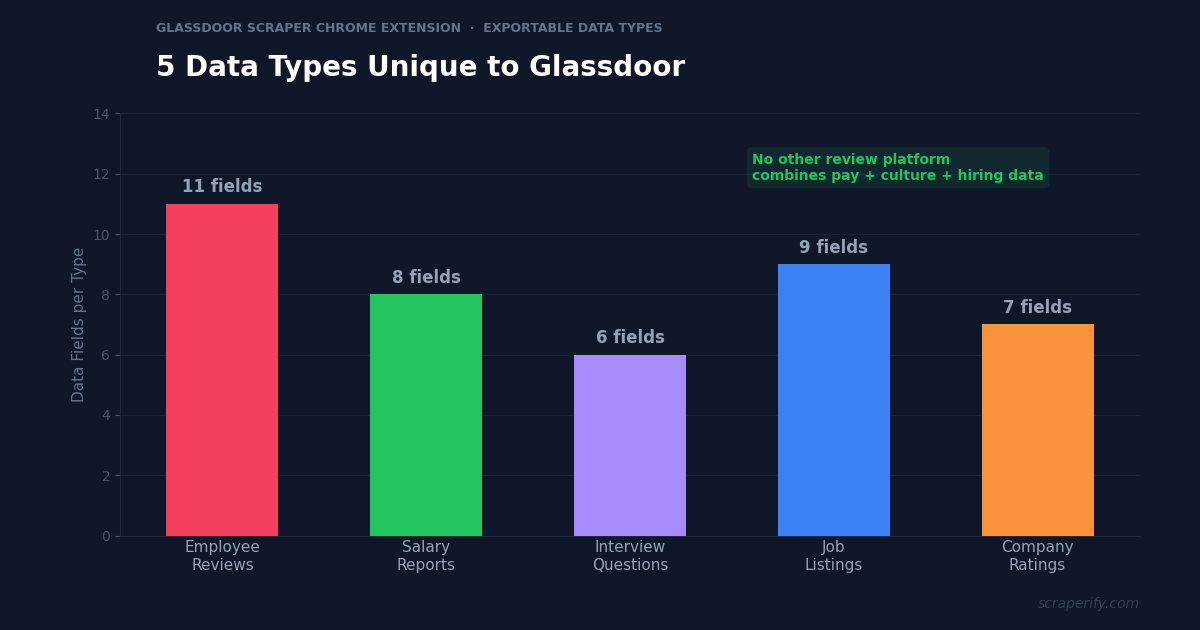
Glassdoor is the only platform that combines three types of workplace intelligence in one place: employee reviews, salary data, and interview questions. No other site gives you culture insights, compensation benchmarks, and hiring process details for the same company. For HR teams, recruiters, compensation analysts, and job seekers, this combination is uniquely valuable. But Glassdoor has no export button, and its data is spread across paginated tabs that require endless clicking. A Glassdoor scraper Chrome extension fixes this — install it, browse Glassdoor, and export reviews, salaries, and interview questions to CSV, Excel, or JSON in one click.
This guide shows you how to use a Glassdoor scraper Chrome extension to export workplace data, benchmark compensation, analyze employer brand sentiment, and research companies at scale.
Why You Need a Glassdoor Scraper Chrome Extension
Glassdoor hosts millions of employee reviews, salary reports, and interview experiences across companies worldwide. Unlike Trustpilot (customer reviews) or Yelp (local business reviews), Glassdoor reviews come from employees — people with insider knowledge of company culture, management quality, and compensation practices.
This makes Glassdoor data essential for several professional use cases that are impossible without bulk export:
Compensation benchmarking requires dozens of salary data points per role. Glassdoor shows salary reports one at a time with ranges, but comparing 50 “Senior Software Engineer” salaries across companies means clicking through 50 pages. A Glassdoor scraper Chrome extension exports them all to a spreadsheet where you calculate medians, percentiles, and geographic adjustments instantly.
Employer brand analysis needs review text at volume. A company with 800 reviews cannot be understood by reading the 10 shown on page one. Exporting all reviews with a Glassdoor scraper Chrome extension lets you quantify complaint themes — “poor management” mentioned in 34% of negative reviews is a fact, not an impression.
Competitive talent intelligence means tracking how competitors are perceived as employers. If your top competitor’s Glassdoor rating dropped from 4.2 to 3.6 over six months, their employees are unhappy — an opening for your recruiting team.
A Glassdoor scraper Chrome extension delivers this data without friction:
- Exports employee reviews — pros, cons, advice to management, ratings by category
- Exports salary reports — base pay, bonus, stock, total compensation by role
- Exports interview questions — the Glassdoor scraper Chrome extension captures difficulty, process, and actual questions asked
- Handles pagination automatically — no manual clicking through hundreds of pages
- Exports to CSV, Excel, or JSON — the Glassdoor scraper Chrome extension supports all analysis formats
- Processes data locally — the Glassdoor scraper Chrome extension never sends data to external servers
The Scraperify Glassdoor scraper Chrome extension is built for HR teams benchmarking pay, recruiters researching competitors, job seekers evaluating employers, and analysts studying labor markets.
What Data Can the Glassdoor Scraper Chrome Extension Export?
The Glassdoor scraper Chrome extension extracts five distinct data types from Glassdoor:
Employee review data the Glassdoor scraper Chrome extension captures:
- Overall rating — 1-5 stars
- Review title — the headline summary
- Pros — what the employee liked
- Cons — what the employee disliked
- Advice to management — direct feedback to leadership
- Job title — the reviewer’s position
- Employment status — current or former employee
- Employment length — how long they worked there
- Location — office or remote location
- Review date — when it was posted
- Recommend / CEO approval / business outlook — the three sentiment flags
Salary data the Glassdoor scraper Chrome extension exports:
- Job title — the specific role
- Base salary — reported base pay
- Additional pay — bonus, commission, tips, profit sharing
- Total compensation — base plus additional
- Salary range — low, median, high for the role
- Years of experience — experience level of reporters
- Location — city and country
- Number of reports — how many employees submitted data (the Glassdoor scraper Chrome extension captures this as a confidence indicator)
Interview data from the Glassdoor scraper Chrome extension:
- Interview questions — actual questions asked
- Difficulty rating — easy, average, or difficult
- Experience rating — positive, neutral, or negative
- Offer status — received offer, declined, no offer
- Interview process — description of stages
- Application method — how the candidate applied
Job listing data:
- Job title, company, location — core listing fields
- Salary estimate — Glassdoor’s estimated range
- Job description — full posting text
- Posted date, company rating, easy apply status
Company rating breakdown:
- Overall rating — company-wide average
- Culture & values / Diversity & inclusion / Work-life balance — subcategory scores
- Senior management / Compensation & benefits / Career opportunities — subcategory scores
- CEO approval rating — percentage approval
WHAT THE GLASSDOOR SCRAPER CHROME EXTENSION EXTRACTS
Employee Reviews
- Rating & Title
- Pros & Cons
- Advice to Management
- Job Title & Tenure
- Current vs Former
- Recommend / CEO Approval
Salary Reports
- Base Salary
- Bonus & Stock
- Total Compensation
- Range (low/med/high)
- Experience Level
- Location & Sample Size
Interviews & Jobs
- Interview Questions
- Difficulty & Experience
- Offer Status
- Process Description
- Job Listings & Salaries
How to Install the Glassdoor Scraper Chrome Extension
Setting up the Glassdoor scraper Chrome extension takes 30 seconds.
Step 1: Open the Chrome Web Store and search for “Glassdoor Scraper.” The Scraperify Glassdoor scraper Chrome extension exports reviews, salaries, and interview data to CSV, Excel, and JSON.
Step 2: Click “Add to Chrome” and confirm permissions. The Glassdoor scraper Chrome extension needs access to glassdoor.com.
Step 3: Log into Glassdoor (most data requires an account), then the Glassdoor scraper Chrome extension is ready to export.
HOW THE GLASSDOOR SCRAPER CHROME EXTENSION WORKS
Install
Add the Glassdoor scraper Chrome extension
Browse
Open a company’s Reviews, Salaries, or Interviews tab
Click
One click on the Glassdoor scraper Chrome extension
Export
Download CSV, Excel, or JSON
How to Export Glassdoor Reviews to CSV (Step-by-Step)
Step 1: Open a Company Profile
With the Glassdoor scraper Chrome extension installed, go to glassdoor.com and search for a company. Navigate to the tab you want to export: Reviews, Salaries, Interviews, or Jobs. The Glassdoor scraper Chrome extension works on all four tabs, and each produces its own CSV structure.
Step 2: Apply Filters
Glassdoor offers filters that shape your export. Use them before running the Glassdoor scraper Chrome extension:
- Filter by job function — engineering, sales, marketing, operations
- Filter by location — specific office or country
- Filter by employment status — current employees vs former employees
- Filter by rating — 1-star only for complaint analysis
- Sort by — most recent, most helpful, highest, or lowest rating
Filtering for former employees only before running the Glassdoor scraper Chrome extension is a useful trick — departed employees write more candid reviews than current staff who fear retaliation.
Step 3: Run the Export
Click the Glassdoor scraper Chrome extension icon. It navigates pagination automatically, capturing reviews page by page. Choose CSV, Excel, or JSON. The Glassdoor scraper Chrome extension downloads the file when finished.
Step 4: Analyze the Data
Open the file the Glassdoor scraper Chrome extension produced. Each row is one review, salary report, or interview experience. With the data:
- Calculate average rating by year to see whether culture is improving or declining
- Search Cons text for recurring keywords (“micromanagement,” “burnout,” “no growth”)
- Compare current vs former employee ratings — a large gap signals retention problems
- Compute salary percentiles by role rather than relying on Glassdoor’s displayed median
- Group interview questions by role to build a preparation guide
Why Glassdoor Data Is Unique in the Review Ecosystem
Glassdoor occupies a category of its own. Understanding what makes it different helps you use the Glassdoor scraper Chrome extension more strategically:
Reviews come from insiders, not customers. A customer review tells you whether a product worked. An employee review tells you how a company is actually run — whether management is competent, whether the culture matches the marketing, whether promised growth opportunities exist. This insider perspective is what makes exported Glassdoor data valuable for due diligence, competitive intelligence, and job search.
Salary data is crowdsourced and self-reported. Unlike compensation surveys that cost thousands of dollars, Glassdoor’s salary data comes free from employees. The tradeoff is variability — self-reported figures include errors, outdated entries, and inconsistent definitions of “total compensation.” Exporting salary data with the Glassdoor scraper Chrome extension lets you clean the data yourself: remove outliers, filter by recency, and calculate percentiles rather than trusting a single displayed median.
Interview questions are a hidden asset. Glassdoor’s interview section contains thousands of real questions candidates were asked, along with difficulty ratings and outcomes. Job seekers export these with the Glassdoor scraper Chrome extension to build company-specific prep guides. Recruiters export competitor interview data to understand how rival companies screen candidates.
Current vs former employee sentiment reveals retention health. Glassdoor labels every review as written by a current or former employee. Companies where former employees rate significantly lower than current ones typically have exit problems — people leave angry. This comparison requires exported data with the status field, which the Glassdoor scraper Chrome extension captures for every review.
Ratings decay over time without intervention. Glassdoor’s overall rating is a running average, but recent reviews reflect current conditions. Export reviews with dates using the Glassdoor scraper Chrome extension, then calculate rolling 12-month averages. A company showing 4.1 overall but 3.4 for the last 12 months is deteriorating — a signal invisible from the headline number.
Subcategory ratings pinpoint problems. Glassdoor rates companies on six dimensions: culture, diversity, work-life balance, senior management, compensation, and career opportunities. A company might rate 4.5 on culture but 2.8 on senior management — a split only visible in a Glassdoor scraper Chrome extension export. The Glassdoor scraper Chrome extension captures all six, letting you diagnose exactly where employer brand is strong and weak.
Ready to export Glassdoor workplace data?
Scraperify offers Chrome extensions for 40+ platforms including Glassdoor, LinkedIn, Upwork, and Indeed-style job boards.
Browse All Scrapers →5 Ways to Use the Glassdoor Scraper Chrome Extension
1. Compensation Benchmarking
HR and compensation teams use the Glassdoor scraper Chrome extension to build salary benchmarks without paying for expensive survey data. Export salary reports for a role across 10-20 comparable companies. Clean the data: remove entries older than 24 months, exclude obvious outliers, and normalize for location using cost-of-living multipliers.
Then calculate what matters from the Glassdoor scraper Chrome extension export: the 25th, 50th, and 75th percentile for the role. If you pay at the 40th percentile and competitors pay at the 60th, you have quantified your retention risk. This analysis — which consultancies charge thousands to produce — takes an afternoon with data exported by the Glassdoor scraper Chrome extension.
The same approach works in reverse for candidates. Use the Glassdoor scraper Chrome extension to export salary data for your target role before an offer negotiation. Walking into a compensation conversation knowing the 75th percentile is $X gives you a defensible anchor.
2. Employer Brand Sentiment Analysis
Export all reviews for your company with the Glassdoor scraper Chrome extension and quantify what employees actually say. Build a keyword frequency table from the Cons column: count mentions of “management,” “pay,” “work-life balance,” “growth,” “politics,” “burnout.”
Track these frequencies quarter over quarter using the Glassdoor scraper Chrome extension. If “no career growth” appears in 41% of negative reviews and you launch a promotion framework, the next quarter’s export tells you whether it worked. Employer brand work without this measurement is guesswork.
Also compare your Pros keywords against competitors’. If competitors’ reviews consistently praise “great benefits” and yours never mention benefits, that is a gap in either your offering or your communication of it.
3. Competitor Talent Intelligence
Recruiters use the Glassdoor scraper Chrome extension to monitor rival employers. Export competitor reviews quarterly and watch for: rating declines, spikes in negative reviews, recurring complaints about layoffs or leadership, and drops in CEO approval.
A competitor whose rating fell from 4.3 to 3.5 over two quarters — a trend the Glassdoor scraper Chrome extension makes visible in minutes — has unhappy employees who are prime recruiting targets. Pair the exported review data with LinkedIn contact exports to identify and reach specific people in the roles you are hiring for.
4. Interview Preparation at Scale
Job seekers and career coaches use the Glassdoor scraper Chrome extension to export interview questions for a target company. A company with 200 interview reports contains a rich question bank — export it, group by role, and identify the questions that appear repeatedly.
The Glassdoor scraper Chrome extension export also includes difficulty ratings and offer outcomes. Cross-referencing these reveals which interview loops are hardest and what separates candidates who received offers from those who did not. This is far more useful than reading five interview reviews on page one.
5. Labor Market Research
Analysts and academics use the Glassdoor scraper Chrome extension to study workplace trends across industries. Use the Glassdoor scraper Chrome extension to export reviews and salary data for hundreds of companies in a sector, answering questions like: How does compensation vary by company size? Do remote-first companies rate higher on work-life balance? Which industries show the steepest rating declines?
Similar research using scraped job posting data has produced widely cited findings — one analysis of 3,800 job postings revealed that Java and JavaScript each appeared in 33% of software developer roles, while only 20% of postings disclosed salary ranges at all. The Glassdoor scraper Chrome extension enables this same class of analysis on workplace and compensation data.
Glassdoor Scraper Chrome Extension vs Other Methods
GLASSDOOR SCRAPER: CHROME EXTENSION VS ALTERNATIVES
| Feature | Chrome Extension | Python Scraper | Comp Survey |
|---|---|---|---|
| Cost | Free tier / $19.99 | Free (+ dev time) | $5,000-$25,000 |
| Coding required | No | Yes | No |
| Handles login walls | ✓ (your session) | Difficult | N/A |
| Review + salary + interviews | ✓ All three | Varies | Salary only |
| Setup time | 30 sec | 4-8 hours | Weeks |
The Glassdoor scraper Chrome extension has a decisive advantage over Python scrapers: it works within your authenticated session. Glassdoor gates most content behind a login and deploys aggressive anti-bot protection. Standalone scrapers get blocked quickly and require constant maintenance. The Glassdoor scraper Chrome extension reads data from pages you are already viewing as a logged-in user, so there is no separate authentication to break.
Against paid compensation surveys (Radford, Mercer, Willis Towers Watson), the tradeoff is different. Surveys provide verified, employer-submitted data with rigorous job matching — the gold standard for enterprise comp planning. But they cost $5,000-$25,000 annually. For startups, small companies, and individual negotiators, the Glassdoor scraper Chrome extension provides directionally useful benchmarks at a fraction of the cost.
Tips for Using the Glassdoor Scraper Chrome Extension
Filter for Former Employees for Candid Reviews
Current employees often self-censor, worried that a critical review could be traced back to them. Former employees have no such constraint. Filter for “Former Employees” before running the Glassdoor scraper Chrome extension to get the most unfiltered assessment of a company.
Weight Recent Reviews Heavily
Glassdoor’s overall rating averages all reviews ever posted, including ones from a decade ago under different leadership. Export with dates using the Glassdoor scraper Chrome extension, then filter to the last 12-18 months. Recent reviews reflect the company you would actually join today.
Check Sample Size on Salary Data
Glassdoor displays salary medians even when based on very few reports. A “median” derived from 3 submissions is noise. The Glassdoor scraper Chrome extension captures the report count — filter for roles with at least 15-20 data points before drawing conclusions.
Compare Subcategory Ratings, Not Just Overall
Two companies can both rate 3.8 overall while being completely different places to work. One might score high on work-life balance and low on compensation; the other the reverse. The Glassdoor scraper Chrome extension exports all six subcategory scores — compare those, not the headline number.
Combine with LinkedIn and Upwork Data
For a complete picture of the talent market, use the Glassdoor scraper Chrome extension alongside the LinkedIn contact exporter for people data and the Upwork Scraper for freelance rate benchmarks. Full-time salary data from Glassdoor plus contract rates from Upwork gives you both sides of the compensation market.
Who Uses the Glassdoor Scraper Chrome Extension?
Compensation Analysts — Build salary benchmarks across competitor sets without buying survey data. Export, clean, and calculate percentiles by role and location.
HR and Employer Brand Teams — Quantify what employees say in reviews, track sentiment over time, and measure the impact of culture initiatives with data rather than anecdote.
Recruiters — Monitor competitor employer ratings for recruiting opportunities. A rival with declining ratings has employees ready to listen.
Job Seekers — Research companies before applying, export interview questions for preparation, and enter salary negotiations with percentile data instead of a single Glassdoor median.
Executive Search Firms — Assemble market intelligence reports for clients on employer competitiveness, compensation positioning, and talent retention risk.
Labor Market Researchers — Study workplace trends, compensation dispersion, and employer sentiment across industries using bulk exported data.
Investors and Due Diligence Teams — Assess company culture and management quality before an acquisition or investment. A target company with collapsing Glassdoor ratings and mass “poor leadership” complaints is a red flag no financial statement will show.
Glassdoor Scraper Chrome Extension — FAQs
Is the Glassdoor scraper Chrome extension free?
The Glassdoor scraper Chrome extension offers a free tier. Scraperify plans start at $19.99/month or $79 lifetime.
Can the Glassdoor scraper Chrome extension export salary data?
Yes. The Glassdoor scraper Chrome extension exports base salary, additional pay, total compensation, salary ranges, experience levels, and the number of reports backing each figure.
Does the Glassdoor scraper Chrome extension work without a Glassdoor account?
Glassdoor gates most content behind a login. Log into your Glassdoor account first — then the Glassdoor scraper Chrome extension exports whatever you can see as a logged-in user.
Can I export interview questions from Glassdoor?
Yes. The Glassdoor scraper Chrome extension captures interview questions, difficulty ratings, offer outcomes, and process descriptions from the Interviews tab.
Is my data private with the Glassdoor scraper Chrome extension?
Yes. The Glassdoor scraper Chrome extension processes everything locally in your browser. No exported data leaves your computer.
How many reviews can the Glassdoor scraper Chrome extension export?
There is no fixed limit. The Glassdoor scraper Chrome extension paginates through review pages and captures each one. Larger companies with thousands of reviews take proportionally longer.
Start Exporting Glassdoor Data Today
Stop clicking through Glassdoor pages one at a time. The Glassdoor scraper Chrome extension exports reviews, salary reports, and interview questions to CSV so you can benchmark compensation, analyze employer brand, and research companies with real data.
Scraperify offers Chrome extensions for 40+ platforms including LinkedIn for professional contacts, Upwork for freelance rates, and Trustpilot for customer-side company reputation.
Export Glassdoor Reviews and Salaries
Scraperify’s Chrome extensions export workplace data from Glassdoor, LinkedIn, Upwork, and 40+ platforms.
Browse All Scrapers →Free tier · $19.99/month · $79 lifetime