How to Track Walmart Prices Over Time (2026 Guide)
5 ways to track Walmart prices, find rollbacks, and get price drop alerts. Use a Chrome extension to export price history to Excel for free.
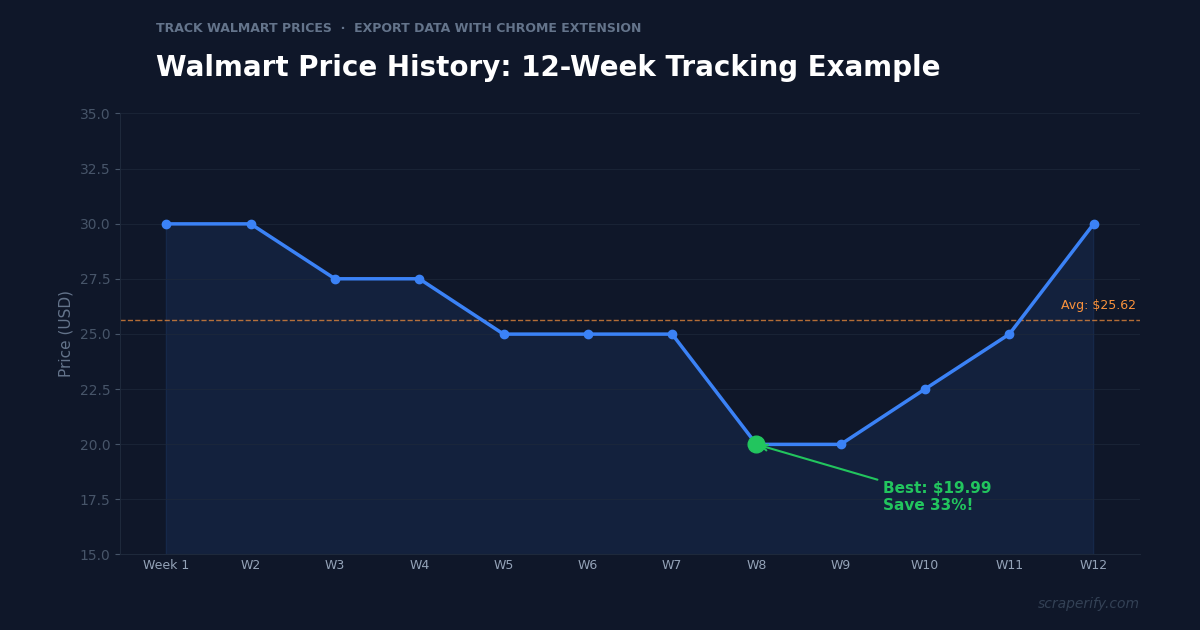
Walmart prices change constantly. A product that costs $29.99 today might drop to $19.99 next week during a rollback, then bounce back to $27.50 the week after. If you buy at the wrong time, you overpay by 20-33%. If you track prices and buy during dips, you save hundreds of dollars per year on the same purchases.
But Walmart does not show price history. Unlike Amazon (where CamelCamelCamel tracks prices), Walmart has no built-in or widely-known price history tool. This guide covers 5 ways to track Walmart prices in 2026 — from free browser extensions to spreadsheet-based tracking with the Scraperify Walmart Scraper Chrome Extension.
Why Track Walmart Prices?
Walmart’s pricing strategy is built on three mechanisms that create significant price fluctuations:
Rollbacks are temporary price reductions — typically 10-30% below the regular price — that last days to weeks. Walmart does not announce when rollbacks start or end. The only way to catch them is to monitor prices regularly.
Clearance markdowns happen when Walmart discontinues a product or needs to clear inventory. Clearance prices can be 50-75% below regular price, but they are unpredictable and vary by store. Online clearance items disappear quickly once discovered.
Algorithmic pricing adjusts prices dynamically based on competitor prices, demand, and inventory levels. Walmart’s algorithm can change prices multiple times per day on high-velocity products. These micro-adjustments are invisible unless you are tracking systematically.
For regular shoppers, tracking prices means buying at rollback lows instead of regular highs — saving $500-$1,000+ per year on household purchases. For Amazon arbitrage sellers, tracking Walmart prices means catching rollback and clearance deals that create profitable resale opportunities. For businesses purchasing supplies, tracking prices means timing bulk orders during price dips.
Method 1: Walmart Scraper Chrome Extension (Best for Bulk Tracking)
Best for: Arbitrage sellers, business buyers, anyone tracking 20+ products
The Walmart Scraper Chrome Extension by Scraperify exports Walmart product data — including current prices, original prices, and rollback status — to a CSV spreadsheet. While it is not a traditional “price tracker” with alerts, it is the most powerful tool for systematic price monitoring because it lets you export hundreds of prices at once and compare them week over week.
How to Track Prices with the Walmart Scraper
-
Create a tracking spreadsheet. List the products you want to monitor with their Walmart URLs or search terms.
-
Export weekly. Every week, search for your tracked products on Walmart.com and use the Walmart Scraper Chrome Extension to export current prices to CSV.
-
Add a date column. Tag each export with the date. Over 4-12 weeks, you build a price history for every product.
-
Set buy thresholds. For each product, calculate the average price from your history. When the current price drops 15%+ below the average, that is your buy signal.
-
Spot rollbacks instantly. The Walmart Scraper captures the “was price” and “rollback” status fields. Products showing rollback pricing are at temporary lows — buy before the rollback ends.
What You Get
| Feature | Walmart Scraper |
|---|---|
| Products per export | Hundreds |
| Price + rollback status | ✓ |
| UPC for cross-platform matching | ✓ |
| CSV/Excel/JSON export | ✓ |
| Cost | Free tier / $19.99 mo / $79 lifetime |
| Automated alerts | ✗ (manual weekly export) |
When to Use This Method
Use the Walmart Scraper when you track 20+ products, need bulk price data for arbitrage analysis, or want to build a comprehensive price history database. The weekly export approach requires discipline but produces the most actionable data.
Export Walmart Prices to a Spreadsheet
The Walmart Scraper Chrome Extension exports product data — prices, rollback status, UPCs — to CSV in one click.
Add to Chrome — FreeMethod 2: CamelCamelCamel Walmart Support (Limited)
Best for: Casual shoppers tracking a few products
CamelCamelCamel is the most popular Amazon price tracker — and it has limited Walmart support. You can search for some Walmart products on camelcamelcamel.com and see historical price charts.
How It Works
- Go to camelcamelcamel.com
- Paste a Walmart product URL or search by name
- View the price history chart
- Set a price drop alert to get emailed when the price drops below your target
Limitations
- Incomplete Walmart coverage. CamelCamelCamel’s Walmart database is much smaller than its Amazon database. Many Walmart products are not tracked.
- No rollback detection. The tool tracks the listed price but does not flag rollback status specifically.
- No bulk export. You can view price charts one product at a time but cannot export data to a spreadsheet.
- Slow updates. Walmart price changes may not be reflected for hours or days.
When to Use This Method
Use CamelCamelCamel when you want a quick price history check for a specific Walmart product and do not need bulk data or CSV exports.
Method 3: Browser Price Tracker Extensions (Good for Alerts)
Best for: Shoppers who want automatic price drop notifications
Several Chrome extensions automatically track prices as you browse and alert you when prices drop. Popular options include Honey (now part of PayPal), Keepa (primarily Amazon but some Walmart support), and Capital One Shopping.
How They Work
- Install the extension from the Chrome Web Store
- Browse Walmart.com normally
- The extension records prices for products you view
- When a price drops below a threshold (often auto-set), you get a notification
- Some extensions also show coupon codes
Limitations
- Passive tracking only. These extensions track products you visit — they do not proactively search for deals across Walmart’s entire catalog.
- No CSV export. Price history stays inside the extension — you cannot download it to a spreadsheet for analysis.
- Limited price history depth. Most extensions only track 30-90 days of history.
- Privacy concerns. Many free price trackers monetize by collecting your browsing data.
When to Use This Method
Use browser-based price trackers when you want set-it-and-forget-it alerts for products you buy regularly. These tools are passive — you browse as usual and get notified when prices drop.
Method 4: Walmart’s Own Tools (Free, Very Limited)
Best for: In-store shoppers checking current prices
Walmart offers a few built-in tools for price awareness, though none provide true price history tracking:
Walmart App — Price Check: Scan a product barcode in-store to see the current online price. Useful for comparing in-store vs online pricing but does not show price history.
Walmart App — Savings Catcher (Discontinued): Walmart previously offered a tool that compared your receipt prices against competitor ads, but this program was discontinued.
Walmart.com — Rollback Badges: Products on rollback are marked with a yellow “Rollback” badge showing the previous price. This tells you the price has dropped but does not show the full price history.
When to Use This Method
Use Walmart’s built-in tools for real-time price checks while shopping. They do not support historical tracking or bulk data export.
Method 5: Manual Spreadsheet Tracking (Free, Time-Intensive)
Best for: Budget-conscious shoppers tracking 5-10 specific products
The DIY approach — create a Google Sheet, manually check prices weekly, and enter them by hand.
How It Works
- Create a spreadsheet with columns: Product Name, Walmart URL, Week 1 Price, Week 2 Price, etc.
- Every week, visit each product page on Walmart.com
- Enter the current price in the spreadsheet
- Use conditional formatting to highlight prices below your buy threshold
- Use the MIN() function to identify the lowest recorded price
Limitations
- Time-consuming. Checking 20 products manually takes 15-20 minutes per week.
- Prone to errors. Manual data entry introduces typos and missed updates.
- No rollback detection. You see the current price but may not notice the “rollback” badge.
- Not scalable. Works for 5-10 products, impractical for 50+.
When to Use This Method
Use manual tracking when you have a short list of high-value items you are waiting to buy and want a zero-cost solution. For anything beyond 10 products, the Walmart Scraper Chrome Extension is more efficient.
WALMART PRICE TRACKING: METHOD COMPARISON
| Method | Cost | Bulk Tracking | CSV Export | Auto Alerts | Best For |
|---|---|---|---|---|---|
| Walmart Scraper Extension | Free-$19.99 | ✓ (100s) | ✓ | ✗ | Arbitrage, bulk |
| CamelCamelCamel | Free | ✗ | ✗ | ✓ | Single products |
| Price Tracker Extensions | Free | ✗ | ✗ | ✓ | Passive alerts |
| Walmart App | Free | ✗ | ✗ | ✗ | In-store checks |
| Manual Spreadsheet | Free | ✗ (5-10 max) | ✓ (DIY) | ✗ | Small lists |
How to Build a Walmart Price Tracking Spreadsheet
Regardless of which method you use to collect prices, here is how to build an effective price tracking spreadsheet:
Step 1: Set Up Your Spreadsheet
Create a Google Sheet or Excel file with these columns:
| Column | Purpose |
|---|---|
| Product Name | What you are tracking |
| Walmart URL | Direct link for easy checking |
| UPC | For cross-platform matching |
| Regular Price | The normal (non-rollback) price |
| Current Price | Today’s price |
| Lowest Recorded | The best price you have seen |
| Buy Threshold | The price at which you should buy |
| Status | Rollback, Clearance, Regular, or Out of Stock |
| Last Checked | Date of most recent price check |
Step 2: Populate with Initial Data
Use the Walmart Scraper Chrome Extension to export your tracked products to CSV. Copy the relevant columns (title, price, UPC, URL) into your tracking spreadsheet. This gives you the baseline prices to compare against.
Step 3: Add Weekly Price Columns
Each week, add a new date column and fill in current prices. After 4-6 weeks, you have enough data to calculate meaningful averages and identify price patterns.
Step 4: Create Conditional Formatting
Set up rules to highlight prices in green when they drop below your buy threshold. This visual cue makes it instant to spot deals during your weekly price check.
Step 5: Calculate Key Metrics
Add formulas for:
- Average price:
=AVERAGE(week1:weekN)— the baseline for comparison - Lowest price:
=MIN(week1:weekN)— the best price seen - Current vs average:
=(current-average)/average— percentage above or below average - Days since last rollback: Track when rollbacks occur to predict the next one
When Walmart Prices Drop the Most
Walmart’s pricing follows predictable seasonal and promotional patterns:
January: Post-holiday clearance on electronics, toys, decorations. Some of the deepest markdowns of the year — 50-75% off holiday inventory that must be cleared for spring merchandise.
March-April: Spring clearance on winter clothing, outdoor heating, and cold-weather items. Winter coats that cost $80 in November can be $20-$30 by March.
July: Mid-year rollbacks across many categories. Walmart competes with Amazon Prime Day (usually in July) with its own “Walmart+ Week” or “Rollback” events.
September: Back-to-school clearance. School supplies, backpacks, and dorm items drop 30-50% once the school year starts and demand evaporates.
November: Black Friday and Cyber Monday. The most widely known deals, but competition is fierce and popular items sell out quickly. Walmart often starts Black Friday deals in early November with “Early Deals.”
December 26-31: Post-Christmas clearance. Gift sets, holiday packaging, and seasonal items get marked down immediately after Christmas.
Tracking prices with the Walmart Scraper Chrome Extension across these seasonal windows reveals the exact depth and duration of price drops for your specific product categories. A product that dips 15% during July rollbacks might drop 40% during January clearance — knowledge that informs when you should buy versus wait.
Price Tracking for Amazon Arbitrage Sellers
Arbitrage sellers have a specific price tracking workflow that combines Walmart price data with Amazon selling prices:
The Arbitrage Price Tracking System
-
Export Walmart rollback and clearance items weekly using the Walmart Scraper Chrome Extension. Focus on electronics, toys, home goods, and grocery — the categories with the most frequent rollbacks.
-
Match UPCs to Amazon. The Walmart Scraper exports UPC codes. Paste each UPC into Amazon’s search bar to find the same product. Note the Amazon selling price.
-
Calculate margin. Amazon selling price minus Walmart cost minus Amazon FBA fees (typically 30-35% of selling price) = your profit per unit.
-
Track rollback cycles. Some Walmart products go on rollback every 6-8 weeks in a predictable cycle. By tracking prices over 3-4 months, you can predict the next rollback window and plan purchases in advance.
-
Set buy triggers. For each product, define the Walmart price that makes the arbitrage profitable. When your weekly export shows a product hitting that price, purchase immediately — rollbacks do not last forever.
The Walmart Scraper Chrome Extension is the cornerstone of this system because it exports hundreds of prices in minutes. Manual price checking for 200 products would take 3-4 hours per week — the scraper does it in 3 minutes.
Frequently Asked Questions
Does Walmart have a price history tool?
No. Walmart does not offer a built-in price history feature. You need third-party tools — CamelCamelCamel (limited Walmart support), browser extensions, or the Walmart Scraper Chrome Extension for CSV-based tracking.
Is there a CamelCamelCamel for Walmart?
CamelCamelCamel has limited Walmart support — some products have price history charts, but coverage is much smaller than their Amazon database. For comprehensive Walmart price tracking, export prices weekly with the Walmart Scraper Chrome Extension and build your own price history in a spreadsheet.
How often do Walmart rollback prices change?
Rollbacks typically last 2-6 weeks. Some products cycle through rollbacks every 6-8 weeks. Clearance markdowns are permanent until the product sells out. Algorithmic price adjustments can happen daily for competitive products.
Can I get Walmart price drop alerts?
CamelCamelCamel and browser extensions like Honey offer price alerts for some Walmart products. For bulk monitoring, export prices weekly with the Walmart Scraper and set up conditional formatting in your spreadsheet to highlight drops.
How much can you save by tracking Walmart prices?
On average, Walmart rollback prices are 10-30% below regular prices. Clearance markdowns can be 50-75% off. A household tracking 50 regularly purchased products and buying during price dips can save $500-$1,500 per year.
Does the Walmart Scraper Chrome Extension track prices automatically?
The Walmart Scraper exports current prices on demand — it is not a passive price tracker with alerts. The workflow is: export prices weekly, compare to your historical data in a spreadsheet, and buy when prices are below your threshold. This approach gives you more data and control than automated trackers.
Start Tracking Walmart Prices Today
Whether you use CamelCamelCamel for quick checks, browser extensions for passive alerts, or the Walmart Scraper Chrome Extension for comprehensive CSV-based tracking, the key is systematically monitoring prices instead of buying at whatever price Walmart shows you today.
For the most powerful approach — bulk price exports, UPC matching, and rollback detection — the Walmart Scraper Chrome Extension gives you the data foundation. Export weekly, build your price history, and buy at the lows.
Track Walmart Prices with Data
Export Walmart product prices, rollback status, and UPCs to CSV. Build your own price history and never overpay again.
Add Walmart Scraper to Chrome — FreeFree tier · $19.99/month · $79 lifetime