Instagram Scraper Chrome Extension: Export Followers (2026)
Export Instagram followers, posts, and engagement data to CSV or Excel. Free Instagram scraper Chrome extension for marketers and influencer research.
You need to export your Instagram followers to a spreadsheet. Maybe you are a marketer building an influencer database. Maybe you are a brand auditing your follower quality. Maybe you are a researcher analyzing engagement patterns. Instagram does not offer a “download followers” button. An Instagram scraper Chrome extension solves this — install it, browse Instagram profiles, and export followers, posts, comments, and engagement data to CSV, Excel, or JSON in one click. No coding. No API keys. No per-record fees.
This guide shows you how to use the Scraperify Instagram scraper Chrome extension to export Instagram data, build influencer databases, analyze engagement, and do social media research at scale.
Why You Need an Instagram Scraper Chrome Extension
Instagram has over 2 billion monthly active users, making it the third-largest social media platform in the world. For marketers, it is the most important platform for influencer marketing, brand partnerships, and audience research. For researchers, it contains invaluable data on social trends, consumer behavior, and content performance.
But Instagram severely restricts data access. The platform has no export feature for followers, posts, or engagement data. Instagram’s official API requires developer approval, is heavily rate-limited, and provides only a fraction of the data visible on the website. Without an Instagram scraper Chrome extension, the only way to collect Instagram data is manual copy-paste — which is completely impractical for any serious research.
Consider the scope of the problem. An influencer marketer evaluating 50 potential partners needs each creator’s follower count, engagement rate, recent post performance, comment sentiment, and audience demographics. Manually checking each profile takes 10-15 minutes. That is 8-12 hours of work for 50 profiles. With an Instagram scraper Chrome extension, the same data collection takes under an hour.
An Instagram scraper Chrome extension automates everything:
- Exports follower lists — the Instagram scraper Chrome extension captures usernames, profile data, and follower counts
- Exports post data — the Instagram scraper Chrome extension captures likes, comments, captions, and timestamps
- Exports comment data — the Instagram scraper Chrome extension captures all comments and commenter profiles
- Exports to CSV, Excel, or JSON — the Instagram scraper Chrome extension supports all formats
- Runs inside your browser — the Instagram scraper Chrome extension needs no software installation
- Processes data locally — the Instagram scraper Chrome extension never sends your data to external servers
The Scraperify Instagram scraper Chrome extension is built for social media marketers, influencer agencies, brand managers, academic researchers, and anyone who needs Instagram data in a format they can analyze.
What Data Can the Instagram Scraper Chrome Extension Export?
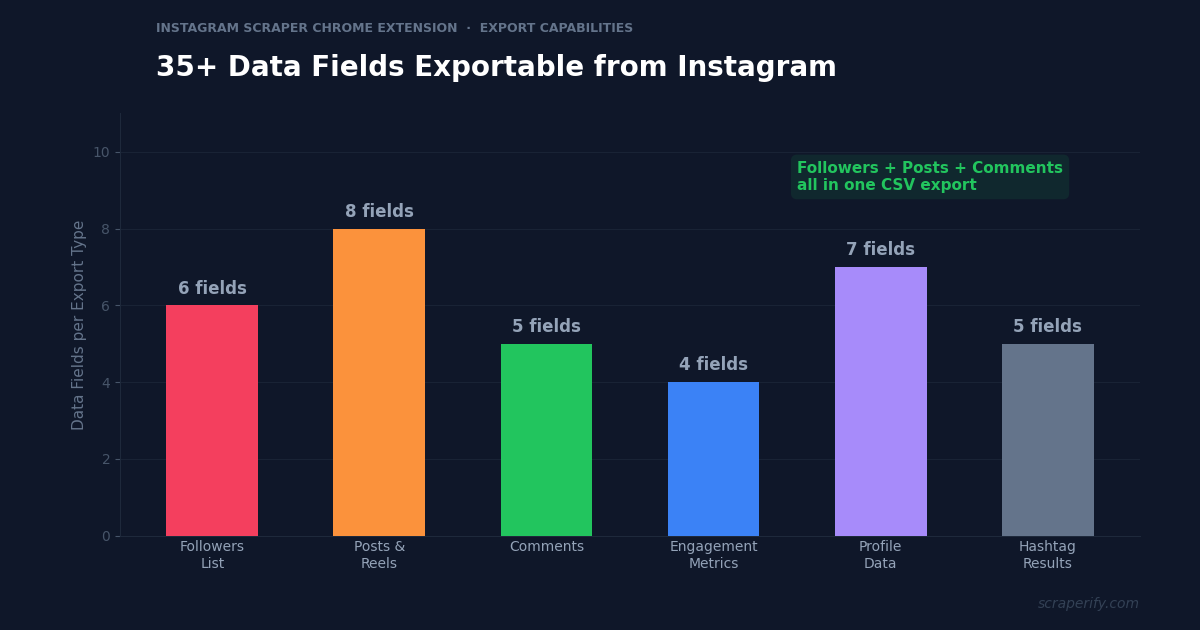
The Instagram scraper Chrome extension extracts 35+ data fields across multiple export types:
Follower/following data the Instagram scraper Chrome extension captures:
- Username — Instagram handle
- Full name — display name
- Profile URL — direct link to the profile
- Bio — profile biography text
- Follower count — how many followers they have
- Following count — how many accounts they follow
- Post count — total number of posts
- Verified status — blue checkmark verified or not
- Profile picture URL — avatar image link via the Instagram scraper Chrome extension
- External URL — website link in bio
- Account type — personal, creator, or business
Post data the Instagram scraper Chrome extension exports:
- Caption — full post caption text
- Like count — number of likes (the Instagram scraper Chrome extension captures this for engagement analysis)
- Comment count — number of comments
- Post type — photo, video, carousel, or reel
- Post URL — direct link to the post
- Timestamp — date and time posted
- Location — tagged location if set
- Hashtags — all hashtags used in the caption
- Image/video URLs — direct media links
Comment data from the Instagram scraper Chrome extension:
- Commenter username — who posted the comment
- Comment text — full comment content
- Comment timestamp — when the comment was posted
- Like count on comment — how many likes the comment received
- Reply status — whether it is a reply to another comment
Hashtag search data:
- Posts using hashtag — total post count for any hashtag
- Top posts — the top-performing posts for each hashtag
- Recent posts — chronologically sorted recent posts
This data is what powers professional influencer marketing, social media auditing, and academic research on Instagram. The Instagram scraper Chrome extension gives you the raw data that expensive SaaS tools charge hundreds per month for.
WHAT THE INSTAGRAM SCRAPER CHROME EXTENSION EXTRACTS
Profile & Followers
- Username & Full Name
- Bio & External URL
- Follower & Following Count
- Verified & Account Type
- Profile Picture URL
Posts & Reels
- Caption & Hashtags
- Likes & Comments
- Post Type & URL
- Timestamp & Location
- Media URLs
Comments & Hashtags
- Comment Text
- Commenter Username
- Comment Likes
- Hashtag Post Count
- Top & Recent Posts
How to Install the Instagram Scraper Chrome Extension
Setting up the Instagram scraper Chrome extension takes 30 seconds.
Step 1: Open the Chrome Web Store. Go to the Instagram Scraper Chrome Extension page. The Instagram scraper Chrome extension is called “Gram Scraper — Export Posts & Followers” by Scraperify.
Step 2: Click “Add to Chrome.” Confirm permissions. The Instagram scraper Chrome extension needs access to instagram.com.
Step 3: Start using it. Log into Instagram in Chrome and the Instagram scraper Chrome extension is ready immediately.
HOW THE INSTAGRAM SCRAPER CHROME EXTENSION WORKS
Install
Add the Instagram scraper Chrome extension — 30 sec
Browse
Visit any Instagram profile or hashtag page
Click
One click on the Instagram scraper Chrome extension
Export
Download CSV, Excel, or JSON
How to Export Instagram Followers to Excel (Step-by-Step)
Step 1: Navigate to an Instagram Profile
With the Instagram scraper Chrome extension installed, go to instagram.com and navigate to any public profile. The Instagram scraper Chrome extension works on profile pages, post pages, hashtag pages, and explore pages.
Step 2: Open the Followers or Following List
Click “followers” or “following” on the profile to open the list. Scroll down to load more followers — Instagram loads them progressively. The Instagram scraper Chrome extension captures each follower as they load. The more you scroll, the more the Instagram scraper Chrome extension captures.
Step 3: Click Export
Click the Instagram scraper Chrome extension icon. Choose CSV, Excel, or JSON. The Instagram scraper Chrome extension downloads a file with username, full name, bio, follower count, following count, post count, verified status, and profile URL for every captured follower.
Step 4: Analyze Your Instagram Data
Open the Instagram scraper Chrome extension export. Each row is one Instagram account. With the data:
- Sort by follower count to find the most influential followers
- Filter by verified status to identify verified accounts following a competitor
- Search bios for keywords — find followers who are “CEO,” “marketer,” or “photographer”
- Calculate engagement rates — (avg likes + avg comments) / followers × 100
- Filter by post count — active accounts (500+ posts) vs inactive ones
Why Instagram Data Matters for Marketing in 2026
Instagram data is the foundation of influencer marketing, brand strategy, and social media research. Understanding these use cases helps you get the most from the Instagram scraper Chrome extension:
Influencer marketing is a $21B+ industry. Brands spend billions partnering with Instagram creators to promote products. But choosing the right influencer requires data — follower count, engagement rate, audience quality, content performance, and comment sentiment. The Instagram scraper Chrome extension captures all of this, replacing expensive SaaS tools that charge $200-$500/month for the same data.
Fake followers are a $1.3B problem. An estimated 10-15% of Instagram accounts are bots or inactive. Brands that partner with influencers who have fake followers waste their marketing budget. The Instagram scraper Chrome extension follower exports let you audit follower quality: filter for accounts with zero posts, no profile picture, and random usernames — these are likely fake. If 30% of an influencer’s followers match this pattern, their engagement rate is artificially deflated and the partnership is not worth the price.
Engagement rate is the key metric. Follower count alone means nothing — a 1M-follower account with 500 likes per post (0.05% engagement) is less valuable than a 50K-follower account with 2,500 likes per post (5% engagement). The Instagram scraper Chrome extension exports post data with like and comment counts, letting you calculate engagement rates for any account without relying on third-party tools.
Competitor analysis drives strategy. Brands use the Instagram scraper Chrome extension to export competitor profiles, posts, and engagement data. What content formats perform best (reels vs carousels vs photos)? What posting frequency generates the most engagement? Which hashtags drive discovery? These questions are answerable only with exported data — not from casual browsing.
Hashtag research reveals content opportunities. Instagram hashtags are a discovery mechanism — using the right hashtags puts your content in front of new audiences. The Instagram scraper Chrome extension exports hashtag search results, showing which posts perform best for any hashtag. Analyzing top posts for a target hashtag reveals what content resonates, what captions convert, and what visual styles attract engagement.
Comment analysis reveals audience sentiment. Comments are the most honest form of audience feedback. Exporting comments from competitor posts with the Instagram scraper Chrome extension reveals what their audience loves (“where can I buy this?”), what they dislike (“too expensive”), and what questions they ask (“does this come in other colors?”). These insights inform product development, content strategy, and ad creative.
Instagram is the top platform for creator partnerships. While TikTok gets headlines for viral growth, Instagram remains the platform where the most brand partnership revenue flows. Creators on Instagram earn through sponsored posts, affiliate marketing, brand ambassadorships, and product collaborations. For brands, choosing the right creator partner requires data that goes beyond follower count — engagement rate, audience demographics, content consistency, and follower authenticity all matter. The Instagram scraper Chrome extension provides the raw data to evaluate all of these factors without paying for expensive influencer marketing platforms.
Reels have changed the engagement game. Instagram’s push toward short-form video (Reels) has dramatically changed how content performs. Reels typically get 2-3x more reach than static photos, but engagement patterns differ — Reels get more views and shares while photos get more saves and comments. Exporting post data with the Instagram scraper Chrome extension and segmenting by post type (reel vs carousel vs photo) reveals which format drives the best results for any specific niche. This format-level analysis is impossible without exported data.
Seasonal content patterns are predictable. Engagement on Instagram follows predictable seasonal cycles. Fashion content peaks during fashion weeks (February, September). Fitness content surges in January (New Year’s resolutions). Holiday content dominates November-December. Travel content peaks during summer. By exporting competitor post data monthly with the Instagram scraper Chrome extension and tracking engagement rates over time, you can plan your content calendar around proven seasonal patterns rather than guessing what to post and when.
Ready to export Instagram data?
Install the Instagram scraper Chrome extension and start exporting followers, posts, and engagement data. Free tier available.
Add to Chrome — Free5 Ways to Use the Instagram Scraper Chrome Extension
1. Build Influencer Databases
Marketing agencies use the Instagram scraper Chrome extension to build databases of potential influencer partners. Export profile data from accounts that appear in hashtag searches for your client’s niche. For each exported profile, the Instagram scraper Chrome extension captures follower count, engagement metrics, bio (which often includes contact email), and content type. Filter for accounts with 10K-100K followers and 3%+ engagement rates — these micro-influencers typically offer the best ROI for brand partnerships.
Build a master spreadsheet with columns for: username, followers, engagement rate, niche, contact info, and partnership status. The Instagram scraper Chrome extension populates the first four columns automatically — you fill in the rest as you evaluate each creator.
2. Audit Follower Quality
Before partnering with an influencer or purchasing an Instagram account, use the Instagram scraper Chrome extension to export their follower list and audit quality. Red flags in exported data: accounts with no posts and no profile photo (likely bots), accounts with random alphanumeric usernames, and accounts following thousands but with zero followers themselves. If more than 20% of followers show these patterns, the account’s audience is significantly inflated.
3. Competitive Content Analysis
Export your top 5 competitors’ recent posts using the Instagram scraper Chrome extension. For each post, the Instagram scraper Chrome extension captures likes, comments, caption, hashtags, post type, and timestamp. Build a comparison matrix: which competitor gets the most engagement? What post types (reels vs carousels) perform best? What posting times generate the highest engagement? This analysis takes 30 minutes with exported data — it would take days of manual tracking without the Instagram scraper Chrome extension.
4. Hashtag Strategy Research
Export the top posts for 20-30 hashtags in your niche with the Instagram scraper Chrome extension. Analyze which hashtags have the best ratio of engagement to competition (posts per hashtag). Small hashtags (10K-100K posts) with high engagement on top posts are more valuable than massive hashtags (10M+ posts) where your content gets buried instantly. The Instagram scraper Chrome extension data informs a hashtag strategy that drives actual discovery.
The ideal hashtag strategy uses a mix of sizes: 3-5 large hashtags (1M+ posts) for potential viral reach, 5-10 medium hashtags (100K-1M posts) for strong discoverability, and 5-10 small hashtags (10K-100K posts) where you can realistically land in the top posts section. The Instagram scraper Chrome extension data for each hashtag shows the engagement level needed to rank in “top posts” — if the top posts for a hashtag have 2,000+ likes and your posts average 200 likes, that hashtag is too competitive for you right now. Focus on hashtags where your typical engagement matches the top posts.
5. Comment Mining for Customer Insights
Export comments from product posts in your industry using the Instagram scraper Chrome extension. Comments contain unfiltered customer opinions: “I wish this came in blue,” “the sizing runs small,” “how long does shipping take?” These comments are product development gold. The Instagram scraper Chrome extension exports thousands of comments that you can analyze for common themes, questions, and sentiment patterns.
Instagram Scraper Chrome Extension vs Other Methods
INSTAGRAM SCRAPER: CHROME EXTENSION VS ALTERNATIVES
| Feature | Instagram Scraper Chrome Extension | SaaS Tools ($200+/mo) | Manual |
|---|---|---|---|
| Monthly cost | Free tier / $19.99 | $200-$500/mo | Free |
| Follower export | ✓ | Limited | ✗ |
| Post + comment data | ✓ | ✓ | ✗ |
| Data stays local | ✓ | ✗ | ✓ |
| Speed (50 profiles) | ~30 min | ~5 min | ~10 hours |
The Instagram scraper Chrome extension offers the best value for most marketers. Enterprise SaaS tools like HypeAuditor, Modash, and Upfluence charge $200-$500/month and provide polished dashboards, but the underlying data is the same. For agencies and freelancers who prefer working in spreadsheets and need to control costs, the Instagram scraper Chrome extension delivers the raw data at a fraction of the price. The SaaS tools are faster for bulk analysis, but the Instagram scraper Chrome extension provides data privacy that cloud tools cannot — your competitive research stays on your computer, not on a third-party server.
Tips for Using the Instagram Scraper Chrome Extension
Export Followers Slowly
Instagram rate-limits follower list loading. When exporting followers with the Instagram scraper Chrome extension, scroll slowly and pause periodically. Rushing through thousands of followers can trigger Instagram’s anti-automation detection. Patience yields better data quality and protects your account.
Calculate Engagement Rate from Post Data
Export the last 12-20 posts for any account with the Instagram scraper Chrome extension. Average the likes and comments. Divide by follower count. Multiply by 100. This gives you the true engagement rate — more accurate than any third-party estimate because you are using actual post data, not sampled data.
Use Bio Keywords to Find Niche Influencers
After exporting follower lists with the Instagram scraper Chrome extension, search the “bio” column for niche-specific keywords. Looking for fitness influencers? Search bios for “trainer,” “coach,” “fitness,” or “gym.” Looking for food bloggers? Search for “recipe,” “foodie,” “chef,” or “cooking.” The Instagram scraper Chrome extension bio data is your discovery filter.
Export Competitor Followers for Audience Overlap
Export the follower lists of 2-3 competitors with the Instagram scraper Chrome extension. Look for accounts that follow all of your competitors — these are highly engaged users in your niche who are likely interested in your brand too. Target them with ads or follow/engage with them to grow your own audience organically.
Track Growth Over Time
Export your own follower data monthly with the Instagram scraper Chrome extension. Compare month-over-month growth in followers, average likes per post, and comment volume. This creates a growth dashboard that shows whether your Instagram strategy is working — or whether engagement is declining despite follower growth (a common sign of declining content quality or algorithm changes). The Instagram scraper Chrome extension monthly data reveals trends that daily browsing misses.
Analyze Posting Frequency vs Engagement
There is an ongoing debate about optimal posting frequency on Instagram — some experts say post daily, others say 3-4 times per week. The answer depends on your niche and audience. Export 3-6 months of post data for the top 10 accounts in your niche using the Instagram scraper Chrome extension. Calculate average engagement per post for accounts that post daily versus those that post 3x per week. The data often reveals that less frequent posting with higher quality content outperforms daily posting with average content — but this varies by niche. Only exported data from the Instagram scraper Chrome extension can answer this question for your specific category.
Combine with Other Scraperify Extensions
If your marketing spans multiple platforms, use the Instagram scraper Chrome extension alongside the Upwork Scraper for finding freelance creators, the TikTok Shop Scraper for cross-platform product promotion data, or the Yelp Scraper for local business Instagram presence analysis.
Who Uses the Instagram Scraper Chrome Extension?
Influencer Marketing Agencies — Agencies managing influencer campaigns for brands use the Instagram scraper Chrome extension to build creator databases, audit follower quality, and report on campaign performance. The Instagram scraper Chrome extension replaces $200-$500/month SaaS subscriptions for agencies that prefer raw data over dashboards.
Brand Social Media Teams — In-house social media teams use the Instagram scraper Chrome extension to analyze competitors, track industry trends, and research content performance. The Instagram scraper Chrome extension exports feed directly into weekly and monthly social media reports.
Social Media Consultants — Freelance consultants use the Instagram scraper Chrome extension to audit client accounts, analyze competitors, and build data-driven strategy recommendations. The Instagram scraper Chrome extension data makes consultant deliverables more professional and evidence-based.
Academic Researchers — Researchers studying social media behavior, influencer culture, digital marketing effectiveness, and online communities use the Instagram scraper Chrome extension to gather datasets. The Instagram scraper Chrome extension exports structured data that imports directly into R, Python, or SPSS for statistical analysis.
E-Commerce Brands — DTC brands use the Instagram scraper Chrome extension to find potential brand ambassadors, analyze competitor Instagram strategies, and mine comments for product feedback. The Instagram scraper Chrome extension data informs product development, content strategy, and partnership decisions.
Talent Managers — Managers representing Instagram creators use the Instagram scraper Chrome extension to track their clients’ growth, benchmark against competitors, and build media kits with accurate engagement data. The Instagram scraper Chrome extension provides the raw metrics that power professional media kit presentations.
Real Estate Agents — Agents use Instagram for lead generation and property marketing. The Instagram scraper Chrome extension helps them analyze competitor agents’ posting strategies, identify local community influencers for partnerships, and export engagement data to demonstrate their social media ROI to clients. Agents who use data-driven Instagram strategies consistently outperform those who post randomly.
Event Promoters — Concert, festival, and event promoters use the Instagram scraper Chrome extension to identify local influencers who can promote upcoming events. Export follower lists of venues and competing events to build a database of engaged local followers who are most likely to attend and share event content. The Instagram scraper Chrome extension turns Instagram from a broadcasting tool into a targeted outreach channel.
Instagram Scraper Chrome Extension — Frequently Asked Questions
Is the Instagram scraper Chrome extension free?
The Instagram scraper Chrome extension offers a free tier. Paid plans start at $19.99/month. Lifetime access to the Instagram scraper Chrome extension is $79.
Can the Instagram scraper Chrome extension export follower lists?
Yes. The Instagram scraper Chrome extension exports follower usernames, names, bios, follower counts, post counts, and verified status.
Does the Instagram scraper Chrome extension work with private accounts?
The Instagram scraper Chrome extension can only export data from public profiles or accounts you follow. Private account data is not accessible.
Is my data private with the Instagram scraper Chrome extension?
Yes. The Instagram scraper Chrome extension processes everything locally. No Instagram data leaves your browser.
Will the Instagram scraper Chrome extension get my account banned?
The Instagram scraper Chrome extension reads data from pages you view. Browse at a normal pace, avoid exporting thousands of followers in a single session, and take breaks. Instagram’s rate limits apply regardless of the tool you use.
Can the Instagram scraper Chrome extension export engagement data?
Yes. The Instagram scraper Chrome extension exports likes, comments, post type, and timestamp for every post — everything you need to calculate engagement rates.
Start Exporting Instagram Data Today
Stop manually copying Instagram data one profile at a time. The Instagram scraper Chrome extension exports followers, posts, comments, and engagement data to CSV, Excel, or JSON.
What the Instagram scraper Chrome extension gives you:
- Instagram scraper Chrome extension export of followers, following, posts, and comments
- 35+ data fields — usernames, bios, engagement metrics, hashtags, media URLs
- Instagram scraper Chrome extension CSV, Excel, and JSON formats
- 100% local — the Instagram scraper Chrome extension keeps your data private
- Calculate real engagement rates from actual post data
- Free tier — try the Instagram scraper Chrome extension before you buy
Whether you are a marketer building influencer databases, a brand auditing follower quality, or a researcher analyzing social media trends, the Instagram scraper Chrome extension is the fastest way to get Instagram data into a spreadsheet.
Export Instagram Data in One Click
Join marketers who use the Instagram scraper Chrome extension to build influencer databases and analyze engagement with data.
Add the Instagram Scraper to Chrome →Free tier available · Paid plans from $19.99/month · $79 lifetime