Mercari Scraper Chrome Extension: Export to CSV (2026)
Export Mercari listings to CSV, Excel, or JSON with the Mercari scraper Chrome extension. Bulk export for resellers. No coding, no API keys needed.
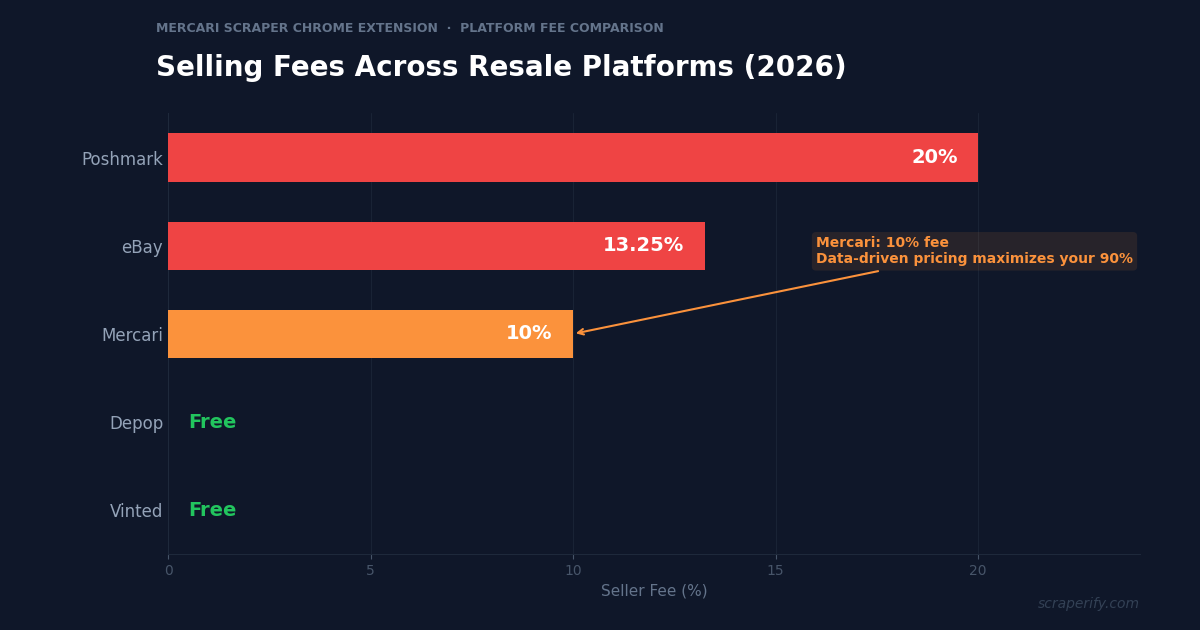
Mercari charges a 10% selling fee on every transaction. That means every dollar you leave on the table by underpricing an item costs you even more than on zero-fee platforms like Depop or Vinted. Accurate pricing is not optional — it is money. But Mercari does not let you export search results, download competitor listings, or extract pricing data. A Mercari scraper Chrome extension solves this — install it, browse Mercari, and export everything to CSV, Excel, or JSON in one click. No coding. No API keys. No per-record fees.
This guide shows you how to use the Scraperify Mercari scraper Chrome extension to export Mercari listings, build pricing databases, and make data-driven reselling decisions.
Why You Need a Mercari Scraper Chrome Extension
Mercari is one of the most popular resale platforms in the US and Japan, known for its simplicity and ease of shipping. Part-time resellers love Mercari because listing an item takes less than 3 minutes — snap photos, add a description, set a price, and you are live. Some sellers report making thousands of dollars on Mercari just by clearing out items from their own homes.
But Mercari has one major limitation: no data export. Without a Mercari scraper Chrome extension, there is no way to download search results, extract pricing data, or export competitor listings to a spreadsheet.
This creates a real problem for resellers who need to price items competitively. Mercari takes a 10% selling fee on every sale — higher than Depop (0%) and Vinted (0%), though lower than Poshmark (20%). With 10% going to the platform, every pricing mistake hits your profit margin hard. Overprice by $10 and the item sits unsold. Underprice by $10 and you lose $9 in take-home profit.
A Mercari scraper Chrome extension eliminates pricing guesswork:
- Captures listing data automatically as you browse Mercari search results
- Exports to CSV, Excel, or JSON with a single click — the Mercari scraper Chrome extension handles all three formats
- Runs inside your browser — the Mercari scraper Chrome extension requires no software installation or server setup
- Processes data locally — the Mercari scraper Chrome extension never sends your data to external servers
- Works with all Mercari categories — electronics, clothing, home goods, collectibles, sporting goods, and more
The Scraperify Mercari scraper Chrome extension is built for resellers who need Mercari data in a spreadsheet format. Whether you sell 5 items a month or 500, the Mercari scraper Chrome extension saves hours of manual research.
What Data Can the Mercari Scraper Chrome Extension Export?
The Scraperify Mercari scraper Chrome extension extracts every visible data point from Mercari pages. Here is what the Mercari scraper Chrome extension captures:
Listing details the Mercari scraper Chrome extension captures:
- Title — full listing title
- Price — current asking price in USD or JPY
- Brand — brand name when listed
- Category — electronics, clothing, home, toys, etc.
- Condition — new, like new, good, fair, poor
- Description — seller’s full item description
- Photos — direct URLs to all listing images via the Mercari scraper Chrome extension
- Listing URL — direct link back to the Mercari listing
- Item ID — unique Mercari identifier
Seller data the Mercari scraper Chrome extension exports:
- Seller username — Mercari handle
- Seller rating — star rating out of 5
- Number of ratings — total transaction reviews
- Number of items listed — active inventory count
- Location — seller’s general area
Pricing and engagement data from the Mercari scraper Chrome extension:
- Original price — if reduced from a higher price
- Shipping — who pays (buyer or seller) and estimated cost
- Likes count — how many users liked the listing (the Mercari scraper Chrome extension captures this for demand analysis)
- Number of comments — buyer interest and negotiation activity
- Date listed — when the item was posted
- Status — active, sold, or inactive
This data is what lets you price with confidence. The Mercari scraper Chrome extension gives you the full competitive picture — what comparable items are listed for, how many likes they have, and whether they are selling or sitting.
WHAT THE MERCARI SCRAPER CHROME EXTENSION EXTRACTS
Listing Data
- Title & Description
- Price & Currency
- Brand & Category
- Condition & Status
- Photo URLs
- Listing URL & Item ID
Seller Data
- Username
- Rating & Reviews
- Items Listed
- Location
Engagement Data
- Likes Count
- Comments Count
- Shipping Details
- Original Price
- Date Listed
How to Install the Mercari Scraper Chrome Extension
Setting up the Mercari scraper Chrome extension takes 30 seconds. No account creation, no API keys, no configuration.
Step 1: Open the Chrome Web Store. Go to the Mercari Scraper Chrome Extension page. The Mercari scraper Chrome extension is called “Mercari Exporter — Bulk Data Export” by Scraperify.
Step 2: Click “Add to Chrome.” Click the button and confirm permissions. The Mercari scraper Chrome extension only needs access to mercari.com.
Step 3: Confirm the installation. The Scraperify icon appears in your toolbar. The Mercari scraper Chrome extension is ready to use immediately.
Step 4: Pin the extension (optional). Click the puzzle piece icon, find the Mercari scraper Chrome extension, and pin it for quick access.
HOW THE MERCARI SCRAPER CHROME EXTENSION WORKS
Install
Add the Mercari scraper Chrome extension — 30 seconds
Browse
Search Mercari — data captured automatically
Click
One click on the Mercari scraper Chrome extension
Export
Download as CSV, Excel, or JSON
How to Export Mercari Listings to CSV (Step-by-Step)
Here is the complete workflow for exporting Mercari listings using the Mercari scraper Chrome extension:
Step 1: Search on Mercari
With the Mercari scraper Chrome extension installed, go to mercari.com and search for the items you want to export. For example, search “PlayStation 5” or “vintage Levi’s 501” to find all matching listings. The Mercari scraper Chrome extension works on every Mercari search page and category page.
Use Mercari’s filters to narrow results before the Mercari scraper Chrome extension starts capturing:
- Filter by category — electronics, clothing, home, toys, sporting goods
- Filter by item condition — new, like new, good, fair
- Filter by price range — set min and max for your budget
- Filter by shipping — free shipping only
- Sort by relevance, newest, price low to high, or price high to low
Step 2: Let the Mercari Scraper Chrome Extension Capture Data
As you scroll through results, the Mercari scraper Chrome extension captures listing data automatically. You do not need to click anything — just browse Mercari as you normally would. The Mercari scraper Chrome extension icon shows a badge count of captured listings. Keep scrolling to load more results, and the Mercari scraper Chrome extension captures those too.
Step 3: Click Export
Click the Mercari scraper Chrome extension icon in your toolbar. Choose your export format:
- CSV — opens in Google Sheets, Excel, or any spreadsheet app
- Excel (.xlsx) — native Excel format with formatted columns
- JSON — structured data for automation and APIs
The Mercari scraper Chrome extension downloads the file instantly.
Step 4: Analyze Your Mercari Data
Open the file from the Mercari scraper Chrome extension. Each row is one Mercari listing. With the Mercari scraper Chrome extension data, you can:
- Sort by price to find the best deals for sourcing
- Filter by condition to focus on new or like-new items
- Sort by likes — high likes mean high demand
- Calculate AVERAGE() and MEDIAN() for competitive pricing
- Filter by status to see only sold items and understand actual market prices
Why Mercari Is Unique for Resellers
Before diving into advanced use cases, it helps to understand what makes Mercari different from other platforms and why the Mercari scraper Chrome extension is especially valuable here:
10% selling fee. Mercari takes 10% of every sale. This is lower than Poshmark (20%) and eBay (13.25%), but higher than Depop and Vinted (both 0%). With 10% going to the platform, accurate pricing through the Mercari scraper Chrome extension directly impacts your take-home. A $50 item nets you $45 on Mercari, but only $40 on Poshmark.
Prepaid shipping labels. Mercari offers prepaid shipping labels from USPS, UPS, and FedEx, making shipping dead simple. You select a shipping option when listing, and Mercari generates the label when the item sells. This simplicity is why many part-time resellers prefer Mercari over platforms with more complex shipping requirements.
US and Japan markets. Mercari operates primarily in the US (mercari.com) and Japan (jp.mercari.com). The Japanese market is particularly interesting for collectors — Japanese-exclusive electronics, vintage clothing, and limited-edition items often sell for premium prices when relisted in the US. The Mercari scraper Chrome extension works on both domains.
Everything sells on Mercari. Unlike Depop (fashion-focused) or Vinted (fashion-focused), Mercari is a general marketplace. Electronics, home goods, baby items, sporting equipment, collectibles, and clothing all sell well. This means the Mercari scraper Chrome extension is useful across a much wider range of product categories.
Smart Pricing feature. Mercari has a built-in “Smart Pricing” feature that automatically lowers your price over time to attract buyers. However, this tool only knows your individual listing — it does not analyze competitor listings. The Mercari scraper Chrome extension fills this gap by giving you the full market picture before you set your initial price.
Wide category appeal. On Mercari, a part-time reseller shared that she made thousands of dollars just by selling items from around her house — things her family no longer used. Unlike fashion-only platforms, Mercari moves electronics quickly (PlayStation consoles, AirPods, gaming peripherals), home goods consistently (KitchenAid mixers, Instant Pots, Dyson vacuums), and collectibles at premium prices (Pokémon cards, vintage toys, limited-edition sneakers). Each of these categories has different pricing dynamics, and the Mercari scraper Chrome extension helps you understand market rates across all of them.
Shipping simplicity. Mercari’s prepaid shipping labels are a game-changer for new resellers. When an item sells, Mercari generates a USPS, UPS, or FedEx label automatically. You print it, tape it to the box, and drop it off. No weighing packages, no calculating rates, no negotiating with carriers. This simplicity is why many resellers start on Mercari before expanding to platforms with more complex shipping workflows. Shipping weight classes range from under 1 lb ($5.99) up to 150 lbs, with UPS and FedEx options for heavier items. Sellers can also offer free shipping by absorbing the cost — a strategy that data shows increases sell-through rates significantly, especially for items under $30.
Ready to export Mercari listings?
Install the Mercari scraper Chrome extension and start exporting data in under 2 minutes. Free tier available.
Add to Chrome — Free5 Ways Resellers Use the Mercari Scraper Chrome Extension
1. Pricing Research Before Listing
The number one use of the Mercari scraper Chrome extension is pricing research. Before listing any item, export all comparable listings from Mercari. If you thrifted a KitchenAid mixer for $15, use the Mercari scraper Chrome extension to export all “KitchenAid mixer” listings. If the median sold price is $85, you know your margin. If the median active price is $95, pricing yours at $80-$85 will move it fast while still netting $72-$76.50 after Mercari’s 10% fee.
2. Cross-Platform Arbitrage
Combine the Mercari scraper Chrome extension with other Scraperify extensions to find price gaps between platforms. Export Mercari data alongside Depop, Vinted, and eBay data. Items that sell for $40 on Mercari might command $60 on eBay, and with the Mercari scraper Chrome extension you can identify these gaps systematically instead of stumbling on them by accident.
3. Sold Listing Analysis
Understanding what actually sells — not just what people are asking — is critical. Use the Mercari scraper Chrome extension to export both active and sold listings. Sold listings reveal the true market price. Active listings that have been sitting for weeks reveal overpriced inventory. The Mercari scraper Chrome extension data lets you calculate the sell-through rate for any product category.
For example, if you export 100 active “Nintendo Switch” listings and 50 sold listings from the past week, you can calculate that the sell-through rate is roughly 50%. If the average active listing price is $220 but the average sold price is $195, you know buyers are only willing to pay about $195 — anything above that is sitting unsold. This kind of analysis is impossible without exported data, and the Mercari scraper Chrome extension makes it trivial.
4. Inventory Sourcing
High-volume resellers use the Mercari scraper Chrome extension to source inventory on Mercari itself. Export listings filtered by “good” or “fair” condition at low prices, then sort by likes. Items with high engagement but low prices are sourcing goldmines — buy them on Mercari, clean or photograph them better, and relist at a higher price on the same platform or cross-list to eBay.
This strategy works particularly well for electronics and collectibles. A used PlayStation 4 listed as “fair” condition for $120 might only need a cleaning and better photos to sell as “good” condition for $175. The price difference minus Mercari’s 10% fee still leaves a healthy margin. The key is finding these opportunities fast — before other resellers spot them — and the Mercari scraper Chrome extension gives you that speed advantage by surfacing hundreds of potential buys in one export.
5. Tax and Bookkeeping
Mercari sellers in the US receive 1099-K forms for sales exceeding $600 in a calendar year. The Mercari scraper Chrome extension helps by exporting your listing data — prices, dates, categories — into spreadsheet format for QuickBooks, Wave, or manual bookkeeping. Having organized sales data from the Mercari scraper Chrome extension makes tax season far less painful.
Mercari Scraper Chrome Extension vs Other Methods
MERCARI SCRAPER: CHROME EXTENSION VS ALTERNATIVES
| Feature | Mercari Scraper Chrome Extension | Python Script | Manual |
|---|---|---|---|
| Setup time | 30 sec | 30-60 min | 0 min |
| Coding required | No | Yes | No |
| Data stays local | ✓ | ✓ | ✓ |
| CSV + Excel + JSON | ✓ | Partial | ✗ |
| Speed (100 listings) | ~2 min | ~10 min | ~3 hours |
The Mercari scraper Chrome extension is the clear winner for non-technical users. Python scripts require coding knowledge, dependency management, and handling Mercari’s anti-bot protections. The Mercari scraper Chrome extension works out of the box in 30 seconds. Manual copy-paste is fine for 5 listings but completely impractical for market research. The Mercari scraper Chrome extension handles hundreds of listings in minutes.
Tips for Using the Mercari Scraper Chrome Extension
Use Specific Search Terms
The Mercari scraper Chrome extension captures everything you scroll past, so narrow your search first. Search “Sony WH-1000XM5 headphones” instead of just “headphones.” Specific searches produce more useful Mercari scraper Chrome extension exports.
Check Both Active and Sold Listings
Active listings show what sellers are asking. Sold listings show what buyers actually pay. Use the Mercari scraper Chrome extension to export both and compare. The gap between asking price and sold price tells you how much room for negotiation exists in any category. On Mercari, buyers frequently use the “Make an Offer” feature, so the typical sold price is 10-20% below the asking price. Knowing this spread helps you set your initial price high enough to absorb offers while still closing sales.
Focus on High-Margin Categories
Not all Mercari categories are equal for reselling profit. Electronics tend to have the highest dollar margins but also the most competition. Vintage and collectible items have the widest price spreads — a rare Pokémon card might range from $5 to $500 depending on condition and seller awareness. Home goods like small appliances sell consistently but with moderate margins. Use the Mercari scraper Chrome extension to export data from your target categories and calculate average margins before committing to inventory purchases.
Export Weekly for Trend Data
Use the Mercari scraper Chrome extension to export the same search weekly. Save exports with dates in the filename. Over time, the Mercari scraper Chrome extension data reveals seasonal pricing trends — electronics drop after holiday returns, winter gear peaks in November, and back-to-school items surge in August.
Understanding seasonality is one of the biggest advantages full-time resellers have over casual sellers. January and February see a flood of new electronics listings as people sell holiday gifts they did not want — prices drop 15-25% during this window, making it an excellent time to source. Spring brings a wave of closet cleanouts with underpriced clothing. Summer is peak season for outdoor and sporting equipment. Fall is when winter gear starts commanding premium prices again. The Mercari scraper Chrome extension data across multiple weeks makes these patterns visible in your spreadsheets.
Organize Your Exports for Long-Term Value
Create a folder structure for your Mercari exports: one folder per product category, with files dated by export date. Over months, you build a pricing database that no competitor has. When a customer asks if $45 is fair for a specific item, you can pull up 6 months of historical data and answer with confidence. This organized approach transforms the Mercari scraper Chrome extension from a one-time tool into an ongoing competitive advantage.
Use Likes as a Demand Signal
On Mercari, the likes count is the strongest demand indicator. Items with 20+ likes but no sale are typically overpriced — there is demand, but the price is too high. Items with 0-2 likes may be in a low-demand category or have poor photos. Use the Mercari scraper Chrome extension to export listings and sort by likes count. The distribution of likes across price points reveals the sweet spot where demand meets willingness to pay.
Combine with Other Scraperify Extensions
The Mercari scraper Chrome extension works alongside other Scraperify tools. Combine it with the Depop Scraper, Vinted Scraper, and eBay Scraper for complete cross-platform pricing data. All Scraperify extensions export in the same CSV format, making multi-platform comparison seamless.
Who Uses the Mercari Scraper Chrome Extension?
The Mercari scraper Chrome extension serves a wide range of users who need Mercari data at scale:
Declutterers and Casual Sellers — People selling items from around their home use the Mercari scraper Chrome extension to price things correctly the first time. Instead of guessing what a used Dyson vacuum or a set of camping gear is worth, they export comparable listings and set competitive prices. Correct pricing means faster sales and less back-and-forth with lowball offers. Many casual sellers discover that items they thought were worth $20 actually sell for $50-$80 on Mercari — and vice versa. The Mercari scraper Chrome extension prevents both underpricing and overpricing.
Part-Time Resellers — Side hustle resellers who source from thrift stores, garage sales, and liquidation pallets use the Mercari scraper Chrome extension to validate sourcing decisions before spending money. Before buying a $5 thrift store find, they check what identical items sell for on Mercari. If the data shows consistent sales at $35+, the purchase is a no-brainer. If similar items are sitting unsold at $15, they pass. The Mercari scraper Chrome extension turns intuition-based sourcing into data-driven sourcing.
Full-Time Reselling Businesses — Professional resellers who process hundreds of items monthly use the Mercari scraper Chrome extension to build category-specific pricing databases. They export data weekly across their top 10 categories, track price trends over time, and adjust inventory strategy based on market data. The Mercari scraper Chrome extension is their competitive intelligence tool — while competitors price by gut feeling, they price by data.
Crosslisting Sellers — Sellers who list on Mercari, eBay, Poshmark, and Depop simultaneously use the Mercari scraper Chrome extension alongside other Scraperify extensions. Exporting data from all platforms into the same CSV format makes cross-platform price comparison effortless. If a North Face jacket sells for $55 on Mercari but $75 on eBay, the crosslister knows to prioritize the eBay listing — or to price the Mercari listing higher. The Mercari scraper Chrome extension combined with other Scraperify tools gives crosslisters a complete view of the resale market.
Collectors and Hobbyists — Pokémon card collectors, vintage toy hunters, and sneaker enthusiasts use the Mercari scraper Chrome extension to track market values for items they are either buying or selling. Mercari is a major marketplace for collectibles, and prices can swing dramatically based on condition, rarity, and market hype. The Mercari scraper Chrome extension helps collectors understand fair market value before making purchase or selling decisions.
Mercari Scraper Chrome Extension — Frequently Asked Questions
Is the Mercari scraper Chrome extension free?
The Mercari scraper Chrome extension offers a free tier with limited exports. Paid plans start at $19.99/month. Lifetime access to the Mercari scraper Chrome extension is $79 — one payment, use forever.
Does the Mercari scraper Chrome extension work on Mercari Japan?
Yes. The Mercari scraper Chrome extension works on both mercari.com (US) and jp.mercari.com (Japan). The Mercari scraper Chrome extension captures data from both domains.
Is my data private with the Mercari scraper Chrome extension?
Yes. The Mercari scraper Chrome extension processes all data locally in your browser. No data leaves your computer. The Mercari scraper Chrome extension does not send listing data to external servers.
How many listings can the Mercari scraper Chrome extension export?
The Mercari scraper Chrome extension has no hard limit. Scroll through results and the Mercari scraper Chrome extension captures everything. Export hundreds or thousands of listings in a single session with the Mercari scraper Chrome extension.
Will the Mercari scraper Chrome extension get my account banned?
The Mercari scraper Chrome extension reads data from pages you are already viewing. The Mercari scraper Chrome extension does not send automated requests. Browse normally and take breaks between long sessions.
Can I export sold Mercari listings with the Mercari scraper Chrome extension?
Yes. When you view sold listings on Mercari, the Mercari scraper Chrome extension captures that data too. This is valuable for understanding actual market prices versus asking prices.
Start Exporting Mercari Listings Today
Stop guessing Mercari prices. The Scraperify Mercari scraper Chrome extension exports hundreds of listings to CSV, Excel, or JSON in under 2 minutes.
What the Mercari scraper Chrome extension gives you:
- Mercari scraper Chrome extension one-click export from any search page
- Complete listing data — titles, prices, brands, conditions, seller info, photos
- Mercari scraper Chrome extension works on US and Japan Mercari domains
- Mercari scraper Chrome extension CSV, Excel, and JSON export formats
- 100% local data processing — the Mercari scraper Chrome extension keeps data private
- Free tier — try the Mercari scraper Chrome extension before you buy
Whether you are a reseller maximizing your 90% take-home after Mercari’s fee, a crosslister comparing prices across platforms, or an analyst tracking market trends, the Mercari scraper Chrome extension is the fastest way to get Mercari data into a spreadsheet.
Export Mercari Listings in One Click
Join resellers who use the Mercari scraper Chrome extension to get Mercari data into spreadsheets — no coding, no API keys.
Add the Mercari Scraper to Chrome →Free tier available · Paid plans from $19.99/month · $79 lifetime