Pinterest Scraper Chrome Extension: Export Pins to CSV
Export Pinterest pins, boards, and image URLs to CSV or Excel. Free Pinterest scraper Chrome extension for marketers, designers, and content creators.
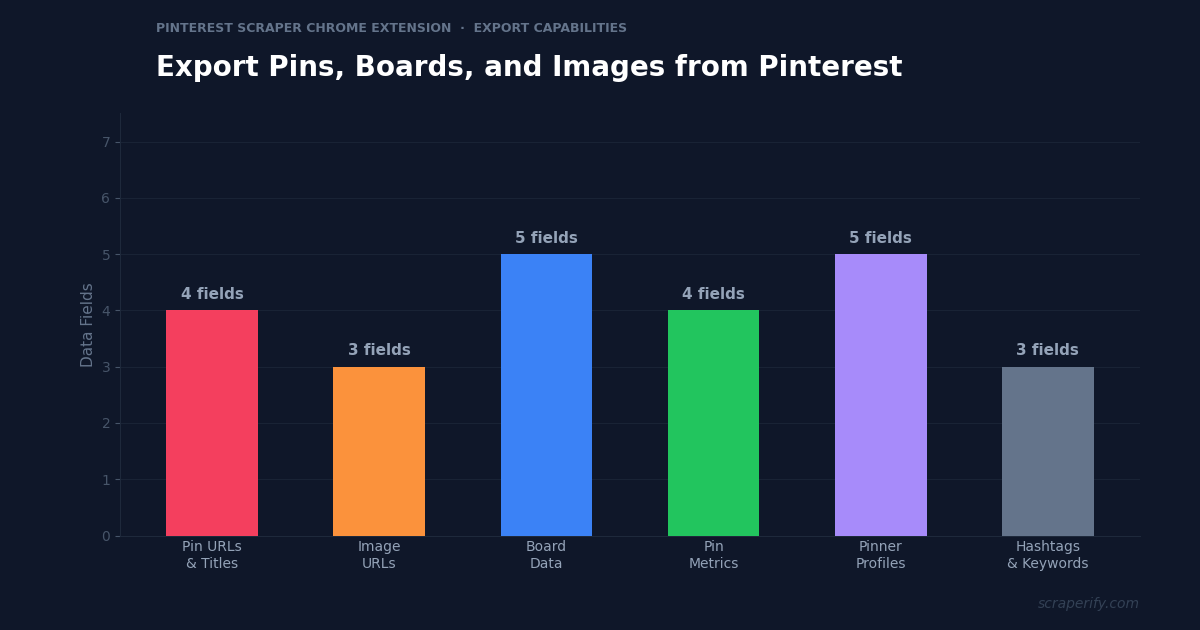
Pinterest has over 500 million monthly active users and billions of saved pins across every visual niche — fashion, home decor, recipes, weddings, travel, art, and more. For marketers, designers, and content creators, Pinterest is a goldmine of visual inspiration and trend data. But Pinterest does not let you export pins, download board data, or save search results to a spreadsheet. A Pinterest scraper Chrome extension fixes this — install it, browse Pinterest, and export pins, boards, and image URLs to CSV, Excel, or JSON in one click. No coding. No API keys.
This guide shows you how to use a Pinterest scraper Chrome extension to export pin data, build mood boards offline, analyze trending content, and do visual content research at scale.
Why You Need a Pinterest Scraper Chrome Extension
Pinterest is fundamentally different from other social media platforms. While Instagram and TikTok are about following people, Pinterest is about discovering ideas. Users search for “modern kitchen design,” “fall wedding flowers,” or “minimalist logo ideas” — and Pinterest serves visual results from across the platform. This search-driven behavior makes Pinterest data uniquely valuable for businesses.
But Pinterest locks all this data inside its platform. Without a Pinterest scraper Chrome extension, there is no way to download pin images in bulk, export board contents to a spreadsheet, or extract trending search data. Designers screenshot individual pins. Marketers manually copy pin URLs. Content creators browse endlessly without capturing what they find.
A Pinterest scraper Chrome extension changes this workflow entirely:
- Exports pin data automatically as you browse Pinterest search results, boards, and profiles
- Captures image URLs — the Pinterest scraper Chrome extension gives you direct links to full-resolution pin images
- Exports to CSV, Excel, or JSON — the Pinterest scraper Chrome extension supports all formats
- Extracts pin metrics — saves, comments, and source URLs
- Runs inside your browser — no software installation required
- Processes data locally — the Pinterest scraper Chrome extension never sends data externally
The Scraperify Pinterest scraper Chrome extension is built for social media marketers analyzing Pinterest trends, designers building reference libraries, content creators researching what performs well, and e-commerce brands tracking product pins.
What Data Can the Pinterest Scraper Chrome Extension Export?
The Pinterest scraper Chrome extension extracts every visible data point from Pinterest pages:
Pin data the Pinterest scraper Chrome extension captures:
- Pin title — the pin’s headline text
- Pin description — full description with hashtags and keywords
- Image URL — direct link to the full-resolution pin image via the Pinterest scraper Chrome extension
- Pin URL — direct link to the pin on Pinterest
- Source URL — the original website the pin links to (blog post, product page, etc.)
- Pin type — standard pin, video pin, idea pin, product pin
- Save count — how many users have saved the pin (the Pinterest scraper Chrome extension captures this as a popularity signal)
- Comment count — number of comments on the pin
Board data the Pinterest scraper Chrome extension exports:
- Board name — the board title
- Board description — board description text
- Pin count — number of pins in the board
- Board URL — direct link to the board
- Board owner — the Pinterest user who created the board
- Board followers — how many users follow the board
Pinner profile data from the Pinterest scraper Chrome extension:
- Username — Pinterest handle
- Display name — profile name
- Bio — profile description
- Follower count — total followers
- Following count — total following
- Monthly views — Pinterest’s monthly viewer metric
- Profile URL — direct link to the profile
- Website URL — linked website
This data set powers everything from competitive content analysis to visual trend research to product pin tracking. The Pinterest scraper Chrome extension gives you the raw data that expensive Pinterest analytics tools charge for.
WHAT THE PINTEREST SCRAPER CHROME EXTENSION EXTRACTS
Pin Data
- Title & Description
- Image URL (full-res)
- Source URL
- Pin Type
- Save & Comment Count
Board Data
- Board Name & Description
- Pin Count
- Board URL
- Board Owner
- Board Followers
Pinner Profiles
- Username & Display Name
- Bio & Website
- Followers & Following
- Monthly Views
- Profile URL
How to Install the Pinterest Scraper Chrome Extension
Setting up the Pinterest scraper Chrome extension takes 30 seconds.
Step 1: Open the Chrome Web Store and search for “Pinterest Scraper.” The Scraperify Pinterest scraper Chrome extension exports pins, boards, and profiles to CSV.
Step 2: Click “Add to Chrome” and confirm permissions. The Pinterest scraper Chrome extension needs access to pinterest.com.
Step 3: The Pinterest scraper Chrome extension is ready immediately — browse Pinterest and start exporting.
HOW THE PINTEREST SCRAPER CHROME EXTENSION WORKS
Install
Add the Pinterest scraper Chrome extension
Browse
Search Pinterest or view any board
Click
One click on the Pinterest scraper Chrome extension
Export
Download CSV, Excel, or JSON
How to Export Pinterest Pins to CSV (Step-by-Step)
Step 1: Search or Browse Pinterest
With the Pinterest scraper Chrome extension installed, go to pinterest.com and search for a topic, browse a board, or visit a profile. The Pinterest scraper Chrome extension works on all Pinterest page types — search results, boards, profiles, and trending pages.
Step 2: Scroll to Load Pins
Pinterest uses infinite scroll. The Pinterest scraper Chrome extension captures pins as they load. Scroll down to load more pins — the more you scroll, the more the Pinterest scraper Chrome extension captures.
Step 3: Click Export
Click the Pinterest scraper Chrome extension icon. Choose CSV, Excel, or JSON. The Pinterest scraper Chrome extension downloads the file with pin titles, descriptions, image URLs, source URLs, and save counts.
Step 4: Use Your Pinterest Data
Open the export. Each row is one pin. With the data:
- Sort by save count to find the most popular pins in any topic
- Extract image URLs for mood board creation or design reference
- Analyze source URLs to discover which websites drive the most Pinterest traffic
- Study pin descriptions and hashtags for Pinterest SEO keyword research
- Filter by pin type to focus on standard pins, video pins, or product pins
Why Pinterest Data Matters for Marketers and Creators
Pinterest is a visual search engine with unique characteristics that make exported data especially valuable:
Pinterest drives traffic to websites. Unlike Instagram (where links are limited), every Pinterest pin can link to an external website. The Pinterest scraper Chrome extension captures these source URLs, letting you analyze which websites dominate Pinterest traffic in your niche. If a competitor’s blog post has been pinned 50,000 times, that pin is driving significant traffic — and you should study what makes it pin-worthy.
Save count is the ultimate engagement metric. When someone saves a pin, they are bookmarking it for future reference — a much stronger intent signal than a like or view. The Pinterest scraper Chrome extension exports save counts, letting you identify which visual styles, topics, and formats get saved most. A pin with 10,000 saves is performing 100x better than one with 100 saves — and the difference is usually in the visual design and description, not the topic.
Pinterest SEO drives organic discovery. Pinterest works like a search engine — users type queries and get results. Pin titles, descriptions, and hashtags determine which pins appear in search results. The Pinterest scraper Chrome extension exports these text fields, letting you reverse-engineer the SEO strategy of top-performing pins. What keywords do they use? How long are their descriptions? Which hashtags drive the most saves?
Trends on Pinterest predict retail trends. Pinterest’s trend data is a leading indicator — what people pin today, they buy in 3-6 months. Home decor trends, fashion trends, and wedding trends all appear on Pinterest before they hit mainstream retail. The Pinterest scraper Chrome extension data reveals these trends through save velocity — pins that are gaining saves rapidly are trending up.
Product pins drive e-commerce sales. E-commerce brands use product pins that link directly to purchase pages. The Pinterest scraper Chrome extension identifies product pins in exports, showing which competitor products perform best on Pinterest. If a competitor’s product pin has 25,000 saves, that product has validated demand through Pinterest’s discovery engine.
Ready to export Pinterest data?
Scraperify offers Chrome extensions for 40+ platforms including Pinterest, Instagram, and TikTok. Export visual content data to CSV.
Browse All Scrapers →5 Ways to Use the Pinterest Scraper Chrome Extension
1. Content Strategy Research
Social media managers use the Pinterest scraper Chrome extension to analyze what content performs best in their niche. Export the top 100 pins for a search term like “minimalist living room.” Sort by save count. The top 10 pins reveal exactly what visual style, color palette, and composition Pinterest users love. Use these insights to create pins that match proven preferences rather than guessing what will work.
2. Mood Board and Design Reference
Interior designers, graphic designers, and creative professionals use the Pinterest scraper Chrome extension to export board contents for offline reference. Instead of bookmarking hundreds of pins, export the entire board to CSV with image URLs. Download the images using the URLs for a local reference library that works without internet access. This is especially valuable for designers who present mood boards to clients — exported data feeds into professional presentation tools.
3. Pinterest SEO and Keyword Research
Pinterest is a search engine, and pin descriptions are SEO content. Export the top-performing pins for your target keywords with the Pinterest scraper Chrome extension. Analyze the descriptions: what keywords do they include? How long are they? Which hashtags appear most frequently? This reverse-engineering approach reveals the Pinterest SEO formula for your niche — write descriptions like the top performers, and your pins will rank similarly.
4. Competitor Pin Analysis
Brands monitoring competitors on Pinterest use the Pinterest scraper Chrome extension to export competitor boards and profiles. How many pins do they post per week? Which boards drive the most saves? What types of pins (product, lifestyle, tutorial) perform best? This competitive intelligence shapes your own Pinterest strategy — replicate what works and avoid what does not.
5. E-Commerce Product Research
Sellers on Shopify, Etsy, and Amazon use the Pinterest scraper Chrome extension to discover trending products. Export pins from categories like “kitchen gadgets” or “home office accessories,” filter for product pins, and sort by save count. Products with thousands of saves have validated consumer interest through Pinterest’s discovery engine — making them strong candidates for your store.
Pinterest Scraper Chrome Extension vs Other Methods
PINTEREST SCRAPER: CHROME EXTENSION VS ALTERNATIVES
| Feature | Pinterest Scraper Chrome Extension | Pinterest API | Manual |
|---|---|---|---|
| Coding required | No | Yes | No |
| Image URL export | ✓ (full-res) | ✓ | ✗ (screenshots) |
| Save count data | ✓ | ✓ | ✗ |
| Speed (100 pins) | ~2 min | ~5 min | ~3 hours |
Tips for Using the Pinterest Scraper Chrome Extension
Sort by Save Count for Trend Discovery
After exporting with the Pinterest scraper Chrome extension, sort by save count descending. The top-saved pins in any search represent what Pinterest users value most. Study these pins’ visual style, title structure, and description keywords — then apply those patterns to your own pins.
Extract Source URLs to Find Traffic-Driving Websites
The Pinterest scraper Chrome extension captures the source URL that each pin links to. Filter for pins with high save counts and check their source URLs. These websites are getting massive free traffic from Pinterest. Analyze what makes their content pin-worthy — usually high-quality images, useful tutorials, or inspirational galleries.
Export Competitor Boards Monthly
Use the Pinterest scraper Chrome extension to export competitor boards monthly. Track which new pins they add, which pins gain the most saves, and what content themes they are focusing on. This competitive monitoring reveals their Pinterest strategy in data form.
Combine with Instagram Data for Visual Content Strategy
Pinterest and Instagram are both visual platforms but serve different purposes. Use the Pinterest scraper Chrome extension alongside the Instagram Scraper to compare which visual content performs best on each platform. A design style that gets 10K saves on Pinterest might get minimal engagement on Instagram — and vice versa.
Who Uses the Pinterest Scraper Chrome Extension?
Social Media Marketers — Analyze Pinterest trends, research competitor strategies, and build data-driven content calendars. The Pinterest scraper Chrome extension replaces hours of manual browsing with structured CSV data.
Interior Designers — Export boards of design inspiration to CSV with image URLs. Build client-facing mood boards from exported data. Track trending design styles through pin save velocity.
E-Commerce Brands — Monitor product pin performance, track competitor products on Pinterest, and identify trending product categories. The Pinterest scraper Chrome extension connects Pinterest discovery data to product development decisions.
Content Creators and Bloggers — Research which blog topics generate the most Pinterest saves. Export top pins in your niche, analyze their titles and descriptions for SEO keywords, and create content optimized for Pinterest discovery.
Wedding Planners — Export wedding inspiration boards for clients. The Pinterest scraper Chrome extension captures image URLs, descriptions, and source links for organized reference libraries.
Graphic Designers — Build design reference collections organized by style, color, and theme. Export pin data to spreadsheets for categorized design libraries that are searchable and shareable.
Pinterest Scraper Chrome Extension — FAQs
Is the Pinterest scraper Chrome extension free?
The Pinterest scraper Chrome extension offers a free tier. Scraperify plans start at $19.99/month or $79 lifetime.
Can the Pinterest scraper Chrome extension download images?
The Pinterest scraper Chrome extension exports image URLs — direct links to full-resolution pin images. You can then batch-download images using the exported URLs.
Does the Pinterest scraper Chrome extension export save counts?
Yes. The Pinterest scraper Chrome extension captures save counts (how many users saved each pin) — the most important engagement metric on Pinterest.
Is my data private with the Pinterest scraper Chrome extension?
Yes. The Pinterest scraper Chrome extension processes everything locally. No pin data leaves your browser.
Can I export an entire Pinterest board?
Yes. Navigate to a board, scroll to load all pins, and the Pinterest scraper Chrome extension captures every pin. Export the complete board to CSV with titles, image URLs, and save counts.
Start Exporting Pinterest Data Today
Stop screenshotting pins one at a time. The Pinterest scraper Chrome extension exports pin data, image URLs, and board contents to CSV so you can build design libraries, analyze trends, and research competitors with data.
Scraperify offers Chrome extensions for 40+ platforms including Instagram for social media comparison and TikTok Shop for e-commerce product trends.
Export Pinterest Pins in One Click
Scraperify’s Chrome extensions export data from Pinterest, Instagram, and 40+ platforms for visual content research.
Browse All Scrapers →Free tier · $19.99/month · $79 lifetime