Shopee Scraper Chrome Extension: Export Products to CSV
Export Shopee product data, reviews, and seller info to CSV, Excel, or JSON. Free Shopee scraper Chrome extension for Southeast Asia market research.
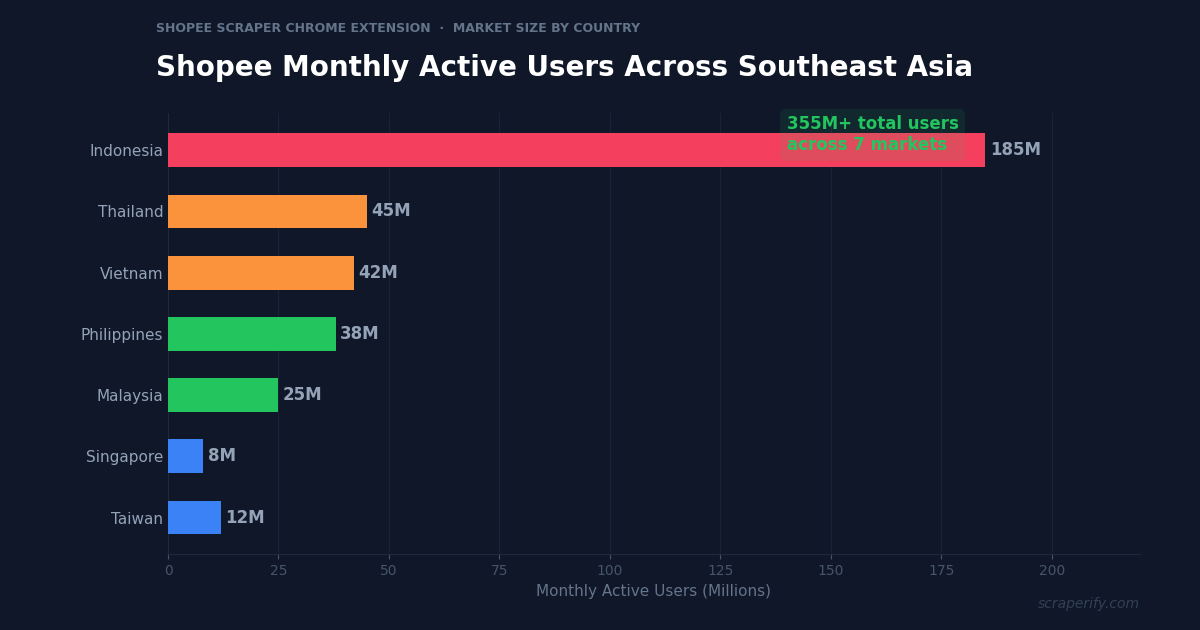
Shopee is the largest e-commerce platform in Southeast Asia, with over 355 million monthly active users across Indonesia, Thailand, Vietnam, Philippines, Malaysia, Singapore, and Taiwan. For sellers, dropshippers, and product researchers targeting SEA markets, Shopee data is essential — but the platform offers no built-in export feature. A Shopee scraper Chrome extension solves this problem. Install it, browse Shopee, and export product listings, reviews, and seller data to CSV, Excel, or JSON in one click. No coding. No API keys. No per-record fees.
This guide shows you how to use the Scraperify Shopee scraper Chrome extension to export Shopee data, analyze competitors, and find winning products across Southeast Asia’s biggest e-commerce marketplace.
Why You Need a Shopee Scraper Chrome Extension
Shopee dominates e-commerce in Southeast Asia. In Indonesia alone, the platform has 185 million monthly active users — more than any other marketplace in the region. For sellers and researchers, this massive user base means massive amounts of product data that can inform pricing, sourcing, and market entry decisions.
But Shopee locks all this data inside the platform. Without a Shopee scraper Chrome extension, there is no way to download search results, export competitor product listings, or extract review data to a spreadsheet. Everything must be browsed one listing at a time.
This is a serious bottleneck for anyone doing market research across multiple Shopee markets. Shopee operates separate domains for each country — shopee.sg (Singapore), shopee.co.id (Indonesia), shopee.co.th (Thailand), shopee.vn (Vietnam), shopee.ph (Philippines), shopee.com.my (Malaysia), and shopee.tw (Taiwan). Comparing prices and product availability across seven markets manually is a full-time job. The Shopee scraper Chrome extension reduces this to minutes.
A Shopee scraper Chrome extension automates the data collection:
- Captures product data automatically as you browse Shopee search results or seller shops
- Exports to CSV, Excel, or JSON — the Shopee scraper Chrome extension supports all three formats
- Runs inside your browser — the Shopee scraper Chrome extension requires no software installation
- Processes data locally — the Shopee scraper Chrome extension never sends your data to external servers
- Works across all Shopee markets — the Shopee scraper Chrome extension supports all 7 country domains
- Exports reviews and seller data — not just product listings
The Scraperify Shopee scraper Chrome extension is built for cross-border sellers, dropshippers sourcing from Southeast Asia, market researchers analyzing SEA e-commerce, and Shopee sellers optimizing their own product listings.
What Data Can the Shopee Scraper Chrome Extension Export?
The Scraperify Shopee scraper Chrome extension extracts every visible data point from Shopee pages. Here is what the Shopee scraper Chrome extension captures:
Product details the Shopee scraper Chrome extension captures:
- Product title — full listing title in local language or English
- Price — current price in local currency (SGD, IDR, THB, VND, PHP, MYR, TWD)
- Original price — before-discount price
- Discount percentage — flash sale or seller discount
- Category — product category and subcategory
- Product images — direct URLs to all product photos via the Shopee scraper Chrome extension
- Product URL — direct link to the Shopee listing
- SKU/Variations — available sizes, colors, and options
Review and sales data the Shopee scraper Chrome extension exports:
- Star rating — average rating out of 5
- Number of ratings — total review count (the Shopee scraper Chrome extension captures this as a demand signal)
- Units sold — total sales count (shown on Shopee as “X sold”)
- Review text — individual review content when on product detail pages
- Review photos — buyer-uploaded images
Seller data from the Shopee scraper Chrome extension:
- Shop name — seller’s store name
- Shop rating — overall seller rating
- Response rate — how quickly the seller responds to messages
- Products listed — total number of active listings
- Follower count — shop followers
- Location — seller’s city and country
- Join date — when the seller created their Shopee account
This data is critical for competitive analysis in Southeast Asian markets. The Shopee scraper Chrome extension gives you the complete picture — what sells, at what price, from which sellers, with what level of customer satisfaction.
WHAT THE SHOPEE SCRAPER CHROME EXTENSION EXTRACTS
Product Data
- Title & Description
- Price & Original Price
- Discount & Flash Sale
- Category
- Image URLs & Variations
- Product URL
Sales & Reviews
- Star Rating
- Review Count
- Units Sold
- Review Text
- Buyer Photos
Seller Data
- Shop Name & Rating
- Response Rate
- Products Listed
- Follower Count
- Location & Join Date
How to Install the Shopee Scraper Chrome Extension
Setting up the Shopee scraper Chrome extension takes 30 seconds.
Step 1: Open the Chrome Web Store. Go to the Shopee Scraper Chrome Extension page. The Shopee scraper Chrome extension is called “SEA Shop Scraper — Export Products” by Scraperify.
Step 2: Click “Add to Chrome.” Confirm permissions. The Shopee scraper Chrome extension needs access to shopee.* domains.
Step 3: Start using it. The Shopee scraper Chrome extension is ready immediately — no account or API key needed.
HOW THE SHOPEE SCRAPER CHROME EXTENSION WORKS
Install
Add the Shopee scraper Chrome extension — 30 sec
Browse
Search any Shopee market — data captured automatically
Click
One click on the Shopee scraper Chrome extension
Export
Download CSV, Excel, or JSON
How to Export Shopee Products to CSV (Step-by-Step)
Step 1: Search on Shopee
With the Shopee scraper Chrome extension installed, go to any Shopee domain and search for products. The Shopee scraper Chrome extension works across all 7 Shopee markets:
| Market | Domain | Currency |
|---|---|---|
| Singapore | shopee.sg | SGD |
| Indonesia | shopee.co.id | IDR |
| Thailand | shopee.co.th | THB |
| Vietnam | shopee.vn | VND |
| Philippines | shopee.ph | PHP |
| Malaysia | shopee.com.my | MYR |
| Taiwan | shopee.tw | TWD |
Use Shopee’s filters to narrow results before the Shopee scraper Chrome extension starts capturing — filter by category, price range, rating, shipping option, and location.
Step 2: Let the Shopee Scraper Chrome Extension Capture Data
As you scroll, the Shopee scraper Chrome extension captures product data automatically. The Shopee scraper Chrome extension icon shows a badge count. Keep scrolling to capture more — the Shopee scraper Chrome extension grabs everything you see.
Step 3: Click Export
Click the Shopee scraper Chrome extension icon. Choose CSV, Excel, or JSON. The Shopee scraper Chrome extension downloads instantly.
Step 4: Analyze Your Shopee Data
Open the Shopee scraper Chrome extension export. Each row is one product. Sort by units sold for bestsellers, by rating for quality products, or by price for sourcing opportunities. Calculate margins by comparing Shopee prices to your target selling price on other platforms.
Why Shopee Data Matters for Cross-Border E-Commerce
Shopee is not just another marketplace — it is the gateway to Southeast Asia’s 700 million consumers. Understanding why Shopee data is so valuable helps you use the Shopee scraper Chrome extension more effectively:
Seven separate markets with different dynamics. A phone case that sells for SGD $3.50 in Singapore might be IDR 15,000 (about $0.90) in Indonesia. Price differences across Shopee’s seven markets create arbitrage opportunities for cross-border sellers. The Shopee scraper Chrome extension lets you export the same product search from all seven domains and compare prices in a single spreadsheet.
“Units sold” is publicly visible. Unlike Amazon (which hides exact sales data) or eBay (which only shows recent sales), Shopee displays total units sold on every product card. This is one of the most valuable data points for product researchers — a product showing “50K+ sold” has undeniable market validation. The Shopee scraper Chrome extension captures this metric for every exported product.
Flash sales and promotional pricing. Shopee runs aggressive promotions — 9.9, 10.10, 11.11, 12.12 sales events — where prices can drop 30-70%. The Shopee scraper Chrome extension captures both the current price and original price, so you can identify true everyday pricing versus promotional pricing. This distinction matters for suppliers and dropshippers who need to calculate sustainable margins.
Seller ecosystem is transparent. Shopee shows seller ratings, response rates, follower counts, and product counts publicly. The Shopee scraper Chrome extension captures all of this. For competitor analysis, this data reveals which sellers are growing fastest, which have the best customer service, and which carry the widest product assortments. For supplier identification, high-rated sellers with thousands of products are often manufacturers or authorized distributors.
Multi-language product data. Shopee product listings are in local languages — Bahasa Indonesia, Thai, Vietnamese, Filipino, Malay, and Chinese. The Shopee scraper Chrome extension captures titles and descriptions in whatever language they appear. For cross-border sellers, exported product titles in local languages can be used as SEO keywords for localized storefronts.
Shopee’s promotional calendar creates predictable opportunities. The platform runs major sales events on the 9th of September (9.9), 10th of October (10.10), 11th of November (11.11 — the biggest e-commerce day in Asia), and 12th of December (12.12). During these events, prices drop 30-70% and sales volume spikes dramatically. Sellers who prepare inventory and pricing strategies in advance consistently outperform those who react last-minute. Exporting competitor data 2-3 weeks before each sale event gives you time to adjust pricing, stock up on inventory, and create promotional campaigns that undercut competitors.
Shopee Mall vs regular sellers. Shopee has two seller tiers: Shopee Mall (official brand stores with verified products) and regular sellers (individual and small business sellers). Price differences between Mall and non-Mall sellers for identical products can be 20-40%. Regular sellers often source from the same manufacturers but offer lower prices due to lower overhead. For product researchers, comparing Mall vs non-Mall pricing reveals the true wholesale cost of goods — the non-Mall price is closer to what you can achieve with direct manufacturer sourcing.
Regional demand variations. Consumer preferences vary significantly across Shopee’s seven markets. Beauty products are the top category in Thailand and Vietnam, while electronics dominate in Singapore and Malaysia. Fashion is the biggest category in Indonesia and Philippines. Understanding these regional preferences — visible in the exported data — helps cross-border sellers focus their inventory on what actually sells in each market rather than assuming all SEA markets are identical.
Ready to export Shopee product data?
Install the Shopee scraper Chrome extension and start exporting data from all 7 SEA markets. Free tier available.
Add to Chrome — Free5 Ways to Use the Shopee Scraper Chrome Extension
1. Cross-Market Price Comparison
The most powerful use of the Shopee scraper Chrome extension is comparing prices across Shopee’s seven markets. Export the same product search from shopee.sg, shopee.co.id, shopee.co.th, and shopee.ph. The Shopee scraper Chrome extension data reveals price gaps that create arbitrage opportunities.
For example, a popular Bluetooth speaker might cost SGD $25 on Shopee Singapore but only PHP 450 ($8) on Shopee Philippines. Cross-border sellers who source from lower-priced markets and sell in higher-priced markets capture this spread. The Shopee scraper Chrome extension makes identifying these gaps systematic instead of accidental.
2. Competitor Product Analysis
Use the Shopee scraper Chrome extension to export all products from a competitor’s Shopee shop. The Shopee scraper Chrome extension captures every product the seller lists — prices, ratings, units sold, and variations. This gives you a complete view of their inventory, pricing strategy, and bestselling items. Identify gaps in their product line that you can fill, or find their top sellers to compete against with better pricing or bundling.
3. Product Research for Dropshipping
Shopee is a major sourcing platform for dropshippers selling on Amazon, eBay, Shopify, and TikTok Shop. The Shopee scraper Chrome extension helps you find winning products by exporting search results and sorting by units sold. Products with 10K+ sales on Shopee have proven demand. Export the data, calculate your margin after platform fees and shipping, and list the winners on your store.
Many successful dropshippers combine the Shopee scraper Chrome extension with the Temu Scraper to compare sourcing costs across both platforms. Temu often has lower per-unit prices, but Shopee sellers sometimes offer better bulk pricing and faster shipping to SEA destinations.
4. Review Mining for Product Insights
The Shopee scraper Chrome extension can export product reviews — not just ratings. This is invaluable for product developers and private label sellers. Export reviews for products in your niche, analyze what customers love and hate, and use those insights to create a better version.
Common patterns in Shopee reviews reveal product improvement opportunities: “battery dies too fast,” “color is different from photos,” “great quality but slow shipping.” These pain points are your competitive advantages if you source a product that solves them.
The review mining workflow is straightforward: export 500+ reviews for the top 5 products in your target category. Group complaints by theme (quality, shipping, accuracy, sizing). If 40% of reviews for LED strip lights mention “adhesive falls off,” you know that sourcing LED strips with better adhesive tape — even if it costs $0.50 more per unit — will result in better reviews and higher conversion on your own listing. This kind of competitive intelligence is invisible without exported review data.
5. Shopee Affiliate Product Selection
Shopee has a growing affiliate program. Affiliates earn commissions by promoting Shopee products on social media, blogs, and YouTube. The Shopee scraper Chrome extension helps affiliates find the highest-converting products — export bestsellers with high ratings and identify products with the best commission rates. Having this data in a spreadsheet lets affiliates build content calendars and track which promoted products perform best.
Shopee Scraper Chrome Extension vs Other Methods
SHOPEE SCRAPER: CHROME EXTENSION VS ALTERNATIVES
| Feature | Shopee Scraper Chrome Extension | Python Script | Apify Actor |
|---|---|---|---|
| Setup time | 30 sec | 1-2 hours | 5-10 min |
| Coding required | No | Yes | No |
| Data stays local | ✓ | ✓ | ✗ |
| All 7 SEA markets | ✓ | Varies | Varies |
| Cost | Free tier | Free | Pay/record |
The Shopee scraper Chrome extension is the best option for non-technical users. Shopee has a complex API (v4) that requires authentication tokens, anti-bot cookies, and rotates its endpoint structure frequently — Python scrapers built from GitHub repos break every few weeks when Shopee updates its defenses. Developers on Reddit report spending more time maintaining their scrapers than analyzing the data they collect.
Apify actors work but charge per record scraped and process your data on external servers — a privacy concern for businesses that do not want competitors or data brokers to see what products they are researching. The Shopee scraper Chrome extension bypasses all API complexity by reading directly from the browser, works across all seven markets, and keeps every byte of data on your local machine. No tokens, no proxies, no credit-per-record billing — just data that flows from your browser to your spreadsheet.
Tips for Using the Shopee Scraper Chrome Extension
Compare Across All 7 Markets
The Shopee scraper Chrome extension works on every Shopee domain. Run the same search on shopee.sg, shopee.co.id, and shopee.com.my to discover pricing disparities. Products sourced from Indonesia (lowest prices) and sold in Singapore (highest prices) often have the best margins.
Use “Units Sold” as Your Primary Filter
After exporting with the Shopee scraper Chrome extension, sort by units sold descending. Products with 10K+ sales are validated bestsellers. Products with under 100 sales are unproven. Focus your research on proven demand — the Shopee scraper Chrome extension data makes this filter trivial.
A useful benchmark: in most Shopee categories, the top 20% of products by units sold account for 80% of total revenue. These top performers are your primary competitive targets. Studying their pricing, photos, titles, and review counts reveals the playbook for success in that category. The remaining 80% of products are either underperforming (poor photos, wrong pricing) or serving very small niches. Either way, the Shopee scraper Chrome extension data tells you where the real volume is.
Export Seller Shops for Competitor Intelligence
Navigate to a competitor’s Shopee shop page and use the Shopee scraper Chrome extension to export their entire product catalog. The Shopee scraper Chrome extension captures all products, prices, ratings, and sales counts. This reveals their bestsellers, pricing strategy, and inventory gaps you can exploit.
Export Reviews for Product Development
Use the Shopee scraper Chrome extension on product detail pages to export reviews. Analyze what buyers complain about — these complaints are product improvement opportunities. If 30% of reviews mention “bad packaging,” you can differentiate by offering better packaging on the same product.
Reviews also reveal keyword opportunities. Buyers describe products using language that differs from seller listings — “super bright” instead of “high lumens,” “fits perfectly” instead of “accurate sizing.” These buyer phrases are the exact search terms that other shoppers use when looking for products. Adding them to your own product titles and descriptions improves search visibility on every platform, not just Shopee.
Track Flash Sale Pricing Separately
During Shopee’s 9.9, 11.11, and 12.12 sales events, prices drop dramatically. Use the Shopee scraper Chrome extension to export data during these events separately from regular-period exports. Keep flash sale exports in a separate folder labeled by event date. This distinction matters because flash sale prices are temporary and do not represent sustainable market pricing. If you base your sourcing decisions on 11.11 prices, you may find that the same products cost 40-60% more at regular times. Having both datasets lets you calculate true average cost and set realistic margin expectations for year-round selling.
Monitor Shopee Preferred Sellers
Shopee highlights “Preferred” and “Star” sellers who meet high performance standards (fast shipping, low cancellation rate, high ratings). These sellers are often the most successful in their categories. Use the Shopee scraper Chrome extension to export their product catalogs and study their pricing strategies, product selection, and inventory breadth. Preferred sellers have already done the hard work of figuring out what sells — learning from their approach accelerates your own growth.
Combine with Other Scraperify Extensions
Use the Shopee scraper Chrome extension alongside the Temu Scraper for sourcing comparison, the eBay Scraper for Western market pricing, and the Walmart Scraper for US retail benchmarks. All Scraperify extensions export in the same format.
Who Uses the Shopee Scraper Chrome Extension?
Cross-Border Sellers — Sellers operating across multiple Shopee markets use the Shopee scraper Chrome extension to compare prices and identify which markets to prioritize. The Shopee scraper Chrome extension data across all seven domains reveals where demand is highest and competition lowest.
Dropshippers — Shopify and TikTok Shop dropshippers use the Shopee scraper Chrome extension to find winning products with proven demand (high units sold) at low sourcing costs. The Shopee scraper Chrome extension replaces hours of manual browsing with a 2-minute data export.
Brand Owners — Brands selling on Shopee use the Shopee scraper Chrome extension to monitor competitor pricing, track unauthorized resellers, and benchmark their product performance against the market. The Shopee scraper Chrome extension exports give brands a data-driven view of their competitive landscape.
Market Researchers — Analysts covering Southeast Asian e-commerce use the Shopee scraper Chrome extension to gather market data at scale. The Shopee scraper Chrome extension data feeds into reports on market sizing, pricing trends, and category growth across the region.
Shopee Affiliates — Affiliate marketers use the Shopee scraper Chrome extension to identify high-commission, high-converting products to promote. The Shopee scraper Chrome extension exports bestseller data that informs content creation and promotional strategies.
Academic Researchers — University researchers studying Southeast Asian digital commerce, consumer behavior, and platform economics use the Shopee scraper Chrome extension to gather large datasets. Research papers on SEA e-commerce adoption, pricing dynamics, and marketplace competition often require thousands of product data points that would be impossible to collect manually. The Shopee scraper Chrome extension outputs clean, structured data that imports directly into R, Python pandas, or SPSS for statistical analysis.
Supply Chain Professionals — Procurement teams at retail companies and manufacturers use Shopee data to benchmark supplier pricing and identify new product trends in Asian markets before they reach Western retailers. Monitoring Shopee’s bestseller lists across all seven markets provides an early warning system for emerging product categories that may disrupt established supply chains within 6-12 months.
Shopee Scraper Chrome Extension — Frequently Asked Questions
Is the Shopee scraper Chrome extension free?
The Shopee scraper Chrome extension offers a free tier. Paid plans start at $19.99/month. Lifetime access to the Shopee scraper Chrome extension is $79.
Does the Shopee scraper Chrome extension work on all Shopee markets?
Yes. The Shopee scraper Chrome extension works on shopee.sg, shopee.co.id, shopee.co.th, shopee.vn, shopee.ph, shopee.com.my, and shopee.tw.
Can the Shopee scraper Chrome extension export reviews?
Yes. The Shopee scraper Chrome extension exports review text, star ratings, reviewer names, and review photos when used on product detail pages.
Is my data private with the Shopee scraper Chrome extension?
Yes. The Shopee scraper Chrome extension processes everything locally. No data leaves your browser. The Shopee scraper Chrome extension does not send product data to external servers.
How many products can the Shopee scraper Chrome extension export?
The Shopee scraper Chrome extension has no hard limit. Scroll through results and the Shopee scraper Chrome extension captures everything. Export hundreds or thousands per session.
Will the Shopee scraper Chrome extension get my account banned?
The Shopee scraper Chrome extension reads data from pages you view — no automated requests. Browse normally and take breaks between sessions.
Start Exporting Shopee Data Today
Stop browsing Shopee manually across seven markets. The Shopee scraper Chrome extension exports hundreds of products to CSV, Excel, or JSON in minutes.
What the Shopee scraper Chrome extension gives you:
- Shopee scraper Chrome extension one-click export from any search or shop page
- Complete data — products, prices, ratings, reviews, seller info, units sold
- Shopee scraper Chrome extension works across all 7 Southeast Asian markets
- Shopee scraper Chrome extension CSV, Excel, and JSON formats
- 100% local — the Shopee scraper Chrome extension keeps your data private
- Free tier — try the Shopee scraper Chrome extension before you buy
Whether you are a cross-border seller comparing prices across SEA markets, a dropshipper sourcing from Shopee, or an analyst tracking e-commerce trends in the region, the Shopee scraper Chrome extension is the fastest way to get Shopee data into a spreadsheet.
Export Shopee Products in One Click
Join sellers who use the Shopee scraper Chrome extension to get data from all 7 SEA markets — no coding, no API keys.
Add the Shopee Scraper to Chrome →Free tier available · Paid plans from $19.99/month · $79 lifetime