Temu Scraper Chrome Extension: Export Products to CSV (2026)
Export Temu product data to CSV, Excel, or JSON with the Temu scraper Chrome extension. No coding needed. Built for dropshippers and researchers.
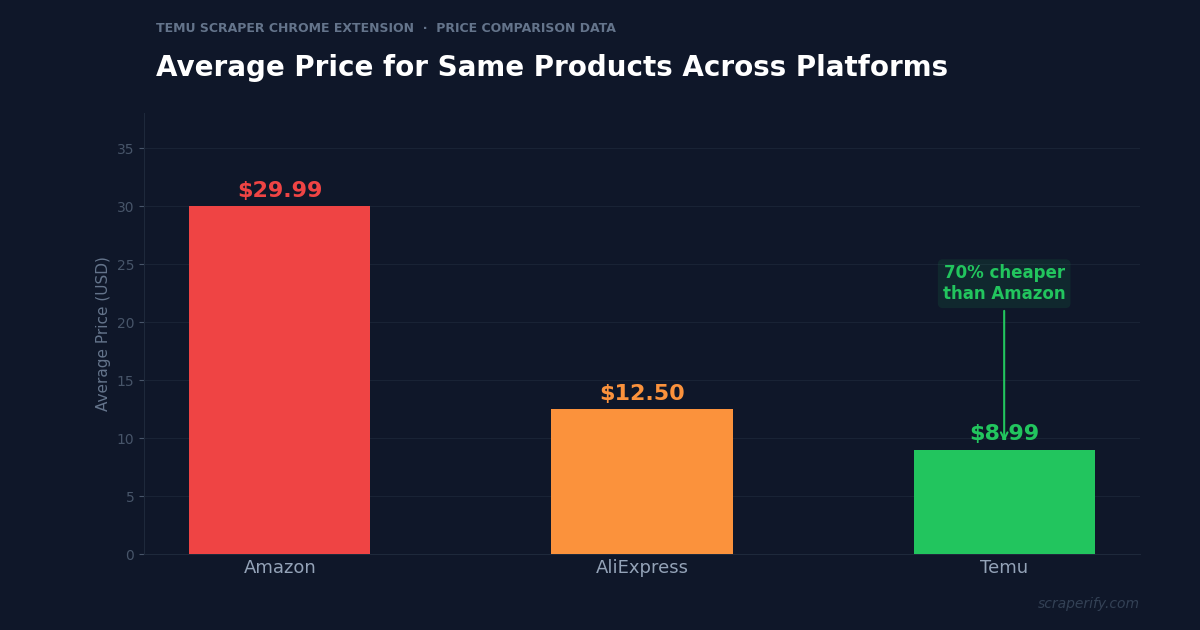
Temu has some of the lowest prices on the internet — often 50-70% cheaper than Amazon for the same products. For dropshippers, arbitrage sellers, and product researchers, this makes Temu a goldmine of product data. But Temu does not let you export search results, download product lists, or extract pricing data. A Temu scraper Chrome extension fixes this — install it, browse Temu, and export everything to CSV, Excel, or JSON in one click. No coding. No API keys. No per-record fees.
This guide shows you how to use the Scraperify Temu scraper Chrome extension to export Temu product data, find winning products for your store, and make data-driven sourcing decisions.
Why You Need a Temu Scraper Chrome Extension
Temu exploded onto the e-commerce scene and quickly became one of the most downloaded shopping apps worldwide. The platform offers direct-from-manufacturer pricing, which means products that sell for $30 on Amazon are often $8-$12 on Temu. This price gap is why dropshippers, Shopify store owners, and Amazon FBA sellers are using Temu as a product research and sourcing tool.
But Temu has one major limitation: no data export. Without a Temu scraper Chrome extension, there is no way to download search results, export product listings to a spreadsheet, or extract pricing data in bulk.
This creates a real bottleneck for product researchers. Finding winning products requires comparing prices across platforms, analyzing review counts as a demand signal, and tracking price changes over time. Doing this manually — opening each Temu listing, noting the price, checking reviews, comparing to Amazon — takes hours per product category. With hundreds of categories to explore, manual research is simply not scalable.
A Temu scraper Chrome extension automates the entire process:
- Captures product data automatically as you browse Temu search results
- Exports to CSV, Excel, or JSON with a single click — the Temu scraper Chrome extension handles all formats
- Runs inside your browser — the Temu scraper Chrome extension requires no software installation
- Processes data locally — the Temu scraper Chrome extension never sends your data to external servers
- Works with all Temu categories — electronics, home, fashion, beauty, toys, sports, and more
The Scraperify Temu scraper Chrome extension is built for anyone who needs Temu product data in a spreadsheet. Whether you are a dropshipper looking for winning products, a retailer comparing wholesale prices, or an analyst tracking e-commerce trends, the Temu scraper Chrome extension is the fastest way to get Temu data into a format you can work with.
What Data Can the Temu Scraper Chrome Extension Export?
The Scraperify Temu scraper Chrome extension extracts every visible data point from Temu product pages. Here is what the Temu scraper Chrome extension captures:
Product details the Temu scraper Chrome extension captures:
- Product title — full title as shown on Temu
- Price — current price in your local currency
- Original price — before-discount price (if shown)
- Discount percentage — calculated savings via the Temu scraper Chrome extension
- Category — electronics, home, fashion, etc.
- Product images — direct URLs to all product photos
- Product URL — direct link back to the Temu listing
- Product ID — unique Temu identifier
Review and rating data the Temu scraper Chrome extension exports:
- Star rating — average rating out of 5
- Number of reviews — total review count (the Temu scraper Chrome extension captures this as a demand signal)
- Number sold — total units sold when visible
- Review highlights — top positive and negative tags
Seller and shipping data from the Temu scraper Chrome extension:
- Seller name — store or manufacturer name
- Shipping estimate — delivery timeframe
- Shipping cost — free or paid shipping
- Return policy — return window details
- Variants — available colors, sizes, and options
This data is what dropshippers and product researchers need to make sourcing decisions. The Temu scraper Chrome extension gives you the full picture — pricing, demand signals (reviews and sales count), and seller information — all in one export.
WHAT THE TEMU SCRAPER CHROME EXTENSION EXTRACTS
Product Data
- Title & Description
- Price & Original Price
- Discount %
- Category
- Image & Product URLs
- Variants
Demand Signals
- Star Rating
- Review Count
- Units Sold
- Review Highlights
Seller & Shipping
- Seller/Store Name
- Shipping Estimate
- Shipping Cost
- Return Policy
How to Install the Temu Scraper Chrome Extension
Setting up the Temu scraper Chrome extension takes 30 seconds. No account creation, no API keys.
Step 1: Open the Chrome Web Store. Go to the Temu Scraper Chrome Extension page. The Temu scraper Chrome extension is called “BargainData Scraper — Export Products” by Scraperify.
Step 2: Click “Add to Chrome.” Confirm permissions. The Temu scraper Chrome extension only needs access to temu.com.
Step 3: Confirm the installation. The Scraperify icon appears in your toolbar. The Temu scraper Chrome extension is ready immediately.
Step 4: Pin the extension (optional). Pin the Temu scraper Chrome extension for quick access.
HOW THE TEMU SCRAPER CHROME EXTENSION WORKS
Install
Add the Temu scraper Chrome extension — 30 sec
Browse
Search Temu — data captured automatically
Click
One click on the Temu scraper Chrome extension
Export
Download CSV, Excel, or JSON
How to Export Temu Products to CSV (Step-by-Step)
Step 1: Search on Temu
With the Temu scraper Chrome extension installed, go to temu.com and search for products. For example, search “wireless earbuds” or “LED strip lights” to find trending products. The Temu scraper Chrome extension works on every Temu search page, category page, and bestseller page.
Use Temu’s filters before the Temu scraper Chrome extension starts capturing:
- Filter by category — electronics, home improvement, fashion
- Filter by price range — set min/max for your budget
- Sort by best sellers, newest, price low to high, or top rated
- Filter by free shipping — reduce your cost basis
Step 2: Let the Temu Scraper Chrome Extension Capture Data
As you scroll through results, the Temu scraper Chrome extension captures product data automatically. Just browse Temu as you normally would. The Temu scraper Chrome extension icon shows a badge count of captured products. Keep scrolling to load more, and the Temu scraper Chrome extension grabs everything.
Step 3: Click Export
Click the Temu scraper Chrome extension icon. Choose CSV, Excel, or JSON. The Temu scraper Chrome extension downloads the file instantly.
Step 4: Analyze Your Temu Data
Open the file from the Temu scraper Chrome extension. Each row is one product. With the Temu scraper Chrome extension data, you can:
- Sort by review count to find products with proven demand
- Sort by price to find the cheapest sourcing options
- Filter by rating — 4.5+ stars only for quality products
- Calculate profit margins by comparing Temu price vs your selling price
- Filter by units sold to identify bestsellers
Why Temu Matters for Dropshippers and Product Researchers
Temu is not just another shopping app. It has fundamentally changed how product researchers and dropshippers find winning products. Here is why the Temu scraper Chrome extension is especially valuable for this audience:
Direct-from-manufacturer pricing. Temu connects buyers directly to manufacturers, cutting out middlemen. The same LED desk lamp that retails for $35 on Amazon often costs $7-$10 on Temu. This 60-80% price gap creates massive opportunities for arbitrage sellers and dropshippers. The Temu scraper Chrome extension lets you systematically identify these price gaps by exporting Temu prices and comparing them to Amazon, eBay, or your own store’s pricing.
Massive product catalog. Temu lists millions of products across every imaginable category — electronics, home goods, fashion, beauty, pet supplies, sporting goods, and more. Browsing this catalog manually to find winning products is like searching for a needle in a haystack. The Temu scraper Chrome extension turns this into a data-driven process: export 500 products from a trending category, sort by reviews and sales count, and focus on the top performers.
Built-in demand signals. Temu shows review counts, star ratings, and sometimes units sold directly on product cards. These are demand signals — products with 10,000+ reviews and 4.7+ star ratings have proven market demand. The Temu scraper Chrome extension captures these signals, letting you build a spreadsheet sorted by demand rather than browsing visually.
Rapid product turnover. New products appear on Temu daily, and trending products change weekly. What is hot this month might not be hot next month. Regular exports with the Temu scraper Chrome extension help you stay ahead of trends. Export the “best sellers” category weekly and track which products are rising — these are your next winners.
Category breadth for niche discovery. Temu covers categories that most product research tools overlook. Pet supplies, craft materials, car accessories, phone cases, garden tools, kitchen gadgets — each of these has sub-niches with strong demand and low competition on Amazon or Shopify. Many successful dropshippers find their winning niche not by following trends, but by exploring obscure Temu categories and discovering products with high review counts that nobody else is selling in their market. The Temu scraper Chrome extension makes this systematic exploration possible.
Seasonal product research. Temu’s catalog shifts with seasons in ways that create predictable profit opportunities. Halloween costumes and decorations appear in August, Christmas items peak in October, and outdoor products surge in March. By exporting seasonal categories 2-3 months before peak season, you can identify products early, test them in your store, and scale up before the competition notices. Back-to-school products (backpacks, stationery, lunch boxes) are a prime example — they cost $3-$8 on Temu and sell for $15-$25 on Amazon during the August rush.
Price comparison opportunity. The biggest use case for the Temu scraper Chrome extension is comparing Temu prices against Amazon, eBay, or Walmart. A product that costs $5 on Temu and sells for $25 on Amazon represents a 5x markup. Not every product has this margin, but the Temu scraper Chrome extension helps you find the ones that do by making bulk comparison possible.
Ready to export Temu product data?
Install the Temu scraper Chrome extension and start exporting data in under 2 minutes. Free tier available.
Add to Chrome — Free5 Ways to Use the Temu Scraper Chrome Extension
1. Dropshipping Product Research
The primary use of the Temu scraper Chrome extension for dropshippers is finding winning products. Export the top 200 products from a Temu category, sort by review count (high reviews = proven demand), then check if those products are available on your dropshipping supplier. The Temu scraper Chrome extension turns hours of manual product hunting into a 10-minute data exercise.
Experienced Shopify dropshippers use the Temu scraper Chrome extension to build product shortlists weekly. They export trending categories, cross-reference with Google Trends to validate demand, and test the top 3-5 products in their store. Data-driven product selection has a much higher success rate than guessing.
2. Amazon-Temu Price Arbitrage
Export Temu products with the Temu scraper Chrome extension, then search for the same products on Amazon. Products with 50-70% price gaps between Temu and Amazon are arbitrage opportunities. Buy on Temu at $8, sell on Amazon FBA at $25. The Temu scraper Chrome extension makes finding these gaps systematic — export 500 products from Temu and run them through an Amazon price check tool.
The arbitrage workflow is straightforward: export a Temu category with the Temu scraper Chrome extension, open the spreadsheet, and for each product search the title on Amazon. Note the Amazon price next to the Temu price. Products where Amazon price is 3x or more the Temu price are your best candidates. Factor in Amazon FBA fees (roughly 30-35% of the selling price), shipping from Temu, and your desired profit margin. A product at $6 on Temu selling for $24 on Amazon leaves roughly $8-$10 profit per unit after all fees — a viable arbitrage play at volume.
3. Competitor Product Analysis
If you run an e-commerce store, use the Temu scraper Chrome extension to analyze what Temu sells in your niche. Export all products in your category, compare prices to yours, and identify gaps in your product line. The Temu scraper Chrome extension data shows you where Temu is undercutting you and where you offer value that Temu cannot match (faster shipping, better quality, local support).
4. Supplier Identification
Temu products come from thousands of different manufacturers. The Temu scraper Chrome extension captures seller and store names, which you can use to identify and contact suppliers directly on platforms like Alibaba or 1688.com. Find a product with great reviews on Temu, use the Temu scraper Chrome extension to get the seller name, then search for that manufacturer on wholesale platforms for bulk pricing.
This reverse-engineering approach is one of the most valuable strategies for established e-commerce sellers. Temu sellers are essentially manufacturers advertising their products at near-wholesale prices. When you find a product performing well on Temu (high reviews, strong ratings, competitive price), the manufacturer behind it has already proven they can produce quality at scale. Contacting them directly through Alibaba often gets you 20-40% below even Temu’s prices on bulk orders of 100+ units. The exported seller data from the Temu scraper Chrome extension is the starting point for building direct supplier relationships.
5. Review and Quality Analysis
Before sourcing a product from Temu, you need to know if the quality is acceptable. The Temu scraper Chrome extension exports review counts and ratings for every product. Products with 4.5+ stars and 1000+ reviews are generally safe bets. Products with 3-star ratings or very few reviews are risky. The Temu scraper Chrome extension data lets you filter out low-quality products before investing.
A practical quality threshold: look for products with at least 500 reviews and a minimum 4.3-star rating. Below these numbers, quality is unpredictable. Above them, the product has been purchased by enough people to generate reliable feedback. The review highlights captured by the Temu scraper Chrome extension also provide quick insight — if multiple reviews mention “broke after one week” or “different from photos,” pass on that product regardless of its rating average. Conversely, review highlights like “better than expected” or “great value” are green flags for sourcing.
Temu Scraper Chrome Extension vs Other Methods
TEMU SCRAPER: CHROME EXTENSION VS ALTERNATIVES
| Feature | Temu Scraper Chrome Extension | Python Script | Manual |
|---|---|---|---|
| Setup time | 30 sec | 1-2 hours | 0 min |
| Coding required | No | Yes | No |
| Handles anti-bot | Built-in | Manual | N/A |
| CSV + Excel + JSON | ✓ | Partial | ✗ |
| Speed (100 products) | ~2 min | ~15 min | ~4 hours |
The Temu scraper Chrome extension is the clear winner for non-technical users. Temu has aggressive anti-bot protections — including CAPTCHAs, rate limiting, and browser fingerprinting — that break most Python scrapers within days. Developers on GitHub forums report spending more time maintaining their Temu scrapers than actually using the data. The Temu scraper Chrome extension bypasses this entirely by running inside your actual browser session — it reads data from pages you are already viewing, so Temu’s anti-bot system sees normal browsing behavior.
This is a critical advantage that many people overlook. Cloud-based scraping services also struggle with Temu’s protections and charge premium prices for the workarounds. The Temu scraper Chrome extension avoids the entire problem because it operates within the context of your legitimate browsing session. No proxies needed, no CAPTCHA solving services, no rotating IP addresses. You browse Temu, the extension captures what you see, and you export. Simple.
Manual copy-paste is the only method that requires zero technical knowledge besides the Temu scraper Chrome extension, but it is painfully slow. Copying 100 product names, prices, and review counts by hand takes 3-4 hours. The Temu scraper Chrome extension does the same job in 2 minutes. At scale — comparing 500 products across categories — manual research is not just slow, it is genuinely impossible. No human can maintain accuracy while copy-pasting 500 product records.
Tips for Using the Temu Scraper Chrome Extension
Focus on High-Review Products
Reviews are the strongest demand signal on Temu. Use the Temu scraper Chrome extension to export a category and sort by review count descending. Products with 5000+ reviews have proven, sustainable demand. Products with under 100 reviews are either new (opportunity) or low-demand (risk). The Temu scraper Chrome extension data helps you tell the difference by cross-referencing review count with date listed.
Compare Across Platforms
The real power of the Temu scraper Chrome extension is cross-platform comparison. Export Temu data, then check the same products on Amazon. A wireless earbud case at $2.50 on Temu that sells for $12.99 on Amazon is a clear arbitrage opportunity. Build a spreadsheet with Temu price, Amazon price, and calculated margin. The Temu scraper Chrome extension provides the Temu side of this equation instantly.
For the most efficient cross-platform comparison, create a master spreadsheet with columns for: Product Name, Temu Price, Temu Reviews, Amazon Price, Amazon BSR (Best Seller Rank), Margin, and Decision (Source / Pass / Watch). Export Temu data with the Temu scraper Chrome extension to fill the first three columns, then manually research Amazon for the top candidates. This structured approach prevents you from falling into the trap of endless browsing without making sourcing decisions.
Export Weekly for Trend Tracking
Temu’s trending products change rapidly. Use the Temu scraper Chrome extension to export bestsellers weekly. Save with dates in filenames. Over time, the Temu scraper Chrome extension data reveals which product categories are growing, which are declining, and where new opportunities emerge.
Build a simple tracking system: create one Google Sheet per product category, with tabs for each week’s export. Add a “New This Week” column to flag products that appeared since the last export. Products that are new AND already have high review counts are likely promoted by Temu’s algorithm, which means they are getting significant traffic. These are often the same products that will trend on Amazon and Shopify stores in the following weeks — giving you a first-mover advantage if you act fast.
Order Samples Before Scaling
One practical tip that goes beyond data: after using the Temu scraper Chrome extension to identify promising products, always order samples before committing to volume. Temu prices are low enough that ordering 2-3 samples of each candidate product is trivial. Test quality, measure actual shipping times, and photograph the real product. Many dropshippers skip this step and end up with customer complaints about quality mismatches. The combination of data-driven product selection (via exported Temu data) and physical sample verification is the recipe for sustainable e-commerce success.
Combine with Other Scraperify Extensions
Use the Temu scraper Chrome extension alongside other Scraperify tools for complete market intelligence. Compare Temu products with eBay listings, Walmart prices, or Shopee data. All Scraperify extensions export in the same format for easy comparison.
Who Uses the Temu Scraper Chrome Extension?
Shopify Dropshippers — The largest user group for the Temu scraper Chrome extension is Shopify store owners doing product research. They use the Temu scraper Chrome extension to find products with proven demand (high reviews) at low prices, then list them in their store at a markup. The Temu scraper Chrome extension turns Temu’s catalog into a searchable product database.
Amazon FBA Sellers — FBA sellers use the Temu scraper Chrome extension to find products they can source cheaply on Temu and resell on Amazon. The Temu scraper Chrome extension exports price and review data that feeds directly into profitability calculators.
E-Commerce Analysts — Market researchers use the Temu scraper Chrome extension to track pricing trends across product categories. The Temu scraper Chrome extension data shows how Temu’s pricing strategy affects other retailers and where price compression is happening.
Retail Buyers — Physical retail store buyers use the Temu scraper Chrome extension to identify trending products before they hit mainstream retail. The Temu scraper Chrome extension data reveals consumer demand signals that inform buying decisions.
Price Comparison Services — Services that compare prices across retailers use the Temu scraper Chrome extension to include Temu data in their databases. The Temu scraper Chrome extension CSV export integrates directly into data pipelines.
Social Media Sellers — Sellers on TikTok Shop, Instagram, and Facebook Marketplace use Temu as a sourcing platform. They find trending products through social media virality, then use the Temu scraper Chrome extension to locate those products at the lowest possible cost. A product that goes viral on TikTok and costs $4 on Temu can sell for $15-$20 on TikTok Shop, creating a healthy margin for social commerce sellers. The Temu scraper Chrome extension data includes product images and URLs, making it easy to create listings on other platforms.
Temu Scraper Chrome Extension — Frequently Asked Questions
Is the Temu scraper Chrome extension free?
The Temu scraper Chrome extension offers a free tier with limited exports. Paid plans start at $19.99/month. Lifetime access to the Temu scraper Chrome extension is $79.
Is my data private with the Temu scraper Chrome extension?
Yes. The Temu scraper Chrome extension processes all data locally. No product data leaves your computer. The Temu scraper Chrome extension does not send data to external servers.
How many products can the Temu scraper Chrome extension export?
The Temu scraper Chrome extension has no hard limit. Scroll through results and the Temu scraper Chrome extension captures everything. Export hundreds or thousands of products per session.
Will the Temu scraper Chrome extension get my account banned?
The Temu scraper Chrome extension reads data from pages you are already viewing. It does not send automated requests. Browse at a normal pace and take breaks between sessions.
Does the Temu scraper Chrome extension export reviews?
The Temu scraper Chrome extension exports review counts, star ratings, and review highlights. For detailed individual review text, use the Temu scraper Chrome extension on a product detail page.
Can I use the Temu scraper Chrome extension for dropshipping research?
Yes. The Temu scraper Chrome extension is specifically designed for this use case. Export product data, filter by reviews and ratings, compare prices to your target selling platform, and build your product shortlist.
Start Exporting Temu Product Data Today
Stop browsing Temu manually for hours. The Scraperify Temu scraper Chrome extension exports hundreds of products to CSV, Excel, or JSON in under 2 minutes.
What the Temu scraper Chrome extension gives you:
- Temu scraper Chrome extension one-click export from any search or category page
- Complete product data — titles, prices, ratings, reviews, seller info, images
- Temu scraper Chrome extension CSV, Excel, and JSON export formats
- 100% local processing — the Temu scraper Chrome extension keeps data private
- Works through Temu’s anti-bot protections — the Temu scraper Chrome extension runs in your browser
- Free tier — try the Temu scraper Chrome extension before you buy
Whether you are a dropshipper finding winning products, an arbitrage seller comparing Temu vs Amazon prices, or an analyst tracking e-commerce pricing trends, the Temu scraper Chrome extension is the fastest way to get Temu data into a spreadsheet.
Export Temu Products in One Click
Join dropshippers who use the Temu scraper Chrome extension to find winning products — no coding, no API keys.
Add the Temu Scraper to Chrome →Free tier available · Paid plans from $19.99/month · $79 lifetime