Tripadvisor Scraper Chrome Extension: Export Reviews
Export Tripadvisor reviews, hotel data, and restaurant ratings to CSV or Excel. Free Tripadvisor scraper Chrome extension for hospitality research.
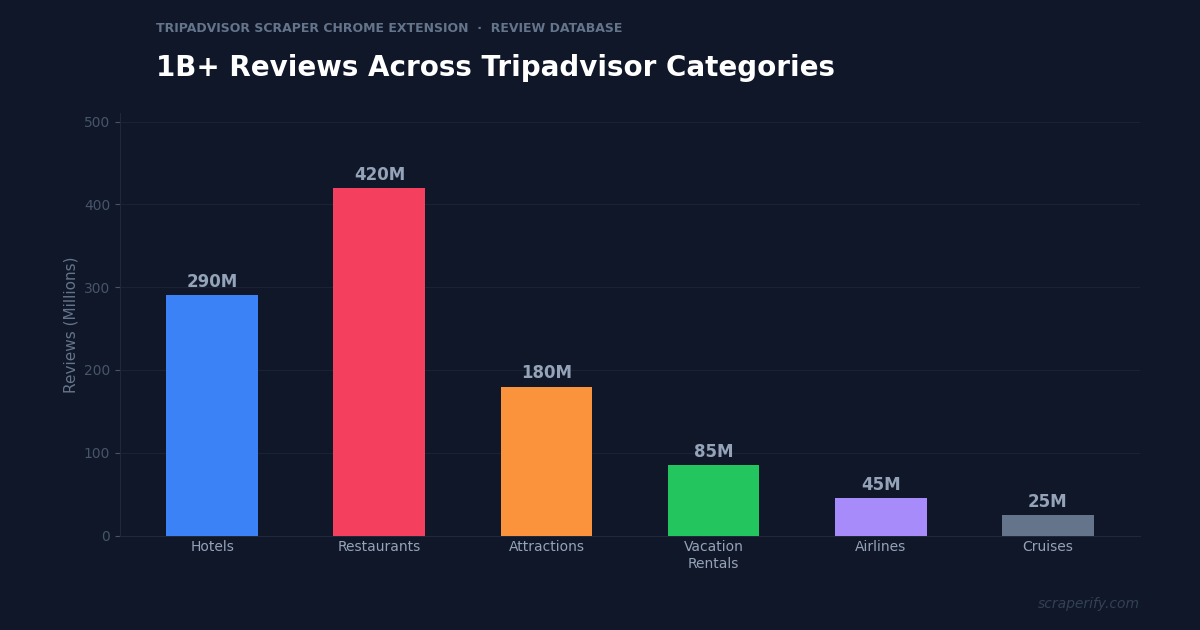
Tripadvisor has over 1 billion reviews across hotels, restaurants, attractions, vacation rentals, airlines, and cruises in 40+ regional domains worldwide. For hospitality professionals, this review data is the most comprehensive source of customer feedback available anywhere. But Tripadvisor does not let you export reviews, download hotel data, or save search results to a spreadsheet. A Tripadvisor scraper Chrome extension fixes this — install it, browse Tripadvisor, and export reviews and listing data to CSV, Excel, or JSON in one click. No coding. No API keys.
This guide shows you how to use a Tripadvisor scraper Chrome extension to export review data, analyze competitors, track sentiment trends, and do hospitality market research at scale.
Why You Need a Tripadvisor Scraper Chrome Extension
Tripadvisor is the world’s largest travel review platform. Hotel managers, restaurant owners, and tourism professionals live and die by their Tripadvisor ratings. A one-star improvement in Tripadvisor rating can increase revenue by 5-9% for hotels. A restaurant dropping below 4.0 stars sees measurable foot traffic decline.
But analyzing Tripadvisor data at scale is impossible without export capability. Without a Tripadvisor scraper Chrome extension, you are stuck reading reviews one by one, mentally tracking sentiment themes, and manually comparing your ratings against competitors. For a hotel with 2,000 reviews and 10 competitors, that is 20,000+ reviews to analyze — a task that is simply not feasible by hand.
A Tripadvisor scraper Chrome extension makes this analysis possible:
- Exports review text, ratings, and dates — the Tripadvisor scraper Chrome extension captures full review content
- Exports hotel/restaurant listing data — prices, ratings, location, amenity details
- Supports CSV, Excel, and JSON — the Tripadvisor scraper Chrome extension works with any analysis tool
- Works across 40+ Tripadvisor regional domains — US, UK, France, Germany, Japan, and more
- Runs inside your browser — no software installation required
- Processes data locally — the Tripadvisor scraper Chrome extension never sends data externally
The Scraperify Tripadvisor scraper Chrome extension is built for hotel managers monitoring reputation, restaurant owners tracking competitor reviews, hospitality consultants benchmarking properties, and academic researchers studying tourism.
What Data Can the Tripadvisor Scraper Chrome Extension Export?
The Tripadvisor scraper Chrome extension extracts every visible data point from Tripadvisor pages:
Review data the Tripadvisor scraper Chrome extension captures:
- Reviewer name — the Tripadvisor member name
- Star rating — 1-5 rating (the Tripadvisor scraper Chrome extension captures this for sentiment analysis)
- Review title — the headline of the review
- Review text — full review content
- Review date — when the review was posted
- Trip type — business, couples, family, friends, solo
- Visit date — the month and year of the visit
- Reviewer location — where the reviewer is from
- Reviewer contributions — total reviews and photos by this member
- Management response — the owner’s reply if present
- Review photos — URLs to photos attached to the review
Listing data the Tripadvisor scraper Chrome extension exports:
- Property name — hotel, restaurant, or attraction name
- Overall rating — average score out of 5
- Number of reviews — total review count
- Ranking — position in the local category (“#3 of 150 hotels in Miami”)
- Price range — $, $$, $$$, $$$$ for restaurants; nightly rate for hotels
- Category/cuisine — hotel class, restaurant type, or cuisine
- Address — full location
- Phone number — when listed
- Website — when listed
- Amenities/features — pool, spa, free Wi-Fi, parking, etc.
- Photos — property image URLs via the Tripadvisor scraper Chrome extension
- Listing URL — direct link to the Tripadvisor page
Rating breakdown data:
- Subcategory ratings — for hotels: location, cleanliness, service, value; for restaurants: food, service, value, atmosphere
- Rating distribution — count of 5-star, 4-star, 3-star, 2-star, 1-star reviews
- Traveler rating — breakdown by excellent, very good, average, poor, terrible
This data is what hospitality analytics platforms like ReviewPro and TrustYou charge hundreds per month for. The Tripadvisor scraper Chrome extension delivers the raw data at a fraction of the cost.
WHAT THE TRIPADVISOR SCRAPER CHROME EXTENSION EXTRACTS
Review Data
- Rating & Review Text
- Review Date & Title
- Trip Type & Visit Date
- Reviewer Location
- Management Response
- Review Photos
Listing Data
- Name & Ranking
- Overall Rating
- Address & Phone
- Price Range
- Amenities
- Category/Cuisine
Rating Breakdown
- Subcategory Scores
- Rating Distribution
- Traveler Type Ratings
- Review Count by Rating
How to Install the Tripadvisor Scraper Chrome Extension
Setting up the Tripadvisor scraper Chrome extension takes 30 seconds.
Step 1: Open the Chrome Web Store. Search for “Tripadvisor Scraper.” The Scraperify Tripadvisor scraper Chrome extension exports reviews and listings to CSV, Excel, and JSON.
Step 2: Click “Add to Chrome.” Confirm permissions. The Tripadvisor scraper Chrome extension needs access to tripadvisor.* domains.
Step 3: Start using it. The Tripadvisor scraper Chrome extension works on all 40+ Tripadvisor regional domains immediately.
HOW THE TRIPADVISOR SCRAPER CHROME EXTENSION WORKS
Install
Add the Tripadvisor scraper Chrome extension
Browse
Navigate to any hotel, restaurant, or attraction
Click
One click on the Tripadvisor scraper Chrome extension
Export
Download CSV, Excel, or JSON
How to Export Tripadvisor Reviews to CSV (Step-by-Step)
Step 1: Navigate to a Tripadvisor Listing
With the Tripadvisor scraper Chrome extension installed, go to any Tripadvisor domain and navigate to a hotel, restaurant, or attraction page. The Tripadvisor scraper Chrome extension works across all 40+ regional domains:
| Region | Domain |
|---|---|
| United States | tripadvisor.com |
| United Kingdom | tripadvisor.co.uk |
| France | tripadvisor.fr |
| Germany | tripadvisor.de |
| Japan | tripadvisor.jp |
| Italy | tripadvisor.it |
| Spain | tripadvisor.es |
| Australia | tripadvisor.com.au |
| Canada | tripadvisor.ca |
| China | tripadvisor.cn |
Step 2: Load Reviews
Scroll through the reviews section. Tripadvisor loads reviews progressively — the Tripadvisor scraper Chrome extension captures reviews as they load. Navigate to additional review pages for more data. The Tripadvisor scraper Chrome extension captures every review that appears in your browser.
Use Tripadvisor’s review filters to focus your export:
- Filter by traveler type — business, couples, family, friends, solo
- Filter by time of year — seasonal analysis
- Filter by language — export reviews in specific languages
- Filter by rating — 1-star only for complaint analysis, 5-star for praise analysis
Step 3: Click Export
Click the Tripadvisor scraper Chrome extension icon. Choose CSV, Excel, or JSON. The Tripadvisor scraper Chrome extension downloads the file instantly.
Step 4: Analyze Review Data
Open the Tripadvisor scraper Chrome extension export. Each row is one review. With the data:
- Sort by rating to separate positive from negative feedback
- Search review text for keywords (“dirty,” “slow,” “amazing,” “friendly”)
- Filter by trip type — business travelers have different expectations than families
- Filter by date to track sentiment changes over time
- Analyze management responses — are all negative reviews addressed?
Why Tripadvisor Review Data Matters for Hospitality
Tripadvisor reviews are the most influential factor in traveler booking decisions. Understanding how to leverage this data helps you use the Tripadvisor scraper Chrome extension strategically:
Rating improvements directly increase revenue. Research shows that a one-star improvement on Tripadvisor increases hotel revenue by 5-9%. A restaurant that moves from 3.5 to 4.0 stars sees measurable increases in reservations. The Tripadvisor scraper Chrome extension data enables systematic review analysis that drives these improvements — identifying exactly which operational issues are suppressing your rating.
Competitor benchmarking is essential. Travelers compare properties on Tripadvisor before booking. If your hotel ranks #15 in your city and the top 5 competitors all have 4.7+ ratings, you know the target to beat. Export competitor reviews with the Tripadvisor scraper Chrome extension to understand what makes top-ranked properties stand out — cleanliness standards, service touches, amenity offerings.
Review text reveals operational insights invisible in ratings. A 4.0-star average tells you “good but not great.” But exported review text reveals exactly why: “breakfast options were limited,” “room was clean but dated,” “staff was friendly but check-in was slow.” These specifics — extractable only from exported review data — become action items for your operations team.
Traveler type segmentation reveals different needs. Business travelers care about Wi-Fi speed, workspace, and location. Families care about pool, kids’ amenities, and noise levels. Couples care about romance, dining, and ambiance. The Tripadvisor scraper Chrome extension captures trip type for every review, letting you segment feedback by traveler type and address each segment’s needs independently.
Seasonal trends affect service expectations. Export reviews from different seasons with the Tripadvisor scraper Chrome extension and compare sentiment. Many hotels see lower ratings during peak season (overcrowding, slower service) and higher ratings during shoulder season (fewer guests, more attention). This seasonal pattern — visible only in exported data — informs staffing decisions and seasonal pricing strategy.
Management response rate affects ranking. Tripadvisor rewards properties that respond to reviews with better visibility in search results. Export your reviews with the Tripadvisor scraper Chrome extension, filter for those without management responses, and prioritize responding to unaddressed negative reviews. A 100% response rate on negative reviews signals to future guests that management cares about feedback.
Ready to export Tripadvisor review data?
Scraperify offers Chrome extensions for 40+ platforms including Tripadvisor, Yelp, and Google Reviews. Export reviews to CSV with one click.
Browse All Scrapers →5 Ways to Use the Tripadvisor Scraper Chrome Extension
1. Reputation Monitoring and Sentiment Analysis
Hotel and restaurant managers use the Tripadvisor scraper Chrome extension to export all reviews monthly, then analyze sentiment trends. Track the percentage of 5-star vs 1-star reviews over time. If the proportion of 1-star reviews is increasing, something is deteriorating — and the review text tells you exactly what.
Build a keyword frequency dashboard: count mentions of “clean,” “dirty,” “friendly,” “rude,” “noisy,” “quiet,” “value,” “overpriced” across all reviews. Compare these frequencies quarter over quarter. This quantitative approach to review management replaces the subjective “I think reviews have been getting worse” with “negative mentions of ‘cleanliness’ increased 35% this quarter.”
2. Competitive Benchmarking
Export reviews for your top 10 competitors with the Tripadvisor scraper Chrome extension. Compare: average rating, review volume, response rate, and most-mentioned positive and negative keywords. If competitors consistently get praised for “amazing breakfast” and your breakfast reviews are lukewarm, that is a specific competitive gap to close.
The most powerful competitive insight from exported data: what do 5-star reviews of top competitors praise that your 5-star reviews do not mention? These are the competitive differentiators you are missing — amenities, services, or touches that delight guests at top properties but are absent from yours.
3. Pre-Opening Market Research
Entrepreneurs opening new hotels, restaurants, or attractions use the Tripadvisor scraper Chrome extension to research existing properties in their target market. Export all hotels or restaurants in the area, analyze rating distributions, identify underserved traveler segments, and design a concept that fills market gaps.
If every restaurant in a beach town is rated 3.5-4.0 stars with complaints about “overpriced tourist food,” there is a clear opportunity for a reasonably priced restaurant with quality food. The Tripadvisor scraper Chrome extension data quantifies this gap.
4. Academic Tourism Research
University researchers studying tourism economics, hospitality service quality, customer satisfaction, and online reputation management use the Tripadvisor scraper Chrome extension to build research datasets. Tripadvisor reviews are one of the most-used data sources in hospitality research — hundreds of academic papers use Tripadvisor data for sentiment analysis, natural language processing, and statistical modeling.
The Tripadvisor scraper Chrome extension exports structured data that imports directly into Python (pandas), R, SPSS, or NVivo for qualitative and quantitative analysis.
5. Travel Planning and Comparison
Sophisticated travelers and travel agents use the Tripadvisor scraper Chrome extension to export hotel or restaurant options for a destination. Sort by rating, filter by price range, compare amenities, and build a shortlist in a spreadsheet rather than clicking through dozens of Tripadvisor pages. For group travel planning — where 8 people need to agree on a hotel — a shared spreadsheet with exported Tripadvisor data is far more efficient than sending links back and forth.
Tripadvisor Scraper Chrome Extension vs Other Methods
TRIPADVISOR SCRAPER: CHROME EXTENSION VS ALTERNATIVES
| Feature | Tripadvisor Scraper Chrome Extension | ReviewPro ($200+/mo) | Manual |
|---|---|---|---|
| Monthly cost | Free / $19.99 | $200-$500/mo | Free |
| Full review text export | ✓ | ✓ | ✗ |
| Competitor data | ✓ (any property) | ✓ (preset compset) | ✓ |
| Automated alerts | ✗ | ✓ | ✗ |
| Speed (500 reviews) | ~10 min | Instant (dashboard) | ~15 hours |
The Tripadvisor scraper Chrome extension offers the best value for most hospitality professionals. ReviewPro and TrustYou provide polished dashboards with automated sentiment analysis and alerts, but cost $200-$500/month — feasible for large hotel chains but prohibitive for independent hotels and restaurants. The Tripadvisor scraper Chrome extension delivers the raw review data that powers sentiment analysis at 90% less cost. For properties that need automated alerts and pre-built dashboards, premium tools are worth the investment. For everyone else, the Tripadvisor scraper Chrome extension provides the data foundation for DIY analysis.
Tips for Using the Tripadvisor Scraper Chrome Extension
Export Reviews by Rating for Targeted Analysis
Use Tripadvisor’s rating filter before exporting with the Tripadvisor scraper Chrome extension. Export only 1-star and 2-star reviews for complaint analysis. Export only 5-star reviews to identify what you are doing right. This targeted approach is more actionable than exporting all reviews at once.
Compare Tripadvisor with Google Reviews
For comprehensive reputation analysis, export Tripadvisor reviews with the Tripadvisor scraper Chrome extension alongside Google Reviews. Different platforms attract different reviewer demographics — Tripadvisor skews toward international travelers while Google Reviews skew toward locals. Comparing sentiment across both platforms reveals a more complete picture.
Track Management Response Rate
Export all your reviews with the Tripadvisor scraper Chrome extension and add a column for “Has Management Response” (yes/no). Calculate your response rate. Industry best practice is 100% response rate on negative reviews (1-3 stars) and at least 50% on positive reviews (4-5 stars). The Tripadvisor scraper Chrome extension data makes this audit instant.
Export Competitor Reviews Quarterly
Markets change. New competitors open. Service quality shifts. Use the Tripadvisor scraper Chrome extension to export competitor reviews quarterly and track their sentiment trends alongside yours. If a competitor’s ratings are improving while yours are stable, they are closing the gap — time to invest in service improvements.
Use Trip Type Filter for Segmented Insights
Tripadvisor lets reviewers tag their trip type. Export reviews filtered by “Business” with the Tripadvisor scraper Chrome extension to understand what business travelers need. Export “Family” reviews separately for family-specific insights. These segments have different priorities, and optimizing for one segment often has neutral or negative effects on another.
Who Uses the Tripadvisor Scraper Chrome Extension?
Hotel General Managers — Monitor reputation, track competitor performance, and identify operational improvements. Monthly exports with the Tripadvisor scraper Chrome extension feed into management reports and staff training programs.
Restaurant Owners — Track food quality feedback, service complaints, and competitive positioning. The Tripadvisor scraper Chrome extension review data reveals what dishes get praised and which need improvement.
Hospitality Consultants — Benchmark client properties against competitors, build reputation improvement plans, and demonstrate ROI of service investments. The Tripadvisor scraper Chrome extension data powers consulting deliverables.
Tourism Boards — Destination marketing organizations analyze aggregate Tripadvisor data for their region — which attractions are trending, which hotels are underperforming, and where visitor satisfaction gaps exist.
Academic Researchers — Hospitality and tourism researchers use the Tripadvisor scraper Chrome extension to build datasets for peer-reviewed studies on customer satisfaction, service quality, and online reputation management.
Travel Agents — Agents use the Tripadvisor scraper Chrome extension to compare hotels for clients, presenting Tripadvisor data alongside pricing in organized spreadsheets for decision-making.
Tripadvisor Scraper Chrome Extension — FAQs
Is the Tripadvisor scraper Chrome extension free?
The Tripadvisor scraper Chrome extension offers a free tier. Scraperify plans start at $19.99/month or $79 lifetime.
Does the Tripadvisor scraper Chrome extension export full review text?
Yes. The Tripadvisor scraper Chrome extension captures complete review text, not truncated snippets.
Does the Tripadvisor scraper Chrome extension work on all Tripadvisor domains?
Yes. The Tripadvisor scraper Chrome extension works on all 40+ regional Tripadvisor domains worldwide.
Is my data private with the Tripadvisor scraper Chrome extension?
Yes. The Tripadvisor scraper Chrome extension processes everything locally. No review data leaves your browser.
Can I export Tripadvisor hotel listing data (not just reviews)?
Yes. The Tripadvisor scraper Chrome extension exports listing details including ratings, rankings, prices, amenities, and contact information.
Start Exporting Tripadvisor Data Today
Stop reading Tripadvisor reviews one at a time. The Tripadvisor scraper Chrome extension exports review data to CSV so you can analyze sentiment, benchmark competitors, and improve guest satisfaction with data.
Scraperify offers Chrome extensions for 40+ platforms including Yelp for US business reviews, Airbnb for short-term rental market analysis, and Google Reviews for local business reputation.
Export Tripadvisor Reviews in One Click
Scraperify’s Chrome extensions export data from Tripadvisor, Yelp, Airbnb, and 40+ platforms for hospitality research.
Browse All Scrapers →Free tier · $19.99/month · $79 lifetime