Trustpilot Scraper Chrome Extension: Export Reviews
Export Trustpilot reviews, ratings, and reviewer data to CSV or Excel. Free Trustpilot scraper Chrome extension for brand monitoring and competitor analysis.
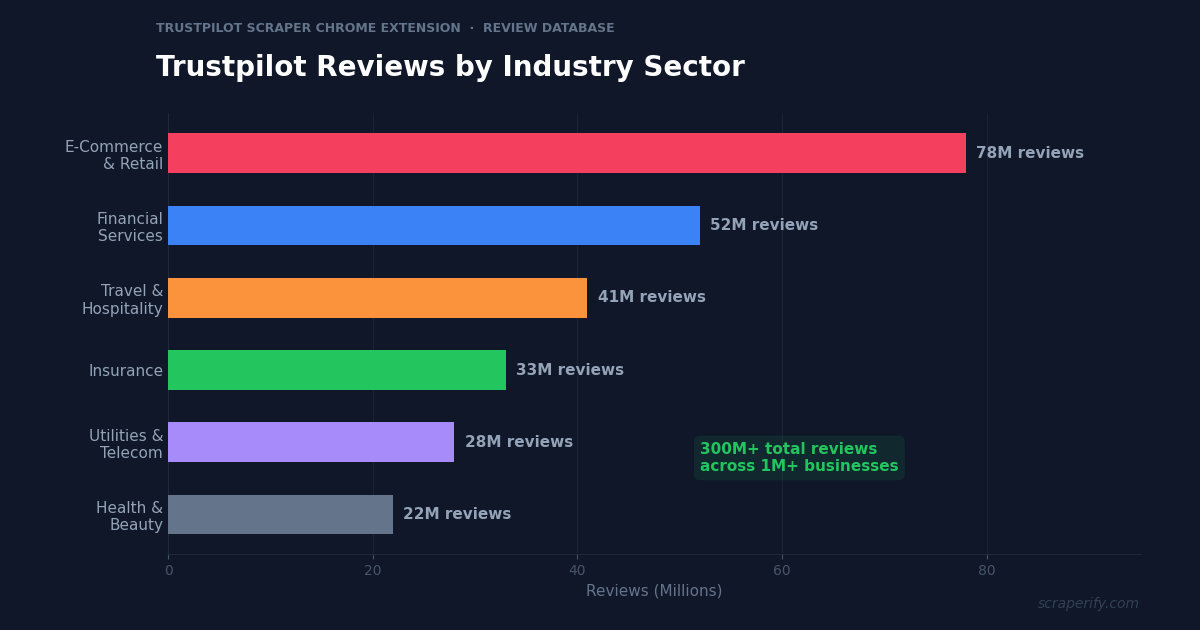
Trustpilot hosts over 300 million reviews across 1 million+ businesses — making it the largest independent review platform for e-commerce, financial services, insurance, and B2B companies. For brand managers, competitive analysts, and market researchers, this review data is invaluable. But Trustpilot does not offer a bulk export button, and its API requires a paid business plan starting at hundreds per month. A Trustpilot scraper Chrome extension fixes this — install it, browse Trustpilot, and export reviews to CSV, Excel, or JSON in one click. No coding. No API fees.
This guide shows you how to use a Trustpilot scraper Chrome extension to export review data, analyze competitor reputation, mine customer sentiment, and track brand perception over time.
Why You Need a Trustpilot Scraper Chrome Extension
Trustpilot occupies a unique position in the review ecosystem. While Google Reviews and Yelp focus on local businesses, and Tripadvisor covers travel, Trustpilot is where consumers review online businesses — e-commerce stores, SaaS products, banks, insurance companies, and telecoms. A Trustpilot rating directly affects conversion rates: research consistently shows that displaying a 4.5+ TrustScore increases checkout conversions by 10-15%.
But Trustpilot locks review data inside its platform. Without a Trustpilot scraper Chrome extension, analyzing reviews at scale is impossible. Trustpilot shows 20 reviews per page with pagination — no infinite scroll, no bulk download, no CSV export for free accounts. A business with 5,000 reviews would require clicking through 250 pages to read them all.
Trustpilot’s official API does offer review access, but it is gated behind a Business plan. Pricing starts in the hundreds per month and scales with review volume — a significant expense for small businesses and analysts who just need data for a one-time analysis.
A Trustpilot scraper Chrome extension removes these barriers:
- Exports review text, ratings, and dates — the Trustpilot scraper Chrome extension captures complete review content
- Handles pagination automatically — no manual clicking through 250 pages
- Exports to CSV, Excel, or JSON — the Trustpilot scraper Chrome extension supports all analysis formats
- Works on any company profile — export your own reviews or competitors’ reviews
- Runs inside your browser — no software installation, no API keys
- Processes data locally — the Trustpilot scraper Chrome extension never sends data externally
The Scraperify Trustpilot scraper Chrome extension is built for brand managers monitoring reputation, marketers analyzing competitor sentiment, researchers studying consumer behavior, and B2B teams identifying prospects.
What Data Can the Trustpilot Scraper Chrome Extension Export?
The Trustpilot scraper Chrome extension extracts every visible data point from Trustpilot company pages:
Review data the Trustpilot scraper Chrome extension captures:
- Star rating — 1-5 stars (the Trustpilot scraper Chrome extension captures this for sentiment scoring)
- Review title — the headline of the review
- Review text — full review content, not truncated
- Review date — when the review was published
- Experience date — when the customer’s experience occurred
- Verified status — whether Trustpilot verified the transaction
- Review URL — direct link to the individual review
- Useful votes — how many users found the review helpful
Reviewer data the Trustpilot scraper Chrome extension exports:
- Reviewer name — the display name
- Reviewer location — country of the reviewer
- Review count — total reviews written by this person
- Reviewer profile URL — link to their Trustpilot profile
Company data from the Trustpilot scraper Chrome extension:
- Company name — the business being reviewed
- TrustScore — Trustpilot’s weighted rating (0-5)
- Total review count — number of reviews
- Rating distribution — count of 5-star, 4-star, 3-star, 2-star, 1-star reviews
- Company website — the linked domain
- Company category — industry classification
- Verified company status — whether the business claimed its profile
Business response data:
- Reply text — the company’s response to the review
- Reply date — when the business responded
- Response status — whether a review has been answered
This data set powers reputation analysis that would otherwise require an expensive Trustpilot Business subscription. The Trustpilot scraper Chrome extension gives you the raw reviews to analyze however you want.
WHAT THE TRUSTPILOT SCRAPER CHROME EXTENSION EXTRACTS
Review Data
- Star Rating (1-5)
- Title & Full Text
- Review & Experience Date
- Verified Status
- Useful Votes
- Review URL
Reviewer Data
- Reviewer Name
- Country/Location
- Total Reviews Written
- Profile URL
Company Data
- TrustScore (0-5)
- Total Review Count
- Rating Distribution
- Website & Category
- Business Replies
How to Install the Trustpilot Scraper Chrome Extension
Setting up the Trustpilot scraper Chrome extension takes 30 seconds.
Step 1: Open the Chrome Web Store and search for “Trustpilot Scraper.” The Scraperify Trustpilot scraper Chrome extension exports reviews to CSV, Excel, and JSON.
Step 2: Click “Add to Chrome” and confirm permissions. The Trustpilot scraper Chrome extension needs access to trustpilot.com.
Step 3: The Trustpilot scraper Chrome extension is ready — navigate to any company profile and start exporting.
HOW THE TRUSTPILOT SCRAPER CHROME EXTENSION WORKS
Install
Add the Trustpilot scraper Chrome extension
Browse
Open any Trustpilot company profile
Click
One click on the Trustpilot scraper Chrome extension
Export
Download CSV, Excel, or JSON
How to Export Trustpilot Reviews to CSV (Step-by-Step)
Step 1: Open a Company Profile
With the Trustpilot scraper Chrome extension installed, go to trustpilot.com and search for a company. The Trustpilot scraper Chrome extension activates on any company review page. The Trustpilot scraper Chrome extension works on any company review page — your own business or a competitor’s.
Step 2: Apply Filters (Optional)
Trustpilot lets you filter reviews before exporting. Use these filters to target your analysis:
- Filter by star rating — export only 1-star reviews for complaint analysis, or 5-star for testimonial mining
- Filter by date — last month, last 3 months, last 6 months, or all time
- Filter by language — for multi-market businesses
- Filter by verified — only Trustpilot-verified transactions
- Sort by — most recent, most relevant, or highest/lowest rating
Step 3: Handle Pagination
Trustpilot shows 20 reviews per page with numbered pagination — there is no infinite scroll. The Trustpilot scraper Chrome extension handles pagination automatically, navigating through pages and capturing reviews from each. This is where the Trustpilot scraper Chrome extension saves the most time: 250 pages of manual clicking becomes a single export. Set the number of pages you want to export (e.g., 10 pages = 200 reviews).
Step 4: Click Export
Click the Trustpilot scraper Chrome extension icon. Choose CSV, Excel, or JSON. The Trustpilot scraper Chrome extension downloads the file with all captured reviews.
Step 5: Analyze Review Data
Open the file the Trustpilot scraper Chrome extension produced. Each row is one review. With the data:
- Calculate average rating by month to track sentiment trends
- Search review text for keywords (“refund,” “shipping,” “customer service”)
- Filter by rating to separate praise from complaints
- Check response rate — what percentage of negative reviews got a business reply?
- Analyze reviewer countries for geographic sentiment differences
Why Trustpilot Data Matters for Online Businesses
Trustpilot occupies a specific niche in the review ecosystem that makes its data uniquely actionable:
TrustScore directly affects conversion rates. Unlike Google Reviews (which affect local search) or Yelp (which affects foot traffic), Trustpilot ratings appear in Google Shopping ads, on checkout pages via widgets, and in Google’s rich snippets. E-commerce businesses that display a 4.5+ TrustScore see measurably higher conversion rates than those with 3.5 or lower. Exporting reviews with the Trustpilot scraper Chrome extension lets you identify exactly which operational issues are dragging your score down.
Trustpilot skews toward complaints. Unlike platforms where satisfied customers routinely leave reviews, Trustpilot attracts disproportionate negative feedback — customers who had problems seek out review platforms to vent. This makes Trustpilot data especially valuable for operational improvement: the complaints are concentrated, specific, and actionable. The Trustpilot scraper Chrome extension exports let you quantify complaint themes rather than reading anecdotes.
Competitor TrustScores reveal market positioning. Export your top 5 competitors’ Trustpilot reviews with the Trustpilot scraper Chrome extension and compare: average TrustScore, review volume, response rate, and complaint themes. If every competitor gets slammed for slow shipping and you ship in 2 days, that is a competitive advantage worth highlighting in your marketing.
Verified reviews carry more weight. Trustpilot marks reviews as “Verified” when they can confirm a real transaction occurred. Unverified reviews are more likely to be fake or from non-customers. The Trustpilot scraper Chrome extension captures verified status, letting you filter for authentic feedback and identify companies with suspiciously high unverified review counts.
Response rate signals customer care. Trustpilot displays whether a business replied to each review. Companies with 90%+ response rates on negative reviews signal to prospective customers that management addresses problems. Export your reviews with the Trustpilot scraper Chrome extension, filter for unanswered negatives, and close the gaps.
Review velocity indicates business health. A company receiving 200 reviews per month is doing significantly more transaction volume than one receiving 10. Exporting competitor reviews monthly with the Trustpilot scraper Chrome extension and tracking review counts over time gives you a proxy for their sales growth — competitive intelligence that is otherwise impossible to obtain.
Ready to export Trustpilot review data?
Scraperify offers Chrome extensions for 40+ platforms including Trustpilot, Yelp, Tripadvisor, and Google Reviews.
Browse All Scrapers →5 Ways to Use the Trustpilot Scraper Chrome Extension
1. Reputation Monitoring and Complaint Analysis
Brand managers use the Trustpilot scraper Chrome extension to export all reviews monthly and quantify complaint themes. Build a keyword frequency table: count mentions of “shipping,” “refund,” “customer service,” “quality,” “delivery,” and “price” across all 1-star and 2-star reviews. If “shipping delays” appears in 42% of negative reviews, that is your top operational priority — not a subjective impression, but a measured fact.
Track these frequencies month over month using the Trustpilot scraper Chrome extension. If shipping complaints drop from 42% to 18% after you switch carriers, you have quantified the ROI of that operational change. This kind of measurement is impossible without the exported review data that the Trustpilot scraper Chrome extension provides.
2. Competitive Reputation Benchmarking
Export Trustpilot reviews for your top 5-10 competitors using the Trustpilot scraper Chrome extension. Compare across dimensions: average TrustScore, review volume (a proxy for transaction volume), rating distribution (do they have more 1-stars than you?), response rate, and complaint themes.
The most valuable competitive insight from the Trustpilot scraper Chrome extension comes from analyzing what competitors’ 5-star reviews praise. If customers consistently rave about a competitor’s “fast customer service response,” and your reviews are silent on service speed, that is a differentiator you are missing. Only bulk export via the Trustpilot scraper Chrome extension makes this pattern visible.
3. B2B Lead Generation
Trustpilot lists company websites on every profile. Sales teams use the Trustpilot scraper Chrome extension to build prospect lists from Trustpilot category pages. The Trustpilot scraper Chrome extension captures each company’s website, TrustScore, and review volume in one export. Export all companies in a category (e.g., “SaaS,” “Insurance,” “E-commerce”), capture their websites and TrustScores, then enrich with contact data.
Companies with low TrustScores (below 3.5) are prime prospects for reputation management, customer service software, and CX consulting services — they have a visible, urgent problem. The Trustpilot scraper Chrome extension identifies these opportunities systematically, turning a category page into a qualified prospect list in minutes.
4. Product and Service Development
Export reviews mentioning specific features or products with the Trustpilot scraper Chrome extension. The Trustpilot scraper Chrome extension captures full review text, so nothing gets truncated. Search the review text column for product names, feature requests, or specific complaints. Customers often describe exactly what they want in reviews: “I wish they offered express shipping,” “The app needs a dark mode,” “Would be perfect if they had 24/7 support.”
These verbatim customer requests — extractable only from the review text that the Trustpilot scraper Chrome extension exports — become your product roadmap, prioritized by frequency of mention.
5. Fake Review Detection
Export reviews with the Trustpilot scraper Chrome extension and analyze reviewer patterns to spot manipulation:
- Reviewers with only 1 review on their profile are more likely to be fake accounts
- Clusters of 5-star reviews posted on the same day suggest coordinated campaigns
- Generic review text without specific details (“Great service! Highly recommend!”) is a red flag
- Unverified reviews making up a high percentage of positive ratings
Competitive analysis using the Trustpilot scraper Chrome extension often reveals that competitors with suspiciously perfect ratings have a high proportion of these red flags — useful intelligence when a competitor’s rating seems too good to be true. Without the Trustpilot scraper Chrome extension, spotting these patterns across hundreds of reviews would take days of manual reading.
Trustpilot Scraper Chrome Extension vs Other Methods
TRUSTPILOT SCRAPER: CHROME EXTENSION VS ALTERNATIVES
| Feature | Chrome Extension | Trustpilot API | Manual |
|---|---|---|---|
| Cost | Free tier / $19.99 | Business plan ($$$) | Free |
| Competitor reviews | ✓ | ✗ (own data only) | ✓ |
| Coding required | No | Yes | No |
| Auto pagination | ✓ | ✓ | Manual clicking |
| Speed (200 reviews) | ~3 min | ~1 min | ~5 hours |
The Trustpilot scraper Chrome extension has one decisive advantage over Trustpilot’s official API: it works on competitor profiles. Trustpilot’s API only gives you access to your own company’s reviews — you cannot pull competitor data through official channels at any price. For competitive analysis, the Trustpilot scraper Chrome extension is the only practical option.
The API is better for automated, ongoing monitoring of your own reviews — real-time webhooks, direct CRM integration, and no manual export step. But it requires a paid Business plan and developer resources. For most use cases — competitive research, one-time analysis, complaint mining — the Trustpilot scraper Chrome extension delivers what you need without the subscription.
Tips for Using the Trustpilot Scraper Chrome Extension
Export Negative Reviews First
Use Trustpilot’s rating filter to show only 1-star and 2-star reviews before exporting with the Trustpilot scraper Chrome extension. Negative reviews contain the most actionable information — specific complaints, failure points, and unmet expectations. Analyzing 200 negative reviews is more valuable than analyzing 1,000 mixed reviews.
Track Response Rate as a KPI
Export all your reviews with the Trustpilot scraper Chrome extension and add a column for “Has Business Reply.” Calculate the percentage. Industry best practice is 100% response on negative reviews within 48 hours. Companies that hit this benchmark see measurably better TrustScores over time because responsive management converts some negative reviewers into rating updates.
Compare Trustpilot with Other Review Platforms
Different platforms attract different reviewers. Export Trustpilot reviews with the Trustpilot scraper Chrome extension, then compare with Google Reviews and Yelp data. A business with 4.6 stars on Google but 3.2 on Trustpilot has a specific problem — Trustpilot reviewers are typically online customers, while Google reviewers may be walk-ins. That gap points to an e-commerce or fulfillment issue.
Export Competitors Quarterly
Set a quarterly calendar reminder to export competitor Trustpilot data with the Trustpilot scraper Chrome extension. Track their TrustScore trend, review velocity, and emerging complaint themes. A competitor whose rating is dropping is losing customers — an opportunity to capture market share by addressing the pain points they are failing on.
Use Experience Date, Not Review Date
The Trustpilot scraper Chrome extension captures both “review date” (when it was published) and “experience date” (when the customer’s transaction occurred). For operational analysis, experience date is more accurate — it tells you when the problem actually happened, not when the customer got around to complaining. Sort by experience date to correlate complaints with specific operational periods.
Who Uses the Trustpilot Scraper Chrome Extension?
E-Commerce Brand Managers — Monitor TrustScore, identify complaint themes, and track sentiment after operational changes. The Trustpilot scraper Chrome extension turns anecdotal review reading into quantified reputation management.
Competitive Intelligence Analysts — Export competitor reviews (impossible via Trustpilot’s API) to benchmark reputation, identify their weaknesses, and find positioning opportunities.
Customer Experience Teams — Mine review text for specific service failures, prioritize fixes by complaint frequency, and measure improvement over time.
B2B Sales Teams — Build prospect lists from Trustpilot category pages. Companies with low TrustScores need reputation and CX solutions — a warm opening for relevant vendors.
Market Researchers — Study consumer sentiment across industries, analyze rating distributions, and research how review platforms influence purchase behavior.
Reputation Management Agencies — Export client and competitor data for reporting, demonstrate ROI of reputation work, and identify quick wins in unanswered negative reviews.
Trustpilot Scraper Chrome Extension — FAQs
Is the Trustpilot scraper Chrome extension free?
The Trustpilot scraper Chrome extension offers a free tier. Scraperify plans start at $19.99/month or $79 lifetime — far cheaper than Trustpilot’s Business API plans.
Can I export competitor reviews from Trustpilot?
Yes. The Trustpilot scraper Chrome extension works on any public Trustpilot company profile. This is its biggest advantage over Trustpilot’s official API, which only provides access to your own company’s reviews.
Does the Trustpilot scraper Chrome extension handle pagination?
Yes. Trustpilot shows 20 reviews per page with numbered pagination. The Trustpilot scraper Chrome extension navigates pages automatically and captures reviews from each.
Is my data private with the Trustpilot scraper Chrome extension?
Yes. The Trustpilot scraper Chrome extension processes everything locally in your browser. No review data leaves your computer.
Does the Trustpilot scraper Chrome extension export business replies?
Yes. The Trustpilot scraper Chrome extension captures company responses to reviews, along with the response date — useful for auditing response rate and timing.
How many Trustpilot reviews can I export?
There is no hard limit. The Trustpilot scraper Chrome extension captures reviews across as many pages as you navigate. For a company with 5,000 reviews (250 pages), plan for a longer export session.
Start Exporting Trustpilot Reviews Today
Stop reading Trustpilot reviews one page at a time. The Trustpilot scraper Chrome extension exports review data to CSV so you can quantify complaints, benchmark competitors, and track reputation with data instead of impressions.
Scraperify offers Chrome extensions for 40+ platforms including Yelp for local business reviews, Tripadvisor for hospitality, and Google Reviews for local search reputation.
Export Trustpilot Reviews in One Click
Scraperify’s Chrome extensions export review data from Trustpilot, Yelp, Tripadvisor, and 40+ platforms — including competitor profiles.
Browse All Scrapers →Free tier · $19.99/month · $79 lifetime