Upwork Scraper Chrome Extension: Export Jobs to CSV (2026)
Export Upwork jobs, freelancer profiles, and client data to CSV, Excel, or JSON. Free Upwork scraper Chrome extension. Save connects, win more projects.
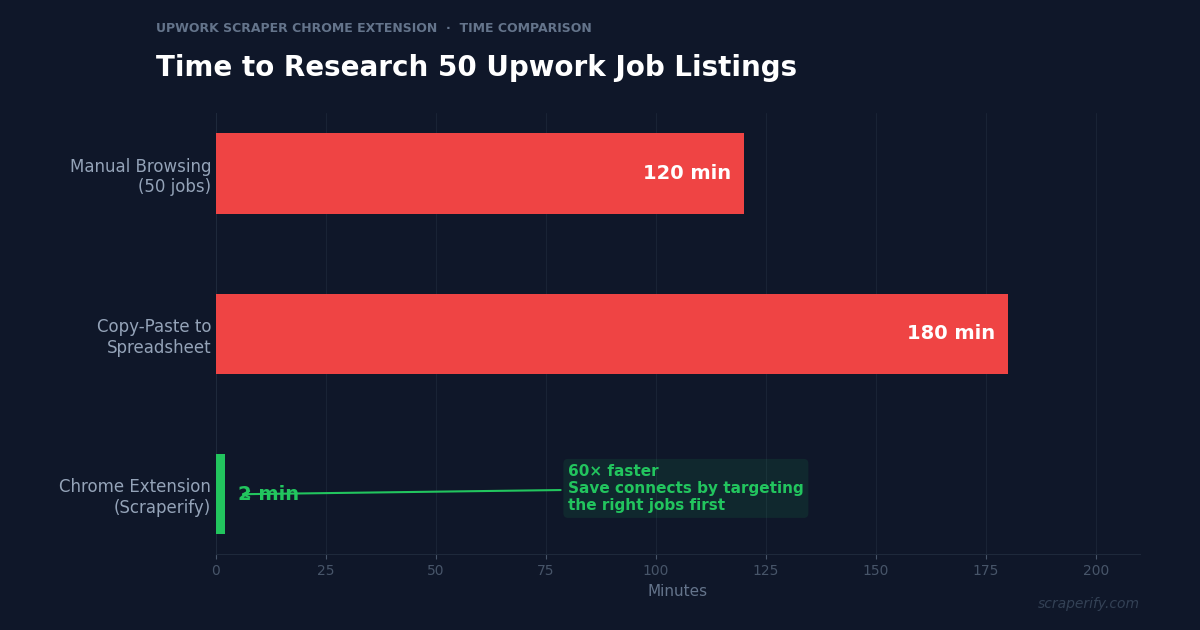
Upwork is a pay-to-play platform. Every proposal costs connects, and connects cost money. Sending 50 proposals per week without data-driven targeting means burning through connects on jobs you are unlikely to win. A Upwork scraper Chrome extension changes this equation — export job listings to a spreadsheet, filter by budget, client history, and proposal count, and spend your connects only on high-probability jobs. No coding. No API keys. No per-record fees.
This guide shows you how to use the Scraperify Upwork scraper Chrome extension to export Upwork jobs, analyze the freelance market, and build a data-driven strategy for winning more projects.
Why You Need an Upwork Scraper Chrome Extension
Upwork is the world’s largest freelancing platform, connecting millions of freelancers with clients across every industry. But the platform has become increasingly competitive. Top-rated freelancers report that the old strategy of “apply to everything and hope for the best” no longer works in 2026. Connects are expensive, boosted proposals push you down the queue, and the algorithm rewards targeted, high-quality applications over volume.
This is where a Upwork scraper Chrome extension becomes essential. Without a Upwork scraper Chrome extension, you are browsing jobs one at a time, reading each description, checking the client’s hiring history, and deciding whether to apply — all manually. For 50 jobs per day, this takes 2-3 hours of pure browsing time before you even start writing proposals.
A Upwork scraper Chrome extension compresses this research into 2 minutes:
- Captures job data automatically as you browse Upwork search results
- Exports to CSV, Excel, or JSON — the Upwork scraper Chrome extension supports all three formats
- Runs inside your browser — the Upwork scraper Chrome extension requires no installation beyond the Chrome Web Store
- Processes data locally — the Upwork scraper Chrome extension never sends your data to external servers
- Works with all Upwork search types — jobs, freelancers, agencies, and project catalogs
The Scraperify Upwork scraper Chrome extension is built for freelancers who want to stop wasting connects, agencies that need market intelligence, and recruiters searching for talent at scale.
What Data Can the Upwork Scraper Chrome Extension Export?
The Scraperify Upwork scraper Chrome extension extracts every visible data point from Upwork pages. Here is what the Upwork scraper Chrome extension captures:
Job listing details the Upwork scraper Chrome extension captures:
- Job title — full title as posted by the client
- Description — complete job description text
- Budget — fixed price or hourly rate range
- Duration — estimated project length
- Experience level — entry, intermediate, or expert
- Skills required — tagged skills (React, Python, SEO, etc.)
- Job URL — direct link to apply
- Posted date — when the job was listed
- Number of proposals — how many freelancers have already applied via the Upwork scraper Chrome extension
Client data the Upwork scraper Chrome extension exports:
- Client name/company — when visible
- Client location — country and city
- Total spent — how much the client has spent on Upwork historically
- Number of hires — total freelancers hired
- Hire rate — percentage of posted jobs that resulted in hires
- Average hourly rate paid — typical rate the client pays
- Payment verified — whether the client has a verified payment method
- Client rating — freelancer reviews of the client
- Jobs posted — total number of jobs the client has posted
Freelancer data (when scraping profiles):
- Freelancer name — profile name
- Title — professional headline
- Hourly rate — asking rate
- Earnings — total platform earnings
- Job success score — percentage rating
- Skills — listed skills and certifications
- Location — country
- Profile URL — direct link
This data is what separates freelancers who win consistently from those who spray-and-pray. The Upwork scraper Chrome extension gives you the information needed to identify ideal clients — high total spend, high hire rate, verified payment — before spending a single connect.
WHAT THE UPWORK SCRAPER CHROME EXTENSION EXTRACTS
Job Data
- Title & Description
- Budget & Duration
- Experience Level
- Skills Required
- Proposals Count
- Posted Date & URL
Client Data
- Location & Company
- Total Spent
- Hire Rate
- Jobs Posted
- Payment Verified
- Client Rating
Freelancer Data
- Name & Title
- Hourly Rate
- Earnings
- Job Success Score
- Skills & Location
How to Install the Upwork Scraper Chrome Extension
Setting up the Upwork scraper Chrome extension takes 30 seconds.
Step 1: Open the Chrome Web Store. Go to the Upwork Scraper Chrome Extension page. The Upwork scraper Chrome extension is called “FreelanceData Scraper — Export Jobs” by Scraperify.
Step 2: Click “Add to Chrome.” Confirm permissions. The Upwork scraper Chrome extension only needs access to upwork.com.
Step 3: Start using it. The Upwork scraper Chrome extension is ready immediately — no account or API key needed.
HOW THE UPWORK SCRAPER CHROME EXTENSION WORKS
Install
Add the Upwork scraper Chrome extension — 30 sec
Browse
Search Upwork jobs — data captured automatically
Click
One click on the Upwork scraper Chrome extension
Export
Download CSV, Excel, or JSON
How to Export Upwork Jobs to CSV (Step-by-Step)
Step 1: Search on Upwork
With the Upwork scraper Chrome extension installed, go to upwork.com and search for jobs in your niche. The Upwork scraper Chrome extension works on job search results, freelancer search, and project catalog pages.
Use Upwork’s filters to narrow results before the Upwork scraper Chrome extension starts capturing:
- Filter by category — web development, design, writing, marketing, data science
- Filter by experience level — entry, intermediate, expert
- Filter by budget — fixed price range or hourly rate range
- Filter by client history — payment verified, previous hires
- Filter by proposals — less than 5, 5-10, 10-15, 15-20, 20-50
- Sort by newest, relevance, or client spending
Step 2: Let the Upwork Scraper Chrome Extension Capture Data
As you scroll through results, the Upwork scraper Chrome extension captures job data automatically. The Upwork scraper Chrome extension icon shows a badge count. Keep scrolling to capture more — the Upwork scraper Chrome extension grabs everything you see.
Step 3: Click Export
Click the Upwork scraper Chrome extension icon. Choose CSV, Excel, or JSON. The Upwork scraper Chrome extension downloads the file instantly.
Step 4: Analyze and Prioritize
Open the Upwork scraper Chrome extension export. Each row is one job listing. With the Upwork scraper Chrome extension data, you can:
- Sort by client total spend — clients who have spent $50K+ are serious and pay well
- Filter by hire rate — clients with 80%+ hire rate actually hire, not just browse
- Filter by proposal count — jobs with under 10 proposals have less competition
- Sort by budget — focus on jobs that match your rate expectations
- Filter by payment verified — skip unverified clients to avoid wasted connects
Why Upwork Data Changes How Freelancers Win
Understanding the Upwork landscape through data fundamentally changes your approach to freelancing. Here is why the Upwork scraper Chrome extension matters more in 2026 than ever before:
Connects are expensive. Upwork charges 1-6 connects per proposal depending on the job. Boosted proposals cost even more. At $0.15 per connect, sending 50 proposals per week costs $30-$60 in connects alone. The Upwork scraper Chrome extension helps you spend those connects wisely by identifying jobs where you have the highest chance of getting hired — high client spend, high hire rate, low proposal count, matching skills.
The algorithm rewards relevance. Upwork’s algorithm in 2026 prioritizes proposals from freelancers whose skills and experience closely match the job requirements. Sending generic proposals to dozens of loosely related jobs actually hurts your visibility. The Upwork scraper Chrome extension lets you filter exported jobs by required skills to find the exact matches where your profile is strongest.
Client quality varies enormously. Some Upwork clients have spent $500K+ and hired hundreds of freelancers with 90%+ hire rates. Others have posted one job, never hired anyone, and have no payment method verified. The Upwork scraper Chrome extension exports client history data so you can distinguish between serious clients and tire-kickers before wasting connects.
Hourly rates differ by 5-10x for the same skills. A React developer job might range from $15/hour to $150/hour depending on the client, project complexity, and geographic preferences. Exported data from the Upwork scraper Chrome extension reveals these rate distributions, helping you price your proposals competitively without underbidding.
Seasonal hiring patterns exist. Q1 (January-March) sees the highest volume of new projects as companies kick off annual budgets. Q4 drops as budgets are depleted. By exporting Upwork job data weekly with the Upwork scraper Chrome extension and tracking volume over months, you can anticipate hiring cycles and adjust your proposal strategy accordingly — ramping up activity during peak periods and focusing on profile optimization during slow periods.
Boosted proposals change the game. Upwork introduced boosted proposals that let freelancers pay extra connects to appear higher in the client’s proposal list. This means even excellent proposals can get buried if competitors boost. The counter-strategy is not to boost blindly — it is to export job data with the Upwork scraper Chrome extension and identify jobs where boosting has the highest ROI: high-budget jobs from clients with strong hire rates where your skills are an exact match. Boosting on a $500 project from a first-time client is a waste; boosting on a $10,000 project from a client who has hired 50 freelancers with a 90% hire rate is a calculated investment.
Geographic arbitrage is real. Client location affects budgets dramatically. US-based clients typically offer 2-4x the rates of clients in South Asia or Eastern Europe for identical work. But they also receive more proposals. The Upwork scraper Chrome extension data reveals which geographic markets offer the best combination of high budgets and manageable competition, helping you target the sweet spot.
Ready to stop wasting connects?
Install the Upwork scraper Chrome extension and export job data before spending connects. Free tier available.
Add to Chrome — Free5 Ways to Use the Upwork Scraper Chrome Extension
1. Smart Proposal Targeting
The number one use of the Upwork scraper Chrome extension is filtering jobs before applying. Export 100 jobs from your niche, then filter in your spreadsheet: payment verified = yes, client total spend > $10K, hire rate > 60%, proposals < 15. The remaining jobs are your high-probability targets. This approach typically reduces your job list from 100 to 15-20 ideal opportunities — but these 15-20 convert at 3-5x the rate of untargeted applications.
Top-rated freelancers who sent over 4,000 proposals on Upwork report that the single biggest factor in getting replies is not the proposal itself — it is choosing the right job to apply to. The Upwork scraper Chrome extension makes this selection data-driven instead of intuition-based.
2. Rate Benchmarking
Before setting your hourly rate, use the Upwork scraper Chrome extension to export freelancer profiles in your skill category. Sort by earnings and hourly rate. If the top earners in “React Developer” charge $75-$120/hour and mid-tier earners charge $40-$60/hour, you know the market rate bands. Price yourself based on where your experience falls. The Upwork scraper Chrome extension eliminates guessing by showing you actual market data.
A common mistake freelancers make is setting their rate based on what they think they deserve rather than what the market pays. A graphic designer with 3 years of experience might set their rate at $25/hour, not realizing that the median rate for their skill set is $55/hour. Conversely, a junior developer might ask for $80/hour in a market where experienced developers charge $60/hour, ensuring they never get hired. The Upwork scraper Chrome extension exported data prevents both mistakes by anchoring your pricing to reality.
3. Client Prospecting for Agencies
Freelancing agencies use the Upwork scraper Chrome extension to identify high-value clients for outreach. Export jobs posted by clients who have spent $100K+ on Upwork, have hire rates above 80%, and are currently hiring in your agency’s specialty. These clients are proven buyers who pay well and follow through. The Upwork scraper Chrome extension builds your prospecting list in minutes instead of hours.
4. Niche Market Analysis
Thinking about expanding into a new skill area? Use the Upwork scraper Chrome extension to export all jobs in that category. Analyze the data: How many jobs are posted per week? What is the average budget? What skills are most requested? How much competition (proposals per job) exists? This analysis tells you whether a niche is worth entering before you invest time in upskilling.
For example, if “AI prompt engineering” shows 200 new jobs per week with an average budget of $2,000 and only 8 proposals per job, that is a high-demand, low-competition niche worth pursuing. If “WordPress developer” shows the same job volume but 45 proposals per job and $500 average budgets, the economics are much less attractive. The Upwork scraper Chrome extension reveals these dynamics instantly.
You can also use this analysis to identify emerging specializations. When a new skill starts appearing in job requirements — like “Claude API integration” or “Cursor AI development” — exported data shows how quickly demand is growing and what clients are willing to pay. Early movers into new specializations face minimal competition and can set premium rates. By the time a skill is mainstream with thousands of freelancers offering it, rates compress and competition intensifies. The Upwork scraper Chrome extension data is your early warning system for these shifts.
Another valuable analysis: export jobs that require your skill + one adjacent skill. For example, “React” + “TypeScript” jobs versus “React” alone. The data often shows that adding a complementary skill to your proposals increases your addressable market by 30-50% while facing less competition, because fewer freelancers combine both skills. This kind of strategic insight comes naturally from a spreadsheet powered by the Upwork scraper Chrome extension but is completely invisible from regular browsing.
5. Tracking Job Market Trends
Export Upwork jobs weekly in your category using the Upwork scraper Chrome extension. Over time, you build a dataset that shows which skills are growing in demand, which client industries are hiring more, and how budgets are trending. Freelancers who track these trends position themselves ahead of the market — learning new skills before demand peaks and adjusting rates as budgets shift.
Upwork Scraper Chrome Extension vs Other Methods
UPWORK SCRAPER: CHROME EXTENSION VS ALTERNATIVES
| Feature | Upwork Scraper Chrome Extension | Python/n8n | Manual |
|---|---|---|---|
| Setup time | 30 sec | 1-3 hours | 0 min |
| Coding required | No | Yes | No |
| Client history data | ✓ | Varies | ✓ |
| CSV + Excel + JSON | ✓ | Partial | ✗ |
| Speed (50 jobs) | ~2 min | ~10 min | ~2 hours |
The Upwork scraper Chrome extension is the clear winner for freelancers. Python scrapers and n8n workflows require technical skills that most freelancers outside of development do not have. Upwork also actively blocks unauthorized API access, so scripted scrapers break frequently. The Upwork scraper Chrome extension works within your browser session — Upwork sees normal browsing behavior, not automated requests. Manual browsing is free but costs you hours of time that could be spent writing proposals or doing client work.
Tips for Using the Upwork Scraper Chrome Extension
Prioritize Clients with $10K+ Total Spend
After exporting with the Upwork scraper Chrome extension, filter for clients who have spent $10,000 or more on the platform. These clients understand how Upwork works, pay on time, leave reviews, and hire repeatedly. First-time clients with zero spend and no reviews are higher risk — they may not understand the platform, may ghost after hiring, or may have unrealistic expectations.
Target Jobs with Under 15 Proposals
Low proposal count means less competition. Use the Upwork scraper Chrome extension to sort by proposals ascending. Jobs with 5-10 proposals posted within the last 24 hours are your sweet spot — fresh enough that the client is still reviewing, but not so old that 50 freelancers are already competing.
The math behind the Upwork scraper Chrome extension strategy is simple: if a job has 5 proposals and you submit proposal #6, each proposal has roughly a 17% chance of being read carefully. If a job has 50 proposals, your odds drop to 2%. Clients do not read all 50 proposals — they typically review the first 10-15 and hire from that group. By the time you submit proposal #40, the client may have already shortlisted candidates. The Upwork scraper Chrome extension data reveals proposal counts so you can focus your energy on jobs where you will actually be seen.
Build a Client Scoring System
Create a simple scoring formula for exported jobs. Assign points: payment verified (+2), total spend > $50K (+3), hire rate > 70% (+2), less than 10 proposals (+2), budget matches your rate (+1). Score each job in your spreadsheet and apply only to jobs scoring 7 or higher. This systematic approach, powered by the Upwork scraper Chrome extension data, transforms freelancing from a lottery into a process.
Track Your Win Rate by Client Type
After applying to exported and scored jobs for a month, track which client profiles actually hire you. You may discover that mid-size clients ($10K-$50K total spend) respond to your proposals at 3x the rate of enterprise clients ($500K+ total spend). This feedback loop — only possible with structured data from the Upwork scraper Chrome extension — refines your targeting over time and continuously improves your connect-to-hire conversion rate.
Export Weekly for Trend Analysis
Use the Upwork scraper Chrome extension to export your job category weekly. Track average budgets, proposal counts, and posting volume over time. If average budgets are rising in your niche, consider raising your rates. If proposal counts per job are dropping, the market is less competitive — increase your application volume. The Upwork scraper Chrome extension data reveals these trends that are invisible from daily browsing.
Combine with Other Scraperify Extensions
If you sell services outside Upwork too, use the Upwork scraper Chrome extension alongside the eBay Scraper for e-commerce client prospecting or the Instagram Scraper for finding potential clients through social media activity.
Who Uses the Upwork Scraper Chrome Extension?
Solo Freelancers — Individual freelancers use the Upwork scraper Chrome extension to work smarter, not harder. Instead of browsing 100 jobs and applying to 50, they export 100 jobs, filter to the best 15 using client data, and write targeted proposals for each. The Upwork scraper Chrome extension turns a 3-hour browsing session into a 10-minute data exercise, leaving more time for actual proposal writing and client work.
Freelancing Agencies — Agencies with multiple specialists use the Upwork scraper Chrome extension to find high-value clients at scale. They export jobs across multiple categories, identify clients with big budgets and repeat hiring patterns, and assign the best opportunities to team members. The Upwork scraper Chrome extension becomes their lead generation engine.
Career Changers — Professionals transitioning into freelancing use the Upwork scraper Chrome extension to understand the market before diving in. By exporting jobs in their target field, they learn what skills are in demand, what rates clients pay, and how much competition exists. This data-driven approach to career planning prevents the common mistake of entering an oversaturated niche.
Recruiters and Hiring Managers — Some recruiters use the Upwork scraper Chrome extension to export freelancer profiles when searching for talent. Instead of manually reviewing 50 profiles, they export the data, filter by job success score, hourly rate range, and skills, and create a shortlist in minutes.
Market Researchers — Analysts studying the gig economy, labor market trends, and remote work adoption use the Upwork scraper Chrome extension to gather large datasets. The exported data feeds into reports on freelance rate trends, skill demand shifts, and geographic hiring patterns.
Content Creators and Course Builders — Freelancing coaches and YouTube creators use the Upwork scraper Chrome extension to gather real data for their content. Instead of speaking in generalities (“rates vary”), they export actual market data and share specific numbers: “The average React developer on Upwork charges $65/hour, based on 500 exported profiles.” Data-backed content powered by the Upwork scraper Chrome extension performs better and builds more trust with their audience.
Startup Founders — Early-stage founders use the Upwork scraper Chrome extension to estimate development costs before building their product. By exporting freelancer profiles and job listings in their tech stack, they understand what talent costs and how many freelancers are available. This data informs their budget planning and helps them write more competitive job postings that attract quality candidates instead of lowball bidders.
Upwork Scraper Chrome Extension — Frequently Asked Questions
Is the Upwork scraper Chrome extension free?
The Upwork scraper Chrome extension offers a free tier. Paid plans start at $19.99/month. Lifetime access to the Upwork scraper Chrome extension is $79.
Can the Upwork scraper Chrome extension export client data?
Yes. The Upwork scraper Chrome extension captures client total spend, hire rate, payment verification status, and rating — all visible on job listing pages.
Is my data private with the Upwork scraper Chrome extension?
Yes. The Upwork scraper Chrome extension processes everything locally. No job or client data leaves your browser.
How many jobs can the Upwork scraper Chrome extension export?
The Upwork scraper Chrome extension has no hard limit. Scroll through results and the Upwork scraper Chrome extension captures everything.
Will the Upwork scraper Chrome extension get my account banned?
The Upwork scraper Chrome extension reads data from pages you are already viewing. It does not send automated requests. Browse normally.
Can I export freelancer profiles with the Upwork scraper Chrome extension?
Yes. The Upwork scraper Chrome extension works on freelancer search pages too — export profiles, rates, skills, and earnings data.
Start Exporting Upwork Jobs Today
Stop wasting connects on low-probability jobs. The Upwork scraper Chrome extension exports job listings to CSV, Excel, or JSON so you can filter, prioritize, and apply strategically.
What the Upwork scraper Chrome extension gives you:
- Upwork scraper Chrome extension one-click export from any search page
- Complete data — jobs, budgets, client history, proposal counts, skills
- Upwork scraper Chrome extension CSV, Excel, and JSON formats
- 100% local — the Upwork scraper Chrome extension keeps your data private
- Save connects by targeting high-probability jobs first
- Free tier — try the Upwork scraper Chrome extension before you buy
Whether you are a solo freelancer optimizing your proposal strategy, an agency building a client pipeline, or a career changer researching the market, the Upwork scraper Chrome extension is the fastest way to turn Upwork browsing into actionable data.
Export Upwork Jobs in One Click
Join freelancers who use the Upwork scraper Chrome extension to win more projects with fewer connects.
Add the Upwork Scraper to Chrome →Free tier available · Paid plans from $19.99/month · $79 lifetime