Vinted Scraper Chrome Extension: Export to CSV (2026)
Export Vinted listings to CSV, Excel, or JSON in one click with this Chrome extension. No coding, no API keys. Works across all 19 Vinted countries.
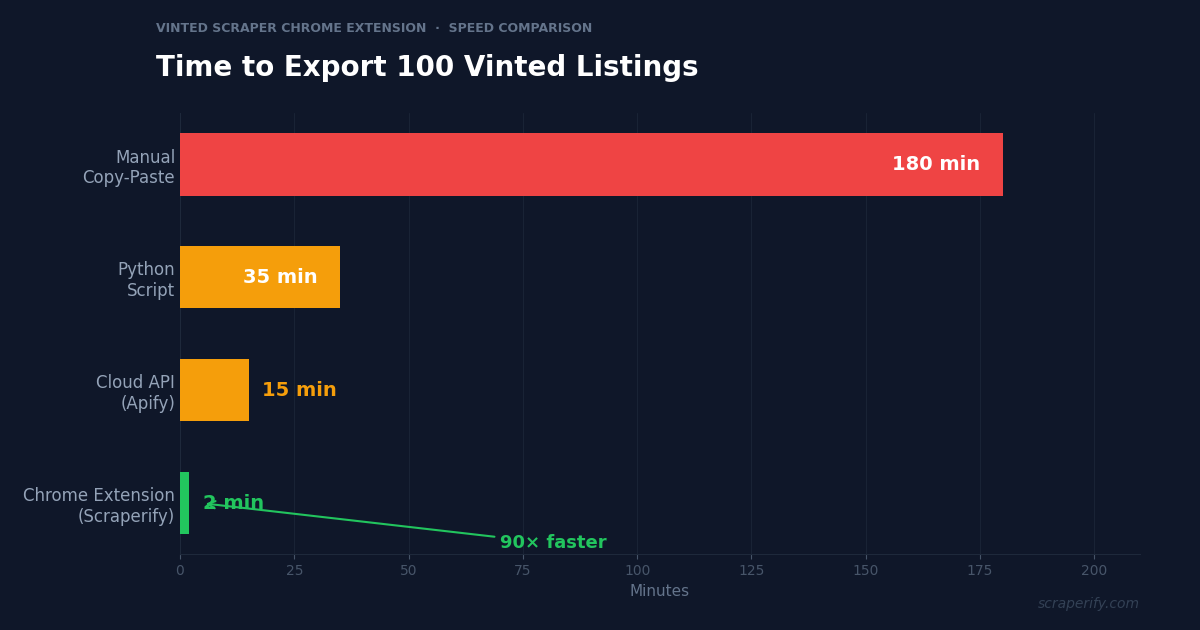
Copying Vinted listings one by one into a spreadsheet is a waste of time. Whether you are tracking prices across 19 countries, researching trending brands, or building inventory for your reselling business, you need a faster way to get data out of Vinted. A Vinted scraper Chrome extension solves this in seconds — install it, browse Vinted as you normally would, and click one button to export everything to CSV, Excel, or JSON. No coding. No API keys. No per-record fees.
This guide shows you exactly how to set up and use a Vinted scraper Chrome extension to export listings, prices, seller data, and more — with real tips from the reseller community.
Why You Need a Vinted Scraper Chrome Extension
Vinted is the largest second-hand fashion marketplace in Europe, with over 100 million members across 19 countries. The platform charges zero selling fees — unlike eBay or Depop — which is why resellers are flocking to it. But Vinted does not offer any built-in data export feature. That is exactly why a Vinted scraper Chrome extension exists.
Without a Vinted scraper Chrome extension, you are stuck doing everything manually. Copy the title. Copy the price. Copy the condition. Copy the seller name. Repeat for every single listing. For 100 listings, this takes hours. For 1,000, it is impossible.
Experienced resellers know that pricing research is one of the hardest parts of selling on Vinted. Many cross-reference prices on eBay and other platforms before listing — a process that takes hours when done by hand. A popular item might sell within 2 hours on Vinted if priced right, but pricing it wrong means it sits for weeks. A Vinted scraper Chrome extension turns hours of research into minutes.
A Vinted scraper Chrome extension eliminates the manual work:
- Runs inside your browser — no software to download, no servers to set up
- Captures data automatically as you browse Vinted search results
- Exports to CSV, Excel, or JSON with a single click
- Works across all 19 Vinted countries — France, Germany, UK, Italy, Spain, Netherlands, Belgium, Lithuania, Poland, and more
- Processes data locally — your Vinted data never leaves your computer
Unlike Python scripts that require coding knowledge, or cloud scrapers like Apify that charge per-record fees and process your data on external servers, a Vinted scraper Chrome extension is the fastest way to get listing data into a spreadsheet. You browse, you click, you export.
What Data Can the Vinted Scraper Chrome Extension Export?
The Scraperify Vinted scraper Chrome extension extracts every visible data point from Vinted listing pages. Here is the complete breakdown:
Listing Details the Vinted scraper Chrome extension captures:
- Title — full listing title as shown on Vinted
- Price — current asking price with currency
- Brand — brand name (Zara, Nike, H&M, Patagonia, etc.)
- Size — clothing size (S, M, L, EU 38, US 8, etc.)
- Condition — new with tags, very good, good, satisfactory
- Color — primary color of the item
- Category — women, men, kids, home
- Photos — direct URLs to all listing images via the Vinted scraper Chrome extension
- Description — the seller’s item description
- Listing URL — direct link back to the Vinted listing
Seller data the Vinted scraper Chrome extension exports:
- Seller name — Vinted username
- Seller rating — average review score
- Number of reviews — total reviews received
- Location — seller’s country and city (when visible)
- Last active — when the seller was last online
Pricing & engagement data from the Vinted scraper Chrome extension:
- Original price — if the seller listed a “was” price
- Discount percentage — calculated from original vs current
- Shipping cost — buyer-paid shipping amount
- Total price — item price + shipping
- Number of favorites — how many users saved the listing (the Vinted scraper Chrome extension captures this for demand analysis)
- Upload date — when the listing was posted
- Number of views — total views (if visible)
This data is what separates professional resellers from hobbyists. The Vinted scraper Chrome extension gives you a complete dataset to calculate average selling prices, spot underpriced items instantly, and make data-driven decisions instead of guessing. No other Vinted scraper Chrome extension captures this many fields in a single export.
WHAT THE VINTED SCRAPER CHROME EXTENSION EXTRACTS
Listing Data
- Title & Description
- Price & Currency
- Brand & Size
- Condition & Color
- Photo URLs
- Listing URL
Seller Data
- Username
- Rating & Reviews
- Location
- Last Active
- Profile URL
Pricing & Engagement
- Original Price
- Discount %
- Shipping Cost
- Favorites Count
- Views & Upload Date
How to Install the Vinted Scraper Chrome Extension
Setting up the Scraperify Vinted scraper Chrome extension takes less than 30 seconds. No account creation, no API keys, no configuration.
Step 1: Open the Chrome Web Store
Go to the Vinted Scraper Chrome Extension page. The extension is called “Vinted Scraper — One-Click Data Export” by Scraperify.
Step 2: Click “Add to Chrome”
Click the blue “Add to Chrome” button. A popup will ask you to confirm permissions. The Vinted scraper Chrome extension only needs access to vinted.com domains — it cannot read data from other websites.
Step 3: Confirm the Installation
Click “Add extension” in the dialog. The Scraperify icon appears in your Chrome toolbar. The Vinted scraper Chrome extension is ready to use immediately.
Step 4: Pin the Extension (Optional)
Click the puzzle piece icon in Chrome’s toolbar, find “Vinted Scraper,” and click the pin icon. This keeps it visible for quick access.
HOW THE VINTED SCRAPER CHROME EXTENSION WORKS
Install
Add to Chrome from the Web Store — 30 seconds
Browse
Search Vinted as usual — data captured automatically
Click
One click on the extension icon to export
Export
Download as CSV, Excel, or JSON instantly
How to Export Vinted Listings to CSV (Step-by-Step)
Here is the complete workflow for exporting Vinted listings using the Vinted scraper Chrome extension:
Step 1: Search on Vinted
With the Vinted scraper Chrome extension installed, navigate to any Vinted domain (vinted.fr, vinted.de, vinted.co.uk, etc.) and search for the items you want to export. For example, search “Patagonia vest” on vinted.co.uk to find all Patagonia vest listings in the UK market. The Vinted scraper Chrome extension works on every Vinted domain.
Use Vinted’s built-in filters to narrow your results before the Vinted scraper Chrome extension captures data:
- Filter by brand — select Patagonia, Nike, Zara, or any specific brand
- Filter by size — pick your target size (S, M, L, or exact EU/US sizes)
- Filter by condition — new with tags, very good, good, satisfactory
- Filter by price range — set min and max to focus on your buy range
- Sort by newest first — catch fresh listings before other resellers
Step 2: Let the Extension Capture Data
As you scroll through search results, the Vinted scraper Chrome extension captures listing data automatically in the background. You do not need to click anything — just browse Vinted as you normally would.
The Vinted scraper Chrome extension icon shows a badge count of captured listings. Scroll down to load more results, and the Vinted scraper Chrome extension captures those too. Want listings from page 2, 3, or 10? Just keep scrolling — the Vinted scraper Chrome extension grabs everything.
Step 3: Click Export
Click the Vinted scraper Chrome extension icon in your toolbar. You will see a summary of all captured listings and three export options:
- CSV — opens in Excel, Google Sheets, Numbers, or any spreadsheet app
- Excel (.xlsx) — native Excel format with pre-formatted columns
- JSON — structured data for developers, APIs, or automation tools
Click your preferred format. The file downloads instantly.
Step 4: Analyze Your Data
Open the file exported by the Vinted scraper Chrome extension. Each row is one Vinted listing. Each column is a data field — title, price, brand, size, condition, seller, URL, favorites count, and more.
With the Vinted scraper Chrome extension data, you can:
- Sort by price to find underpriced items for resale
- Filter by brand to analyze specific market segments
- Create pivot tables to compare average prices across countries
- Use AVERAGE(), MEDIAN(), MIN(), MAX() on the price column for pricing research
- Sort by favorites — high favorites with reasonable price signals strong demand
The entire process — from searching Vinted to having a complete spreadsheet — takes under 2 minutes with the Vinted scraper Chrome extension. Compare that to the hours of manual copy-paste that most Vinted resellers endure. The Vinted scraper Chrome extension makes data collection the easiest part of your workflow.
Vinted Scraper Chrome Extension: Export to Excel, JSON, or CSV
The Scraperify Vinted scraper Chrome extension supports three export formats. Each is optimized for different workflows:
CSV (Comma-Separated Values)
Best for: Google Sheets, quick analysis, importing into other tools like crosslisting software
CSV is the universal spreadsheet format. Every spreadsheet application can open CSV files. When you use the Vinted scraper Chrome extension for a quick price check or uploading data to crosslisting tools like ZipSale, CSV is the simplest choice.
Excel (.xlsx)
Best for: Microsoft Excel users, formatted reports, pivot tables, inventory management
The Vinted scraper Chrome extension Excel export includes pre-formatted column headers and proper data types. Numbers stay as numbers, not text. If you are building pricing reports or tracking inventory in Excel, the Vinted scraper Chrome extension Excel format saves formatting time.
JSON (JavaScript Object Notation)
Best for: Developers, API integrations, n8n or Make.com automations, database imports
The Vinted scraper Chrome extension JSON export gives you structured data that automation tools can parse directly. If you are building automated workflows — like feeding Vinted data into a spreadsheet automatically every day — the Vinted scraper Chrome extension JSON format is the right choice.
All three Vinted scraper Chrome extension formats contain the same complete dataset. The only difference is file structure.
5 Ways Resellers Use the Vinted Scraper Chrome Extension
A Vinted scraper Chrome extension is not just about getting data into a spreadsheet. Here is how professional resellers actually use exported Vinted data:
1. Cross-Country Price Arbitrage
Vinted operates in 19 countries, and prices for identical items vary dramatically between markets. The Vinted scraper Chrome extension reveals these gaps instantly. A pair of Nike Dunks might sell for €45 in Lithuania but €85 in France. A Patagonia vest could be £30 on vinted.co.uk but €55 on vinted.fr. The Vinted scraper Chrome extension makes cross-country comparison effortless.
How to do it with the Vinted scraper Chrome extension: Export listings for the same search term from vinted.fr, vinted.de, vinted.co.uk, and vinted.lt. The Vinted scraper Chrome extension makes it easy to paste them into one spreadsheet. Compare average prices by country. Buy from the cheapest market, relist in the most expensive one. Since Vinted charges zero selling fees, your entire margin is profit minus shipping.
2. Competitive Pricing Analysis
Before listing an item, smart resellers use the Vinted scraper Chrome extension to check what similar items are actually selling for — not just what sellers are asking. Many resellers also cross-reference eBay sold prices to validate their Vinted pricing. But without a Vinted scraper Chrome extension, manually browsing dozens of listings takes forever.
How to do it: Search for your exact item on Vinted. Export all results with the Vinted scraper Chrome extension. Use AVERAGE() and MEDIAN() on the price column. Price your item 5-10% below the median for a fast sale, or at the median if you are patient. Items priced correctly on Vinted can sell within 2 hours.
3. Trending Brand Detection
Fashion trends change fast. The Vinted scraper Chrome extension helps resellers stay ahead by regularly exporting Vinted search results for broad categories (“women’s jackets” or “men’s sneakers”). With the Vinted scraper Chrome extension, resellers spot which brands are appearing more frequently and which are gaining favorites.
How to do it with the Vinted scraper Chrome extension: Export listings weekly for your niche. Track listing count per brand over time. Rising listing counts + high average favorites = growing demand. The Vinted scraper Chrome extension helps resellers catch trends before they peak — brands like Corteiz, Represent, and Arc’teryx all showed early signals on Vinted before going mainstream.
4. Inventory Sourcing at Scale
High-volume resellers need to source items efficiently. The Vinted scraper Chrome extension makes this possible by exporting listings filtered by condition (“new with tags”) and price (under a buy threshold). Using the Vinted scraper Chrome extension, they build a shortlist of items to purchase — complete with URLs to go back and buy instantly.
How to do it with the Vinted scraper Chrome extension: Search with filters — condition: new with tags, price: under €15 (or your threshold). Use the Vinted scraper Chrome extension to export results. Sort by favorites count (high favorites = high demand = will resell quickly). Click through the listing URLs to purchase the best items before other resellers spot them.
5. Market Research Reports
Some resellers and consultants use the Vinted scraper Chrome extension to create market reports for specific niches — “Luxury handbags on Vinted in Q2 2026” or “Sneaker resale trends across European markets.” The Vinted scraper Chrome extension exported data makes these reports possible.
How to do it with the Vinted scraper Chrome extension: Export 500+ listings across multiple searches and countries. The Vinted scraper Chrome extension outputs clean data for pivot tables to aggregate by brand, country, condition, and price range. Build charts showing price distributions and market size. Share with clients, your team, or your own buying strategy.
5 WAYS RESELLERS USE VINTED LISTING DATA
Price Arbitrage
Buy low in one country, sell high in another
Price Analysis
Check avg, median, range before listing
Trend Detection
Spot rising brands and demand shifts
Inventory Sourcing
Find NWT items under your buy threshold
Market Reports
Build data-driven niche reports
Ready to export Vinted listings?
Install the Vinted Scraper Chrome extension and start exporting data in under 2 minutes. Free tier available.
Add to Chrome — FreeVinted Scraper Chrome Extension vs Other Methods
There are several ways to get data out of Vinted. Here is how the Vinted scraper Chrome extension stacks up against alternatives:
VINTED SCRAPER: CHROME EXTENSION VS ALTERNATIVES
| Feature | Chrome Extension | Python Script | Cloud API | Manual |
|---|---|---|---|---|
| Setup time | 30 sec | 30-60 min | 5-10 min | 0 min |
| Coding required | No | Yes | No | No |
| Data stays local | ✓ | ✓ | ✗ | ✓ |
| CSV + Excel + JSON | ✓ | Partial | ✓ | ✗ |
| All 19 countries | ✓ | Varies | Varies | ✓ |
| Speed (100 listings) | ~2 min | ~5 min | ~3 min | ~3 hours |
| Cost | Free tier | Free | Pay/record | Your time |
Chrome Extension (Scraperify) — Best for Resellers
Zero setup. No coding. Works across all 19 Vinted domains. Data stays on your computer. The Vinted scraper Chrome extension is designed for resellers, analysts, and anyone who needs Vinted data in a spreadsheet without touching code.
Best for: Resellers, market researchers, pricing analysts, non-technical users who want data now.
Python Scripts (GitHub)
Plenty of open-source Vinted scraping scripts exist on GitHub. They offer full customization — you can modify the code to extract exactly what you need. But unlike the Vinted scraper Chrome extension, you need Python installed, you need to understand dependencies, and you need to handle Vinted’s anti-bot protections yourself. Most resellers choose the Vinted scraper Chrome extension over Python because it requires zero technical knowledge.
Best for: Developers who want full control and do not mind debugging blocked requests.
Cloud Scraper APIs (Scraping Badger, Apify)
Cloud-based scrapers handle the technical complexity for you — proxies, rate limiting, anti-bot bypasses. Some like Scraping Badger offer dedicated Vinted endpoints with search, item details, and user profile scrapers. But unlike the Vinted scraper Chrome extension, they charge per API call or per record, and your data is processed on their servers. The Vinted scraper Chrome extension keeps your data local and charges a flat monthly rate.
Best for: Technical users who need scheduled, high-volume scraping and are comfortable with API keys and per-record pricing.
Manual Copy-Paste
No tools, no cost, no setup. Just you, Vinted, and a spreadsheet. Works fine for 5-10 listings. Completely impractical for 100+ listings. If you have ever tried to manually copy 200 Vinted listings into Excel, you know why the Vinted scraper Chrome extension exists.
Best for: One-off checks of a handful of listings. For anything beyond that, the Vinted scraper Chrome extension is the clear winner.
The Vinted scraper Chrome extension hits the sweet spot between simplicity and power. If you need more than 10 listings in a spreadsheet, it is the fastest path from Vinted to data.
Tips for Using the Vinted Scraper Chrome Extension Effectively
To get the most out of your Vinted scraper Chrome extension, follow these best practices:
Use Specific Search Terms
Broad searches like “shoes” return thousands of irrelevant results. The Vinted scraper Chrome extension will capture everything you scroll past, so narrow your search first: “Nike Air Max 90 size 42” or “Levi’s 501 W32 L32.” The more specific your search, the more useful the Vinted scraper Chrome extension output. Quality of input determines quality of output.
Apply Vinted Filters Before Using the Vinted Scraper Chrome Extension
Use Vinted’s built-in filters before letting the Vinted scraper Chrome extension capture data. Filter by condition (new with tags), price range (set a min and max), brand, and size. This means every listing the Vinted scraper Chrome extension captures is relevant — no time wasted cleaning junk data in your spreadsheet.
Scrape Multiple Countries for Price Comparison
One of the biggest advantages of using the Vinted scraper Chrome extension is that Vinted spans 19 European countries. To find arbitrage opportunities, use the Vinted scraper Chrome extension to export the same search from multiple Vinted domains:
| Country | Domain | Currency |
|---|---|---|
| France | vinted.fr | EUR |
| Germany | vinted.de | EUR |
| United Kingdom | vinted.co.uk | GBP |
| Spain | vinted.es | EUR |
| Italy | vinted.it | EUR |
| Netherlands | vinted.nl | EUR |
| Belgium | vinted.be | EUR |
| Lithuania | vinted.lt | EUR |
| Poland | vinted.pl | PLN |
| Czech Republic | vinted.cz | CZK |
| Sweden | vinted.se | SEK |
| Denmark | vinted.dk | DKK |
| Portugal | vinted.pt | EUR |
| Finland | vinted.fi | EUR |
| Austria | vinted.at | EUR |
| Hungary | vinted.hu | HUF |
| Romania | vinted.ro | RON |
| Croatia | vinted.hr | EUR |
| Luxembourg | vinted.lu | EUR |
Compare average prices in your spreadsheet. The Vinted scraper Chrome extension reveals price gaps between Eastern and Western European markets that can be 40-60% for the same items.
Export Regularly for Trend Tracking
One-time exports give you a snapshot. Regular exports give you trends. Save each export with a date in the filename (“vinted-nike-dunks-2026-06-26.csv”) and track how prices, supply, and demand change over time. Weekly exports are enough for most niches.
Professional resellers use the Vinted scraper Chrome extension to build pricing databases over weeks and months. By comparing this week’s average price for a specific item against last month’s, you can spot seasonal trends — winter coats drop in price during spring, and summer dresses peak in June. This kind of time-series data is impossible to build manually but trivial with regular CSV exports.
Clean and Organize Your Exports
After the Vinted scraper Chrome extension finishes exporting, take two minutes to clean your data. Delete duplicate listings, remove sold items if they appear, and add a “date exported” column. Store your Vinted scraper Chrome extension exports in a consistent folder structure — one folder per brand or category. Over time, this organized Vinted scraper Chrome extension data becomes a competitive advantage that no other reseller in your niche has.
Combine with Other Scraperify Extensions
If you sell across multiple platforms, combine the Vinted scraper Chrome extension with other Scraperify extensions:
- Depop Scraper — export Depop listings for cross-platform price comparison
- Mercari Scraper — export Mercari data (popular in the US and Japan)
- eBay Scraper — export eBay listings across 15+ regional domains
Having data from multiple reselling platforms in the same spreadsheet format makes cross-platform analysis effortless. The Vinted scraper Chrome extension combined with other Scraperify extensions lets you see where the same item commands the highest price and list there.
Who Uses the Vinted Scraper Chrome Extension?
The Vinted scraper Chrome extension is built for anyone who needs Vinted data at scale. Here are the most common users:
Part-Time Resellers — The UK reselling community has exploded on Vinted. Part-time sellers who flip clothing alongside their day jobs use the Vinted scraper Chrome extension to check competitive prices before listing. Instead of guessing what a New Balance running top is worth, they export 50 comparable listings and price based on data. Many report that data-driven pricing helps items sell within hours rather than sitting for weeks.
Full-Time Reselling Businesses — Professional resellers who process hundreds of items per month cannot afford to price manually. They export listings from multiple countries daily, build pricing databases, and identify sourcing opportunities at scale. The Vinted scraper Chrome extension replaces what would otherwise require a virtual assistant or custom software.
Market Research Analysts — Consultants and research firms analyzing the European second-hand fashion market use exported Vinted data to build reports. Which brands are trending? How do prices compare between Eastern and Western Europe? What condition grades command the highest premiums? All answerable with exported data.
Crosslisting Sellers — Sellers who list on Vinted, Depop, eBay, and Mercari simultaneously use the Vinted scraper Chrome extension alongside other Scraperify extensions. Exporting data from all four platforms into the same CSV format makes cross-platform pricing easy. If a Patagonia vest sells for £30 on Vinted UK but $55 on Depop US, the arbitrage opportunity is obvious.
Dropshipping Researchers — Some sellers research Vinted pricing to understand the second-hand market value of items they source from wholesale or liquidation pallets. The Vinted scraper Chrome extension helps them estimate resale value before committing to inventory purchases.
Whether you sell 5 items a month or 500, the Vinted scraper Chrome extension saves hours of manual research and helps you make pricing decisions based on real market data rather than guesswork.
Vinted Scraper Chrome Extension — Frequently Asked Questions
Is the Vinted scraper Chrome extension free?
The Scraperify Vinted scraper Chrome extension offers a free tier with limited exports per month. Paid plans start at $19.99/month for unlimited exports. Lifetime access is $79 — one payment, use forever. All plans include CSV, Excel, and JSON export.
Does the Vinted scraper work in all countries?
Yes. The Vinted scraper Chrome extension works on all 19 Vinted domains: France, Germany, UK, Spain, Italy, Netherlands, Belgium, Luxembourg, Austria, Czech Republic, Lithuania, Poland, Portugal, Denmark, Finland, Sweden, Romania, Hungary, and Croatia.
Is my data private when using the extension?
Yes. The Vinted scraper Chrome extension processes all data locally in your browser. No listing data is sent to external servers. Your scraped data stays on your computer — unlike cloud scrapers that process your data on their infrastructure.
Can the Vinted scraper Chrome extension export seller data?
Yes. The Vinted scraper Chrome extension captures seller information including username, rating, review count, and location (when visible on the listing page). This makes the Vinted scraper Chrome extension useful for identifying high-volume sellers or sourcing from specific regions.
How many listings can the Vinted scraper Chrome extension export at once?
The Vinted scraper Chrome extension captures listings as you scroll through Vinted search results. The more you scroll, the more the Vinted scraper Chrome extension captures. There is no hard limit — export hundreds or thousands of listings in a single session with the Vinted scraper Chrome extension.
Will using the scraper get my Vinted account banned?
The Vinted scraper Chrome extension reads data from pages you are already viewing — it does not send automated requests or bypass access controls. It mimics normal browsing behavior. That said, browse at a normal pace and take breaks between long scraping sessions.
What is the difference between CSV and Excel export in the Vinted scraper Chrome extension?
The Vinted scraper Chrome extension CSV export is a plain text format that works in any spreadsheet app (Google Sheets, Excel, Numbers). The Vinted scraper Chrome extension Excel (.xlsx) export is a native Microsoft format with pre-formatted columns and proper data types. Both Vinted scraper Chrome extension exports contain the same data — choose based on your preferred application.
Can I use the Vinted scraper Chrome extension data commercially?
Yes. Many resellers use Vinted scraper Chrome extension data for pricing research, competitor analysis, and market reports. The data exported by the Vinted scraper Chrome extension is yours to use for any legal business purpose. Common uses include pricing your own listings, building sourcing lists, and creating market analysis reports for clients.
How is the Scraperify Vinted scraper Chrome extension different from other tools?
The Scraperify Vinted scraper Chrome extension captures data automatically as you browse — no need to manually click “extract” on each page. The Vinted scraper Chrome extension exports all data fields including photos, seller info, and engagement metrics. The Vinted scraper Chrome extension supports CSV, Excel, and JSON formats. And the Vinted scraper Chrome extension processes everything locally with zero data leaving your browser.
Start Exporting Vinted Listings Today
Stop wasting hours copying Vinted listings by hand. The Scraperify Vinted scraper Chrome extension lets you export hundreds of listings to CSV, Excel, or JSON in under 2 minutes.
What the Vinted scraper Chrome extension gives you:
- Vinted scraper Chrome extension one-click export from any Vinted search page
- Complete listing data — titles, prices, brands, sizes, conditions, seller info, photos
- Vinted scraper Chrome extension works across all 19 Vinted countries
- Vinted scraper Chrome extension CSV, Excel, and JSON export formats
- 100% local data processing — the Vinted scraper Chrome extension keeps your data private
- Free tier available — try the Vinted scraper Chrome extension before you buy
Whether you are a reseller tracking prices across European markets, an analyst researching fashion trends, or a sourcing professional building inventory at scale, the Vinted scraper Chrome extension is the fastest way to get Vinted data into a spreadsheet.
Export Vinted Listings in One Click
Join thousands of resellers who use Scraperify to get Vinted data into spreadsheets — no coding, no API keys, no per-record fees.
Add the Vinted Scraper to Chrome →Free tier available · Paid plans from $19.99/month · $79 lifetime