Walmart Scraper Chrome Extension: Export Products (2026)
Export Walmart products, prices, and reviews to CSV or Excel. Free Walmart scraper Chrome extension for Amazon arbitrage and price monitoring.
Walmart is the world’s largest retailer with over 240 million weekly customers and an e-commerce platform that rivals Amazon. For Amazon FBA sellers doing retail arbitrage, Walmart prices are the starting point — buy at Walmart’s price, sell on Amazon at a markup. For Walmart Marketplace sellers, competitor pricing data determines whether products are viable. For price monitoring services, Walmart’s catalog of millions of products needs to be tracked continuously. But Walmart does not let you export search results or download product data. A Walmart scraper Chrome extension solves this — install it, browse Walmart.com, and export everything to CSV, Excel, or JSON in one click. No coding. No API keys.
This guide shows you how to use the Scraperify Walmart scraper Chrome extension to export Walmart product data, compare prices across retailers, and build profitable arbitrage and selling strategies.
Why You Need a Walmart Scraper Chrome Extension
Walmart.com lists millions of products across every category — electronics, grocery, home, fashion, toys, automotive, and more. The platform offers some of the lowest retail prices in the US, which creates massive opportunities for arbitrage sellers, competitive intelligence teams, and price monitoring services.
But Walmart has the same limitation as every other major retailer: no data export. Without a Walmart scraper Chrome extension, there is no way to download product listings, extract pricing data in bulk, or export search results to a spreadsheet.
This matters most for Amazon retail arbitrage sellers. The entire business model depends on finding products that are cheaper on Walmart than on Amazon. Manually checking prices one product at a time — Walmart price versus Amazon price, calculating FBA fees and margins — is the bottleneck that limits how many products a seller can evaluate per day. Most arbitrage sellers manually analyze 20-30 products per hour. With a Walmart scraper Chrome extension, you can export 200 products in 3 minutes and run your entire margin analysis in a spreadsheet.
A Walmart scraper Chrome extension automates the data collection:
- Captures product data automatically as you browse Walmart.com search results
- Exports to CSV, Excel, or JSON — the Walmart scraper Chrome extension supports all formats
- Extracts prices, reviews, and seller info — the Walmart scraper Chrome extension captures everything visible
- Runs inside your browser — the Walmart scraper Chrome extension needs no software installation
- Processes data locally — the Walmart scraper Chrome extension never sends data to external servers
- Works with all Walmart categories — electronics, grocery, home, fashion, toys, auto, and more
The Scraperify Walmart scraper Chrome extension is built for Amazon arbitrage sellers, Walmart Marketplace sellers, price monitoring teams, and anyone who needs Walmart product data in spreadsheet format.
What Data Can the Walmart Scraper Chrome Extension Export?
The Scraperify Walmart scraper Chrome extension extracts every visible data point from Walmart product pages. Here is what the Walmart scraper Chrome extension captures:
Product details the Walmart scraper Chrome extension captures:
- Product title — full name as listed on Walmart
- Price — current selling price
- Was price — original price before rollback or clearance
- Savings — dollar and percentage discount
- UPC/GTIN — universal product code for cross-platform matching via the Walmart scraper Chrome extension
- Walmart item number — internal SKU
- Category — product category and subcategory
- Brand — manufacturer brand name
- Product images — direct URLs to all product photos
- Product URL — direct link to the Walmart listing
- Availability — in stock, out of stock, limited stock
- Fulfillment — shipped by Walmart, third-party seller, or pickup only
Review and rating data the Walmart scraper Chrome extension exports:
- Star rating — average rating out of 5 (the Walmart scraper Chrome extension captures this for quality filtering)
- Number of reviews — total review count
- Review text — individual reviews on product detail pages
- Review breakdown — distribution of 1-5 star ratings
Seller and shipping data from the Walmart scraper Chrome extension:
- Sold by — Walmart or third-party seller name
- Shipped by — Walmart fulfillment or seller-shipped
- Shipping speed — free next-day, 2-day, standard
- Pickup availability — available for store pickup
- Walmart+ eligible — free shipping with Walmart+ membership
The UPC/GTIN field is particularly valuable for arbitrage sellers. The Walmart scraper Chrome extension captures this universal identifier, which you can use to instantly match products across Amazon, eBay, and other platforms. No more searching by title and hoping you find the same product — the UPC guarantees an exact match.
WHAT THE WALMART SCRAPER CHROME EXTENSION EXTRACTS
Product Data
- Title & Brand
- Price & Was Price
- UPC/GTIN & SKU
- Category
- Availability
- Image & Product URLs
Reviews & Ratings
- Star Rating
- Review Count
- Review Text
- Rating Breakdown
Seller & Shipping
- Sold By (Walmart/3P)
- Shipping Speed
- Pickup Available
- Walmart+ Eligible
How to Install the Walmart Scraper Chrome Extension
Setting up the Walmart scraper Chrome extension takes 30 seconds.
Step 1: Open the Chrome Web Store. Go to the Walmart Scraper Chrome Extension page. The Walmart scraper Chrome extension is called “RetailData Exporter — Bulk Data Export” by Scraperify.
Step 2: Click “Add to Chrome.” Confirm permissions. The Walmart scraper Chrome extension needs access to walmart.com.
Step 3: Start using it. The Walmart scraper Chrome extension is ready immediately.
HOW THE WALMART SCRAPER CHROME EXTENSION WORKS
Install
Add the Walmart scraper Chrome extension — 30 sec
Browse
Search Walmart — data captured automatically
Click
One click on the Walmart scraper Chrome extension
Export
Download CSV, Excel, or JSON
How to Export Walmart Products to CSV (Step-by-Step)
Step 1: Search on Walmart.com
With the Walmart scraper Chrome extension installed, go to walmart.com and search for products. The Walmart scraper Chrome extension works on search results, category pages, rollback deals, and clearance sections.
Use Walmart’s filters before the Walmart scraper Chrome extension captures data:
- Filter by category — electronics, home, toys, grocery, auto
- Filter by price range — set min and max
- Filter by brand — specific manufacturers
- Filter by rating — 4+ stars for quality items
- Filter by fulfillment — shipped by Walmart, pickup, or 2-day delivery
- Sort by best sellers, price low to high, or new arrivals
Step 2: Let the Walmart Scraper Chrome Extension Capture Data
As you scroll, the Walmart scraper Chrome extension captures product data automatically. The Walmart scraper Chrome extension icon shows a badge count. Keep scrolling or navigate to additional pages — the Walmart scraper Chrome extension grabs everything.
Step 3: Click Export
Click the Walmart scraper Chrome extension icon. Choose CSV, Excel, or JSON. The Walmart scraper Chrome extension downloads the file instantly.
Step 4: Analyze Walmart Data
Open the Walmart scraper Chrome extension export. Each row is one product. With the data:
- Sort by price to find rollback deals and clearance items
- Filter by UPC to match products on Amazon for arbitrage analysis
- Sort by review count — high-review products have proven demand
- Filter by “sold by Walmart” for reliable fulfillment
- Calculate margins by comparing Walmart price to Amazon selling price minus FBA fees
Why Walmart Data Is Essential for Amazon Arbitrage
Walmart-to-Amazon retail arbitrage is one of the most popular e-commerce business models. Understanding why Walmart data matters helps you use the Walmart scraper Chrome extension more effectively:
Walmart has everyday low prices. Walmart’s pricing strategy is built on EDLP (Every Day Low Price). Products on Walmart.com are frequently 15-40% cheaper than the same products on Amazon. This price gap is the foundation of retail arbitrage — buy at Walmart’s price, sell on Amazon at the market price, and pocket the difference after fees. The Walmart scraper Chrome extension lets you systematically identify these price gaps by exporting Walmart prices for comparison.
Rollbacks and clearance create margin spikes. When Walmart rolls back prices or puts items on clearance, the gap between Walmart and Amazon prices can expand to 50-70%. These temporary price reductions are goldmines for arbitrage sellers who catch them early. The Walmart scraper Chrome extension helps you scan rollback and clearance sections quickly, exporting dozens of deals that would take hours to evaluate manually.
UPC matching enables automated comparison. Every product on Walmart has a UPC (Universal Product Code). The Walmart scraper Chrome extension captures this field, which you can paste into Amazon or tools like Keepa and CamelCamelCamel to instantly find the same product and compare prices. Without the UPC, you are searching by product title — which is slow, error-prone, and often returns incorrect matches. The Walmart scraper Chrome extension UPC export eliminates this problem.
Walmart Marketplace creates pricing complexity. Walmart.com now hosts thousands of third-party sellers alongside Walmart’s own inventory. Third-party sellers often price higher than Walmart’s direct listings. The Walmart scraper Chrome extension captures the “sold by” field, letting you distinguish between Walmart-direct pricing (the true EDLP baseline) and inflated third-party prices.
Seasonal pricing patterns are predictable. Walmart’s pricing follows retail seasons — back-to-school (July-August), holiday (November-December), spring clearance (March-April), and post-holiday markdowns (January). The Walmart scraper Chrome extension weekly exports build a pricing history that reveals these cycles for your specific product categories. Savvy arbitrage sellers time their purchases around these seasonal windows — buying heavily during clearance events when margins are highest and reducing purchases during regular-price periods when margins compress.
Walmart’s product catalog overlaps heavily with Amazon. An estimated 60-70% of products sold on Walmart.com are also listed on Amazon. This overlap means the Walmart scraper Chrome extension data is directly comparable to Amazon data — no need to find “similar” products. The same brand, same model, same UPC exists on both platforms, just at different prices.
Walmart’s price matching and algorithm create opportunities. Walmart uses algorithmic pricing that adjusts dynamically based on competitor prices, demand, and inventory levels. Occasionally, the algorithm creates pricing anomalies — products priced well below market value due to temporary competitive pressure or inventory clearing. These algorithmic pricing errors are the most profitable arbitrage opportunities, but they disappear within hours or days. Regular exports with the Walmart scraper Chrome extension help you catch these anomalies before they correct.
Third-party marketplace growth expands the data. Walmart Marketplace has grown to over 150,000 third-party sellers in 2026. This means the same product might be listed at 3-5 different price points from different sellers on Walmart.com alone. The Walmart scraper Chrome extension captures all of these listings, revealing the full pricing spectrum. For sellers joining Walmart Marketplace, this data shows exactly how aggressively you need to price to compete — and whether the category margins support your business model.
Ready to export Walmart product data?
Install the Walmart scraper Chrome extension and start finding arbitrage opportunities. Free tier available.
Add to Chrome — Free5 Ways to Use the Walmart Scraper Chrome Extension
1. Amazon Retail Arbitrage
The primary use of the Walmart scraper Chrome extension is finding products to buy on Walmart and resell on Amazon. Export a Walmart category with the Walmart scraper Chrome extension, take the UPC codes, and look up each product on Amazon. Products where the Amazon price exceeds the Walmart price by 40%+ (after accounting for Amazon’s ~35% in referral and FBA fees) are profitable arbitrage candidates.
The math works like this: Walmart price $15, Amazon selling price $28, Amazon fees ~$10 (referral fee + FBA fee + shipping to warehouse). Profit = $28 - $15 - $10 = $3 per unit. At 20 units per month, that is $60 profit from a single product. Scale to 50 products and you are looking at $3,000/month. The Walmart scraper Chrome extension is the starting point for this entire workflow — it gives you the Walmart prices and UPCs that make the rest possible.
2. Walmart Marketplace Competitor Analysis
Sellers on Walmart Marketplace use the Walmart scraper Chrome extension to monitor competitor pricing. Export all listings in your category, sort by price, and see exactly where your products sit in the competitive landscape. If 10 competitors are pricing a widget at $19-$22 and you are at $25, your product is overpriced for the market. The Walmart scraper Chrome extension makes this competitive audit take minutes instead of hours.
3. Price Monitoring and Tracking
Brands and retailers use the Walmart scraper Chrome extension to monitor their own products’ pricing on Walmart. If a product is listed by multiple sellers at different prices, or if Walmart’s algorithm is not showing the best offer, exported data reveals these issues. Weekly exports with the Walmart scraper Chrome extension create a price history that shows volatility, unauthorized discounting, and MAP (Minimum Advertised Price) violations.
4. Clearance and Rollback Hunting
Walmart’s clearance and rollback sections are goldmines for resellers. Use the Walmart scraper Chrome extension to export all clearance items in a category, then cross-reference with Amazon prices using UPCs. Clearance items often have 60-80% markdowns from original retail — and if the item still sells for near-retail on Amazon, the margin is enormous. The Walmart scraper Chrome extension lets you systematically scan clearance sections that would otherwise require hours of manual browsing.
5. Product Research for Private Label
Private label sellers use the Walmart scraper Chrome extension to research which products sell well at retail. If a product has strong reviews and high demand on Walmart, there may be an opportunity to create a similar private label product for Amazon. The Walmart scraper Chrome extension exports review counts, ratings, and pricing data that validates product ideas before investing in manufacturing.
Walmart Scraper Chrome Extension vs Other Methods
WALMART SCRAPER: CHROME EXTENSION VS ALTERNATIVES
| Feature | Walmart Scraper Chrome Extension | Tactical Arbitrage | Manual |
|---|---|---|---|
| Monthly cost | Free tier / $19.99 | $49-$99/mo | Free |
| Coding required | No | No | No |
| UPC export | ✓ | ✓ | ✗ |
| CSV + Excel + JSON | ✓ | ✓ | ✗ |
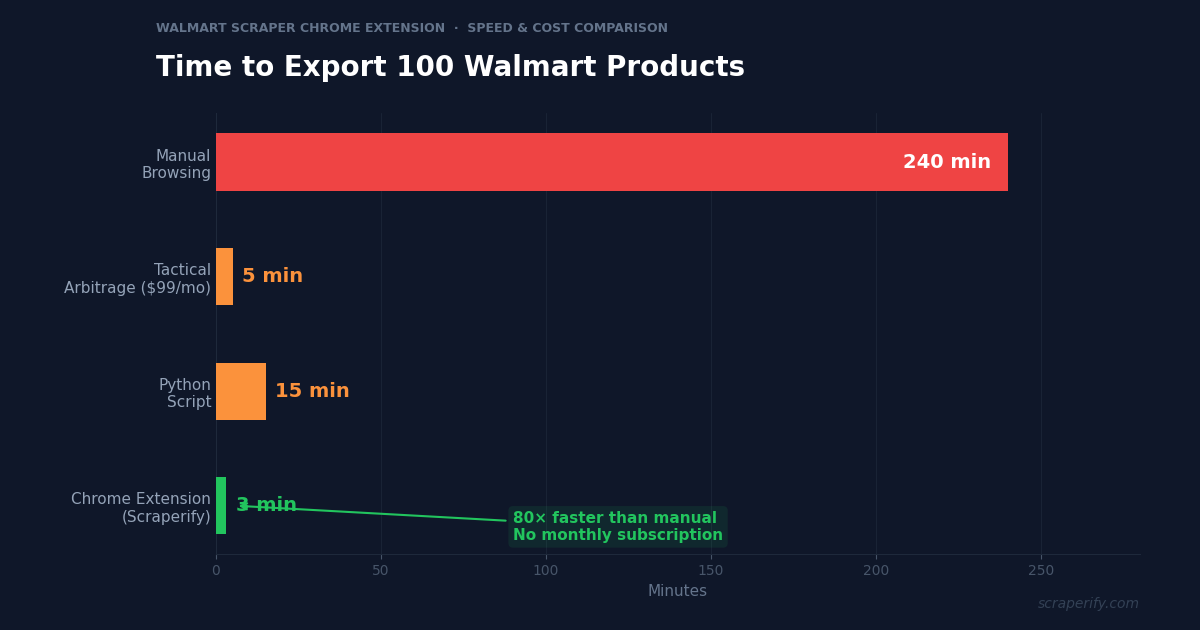
| Speed (100 products) | ~3 min | ~5 min | ~4 hours |
The Walmart scraper Chrome extension offers the best value for most sellers. Tactical Arbitrage and similar tools are powerful but cost $49-$99/month — a significant expense for new sellers just getting started. The Walmart scraper Chrome extension provides the core data export capability at a fraction of the cost. For established sellers already paying for Tactical Arbitrage, the Walmart scraper Chrome extension is a useful complement for ad-hoc research and categories that premium tools do not cover well.
Python scripts require developer skills and constant maintenance as Walmart updates its website structure. The Walmart scraper Chrome extension handles all of this behind the scenes. Manual browsing is free but limits you to 20-30 products per hour — far too slow for systematic product research.
Tips for Using the Walmart Scraper Chrome Extension
Focus on Rollbacks and Clearance First
The highest-margin arbitrage opportunities are in Walmart’s rollback and clearance sections. Use the Walmart scraper Chrome extension to export these sections first. Items marked with yellow “Rollback” tags or red “Clearance” tags have the biggest price gaps versus Amazon.
Use UPCs for Instant Amazon Matching
After exporting with the Walmart scraper Chrome extension, copy the UPC column and paste into Amazon’s search bar or a tool like Keepa. UPC matching is the fastest and most accurate way to find the same product on Amazon. The Walmart scraper Chrome extension UPC export saves you from the tedious process of searching by product title, which often returns incorrect matches.
Export Weekly for Price Trend Analysis
Walmart prices change frequently — rollbacks start and end, clearance items come and go, and regular prices adjust based on competition. Use the Walmart scraper Chrome extension to export the same categories weekly. Track price trends in a spreadsheet to identify when items enter rollback (your buy signal) and when they return to regular price (your comparison baseline).
Filter by “Sold by Walmart” for Reliable Data
Third-party sellers on Walmart.com often set higher prices than Walmart’s direct listings. When doing arbitrage analysis, filter the Walmart scraper Chrome extension exports for items “sold by Walmart.com” to get the true EDLP baseline. Third-party prices can be misleading for margin calculations.
Build a Category-Specific Pricing Database
Choose 5-10 product categories that you specialize in. Export each category monthly with the Walmart scraper Chrome extension and store the data in a master spreadsheet with a date column. Over 3-6 months, you build a category pricing database that shows normal price ranges, typical rollback depths, and seasonal patterns. This database becomes your competitive advantage — when you see a product at $12 and your data shows it normally sells for $22 with rollbacks to $15, you know $12 is an exceptional deal worth acting on immediately. Without historical data from the Walmart scraper Chrome extension, every price looks the same — you cannot distinguish a true deal from an everyday price.
Cross-Reference with Review Data for Quality Assurance
Before purchasing Walmart products for resale, check the review data in your Walmart scraper Chrome extension export. Products with 4+ stars and 100+ reviews are safe to resell — buyer satisfaction is proven. Products with sub-3-star ratings or very few reviews are risky. Returns on Amazon eat into margins and hurt your seller metrics. The 30 seconds it takes to check review data in your spreadsheet can save you from a costly sourcing mistake.
Check Availability Before Building Strategy
Walmart products go in and out of stock frequently. The Walmart scraper Chrome extension captures availability status (in stock, limited stock, out of stock). If a product is already out of stock on Walmart, it is not a viable sourcing option regardless of how good the price is. Filter your exports for “in stock” items only to avoid wasting time analyzing unavailable products.
Combine with eBay and Shopee Scrapers
Arbitrage is not limited to Walmart-to-Amazon. Use the Walmart scraper Chrome extension alongside the eBay Scraper, Temu Scraper, and Shopee Scraper for multi-platform price comparison. Some products have better margins on eBay than Amazon, and Temu may offer even lower sourcing prices than Walmart for certain items.
Who Uses the Walmart Scraper Chrome Extension?
Amazon FBA Arbitrage Sellers — The largest user group for the Walmart scraper Chrome extension. They export Walmart prices, match UPCs to Amazon listings, calculate margins after FBA fees, and purchase profitable items for resale. The Walmart scraper Chrome extension is their product sourcing engine.
Walmart Marketplace Sellers — Direct sellers on Walmart.com use the Walmart scraper Chrome extension to monitor competitor pricing, track their own products’ price position, and identify category opportunities. The Walmart scraper Chrome extension competitive intelligence helps them price to win the buy box.
Price Monitoring Services — Companies that track retail prices for brands and manufacturers use the Walmart scraper Chrome extension to gather pricing data from Walmart at scale. The Walmart scraper Chrome extension CSV exports feed into pricing dashboards and alerting systems.
Dropshippers — Sellers who source from Walmart and ship directly to customers on other platforms use the Walmart scraper Chrome extension to find products with sufficient margins. Walmart’s free shipping on orders over $35 makes certain products viable for dropshipping.
Brand Managers — Brands selling through Walmart use the Walmart scraper Chrome extension to monitor how their products are priced, which sellers are listing them, and whether MAP policies are being followed. The Walmart scraper Chrome extension data provides visibility into the retailer’s marketplace activity.
Wholesale Buyers — Purchasing teams at small retailers use the Walmart scraper Chrome extension to benchmark Walmart’s retail prices against their wholesale costs. If Walmart sells an item at retail for less than what the buyer pays at wholesale, there is a supplier pricing issue to investigate.
eBay Sellers — eBay resellers use the Walmart scraper Chrome extension to source products from Walmart for resale on eBay. The arbitrage model works similarly to Amazon but with eBay’s different fee structure (13.25% final value fee versus Amazon’s referral + FBA fees). Some products that are not profitable for Amazon arbitrage work well on eBay because of lower fees or higher market prices in eBay’s buyer demographic. The Walmart scraper Chrome extension data feeds into both Amazon and eBay arbitrage workflows.
Market Research Firms — Research companies tracking retail pricing trends, consumer goods availability, and competitive dynamics use the Walmart scraper Chrome extension to gather data at scale. Walmart’s pricing decisions influence the entire US retail market — when Walmart drops prices on a category, competitors follow within days. Having historical pricing data from the Walmart scraper Chrome extension provides early signals of market-wide price movements.
Walmart Scraper Chrome Extension — Frequently Asked Questions
Is the Walmart scraper Chrome extension free?
The Walmart scraper Chrome extension offers a free tier. Paid plans start at $19.99/month. Lifetime access to the Walmart scraper Chrome extension is $79.
Does the Walmart scraper Chrome extension export UPC codes?
Yes. The Walmart scraper Chrome extension captures UPC/GTIN codes when visible on product pages. This is essential for matching products across Amazon, eBay, and other platforms.
Is my data private with the Walmart scraper Chrome extension?
Yes. The Walmart scraper Chrome extension processes everything locally. No product data leaves your browser.
Can the Walmart scraper Chrome extension export rollback and clearance items?
Yes. The Walmart scraper Chrome extension works on all Walmart.com pages including rollback deals, clearance sections, and category pages.
How many products can the Walmart scraper Chrome extension export?
The Walmart scraper Chrome extension captures products as you scroll and navigate pages. There is no hard limit — export hundreds per session.
Will the Walmart scraper Chrome extension get my account banned?
The Walmart scraper Chrome extension reads data from pages you view. It does not send automated requests. Browse normally and take breaks between sessions.
Start Exporting Walmart Product Data Today
Stop manually checking Walmart prices one product at a time. The Walmart scraper Chrome extension exports product data to CSV, Excel, or JSON so you can analyze pricing, find arbitrage opportunities, and monitor competitors with data.
What the Walmart scraper Chrome extension gives you:
- Walmart scraper Chrome extension one-click export from any search or category page
- Complete data — products, prices, UPCs, reviews, seller info, availability
- Walmart scraper Chrome extension CSV, Excel, and JSON formats
- 100% local — the Walmart scraper Chrome extension keeps data private
- UPC export for instant Amazon matching
- Free tier — try the Walmart scraper Chrome extension before you buy
Whether you are an Amazon arbitrage seller finding profitable products, a Walmart Marketplace seller monitoring competitors, or a brand manager tracking retail pricing, the Walmart scraper Chrome extension is the fastest way to get Walmart data into a spreadsheet.
Export Walmart Products in One Click
Join arbitrage sellers who use the Walmart scraper Chrome extension to find profitable products with data, not guesswork.
Add the Walmart Scraper to Chrome →Free tier available · Paid plans from $19.99/month · $79 lifetime