Yelp Scraper Chrome Extension: Export Business Data (2026)
Export Yelp business listings, reviews, and phone numbers to CSV or Excel. Free Yelp scraper Chrome extension for local lead generation and research.
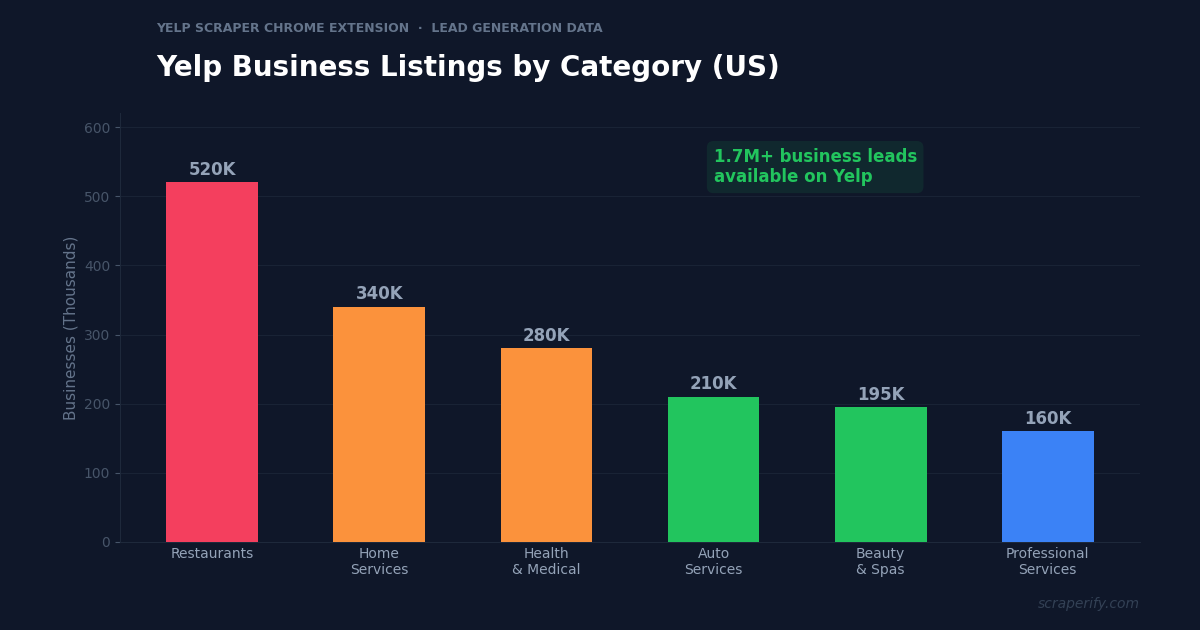
Yelp has over 1.7 million business listings in the US alone — restaurants, HVAC companies, salons, law firms, plumbers, dentists, and every other local service you can think of. Each listing includes the business name, phone number, website, address, reviews, and ratings. For agencies running cold email campaigns, sales teams building prospect lists, and market researchers analyzing local businesses, this data is pure gold. But Yelp has no export button. A Yelp scraper Chrome extension fixes this — install it, browse Yelp, and export business listings to CSV, Excel, or JSON in one click. No coding. No API keys. No per-record fees.
This guide shows you how to use the Scraperify Yelp scraper Chrome extension to export Yelp business data, build lead lists, mine reviews for insights, and do local market research at scale.
Why You Need a Yelp Scraper Chrome Extension
Yelp is one of the largest databases of local businesses in the United States, with significant coverage in Canada, UK, and 30+ other countries. The platform lists businesses across every category — from restaurants and bars to HVAC contractors, roofing companies, medical clinics, and professional services. Each listing contains contact information, customer reviews, ratings, hours of operation, and more.
For anyone doing local business outreach, Yelp is a lead generation goldmine. But without a Yelp scraper Chrome extension, accessing this data at scale is impossible. Yelp does not let you download search results, export business listings, or extract contact data to a spreadsheet. Everything must be browsed one listing at a time.
This is a massive bottleneck for cold email agencies. A typical outreach campaign needs 500-2,000 leads per niche per city. Manually copying business names, phone numbers, websites, and addresses from Yelp for 1,000 businesses would take a full week of tedious work. With a Yelp scraper Chrome extension, the same task takes 10-15 minutes.
A Yelp scraper Chrome extension automates the data collection:
- Captures business data automatically as you browse Yelp search results
- Exports to CSV, Excel, or JSON — the Yelp scraper Chrome extension supports all three formats
- Extracts phone numbers and websites — the Yelp scraper Chrome extension captures contact info directly
- Runs inside your browser — the Yelp scraper Chrome extension requires no software installation
- Processes data locally — the Yelp scraper Chrome extension never sends your data to external servers
- Works across all Yelp regions — the Yelp scraper Chrome extension supports US, UK, Canada, and 30+ countries
The Scraperify Yelp scraper Chrome extension is built for agencies building lead lists, sales teams prospecting local businesses, market researchers analyzing industries, and anyone who needs local business data in a spreadsheet.
What Data Can the Yelp Scraper Chrome Extension Export?
The Scraperify Yelp scraper Chrome extension extracts every visible data point from Yelp pages. Here is what the Yelp scraper Chrome extension captures:
Business details the Yelp scraper Chrome extension captures:
- Business name — full name as listed on Yelp
- Phone number — direct business phone via the Yelp scraper Chrome extension
- Website URL — business website link
- Address — full street address, city, state, ZIP
- Category — business type (restaurant, HVAC, salon, etc.)
- Price range — $ to $$$$ pricing indicator
- Hours of operation — open/closed status and schedule
- Yelp URL — direct link to the Yelp listing
- Years in business — when available
Review and rating data the Yelp scraper Chrome extension exports:
- Star rating — average rating out of 5 (the Yelp scraper Chrome extension captures this for quality filtering)
- Number of reviews — total review count
- Review text — individual review content on detail pages
- Review date — when each review was posted
- Reviewer name — who wrote the review
- Review photos — customer-uploaded images
Additional data from the Yelp scraper Chrome extension:
- Highlights — “Women-owned,” “Veteran-owned,” etc.
- Services offered — listed services and specialties
- Amenities — parking, Wi-Fi, outdoor seating, etc.
- Response time — how quickly the business responds to messages
- Claimed status — whether the owner has claimed the listing
This data is what makes the Yelp scraper Chrome extension essential for lead generation. You get business name + phone number + website + address + ratings in one export — the complete contact profile needed for cold outreach, direct mail, or market analysis.
WHAT THE YELP SCRAPER CHROME EXTENSION EXTRACTS
Business Data
- Name & Category
- Phone Number
- Website URL
- Full Address
- Price Range
- Hours & Yelp URL
Reviews & Ratings
- Star Rating
- Review Count
- Review Text
- Review Dates
- Reviewer Names
Additional Info
- Business Highlights
- Services Offered
- Amenities
- Response Time
- Claimed Status
How to Install the Yelp Scraper Chrome Extension
Setting up the Yelp scraper Chrome extension takes 30 seconds.
Step 1: Open the Chrome Web Store. Go to the Yelp Scraper Chrome Extension page. The Yelp scraper Chrome extension is called “LocalBiz Scraper — Business Data Export” by Scraperify.
Step 2: Click “Add to Chrome.” Confirm permissions. The Yelp scraper Chrome extension only needs access to yelp.com domains.
Step 3: Start using it. The Yelp scraper Chrome extension is ready immediately.
HOW THE YELP SCRAPER CHROME EXTENSION WORKS
Install
Add the Yelp scraper Chrome extension — 30 sec
Search
Search businesses on Yelp — data captured automatically
Click
One click on the Yelp scraper Chrome extension
Export
Download CSV, Excel, or JSON
How to Export Yelp Business Data to CSV (Step-by-Step)
Step 1: Search on Yelp
With the Yelp scraper Chrome extension installed, go to yelp.com and search for businesses. The Yelp scraper Chrome extension works on every Yelp search page. Search by business type and location — for example, “HVAC” in “Houston, TX” or “Dentists” in “Los Angeles, CA.”
Use Yelp’s filters before the Yelp scraper Chrome extension starts capturing:
- Filter by category — restaurants, home services, health, auto, beauty
- Filter by rating — 4+ stars for quality leads
- Filter by price range — $ to $$$$ depending on your target
- Sort by best match, most reviewed, or highest rated
- Filter by open now or specific hours
Step 2: Let the Yelp Scraper Chrome Extension Capture Data
As you scroll through results, the Yelp scraper Chrome extension captures business data automatically. The Yelp scraper Chrome extension icon shows a badge count. Navigate to page 2, 3, or beyond — the Yelp scraper Chrome extension captures listings across all pages. Yelp typically shows 10 businesses per page with up to 24 pages per search (240 businesses per query).
Step 3: Click Export
Click the Yelp scraper Chrome extension icon. Choose CSV, Excel, or JSON. The Yelp scraper Chrome extension downloads the file instantly with all captured business data.
Step 4: Build Your Lead List
Open the Yelp scraper Chrome extension export. Each row is one business. With the Yelp scraper Chrome extension data, you can:
- Filter by rating — target only 4-5 star businesses for premium service outreach
- Filter businesses with websites — these businesses are more likely to respond to digital marketing pitches
- Sort by review count — high-review businesses are established and likely have budget for services
- Remove duplicates across multiple city searches
- Enrich with emails by running exported websites through Apollo.io or Hunter.io
Why Yelp Is the Best Source for Local Business Leads
Yelp is not just a review platform — it is one of the most comprehensive local business databases in the world. Understanding why Yelp data is so valuable helps you use the Yelp scraper Chrome extension more strategically:
Phone numbers and websites are publicly listed. Unlike LinkedIn (which gates contact info behind premium plans) or Google Maps (which sometimes hides phone numbers), Yelp displays phone numbers and website URLs directly on business listing pages. The Yelp scraper Chrome extension captures both, giving you direct contact channels without any additional enrichment steps.
Reviews reveal business quality and pain points. A plumber with 200 five-star reviews is a thriving business that might need help scaling. A plumber with 50 reviews averaging 3.2 stars has quality issues and might need operational consulting. The Yelp scraper Chrome extension captures review counts and ratings, letting you segment leads by business health.
Category specificity. Yelp categorizes businesses with remarkable granularity. You are not just searching for “restaurants” — you can find “Vietnamese restaurants” or “vegan bakeries” or “24-hour diners.” For agencies serving specific niches, this category depth means highly targeted lead lists. The Yelp scraper Chrome extension captures the category field, enabling precise segmentation.
Geographic coverage across 30+ countries. While Yelp is strongest in the US and Canada, it has significant listings in the UK, Ireland, France, Germany, Italy, Spain, and other European countries. The Yelp scraper Chrome extension works on all Yelp domains, making it useful for agencies with international clients.
“Claimed” vs “unclaimed” listings reveal opportunity. Businesses that have not claimed their Yelp listing are likely not actively managing their online presence. These are prime prospects for digital marketing agencies — they clearly need help. The Yelp scraper Chrome extension captures the claimed status, giving you a ready-made prospecting filter. In many categories, 30-40% of Yelp listings are unclaimed — representing a massive pool of businesses that need marketing services.
Review recency indicates active businesses. A business with its most recent review from 3 years ago may be closed or barely operating. A business with reviews from this month is active and generating revenue. The Yelp scraper Chrome extension review data helps you filter out dead leads and focus on businesses that are currently serving customers.
Yelp covers the entire business lifecycle. New businesses with few reviews need help building their reputation. Established businesses with hundreds of reviews need help maintaining their rankings. Declining businesses with deteriorating ratings need operational help. Each stage represents a different service opportunity for agencies. The Yelp scraper Chrome extension data — rating, review count, review recency — lets you segment businesses by lifecycle stage and tailor your pitch accordingly.
32 regional variants. Yelp operates localized versions for the US, Canada, UK, Ireland, France, Germany, Austria, Switzerland, Netherlands, Belgium, Spain, Italy, Poland, Czech Republic, Denmark, Finland, Norway, Sweden, Australia, New Zealand, Japan, Singapore, Hong Kong, Taiwan, Philippines, Malaysia, Mexico, Brazil, Argentina, Chile, and Turkey. The Yelp scraper Chrome extension works on all of these domains, making it the most geographically versatile local business scraping tool available.
Ready to build local business lead lists?
Install the Yelp scraper Chrome extension and start exporting business data in under 2 minutes. Free tier available.
Add to Chrome — Free5 Ways to Use the Yelp Scraper Chrome Extension
1. Cold Email Lead Generation
The number one use of the Yelp scraper Chrome extension is building lead lists for cold email campaigns. The workflow is straightforward: search Yelp for your target niche and city (e.g., “HVAC Houston TX”), export with the Yelp scraper Chrome extension, then enrich the exported websites with decision-maker emails using Apollo.io or Hunter.io.
Successful cold email agencies report building lead lists of 500-2,000 businesses per niche per city using the Yelp scraper Chrome extension. A single Yelp search returns up to 240 results — run the same search for 5 cities and you have 1,200 leads in under an hour. Without the Yelp scraper Chrome extension, building the same list manually would take an entire week.
2. Local Market Analysis
Real estate developers, franchise operators, and retail chains use the Yelp scraper Chrome extension to analyze local markets before entering. How many restaurants exist in a 5-mile radius? What is the average rating? How many are high-end ($$$$) versus budget ($)? The Yelp scraper Chrome extension exports this data for instant market analysis.
For example, a coffee shop franchise considering a new location can export all “coffee shops” within a ZIP code using the Yelp scraper Chrome extension. If the data shows 15 existing coffee shops with an average rating of 4.2 stars and only 2 with more than 200 reviews, the market has competition but no dominant player — a potential opening.
3. Review Mining for Competitive Intelligence
Export reviews for competitors in your industry using the Yelp scraper Chrome extension. Analyze what customers praise and complain about. If every 1-star review of competing HVAC companies mentions “showed up late” or “no call back,” you know that reliability and communication are market differentiators. Position your business or your client’s business as the answer to these pain points.
The Yelp scraper Chrome extension review data is also valuable for content marketing. Common customer questions in reviews (“Do they offer financing?” “Are they licensed?”) reveal exactly what potential customers want to know — perfect topics for blog posts and FAQ pages that drive organic traffic.
4. Reputation Monitoring
Business owners use the Yelp scraper Chrome extension to export their own reviews over time. Track review sentiment, identify recurring complaints, and measure the impact of service improvements. Monthly exports create a timeline showing whether customer satisfaction is improving or declining — data that is invisible from Yelp’s interface.
This is especially valuable for multi-location businesses. A restaurant group with 10 locations can export reviews for each location using the Yelp scraper Chrome extension, calculate average ratings and common complaint themes per location, and identify which locations need attention. The location manager who consistently gets “slow service” complaints needs different support than the one getting “food quality” complaints. Without exported review data, these patterns are invisible to management.
5. Vendor and Supplier Research
Procurement teams looking for local vendors use the Yelp scraper Chrome extension to build shortlists. Need a catering company for corporate events? Export all caterers in your city with the Yelp scraper Chrome extension, sort by rating and review count, and contact the top 5. The exported data includes phone numbers and websites for immediate outreach.
Yelp Scraper Chrome Extension vs Other Methods
YELP SCRAPER: CHROME EXTENSION VS ALTERNATIVES
| Feature | Yelp Scraper Chrome Extension | Yelp API | Manual |
|---|---|---|---|
| Setup time | 30 sec | 1-2 hours | 0 min |
| Coding required | No | Yes | No |
| Phone numbers | ✓ | ✓ | ✓ |
| Review text export | ✓ | Limited (3 per biz) | ✗ |
| Speed (240 businesses) | ~10 min | ~5 min | ~8 hours |
The Yelp scraper Chrome extension is the best option for non-technical users. The Yelp Fusion API is free but requires developer registration, API key management, and programming skills — most agency owners and sales teams do not have these. The API also limits review data to 3 reviews per business, while the Yelp scraper Chrome extension can capture full review pages. Manual copy-paste works for 5-10 businesses but is completely impractical for the 500+ leads needed for cold email campaigns.
Tips for Using the Yelp Scraper Chrome Extension
Search by Niche + City for Targeted Lists
The Yelp scraper Chrome extension captures whatever Yelp shows you. Narrow your search for maximum lead quality: “HVAC contractors Houston TX” gives you more targeted leads than just “home services.” The more specific your Yelp search, the more useful the Yelp scraper Chrome extension output.
Cover Multiple Cities Systematically
For statewide or national lead generation, use the Yelp scraper Chrome extension to export the same niche across multiple cities. Create a list of your target cities, search each on Yelp, export with the Yelp scraper Chrome extension, and combine into a master spreadsheet. Add a “City” column to each export for segmentation. This systematic approach builds lead lists of thousands in hours.
Filter by Rating for Quality Leads
After exporting with the Yelp scraper Chrome extension, filter for businesses with 3.5-4.5 star ratings. These businesses are good but not great — they have room for improvement and are likely receptive to services that help them grow. Perfect 5-star businesses may not feel they need help, and sub-3-star businesses may be struggling financially.
Use Review Count as a Business Size Proxy
More reviews generally correlate with more customers. Businesses with 100+ reviews are established and likely have revenue to spend on services. Businesses with 5-10 reviews are newer or smaller and may have tighter budgets. The Yelp scraper Chrome extension data lets you segment leads by business maturity.
A practical segmentation framework based on Yelp scraper Chrome extension data: Tier 1 leads have 200+ reviews, 4+ star rating, and a website (established, successful, have budget). Tier 2 leads have 50-199 reviews and 3.5+ stars (growing, may need services to scale). Tier 3 leads have under 50 reviews (new or small, budget-sensitive, may need affordable starter packages). Tailor your outreach messaging to each tier — a pitch that works for an established 300-review restaurant will not resonate with a newly opened 8-review one.
Target Unclaimed Listings for Easy Wins
One of the most powerful filters available in the Yelp scraper Chrome extension data is claimed vs unclaimed status. Unclaimed Yelp listings represent businesses that are not managing their online reputation — they do not respond to reviews, have not updated their hours or photos, and are probably not doing any digital marketing. These businesses are the easiest prospects for agencies: the need is obvious, the sale is straightforward (“You have an unclaimed Yelp listing with negative reviews — want us to fix that?”), and the close rate is significantly higher than pitching to businesses that already manage their online presence.
Enrich with Email Data
The Yelp scraper Chrome extension exports websites and phone numbers, but not email addresses (Yelp does not display emails). To get decision-maker emails, run the exported website domains through enrichment tools like Apollo.io, Hunter.io, or Snov.io. These tools find email addresses associated with each domain. The workflow is: Yelp scraper Chrome extension → CSV with websites → Apollo.io enrichment → complete lead list with emails.
Combine with Google Maps Scraper
Yelp and Google Maps have different business coverage. Some businesses are on Yelp but not Google Maps, and vice versa. For the most complete lead list, use the Yelp scraper Chrome extension alongside a Google Maps scraper. Combine both exports, deduplicate by phone number or business name, and you have coverage that no single source provides.
Who Uses the Yelp Scraper Chrome Extension?
Cold Email Agencies — Digital marketing agencies use the Yelp scraper Chrome extension as their primary lead source. They export businesses by niche and city, enrich with decision-maker emails, and run outreach campaigns offering SEO, web design, PPC, or social media services. The Yelp scraper Chrome extension builds lead lists in minutes that would otherwise take days.
Sales Teams — B2B sales teams selling to local businesses (insurance, payment processing, POS systems, marketing services) use the Yelp scraper Chrome extension to build prospect lists. The exported data includes phone numbers for cold calling and websites for pre-call research.
Market Researchers — Analysts studying local business landscapes use the Yelp scraper Chrome extension to gather data at scale. How many Italian restaurants are in San Francisco? What is the average rating? How many have fewer than 50 reviews (potential new entrants)? The Yelp scraper Chrome extension answers these questions with one export.
Franchise Developers — Companies evaluating franchise locations use the Yelp scraper Chrome extension to analyze competition density. Export all businesses in your franchise category within a target ZIP code. If the market is saturated (50+ competitors), look elsewhere. If there are gaps (only 3-5 competitors with mediocre ratings), that is your opportunity.
Local SEO Professionals — SEO specialists use the Yelp scraper Chrome extension to audit competitors for their clients. Export the top 20 businesses in a client’s category and city, analyze their review counts, ratings, and response rates, and build a competitive improvement plan.
Business Brokers — Brokers helping clients buy or sell local businesses use the Yelp scraper Chrome extension to research market comparables. What does a typical salon in this neighborhood look like? What rating does it need to command a premium valuation? The Yelp scraper Chrome extension data provides objective benchmarks.
Yelp Scraper Chrome Extension — Frequently Asked Questions
Is the Yelp scraper Chrome extension free?
The Yelp scraper Chrome extension offers a free tier. Paid plans start at $19.99/month. Lifetime access to the Yelp scraper Chrome extension is $79.
Does the Yelp scraper Chrome extension export phone numbers?
Yes. The Yelp scraper Chrome extension captures phone numbers directly from Yelp business listings. This is one of the most valuable features of the Yelp scraper Chrome extension for lead generation.
Can the Yelp scraper Chrome extension export reviews?
Yes. The Yelp scraper Chrome extension exports review text, star ratings, reviewer names, and review dates when used on business detail pages.
Is my data private with the Yelp scraper Chrome extension?
Yes. The Yelp scraper Chrome extension processes everything locally. No business data leaves your browser.
How many businesses can the Yelp scraper Chrome extension export?
Yelp shows up to 240 businesses per search (24 pages × 10 results). The Yelp scraper Chrome extension captures all of them. Run multiple searches for different cities or categories to build larger lists.
Will the Yelp scraper Chrome extension get my account banned?
The Yelp scraper Chrome extension reads data from pages you are already viewing. Browse at a normal pace and take breaks between long sessions.
Does the Yelp scraper Chrome extension work outside the US?
Yes. The Yelp scraper Chrome extension works on all Yelp domains — US, Canada, UK, Ireland, France, Germany, Italy, Spain, and more.
Start Exporting Yelp Business Data Today
Stop copying Yelp listings by hand. The Scraperify Yelp scraper Chrome extension exports hundreds of businesses to CSV, Excel, or JSON with one click.
What the Yelp scraper Chrome extension gives you:
- Yelp scraper Chrome extension one-click export from any search page
- Complete data — names, phone numbers, websites, addresses, ratings, reviews
- Yelp scraper Chrome extension CSV, Excel, and JSON formats
- 100% local — the Yelp scraper Chrome extension keeps your data private
- Works across 30+ countries — US, Canada, UK, Europe, and more
- Free tier — try the Yelp scraper Chrome extension before you buy
Whether you are an agency building cold email lead lists, a sales team prospecting local businesses, or a researcher analyzing market competition, the Yelp scraper Chrome extension is the fastest way to get Yelp data into a spreadsheet.
Export Yelp Business Data in One Click
Join agencies who use the Yelp scraper Chrome extension to build lead lists in minutes — no coding, no API keys.
Add the Yelp Scraper to Chrome →Free tier available · Paid plans from $19.99/month · $79 lifetime