Zillow Scraper Chrome Extension: Export Listings (2026)
Export Zillow property listings, agent data, and prices to CSV or Excel with a Zillow scraper Chrome extension. No coding needed for real estate research.
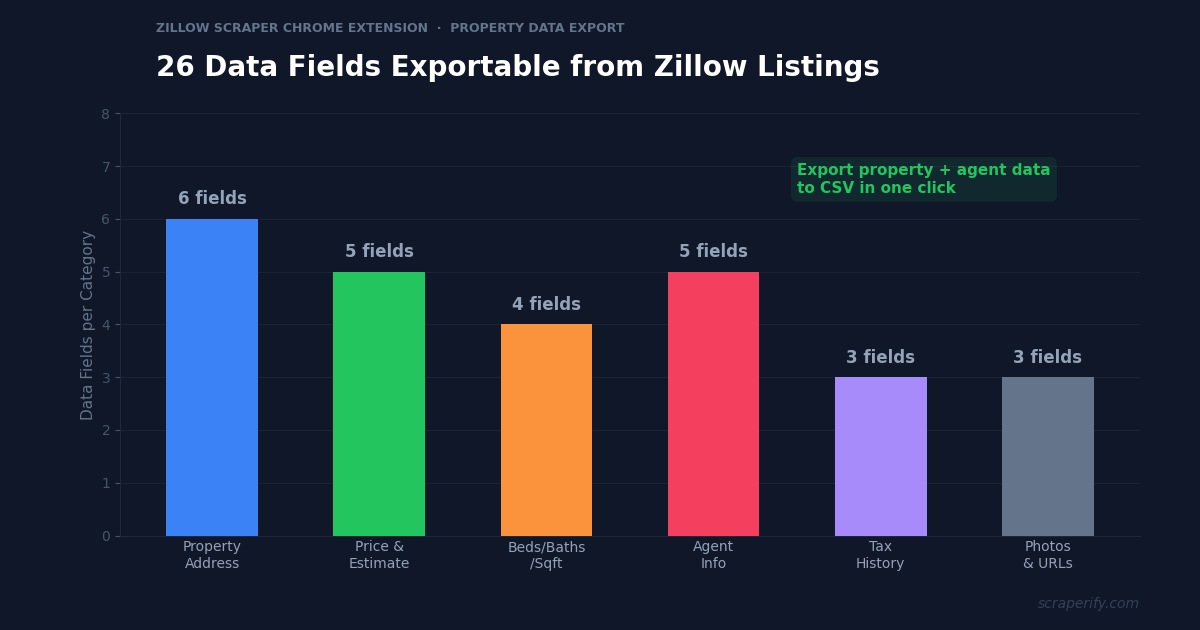
Zillow has over 135 million property listings in the US — homes for sale, rentals, recently sold properties, and FSBO (For Sale By Owner) listings. Each listing contains the property address, price, Zestimate, beds, baths, square footage, lot size, year built, tax history, agent contact info, and photos. For real estate investors, agents, and market analysts, this data is essential. But Zillow does not let you export search results. A Zillow scraper Chrome extension fixes this — install it, browse Zillow, and export property listings to CSV, Excel, or JSON in one click. No coding. No API keys.
This guide shows you how to use a Zillow scraper Chrome extension to export property data, build lead lists, analyze market trends, and do real estate research at scale.
Why You Need a Zillow Scraper Chrome Extension
Zillow is the most visited real estate website in the US, with over 220 million monthly unique visitors. Whether you are an investor analyzing property values, an agent prospecting for leads, or a wholesaler finding motivated sellers, Zillow’s data is the starting point for every real estate decision.
But Zillow locks all this data inside its interface. Without a Zillow scraper Chrome extension, there is no way to download search results, export property listings to a spreadsheet, or extract agent contact information in bulk. Everything must be browsed one listing at a time.
This creates a real bottleneck. A real estate investor analyzing a market needs to compare 200-500 properties — prices, square footage, year built, tax assessments, days on market. Doing this manually takes days. An agent prospecting FSBO listings needs seller phone numbers from dozens of listings. A wholesaler running cold text campaigns needs hundreds of property addresses and owner details. All of these workflows require data in a spreadsheet — and Zillow does not provide one.
Experienced real estate professionals know this pain. One investor shared that he spends hours every week on “pick a market Monday” — manually browsing Zillow, noting property details, setting up scrapes for lead generation campaigns. A Zillow scraper Chrome extension compresses this hours-long process into minutes.
A Zillow scraper Chrome extension automates the data collection:
- Captures property data automatically as you browse Zillow search results
- Exports to CSV, Excel, or JSON — the Zillow scraper Chrome extension supports all formats
- Exports up to 800 listings per search — the maximum Zillow displays per query
- Extracts agent and FSBO contact info — the Zillow scraper Chrome extension captures phone numbers and names
- Runs inside your browser — no software installation beyond the Chrome Web Store
- Processes data locally — the Zillow scraper Chrome extension never sends property data to external servers
- Works with all Zillow listing types — for sale, for rent, sold, FSBO, pre-foreclosure
The Scraperify Zillow scraper Chrome extension is built for real estate investors analyzing markets, agents building lead lists, wholesalers finding motivated sellers, and analysts tracking property trends.
What Data Can the Zillow Scraper Chrome Extension Export?
The Zillow scraper Chrome extension extracts every visible data point from Zillow property pages. Here is what the Zillow scraper Chrome extension captures:
Property details the Zillow scraper Chrome extension captures:
- Address — full street address, city, state, ZIP
- Price — listing price or last sold price
- Zestimate — Zillow’s automated home value estimate
- Beds — number of bedrooms
- Baths — number of bathrooms
- Square footage — living area size
- Lot size — total lot area
- Year built — construction year
- Property type — single family, condo, townhouse, multi-family, land
- Listing status — active, pending, contingent, sold
- Days on Zillow — how long the listing has been active
- Photos — direct URLs to listing images via the Zillow scraper Chrome extension
- Listing URL — direct link to the Zillow page
Financial data the Zillow scraper Chrome extension exports:
- Price per square foot — calculated price/sqft
- Tax assessed value — county tax assessment
- Annual property tax — yearly tax amount
- HOA fees — monthly homeowner association dues
- Price history — listing price changes over time
- Zestimate history — Zillow estimate changes
Agent and contact data from the Zillow scraper Chrome extension:
- Listing agent name — the agent representing the property
- Agent phone number — direct phone via the Zillow scraper Chrome extension
- Agent brokerage — the real estate company
- FSBO owner contact — seller phone number on For Sale By Owner listings (the Zillow scraper Chrome extension captures this for lead generation)
This data is what makes the Zillow scraper Chrome extension essential for real estate professionals. Property details plus financial data plus contact information — all in one CSV export — powers every real estate workflow from market analysis to lead generation to investment analysis.
WHAT THE ZILLOW SCRAPER CHROME EXTENSION EXTRACTS
Property Data
- Address & ZIP Code
- Price & Zestimate
- Beds, Baths, Sqft
- Year Built & Lot Size
- Property Type
- Days on Market
Financial Data
- Price per Sqft
- Tax Assessed Value
- Annual Property Tax
- HOA Fees
- Price History
- Zestimate History
Contact Data
- Listing Agent Name
- Agent Phone Number
- Agent Brokerage
- FSBO Owner Contact
- Listing URL
How to Install the Zillow Scraper Chrome Extension
Setting up the Zillow scraper Chrome extension takes 30 seconds.
Step 1: Open the Chrome Web Store. Search for “Zillow Scraper” or “Zillow Data Exporter.” The Scraperify Zillow scraper Chrome extension exports property listings to CSV, Excel, and JSON.
Step 2: Click “Add to Chrome.” Confirm permissions. The Zillow scraper Chrome extension needs access to zillow.com.
Step 3: Start using it. The Zillow scraper Chrome extension is ready immediately — navigate to Zillow and start exporting.
HOW THE ZILLOW SCRAPER CHROME EXTENSION WORKS
Install
Add the Zillow scraper Chrome extension — 30 sec
Search
Search Zillow for properties — any listing type
Click
One click on the Zillow scraper Chrome extension
Export
Download CSV, Excel, or JSON
How to Export Zillow Listings to CSV (Step-by-Step)
Step 1: Search on Zillow
With the Zillow scraper Chrome extension installed, go to zillow.com and search for properties. The Zillow scraper Chrome extension works on all Zillow search types:
- For Sale — active listings on the market
- For Rent — rental properties
- Sold — recently sold properties (last 1-12 months)
- FSBO — For Sale By Owner listings (filter under “Other Listings”)
- Pre-Foreclosure — properties in foreclosure process
- Foreclosed — bank-owned properties
Use Zillow’s filters before the Zillow scraper Chrome extension starts capturing:
- Filter by price range — set min and max
- Filter by beds/baths — minimum bedroom and bathroom count
- Filter by home type — houses, condos, townhomes, land, multi-family
- Filter by square footage — minimum and maximum
- Filter by year built — construction age range
- Filter by days on Zillow — new listings vs stale inventory
- Filter by keywords — “pool,” “garage,” “waterfront”
Step 2: Let the Zillow Scraper Chrome Extension Capture Data
The Zillow scraper Chrome extension captures property data from the search results page. Zillow displays up to 40 listings per page and up to 20 pages per search (800 listings maximum — this is a Zillow platform limit, not an extension limit). Navigate through pages and the Zillow scraper Chrome extension captures listings from each page.
For detailed data (year built, tax history, agent phone), the Zillow scraper Chrome extension can also scrape individual listing pages. This captures more data fields but takes longer since the extension visits each property page.
Step 3: Click Export
Click the Zillow scraper Chrome extension icon. Choose CSV, Excel, or JSON. Some Zillow scraper Chrome extension variants also support direct export to Google Sheets — useful for teams that collaborate on shared spreadsheets.
Step 4: Analyze Your Property Data
Open the Zillow scraper Chrome extension export. Each row is one property. With the data:
- Sort by price per sqft to find the best value properties in an area
- Filter by days on Zillow — stale listings (60+ days) indicate motivated sellers
- Compare Zestimate vs listing price — properties listed below Zestimate may be undervalued
- Filter by FSBO to build a direct-to-seller lead list
- Calculate cap rates for rental properties using price, estimated rent, and tax data
Why Zillow Data Is Essential for Real Estate Professionals
Zillow is more than a property search engine — it is the most comprehensive real estate database available to the public. Understanding why this data matters helps you use the Zillow scraper Chrome extension more strategically:
Zestimate vs listing price reveals opportunity. Zillow’s Zestimate is an automated valuation model that estimates every property’s market value. When a property is listed significantly below its Zestimate (e.g., listed at $350K with a Zestimate of $420K), it signals a potentially undervalued property or a motivated seller. The Zillow scraper Chrome extension captures both values, letting you filter for the biggest Zestimate-to-price gaps in any market.
Days on Zillow reveals seller motivation. A property listed for 90+ days is not selling at its current price. The seller is likely willing to negotiate — sometimes 10-20% below asking. The Zillow scraper Chrome extension captures the “days on Zillow” field, which is one of the most powerful filters for finding motivated sellers. Wholesalers and investors use this metric religiously.
FSBO listings are lead generation gold. For Sale By Owner listings on Zillow include the owner’s phone number. These homeowners are selling without an agent — they are prime prospects for buyer’s agents, real estate investors, and wholesalers. The Zillow scraper Chrome extension exports FSBO contact information directly, turning Zillow into a lead generation machine.
Tax assessed value reveals equity. The gap between a property’s market value (Zestimate) and its tax assessed value often indicates equity potential. Properties where the tax assessed value is significantly below market value may have untapped equity. The Zillow scraper Chrome extension captures both values for instant equity analysis.
Sold data shows actual market values. Like eBay sold prices for resellers, Zillow sold data shows what properties actually transacted for — not just what they were listed at. Exporting sold properties with the Zillow scraper Chrome extension and calculating average price per square foot by neighborhood gives you the most accurate market valuation tool available without an MLS subscription.
Agent data builds networking lists. Every Zillow listing shows the listing agent’s name, phone, and brokerage. The Zillow scraper Chrome extension captures this data, which is valuable for mortgage brokers, home inspectors, contractors, and other service providers who want to build relationships with active real estate agents in their market.
Ready to export Zillow property data?
Scraperify offers Chrome extensions for 40+ platforms including real estate, e-commerce, and social media. Browse the full suite.
Browse All Scrapers →5 Ways to Use the Zillow Scraper Chrome Extension
1. Real Estate Investment Analysis
Investors use the Zillow scraper Chrome extension to analyze entire markets before buying. Export 500+ properties in a target ZIP code, calculate average price per square foot, median days on market, and price distribution. Compare these metrics across neighborhoods to identify undervalued areas. The Zillow scraper Chrome extension data feeds directly into investment analysis spreadsheets and cash flow models.
For rental investors, the Zillow scraper Chrome extension enables a powerful analysis: export rental listings alongside for-sale listings in the same area. If the average 3-bed rental is $2,200/month and the average 3-bed purchase price is $280K, the gross rent multiplier is 10.6 — a metric that tells you whether rental prices justify purchase prices. This dual export — only practical with the Zillow scraper Chrome extension — is the foundation of rental investment analysis.
2. FSBO Lead Generation
Real estate agents and wholesalers use the Zillow scraper Chrome extension to build FSBO lead lists. Export all For Sale By Owner listings in a target area, capturing owner phone numbers and property details. Then reach out via phone, text, or mail with your value proposition. FSBO sellers often struggle to sell without professional help — 36% of FSBO homes end up listing with an agent eventually.
The workflow from experienced real estate professionals: they run “pick a market” sessions where they choose a city, export FSBO data with the Zillow scraper Chrome extension, set up cold text campaigns, and follow up with interested sellers. Without the Zillow scraper Chrome extension, this workflow requires hours of manual copying. With the Zillow scraper Chrome extension, the data collection step takes minutes — leaving more time for actually contacting sellers and closing deals.
3. Comp Analysis for Pricing
When listing a property or making an offer, agents and investors need comparable sales (“comps”). Export recently sold properties within 0.5-1 mile of the subject property using the Zillow scraper Chrome extension. Filter for similar beds, baths, square footage, and year built. The median sold price of these comps establishes the fair market value. This comp analysis — which takes 30+ minutes on Zillow’s interface — takes 2 minutes with the Zillow scraper Chrome extension and a spreadsheet. Agents who use the Zillow scraper Chrome extension for comps produce more accurate CMAs in less time, impressing clients with data-driven valuations.
4. Market Trend Tracking
Export property data monthly with the Zillow scraper Chrome extension and track metrics over time: average listing price, average price per square foot, median days on market, inventory count (number of active listings), and new listings per week. Rising prices with shrinking inventory signals a seller’s market. Falling prices with growing inventory signals a buyer’s market. This trend data is invisible from daily browsing but obvious in a spreadsheet with 6 months of Zillow scraper Chrome extension exports.
5. Agent Prospecting for Service Providers
Mortgage brokers, home inspectors, title companies, and contractors need to build relationships with active real estate agents. Export listings from the Zillow scraper Chrome extension with agent name, phone, and brokerage. Filter for agents with multiple active listings (high-volume agents) and reach out with your service offering. A home inspector who partners with the top 10 listing agents in a market gets a steady stream of referrals.
Zillow Scraper Chrome Extension vs Other Methods
ZILLOW SCRAPER: CHROME EXTENSION VS ALTERNATIVES
| Feature | Zillow Scraper Chrome Extension | Zillow API | Manual |
|---|---|---|---|
| Setup time | 30 sec | Days-weeks | 0 min |
| Coding required | No | Yes | No |
| FSBO phone numbers | ✓ | Limited | ✓ |
| CSV + Excel + JSON | ✓ | JSON only | ✗ |
| Speed (200 properties) | ~5 min | ~2 min | ~6 hours |
The Zillow scraper Chrome extension is the best option for most real estate professionals. Zillow’s API (now managed through their Bridge API) requires a partnership application and is restricted to licensed data users — most individual agents, investors, and wholesalers do not have access. Python scraping scripts work but require developer skills and constant maintenance as Zillow updates its website. The Zillow scraper Chrome extension works within your browser session and requires zero technical knowledge.
One important limitation: Zillow limits search results to approximately 800 properties per search query. This is a Zillow platform restriction, not a Zillow scraper Chrome extension limitation. To export more than 800 properties in a market, run multiple searches with different filters (e.g., different price ranges or neighborhoods) and combine the exports.
Tips for Using the Zillow Scraper Chrome Extension
Export Sold Data for Accurate Comps
Active listing prices are aspirational — they show what sellers want. Sold prices show what buyers actually paid. Always export recently sold properties with the Zillow scraper Chrome extension alongside active listings. The sold data is your pricing anchor; active listings are your competitive landscape.
Filter by Days on Zillow for Motivated Sellers
After exporting with the Zillow scraper Chrome extension, sort by “days on Zillow” descending. Properties sitting for 60+ days are likely overpriced or have issues — and their sellers are increasingly motivated. These are your best negotiation targets. Properties over 90 days may accept offers 10-15% below asking.
Compare Zestimate to Listing Price
Add a calculated column in your spreadsheet: Zestimate minus listing price. Properties where the Zestimate is significantly higher than the listing price may be undervalued. Properties priced above their Zestimate may face appraisal issues. The Zillow scraper Chrome extension captures both values for instant comparison.
Use FSBO Filter for Direct Lead Generation
Filter Zillow’s search for “By Owner” or “Other Listings” before exporting with the Zillow scraper Chrome extension. FSBO listings include the seller’s direct phone number — no agent intermediary. These sellers are often open to offers and conversations that traditionally-listed sellers are not.
Export Monthly for Market Analysis
Use the Zillow scraper Chrome extension to export the same market monthly. Track: total active inventory, median listing price, median price per sqft, and average days on market. Plot these metrics over time in a chart. This market health dashboard — built from Zillow scraper Chrome extension data — is more valuable than any real estate newsletter because it reflects your specific target market, not national averages.
Combine with Yelp Data for Neighborhood Analysis
Property values are influenced by local businesses and amenities. Use the Zillow scraper Chrome extension for property data alongside the Yelp Scraper Chrome Extension for local business data. A neighborhood with 50+ restaurants averaging 4.3 stars commands higher property values than one with 10 restaurants averaging 3.5 stars. Combining real estate data with local business data gives you a complete neighborhood quality assessment.
Who Uses the Zillow Scraper Chrome Extension?
Real Estate Investors — The largest user group for the Zillow scraper Chrome extension. They export property data to analyze markets, identify undervalued properties, calculate rental yields, and find motivated sellers. The Zillow scraper Chrome extension is their primary market research tool.
Real Estate Agents — Agents use the Zillow scraper Chrome extension to pull comps for pricing opinions, build FSBO prospect lists, and monitor competitor listings. The Zillow scraper Chrome extension data supports CMAs (Comparative Market Analyses) that agents prepare for clients.
Wholesalers — Real estate wholesalers use the Zillow scraper Chrome extension to find properties they can put under contract and assign to investors. They filter for stale listings, FSBO properties, and pre-foreclosures — all indicators of motivated sellers who may accept below-market offers.
Mortgage Brokers — Brokers use the Zillow scraper Chrome extension to identify active agents in their market and reach out for referral partnerships. Exporting agent contact data from hundreds of active listings builds a prospecting list of the most productive agents in any ZIP code.
Appraisers — Property appraisers use the Zillow scraper Chrome extension to gather comparable sales data quickly. While MLS data is the primary source for appraisals, Zillow sold data from the Zillow scraper Chrome extension provides a secondary validation source and is especially useful in markets with limited MLS access.
Data Analysts and Researchers — Academics and consultants studying housing markets, affordability trends, and urban development use the Zillow scraper Chrome extension to gather large datasets. The exported data feeds into statistical models, GIS mapping tools, and research papers.
Relocation Specialists — HR departments and relocation companies use the Zillow scraper Chrome extension to research housing markets for transferring employees. Export listings in the destination city, compare to the employee’s current market, and estimate the cost-of-living adjustment needed.
Zillow Scraper Chrome Extension — Frequently Asked Questions
Is the Zillow scraper Chrome extension free?
Many Zillow scraper Chrome extension options offer free tiers with limited exports. Scraperify plans start at $19.99/month or $79 lifetime. Some alternatives like Zillow Data Exporter have their own pricing models.
How many Zillow listings can the Zillow scraper Chrome extension export?
Zillow limits search results to approximately 800 properties per query. The Zillow scraper Chrome extension can export all 800. For larger datasets, run multiple searches with different filters and combine the exports.
Does the Zillow scraper Chrome extension export agent phone numbers?
Yes. The Zillow scraper Chrome extension captures listing agent names, phone numbers, and brokerages from property detail pages. FSBO listings include the owner’s direct phone number.
Is my data private with the Zillow scraper Chrome extension?
Yes. The Zillow scraper Chrome extension processes everything locally. No property data leaves your browser.
Does the Zillow scraper Chrome extension work for rentals?
Yes. The Zillow scraper Chrome extension works on for-sale, for-rent, sold, FSBO, and pre-foreclosure listings.
Will the Zillow scraper Chrome extension get my account banned?
The Zillow scraper Chrome extension reads data from pages you view. Browse at a normal pace, avoid extremely rapid page navigation, and take breaks between large export sessions.
Can I export Zillow sold data with the Zillow scraper Chrome extension?
Yes. Filter Zillow’s search for “Recently Sold” and the Zillow scraper Chrome extension exports sold prices, sold dates, and property details for recently closed transactions.
Start Exporting Zillow Property Data Today
Stop manually browsing Zillow listings one at a time. A Zillow scraper Chrome extension exports property data to CSV, Excel, or JSON so you can analyze markets, find deals, and build lead lists with data.
Scraperify offers Chrome extensions for 40+ platforms — from real estate to e-commerce to social media. For local business data that complements Zillow property research, try the Yelp Scraper for business listings with phone numbers, or the Facebook Marketplace Scraper for local property and rental listings.
Export Property Data from Any Platform
Scraperify has 40+ Chrome extensions for e-commerce, real estate, social media, and more. All with one-click CSV export.
Browse All Scrapers →Free tier on every extension · Paid plans from $19.99/month · $79 lifetime